MediBang Paletta:Drawing App

MediBang Paletta:Drawing App

다운로드: App Store
로고: MediBang Paletta:Drawing App

MediBang Paletta: 최고의 전문 예술

구독 피로와 소프트웨어 과부하에서 벗어나세요. iPad를 창의적인 자유의 안식처로 바꿔줄 미니멀리스트, 고성능 스튜디오를 경험해 보세요.

개발사

MediBang inc.

카테고리

Graphics & Design

다운로드

259K+

사용자 평점

4.5/5

총 평가 수

3K+

지원 언어

18

당신의 캔버스가 기다립니다

이 인터페이스를 사용하는 259K+ 명의 사용자.

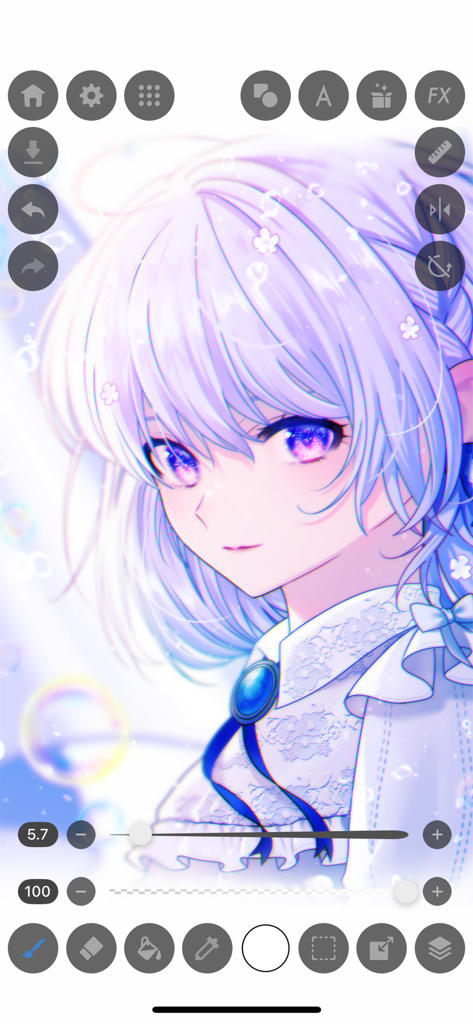
상세한 애니메이션 소녀 일러스트와 디지털 페인팅 도구가 있는 MediBang Paletta 앱 인터페이스 스크린샷.

상세한 애니메이션 소녀 일러스트와 디지털 페인팅 도구가 있는 MediBang Paletta 앱 인터페이스 스크린샷.

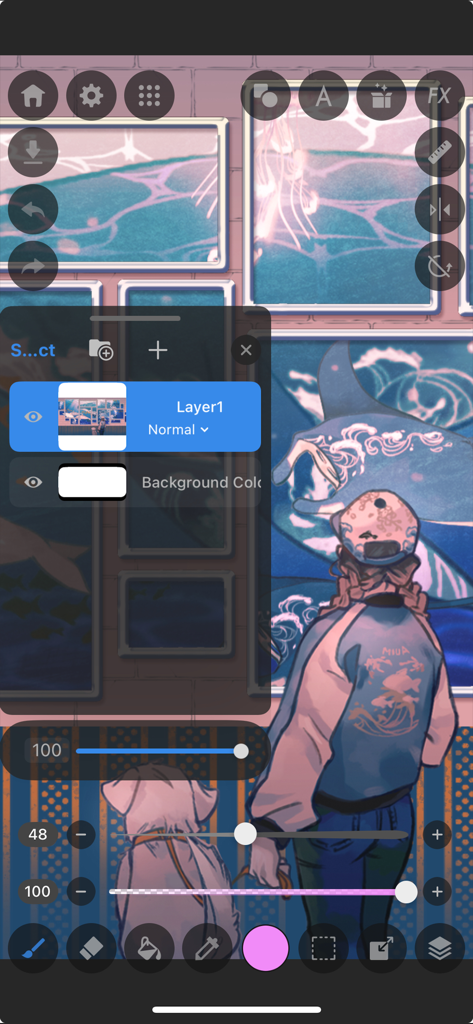
레이어와 예술 도구를 보여주는 MediBang Paletta의 디지털 일러스트레이션 인터페이스

레이어와 예술 도구를 보여주는 MediBang Paletta의 디지털 일러스트레이션 인터페이스

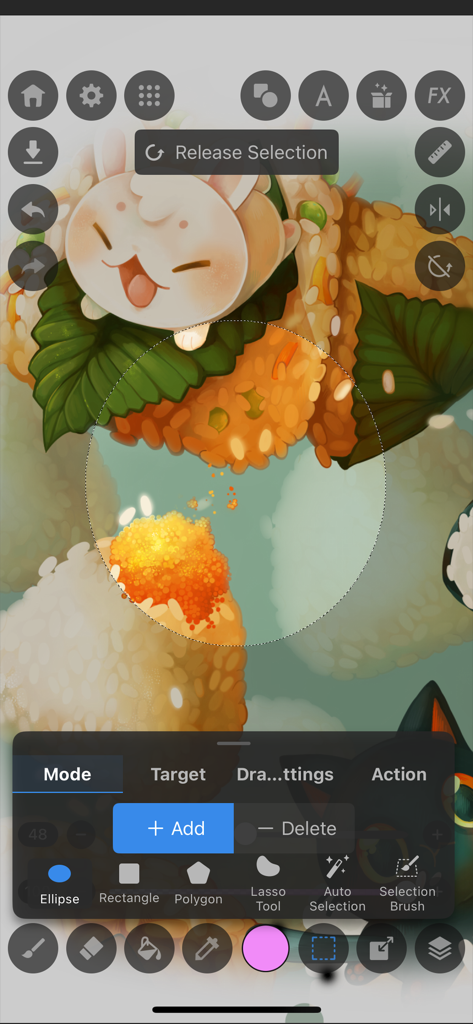
음식 일러스트가 있는 MediBang Paletta 드로잉 앱 선택 도구 인터페이스

음식 일러스트가 있는 MediBang Paletta 드로잉 앱 선택 도구 인터페이스

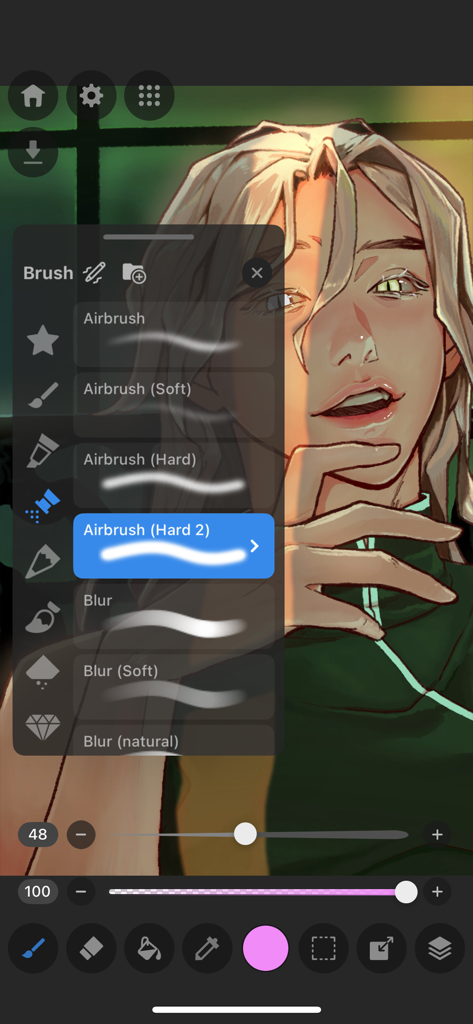
디지털 초상화 위에 에어브러시 및 흐림 효과 옵션이 있는 브러시 선택 메뉴를 보여주는 MediBang Paletta 드로잉 앱 인터페이스

디지털 초상화 위에 에어브러시 및 흐림 효과 옵션이 있는 브러시 선택 메뉴를 보여주는 MediBang Paletta 드로잉 앱 인터페이스

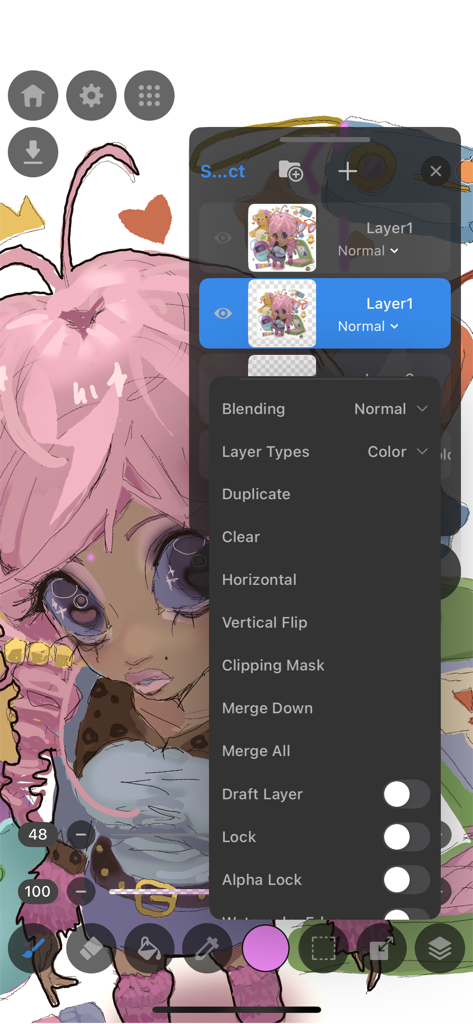
전문적인 편집 옵션이 있는 레이어 메뉴를 표시하는 MediBang Paletta 드로잉 앱 인터페이스

전문적인 편집 옵션이 있는 레이어 메뉴를 표시하는 MediBang Paletta 드로잉 앱 인터페이스

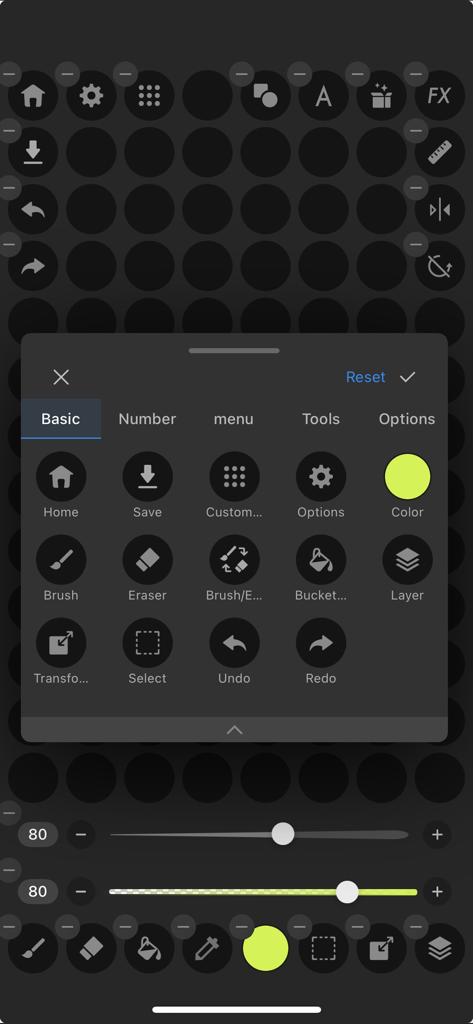
브러시 레이어 및 실행 취소 옵션과 같은 기본 도구에 대한 사용자 정의 메뉴를 보여주는 MediBang Paletta 드로잉 앱 인터페이스 스크린샷

브러시 레이어 및 실행 취소 옵션과 같은 기본 도구에 대한 사용자 정의 메뉴를 보여주는 MediBang Paletta 드로잉 앱 인터페이스 스크린샷

산만함 없이 실력을 향상시키세요

이 앱을 돋보이게 하는 도구, 259K+ 명의 사용자가 선택.

💸

구독 없음, 절대

월별 요금에서 벗어나세요. 구독 피로의 부담 없이 세계적 수준의 브러시와 전문 도구에 액세스하세요.

🚀

끊김 없는 성능

iPad에 최적화된 고속 미니멀리스트 엔진으로 창의적인 흐름에 집중하여 획이 끊기지 않도록 합니다.

📂

전문가급 워크플로우

섬세한 레이어링부터 PSD 내보내기까지, 부업과 개인 작품 모두에 필요한 전문적인 제어 기능을 얻으세요.

앱 소개

에 대해 알아야 할 모든 것 MediBang Paletta:Drawing App.

설명

Draw for yourself, in your time, by you like. MediBang Paletta is the painting app for you. We made this for you. The latest work in the MediBang Paint series, which boasts 100 million downloads. This is a new proposal from MediBang. The app's beautiful canvas is waiting for you to create art. Today, try MediBang Paletta and watch your improvement skyrocket! Crafted by the minds behind MediBang Paint, MediBang Paletta gives you a perfectly designed experience to reach creative heights never thought possible, no subscription required. Key Highlights: ・User-Friendly Interface: Work effortlessly with an intuitive interface. ・World-Class Brushes: Enjoy meticulously crafted brushes for the iPad experience. ・Auto-Save: Never worry about losing a sketch again. ・Nuanced Layering: Exercise precise control over your art. Your Perfect Brushes ・Customizable Default Brushes: Tailor any default brushes to match your style. ・Stabilization Tool: Create your smoothest lines ever. ・Creative Effects: Add intricate details with cool effect and stamp brushes. ・Pen Pressure Settings: Responsive and adjustable settings to suit you. ・Unique Brushes: Explore dozens of brushes designed exclusively for MediBang Paletta's brush engine. Effortless Layers and Colors ・Clipping Masks: Edit without compromising your initial art. ・Layer Groups: Keep your work neat and tidy. ・Blending Modes: Nearly 20 blending modes to adjust your art as you desire. Professional Finishing Touches ・Artistic Filters: Add captivating effects to give your work a professional look. ・Blur Tool: Achieve softness, movement, and depth. ・Easy Edits: Refine your work's proportions using the Transformation Tool. Intuitive and Lightweight ・Artist-First Design: Enjoy an app designed with giving you the best artistic experience in mind. ・Simplicity is Key: Focus on your creativity with a simple, lightweight interface that transforms your screen into a studio. ・Efficient Storage: Save your work in MediBang Paletta export it to the Files app. ・No Lag: Bid farewell to brush lag and slow loading times forever. Share Your Masterpieces ・Pro Export: Import or export your art in various formats, including Adobe® Photoshop® PSD files. ・Seamless Saving and Backups: Save your art locally in MediBang Paletta and find your files backed up to the app itself in the event of a crash. Operating Environment ・OS: iOS 18 or later ・Recommended Devices: iPhone13 or later / iPad 9th generation or later / iPad Air 5th generation or later / iPad mini 6th generation or later / iPad Pro 5th generation or later *App performance may vary depending on the device condition Crafted by visionaries and tailored for artists, MediBang Paletta is here to provide the ultimate digital art experience. With a canvas and tools that are convenient yet unobtrusive, this app transforms your iPad screen into an inviting workspace, allowing your creativity to flow freely. Every element is meticulously decided by MediBang Paletta's designers to ensure the most immersive and intuitive experience that maximizes all the best parts of working on the iPad for the individual creator experience. MediBang Paletta is more than just an app, it's a creator-centric space that gives you what you need to translate vision into reality. No compromises or limitations—just pure creative freedom. Bid farewell to confusing design, and software bloat. Say hello to MediBang Paletta.

최신 버전

4.0.1

크기

189.0 MB

출시일

2024년 1월 11일

제한 없이 창작할 준비가 되셨나요?

기다리고 기다리던 미니멀리스트, 끊김 없는 스튜디오로 iPad 및 iPhone에서 전문가 수준의 그림을 경험하세요. 구독이나 과부하 없이 순수한 창의적 자유만 있습니다.

다운로드: App Store
FAQ

자주 묻는 질문

에 대해 알아야 할 모든 것 MediBang Paletta:Drawing App

MediBang Paletta는 무엇인가요?

MediBang Paletta는 MediBang Paint 제작사가 개발한 디지털 아티스트를 위한 페인팅 앱입니다. 사용자 친화적인 인터페이스와 세계적인 수준의 브러시, 창의적인 표현을 위한 고급 레이어 기능을 제공합니다.

MediBang Paletta의 주요 기능은 무엇인가요?

MediBang Paletta는 사용자 친화적인 인터페이스, 사용자 정의 가능한 브러시, 자동 저장, 섬세한 레이어링, 다양한 블렌딩 모드, 예술적 필터, PSD 파일을 포함한 전문적인 내보내기 옵션 등의 기능을 제공합니다.

MediBang Paletta는 무료로 사용할 수 있나요?

네, MediBang Paletta는 30분마다 동영상 광고가 한 번씩 표시되는 것을 제외하고 모든 기능을 무료로 제공합니다. 이러한 광고를 제거하기 위한 일회성 영구 라이선스 구매도 가능합니다.

MediBang Paletta는 구독이 필요한가요?

아니요, MediBang Paletta는 구독이 필요하지 않습니다. 사용자는 모든 기능을 무료로 이용하거나 광고를 제거하기 위한 일회성 영구 라이선스를 구매할 수 있습니다.

MediBang Paletta는 어떤 운영 체제를 지원하나요?

MediBang Paletta는 iOS 18 이상을 지원합니다. iPhone 13 이상, iPad 9세대 이상을 포함한 특정 iPhone 및 iPad 모델에 최적화되어 있습니다.

MediBang Paletta에 권장되는 기기는 무엇인가요?

MediBang Paletta에 권장되는 기기는 iPhone 13 이상, iPad 9세대 이상, iPad Air 5세대 이상, iPad mini 6세대 이상, iPad Pro 5세대 이상입니다.

MediBang Paletta에 자동 저장 기능이 있나요?

네, MediBang Paletta에는 자동 저장 기능이 포함되어 있습니다. 이 기능은 스케치를 자동으로 저장하여 사용자가 창작물을 잃지 않도록 합니다.

MediBang Paletta는 Photoshop PSD 파일로 내보낼 수 있나요?

네, MediBang Paletta를 사용하면 Adobe® Photoshop® PSD 파일을 포함한 다양한 형식으로 아트워크를 가져오거나 내보낼 수 있어 전문적인 워크플로우 통합이 가능합니다.

MediBang Paletta는 레이어를 어떻게 처리하나요?

MediBang Paletta는 비파괴 편집을 위한 클리핑 마스크와 정리를 위한 레이어 그룹을 포함한 섬세한 레이어링 기능을 제공합니다. 또한 거의 20가지의 블렌딩 모드를 제공합니다.

MediBang Paletta에서 브러시를 사용자 정의할 수 있나요?

네, MediBang Paletta에서는 기본 브러시를 사용자 정의하여 개별적인 아트 스타일에 맞출 수 있습니다. 또한 안정화 도구, 창의적인 효과, 조절 가능한 펜 압력 설정을 제공합니다.

MediBang Paletta에 블러 도구가 포함되어 있나요?

네, MediBang Paletta에는 블러 도구가 포함되어 있습니다. 이 도구는 아티스트가 부드러움, 움직임, 깊이와 같은 효과를 아트워크 내에서 구현하는 데 도움이 됩니다.

MediBang Paletta에서 사용할 수 있는 선택 도구는 무엇인가요?

MediBang Paletta는 타원, 사각형, 다각형, 올가미 도구, 자동 선택, 선택 브러시를 포함한 다양한 선택 도구를 제공합니다. 사용자는 선택 영역에 추가하거나 삭제할 수 있습니다.

MediBang Paletta는 브러시 지연 현상이 발생하나요?

아니요, MediBang Paletta는 지연 현상이 없도록 설계되어 브러시 스트로크나 로딩 시간의 지연 없이 부드럽고 반응성이 뛰어난 그리기 경험을 보장합니다.

사용자는 MediBang Paletta에서 로컬로 작업물을 저장할 수 있나요?

네, 사용자는 MediBang Paletta 내에서 로컬로 아트워크를 저장할 수 있습니다. 충돌 발생 시 앱 자체에도 파일이 백업됩니다.

MediBang Paletta는 어떤 종류의 광고를 사용하나요?

MediBang Paletta는 30분마다 동영상 광고를 한 번씩 사용합니다. 사용자는 일회성 영구 라이선스를 구매하여 이러한 광고를 제거할 수 있습니다.

MediBang Paletta는 펜 압력 감도를 지원하나요?

네, MediBang Paletta에는 반응성이 뛰어나고 조절 가능한 펜 압력 설정이 포함되어 있습니다. 이를 통해 아티스트는 개별적인 그리기 스타일에 맞게 브러시 반응을 맞춤 설정할 수 있습니다.

MediBang Paletta에는 몇 가지 블렌딩 모드가 있나요?

MediBang Paletta는 거의 20가지의 블렌딩 모드를 제공합니다. 이러한 모드를 통해 아티스트는 원하는 대로 아트워크를 조정할 수 있으며 레이어 상호 작용에 대한 광범위한 제어를 제공합니다.

App information, icons, screenshots, and descriptions displayed on this page are sourced from the Apple App Store and are the property of their respective developers. Download estimates and rankings are based on MWM's proprietary models and may not reflect actual figures. This page is provided for informational and analytical purposes only.

Believe this page infringes your intellectual property? File a dispute