Project Indigo

Project Indigo

다운로드: App Store
로고: Project Indigo

Project Indigo: 비전 있는 크리에이터를 위한 전문가용 컴퓨테이셔널 사진

과도하게 처리된 스마트폰 룩은 이제 그만. Adobe Labs의 맞춤형 파이프라인을 활용하여 정밀한 수동 제어와 차세대 AI 이미지 처리에 대한 조기 액세스를 통해 자연스러운 SLR 미학을 구현하세요.

개발사

Adobe Labs, Inc.

카테고리

Photo & Video

다운로드

2M+

사용자 평점

3.3/5

총 평가 수

1K+

지원 언어

1

다시 태어난 뷰파인더

이 인터페이스를 사용하는 2M+ 명의 사용자.

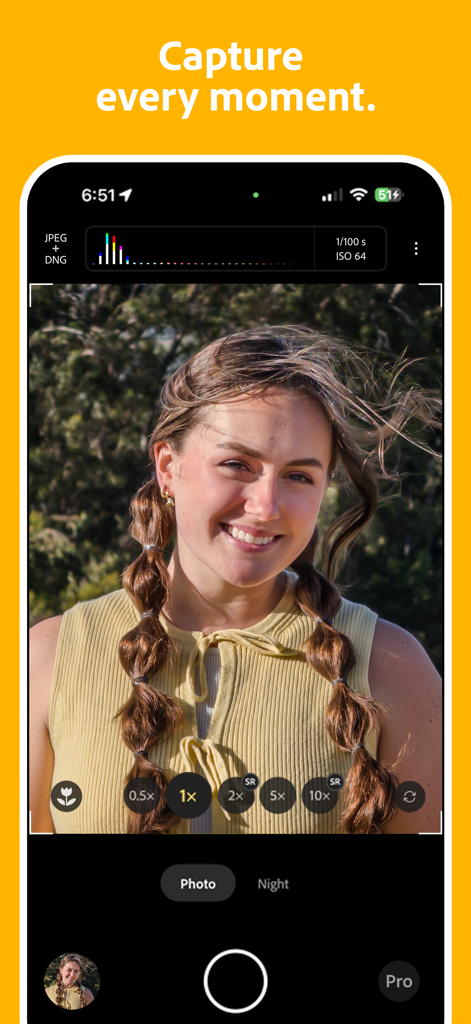
전문가용 수동 제어 및 인물 사진이 표시된 Adobe Project Indigo 카메라 앱 인터페이스

전문가용 수동 제어 및 인물 사진이 표시된 Adobe Project Indigo 카메라 앱 인터페이스

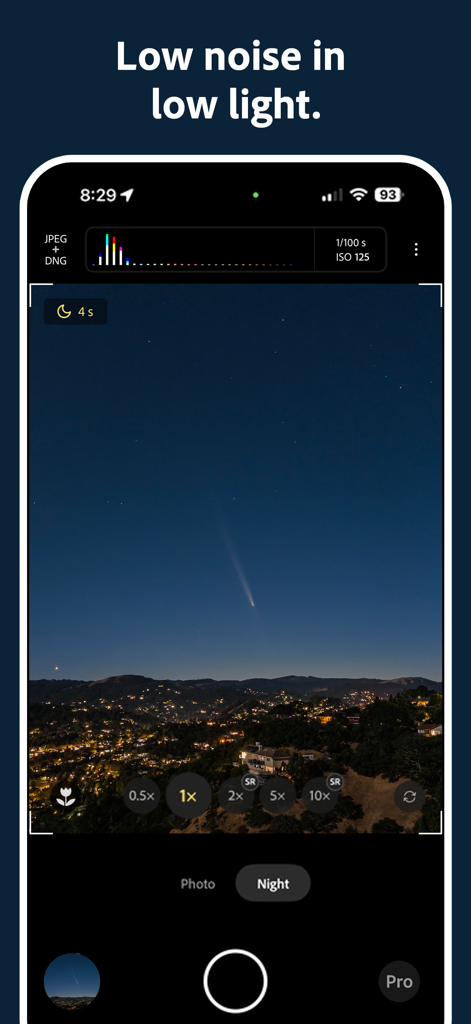
도시 풍경 위 혜성과 함께 별이 빛나는 밤하늘을 촬영하는 Project Indigo 카메라 앱 야간 모드

도시 풍경 위 혜성과 함께 별이 빛나는 밤하늘을 촬영하는 Project Indigo 카메라 앱 야간 모드

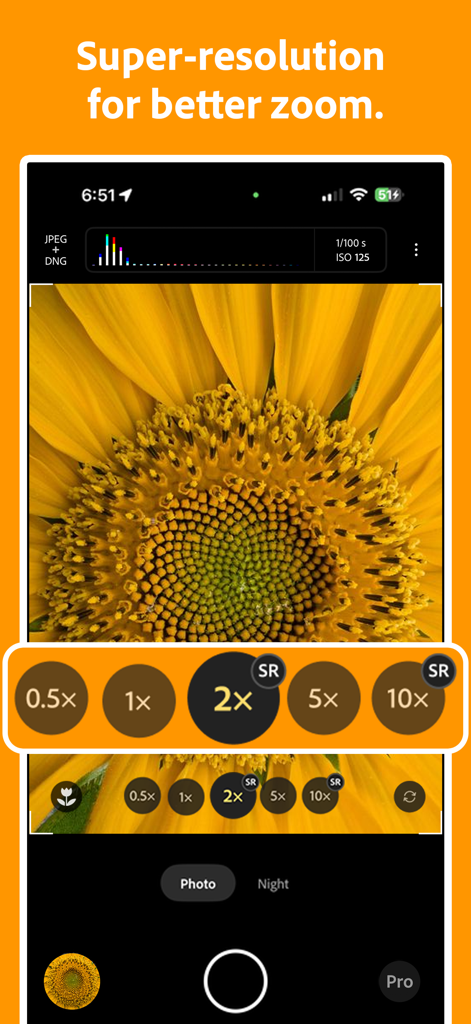
해바라기 클로즈업에 대한 슈퍼 해상도 줌 기능을 보여주는 Project Indigo 카메라 인터페이스

해바라기 클로즈업에 대한 슈퍼 해상도 줌 기능을 보여주는 Project Indigo 카메라 인터페이스

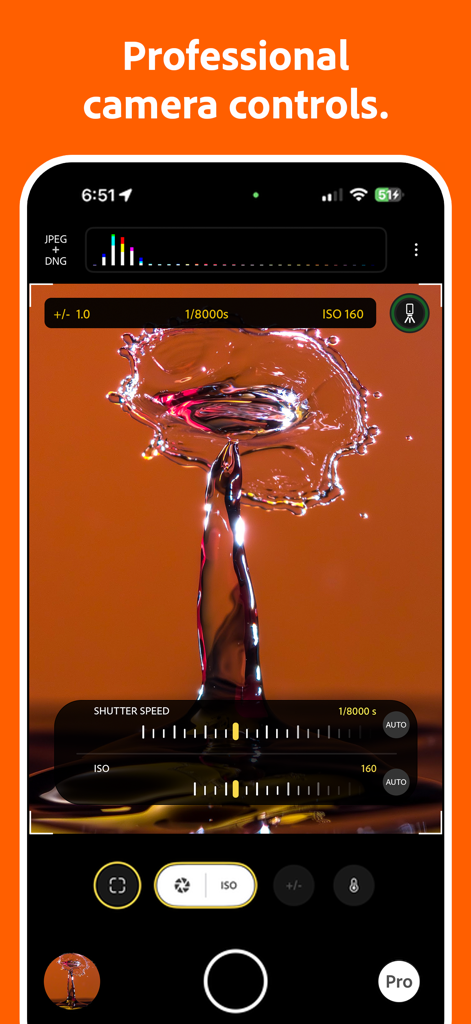
물방울 튀는 사진을 보여주는 Project Indigo 카메라 앱 인터페이스의 수동 셔터 속도 및 ISO 설정

물방울 튀는 사진을 보여주는 Project Indigo 카메라 앱 인터페이스의 수동 셔터 속도 및 ISO 설정

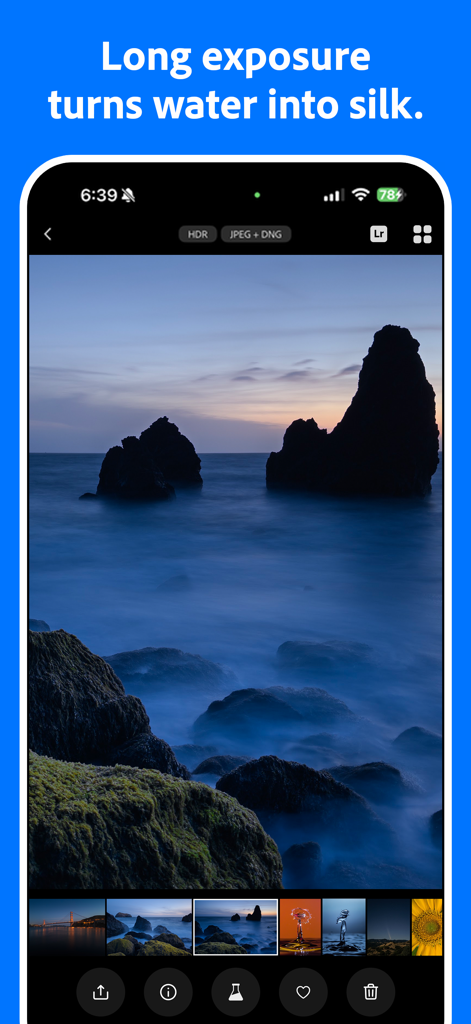
부드러운 물 효과를 위해 바위 해안선의 장노출 사진을 표시하는 Project Indigo 앱 인터페이스

부드러운 물 효과를 위해 바위 해안선의 장노출 사진을 표시하는 Project Indigo 앱 인터페이스

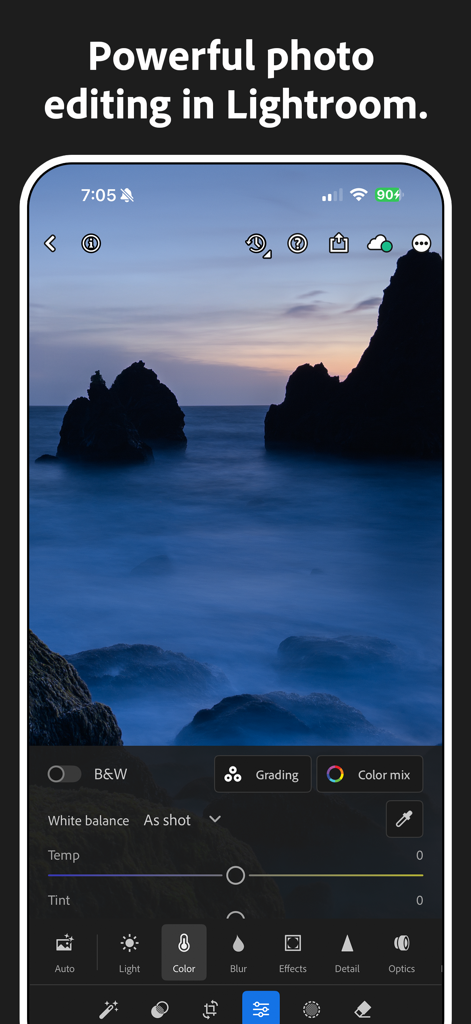
Project Indigo 통합을 통해 Adobe Lightroom에서 장노출 해상화면 편집

Project Indigo 통합을 통해 Adobe Lightroom에서 장노출 해상화면 편집

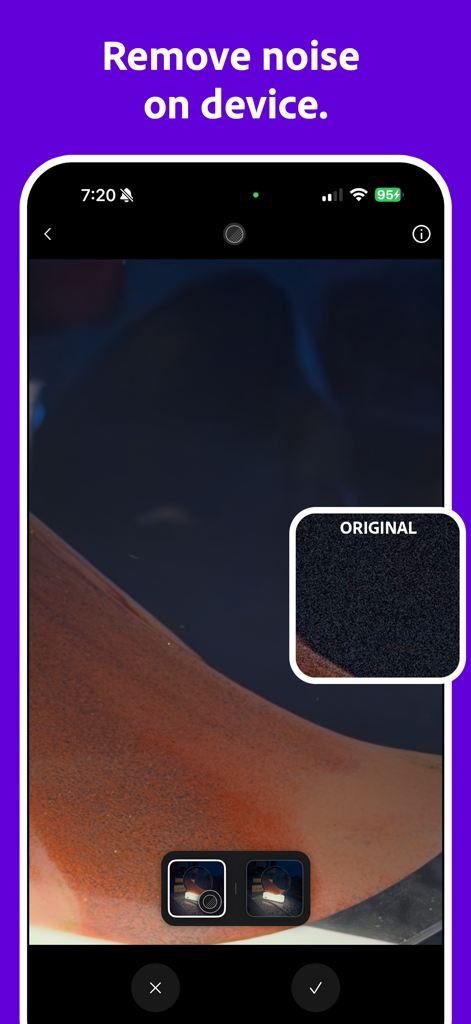
원본 노이즈가 있는 사진과 비교하여 온디바이스 AI 노이즈 감소 기능을 보여주는 Project Indigo 앱 인터페이스

원본 노이즈가 있는 사진과 비교하여 온디바이스 AI 노이즈 감소 기능을 보여주는 Project Indigo 앱 인터페이스

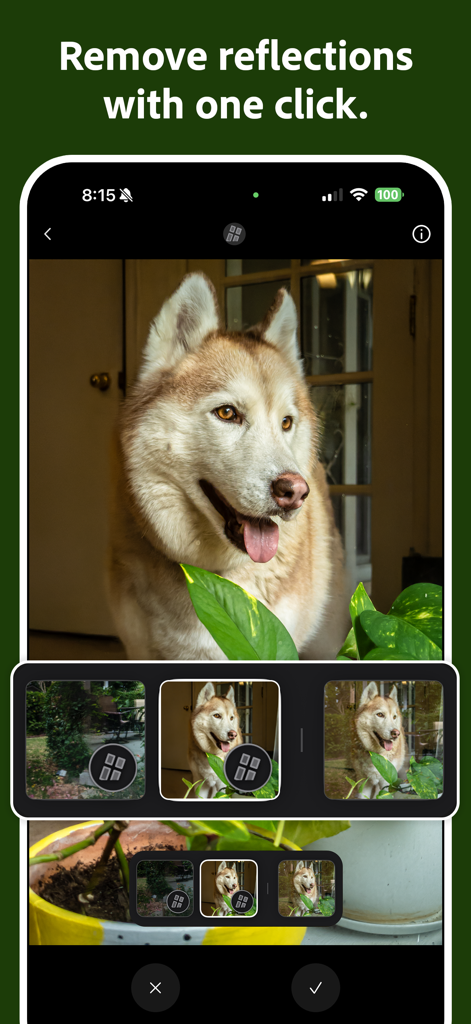
허스키 개 사진에 AI 반사 제거 도구를 보여주는 Adobe Project Indigo 인터페이스

허스키 개 사진에 AI 반사 제거 도구를 보여주는 Adobe Project Indigo 인터페이스

주머니 속 전문가급 성능

이 앱을 돋보이게 하는 도구, 2M+ 명의 사용자가 선택.

📸

진정한 SLR 미학

표준 휴대폰 카메라의 '거친' 느낌을 피하고, 자연스러운 질감과 부드럽고 사실적인 하늘을 만들어내는 맞춤형 컴퓨테이셔널 파이프라인을 사용하세요.

🎛️

완벽한 수동 제어

ISO, 셔터 속도, 초점에 대한 세밀한 제어를 통해 하드웨어를 완벽하게 제어하고, 날카로운 정확도를 위한 확대 루페를 사용하세요.

🧪

독점 기술 미리보기

Adobe의 최첨단 AI 노이즈 제거 및 반사 제거 도구를 가장 먼저 사용해보고, iPhone 센서의 성능을 한계까지 끌어올리세요.

앱 소개

에 대해 알아야 할 모든 것 Project Indigo.

설명

Welcome to Project Indigo, a new camera experience from Adobe Labs. With a custom computational photography pipeline, a natural image look, and full set of manual camera controls, it offers something for professional and casual photographers alike. Also with new controls for computational cameras and a glimpse into the future of AI image processing on our Tech Previews page. Available for iPhone 12 and 13 Pro/Pro Max, and all 14, 15, 16, or 17-series devices. For best experience we recommend using iPhone 15 Pro or newer. A COMPUTATIONAL PHOTOGRAPHY CAMERA Instead of capturing a single photo, for every shutter press Indigo captures a burst of photos and combines them together to produce a high-quality photo with lower noise and higher dynamic range. PHOTO MODE VS NIGHT MODE Photo mode is intended for everyday use in good lighting and has zero shutter lag, meaning it captures the moment you wanted. Night mode is intended for use in low light. In this mode images are captured after you press the shutter button, but use longer exposure times, further reducing noise. NATURAL LOOK Photos produced by Indigo employ computational photography and AI to produce a natural (SLR-like) look for your photos, including special (but gentle) treatment of subjects and skies. This look is applied when generating JPEG images and is embedded as a rendering suggestion in raw DNG files (if enabled). All raw pixels remain intact – the look does not alter them. PRO CONTROLS Using these you can take full control of how Indigo captures the image, manually specifying focus, exposure time and ISO, exposure compensation, and white balance. Focus control includes an optional magnified loupe for setting precise focus, and white balance control allows you to tap on an object known to be neutral gray. Unique to Indigo’s Night mode is manual control over the number of frames aligned and merged into a final photo. More frames result in lower noise but a longer time to capture a photo. There is also a Long Exposure mode: if the phone is on a tripod, this allows the capture of synthetic long exposure effects like “water-into-silk" with infinite number of frames where the camera captures and merges images until stopped. SUPER-RESOLUTION FOR ZOOM Using pinch-to-zoom in any camera app often results in image quality loss. To recover the image Indigo employs multi-frame super-resolution which can restore much of the lost quality. ‘SR’ indicator on the zoom buttons shows when it is active. MACRO MODE Enable Macro from the viewfinder and capture stunning close-up shots. VIEWFINDER Provides a view of the camera parameters that will be used for capture, a live histogram of the scene, zebra striping that shows you where there are over-exposed areas in the image, and a level to help you capture straight images. LIGHTROOM INTEGRATION Adobe Lightroom for mobile is the most powerful photo editor in the App Store. Indigo filmstrip allows you to send an image directly to Lightroom mobile app for editing. In addition, our (optional) raw DNG files provide maximum compatibility with Adobe Lightroom and Photoshop. TECHNOLOGY PREVIEWS Technology Previews will be a place where we will offer an early look at technologies that may eventually be deployed in Adobe’s flagship products, or that already appear in these products in a slightly different form. AI DENOISE One such technology is a variant of the AI-based denoising available in Camera Raw and Lightroom desktop clients. It requires raw DNG as input, and it saves a new DNG to your camera roll. REMOVE REFLECTIONS Another example is a variant of the AI-based Remove Reflections technology from Camera Raw and Lightroom desktop clients. It requires a DNG as input, and it saves a medium-resolution JPEG to your camera roll. The technology is designed to address reflections when shooting through plate glass windows that cover most of the camera field of view.

최신 버전

1.0.10

크기

246.9 MB

출시일

2025년 6월 12일

컴퓨테이셔널 사진의 미래로 나아가세요

AI 및 수동 제어 분야의 Adobe 최신 혁신을 경험하세요. 지금 Project Indigo를 다운로드하고 iPhone Pro에 걸맞은 자연스럽고 SLR 수준의 품질을 선사하세요.

다운로드: App Store
FAQ

자주 묻는 질문

에 대해 알아야 할 모든 것 Project Indigo

Project Indigo는 무엇인가요?

Project Indigo는 Adobe Labs의 새로운 카메라 경험으로, 맞춤형 컴퓨테이셔널 사진 파이프라인, 자연스러운 이미지 룩, 그리고 사진가를 위한 완벽한 수동 제어를 제공합니다.

Project Indigo는 어떤 아이폰 모델과 호환되나요?

Project Indigo는 iPhone 12/13 Pro/Pro Max 및 모든 14, 15, 16, 17 시리즈 기기와 호환됩니다. 최적의 성능을 위해서는 iPhone 15 Pro 또는 최신 기기를 권장합니다.

Project Indigo의 컴퓨테이셔널 사진은 어떻게 작동하나요?

Project Indigo의 컴퓨테이셔널 사진은 사진 여러 장을 연속으로 촬영하여 결합합니다. 이 과정은 노이즈를 줄이고 동적 범위를 늘린 고품질 이미지를 생성합니다.

Project Indigo의 사진 모드와 야간 모드의 차이점은 무엇인가요?

Project Indigo의 사진 모드는 좋은 조명 환경에서 셔터 지연 없이 일상적으로 사용하기 위한 것입니다. 야간 모드는 저조도 환경을 위해 더 긴 노출 시간을 사용하여 노이즈를 더욱 줄입니다.

Project Indigo는 자연스러운 사진을 생성하나요?

네, Project Indigo는 컴퓨테이셔널 사진과 AI를 사용하여 자연스러운 SLR과 같은 룩을 생성합니다. 이 시각적 스타일은 JPEG에 적용되며 raw DNG 파일에 렌더링 제안으로 포함됩니다.

사용자는 Project Indigo에서 카메라 설정을 수동으로 제어할 수 있나요?

네, Project Indigo는 초점, 노출 시간, ISO, 노출 보정 및 화이트 밸런스를 수동으로 설정할 수 있는 Pro Controls를 제공하며, 정확한 초점을 위한 확대 루페 기능도 포함됩니다.

Project Indigo는 장노출 모드를 제공하나요?

네, Project Indigo는 장노출 모드를 제공합니다. 삼각대를 사용하면 무한한 프레임을 병합하여 “물을 비단처럼” 만드는 것과 같은 합성 장노출 효과를 얻을 수 있습니다.

Project Indigo는 줌 이미지 품질을 어떻게 향상시키나요?

Project Indigo는 핀치 투 줌으로 인한 품질 손실을 복구하기 위해 멀티 프레임 초해상도 기술을 사용하여 줌 이미지 품질을 향상시킵니다. 줌 버튼의 'SR' 표시기는 이 기능의 활성화를 확인합니다.

Project Indigo는 매크로 사진을 지원하나요?

네, Project Indigo는 매크로 모드를 지원합니다. 사용자는 뷰파인더에서 이 기능을 직접 활성화하여 놀라운 클로즈업 사진을 촬영할 수 있습니다.

Project Indigo의 뷰파인더에는 어떤 기능이 있나요?

Project Indigo의 뷰파인더는 카메라 매개변수, 라이브 히스토그램, 과다 노출 영역을 위한 제브라 스트라이핑, 그리고 수평 이미지를 촬영하는 데 도움이 되는 레벨을 표시합니다.

Project Indigo는 Adobe Lightroom과 통합되나요?

네, Project Indigo는 Adobe Lightroom과 통합됩니다. 필름스트립을 통해 이미지를 Lightroom 모바일 앱으로 직접 전송하여 편집할 수 있으며, raw DNG는 최대 호환성을 보장합니다.

Project Indigo는 AI 기반 노이즈 감소 기능을 제공하나요?

네, Project Indigo에는 Camera Raw 및 Lightroom 데스크톱 클라이언트에서 발견되는 기술의 변형인 AI Denoise가 포함되어 있습니다. 이 기능은 raw DNG 입력을 필요로 하며 새로운 DNG 파일을 저장합니다.

Project Indigo는 사진에서 반사를 제거할 수 있나요?

네, Project Indigo는 AI 기반 반사 제거 기술을 특징으로 합니다. DNG 입력을 처리하여 유리창을 통한 반사를 해결하고 중간 해상도 JPEG를 저장합니다.

App information, icons, screenshots, and descriptions displayed on this page are sourced from the Apple App Store and are the property of their respective developers. Download estimates and rankings are based on MWM's proprietary models and may not reflect actual figures. This page is provided for informational and analytical purposes only.

Believe this page infringes your intellectual property? File a dispute