
이 페이지는 앱이나 개발자의 공식 페이지가 아니며, 정보 제공 및 논평을 목적으로 작성된 독립 편집 간행물입니다. 명시적으로 달리 언급되지 않는 한, 해당 앱이나 개발자는 MWM, Apple, Google Play, 앱 퍼블리셔 또는 앱 개발자와 제휴, 보증, 후원, 승인 또는 공식적으로 연결되어 있지 않으며, 이 페이지의 어떤 내용도 해당 앱이 MWM의 서비스를 사용하여 개발되었음을 의미하지 않습니다. 모든 상표, 로고, 스크린샷 및 기타 콘텐츠는 해당 소유자의 자산입니다.


다운로드
12.5M+사용자 평점
총 평가 수
224.3K개발사
카테고리
Photo & Video지원 언어
5최신 버전
v1.11.10크기
4.3 MB출시일
2016년 5월 27일ProMovie Recorder 분석
아이폰/아이패드를 위한 전문가용 비디오 촬영 앱의 핵심 기능 평가
수동 카메라 제어
이 앱은 노출, 셔터 속도, ISO, 초점, 화이트 밸런스와 같은 주요 촬영 매개변수를 수동으로 정밀하게 제어할 수 있게 해주어 원하는 시네마틱 룩을 구현합니다. 노출 및 초점 지점 분리, 매개변수 잠금 기능으로 더욱 세밀한 조작이 가능합니다.
고품질 비디오 녹화
이 도구는 4K(최대 120FPS) 및 1080p(최대 240FPS) 해상도로 비디오를 녹화할 수 있으며, 최대 224Mbps의 비트레이트를 지원하여 전문가 수준의 고품질 시네마틱 영상을 제작합니다.
전문 오디오 기능
이 앱은 외부 마이크 지원(Lightning, 3.5mm, Bluetooth), 스테레오 오디오 녹음, 헤드폰 오디오 모니터링 및 온스크린 오디오 레벨 표시기를 통해 고품질의 선명한 사운드를 녹음하고 모니터링할 수 있습니다.
다양한 액세서리 호환성
이 앱은 아나모픽 어댑터, 렌즈 액세서리용 비디오 회전/뒤집기, 외부 디스플레이 및 블루투스 리모컨과 같은 다양한 외부 액세서리를 지원하여 촬영 유연성과 확장성을 제공합니다.
다중 렌즈 지원
이 앱은 아이폰 및 아이패드 기기에 내장된 울트라 와이드, 와이드, 망원 카메라 간의 전환을 지원하여 사용자가 다양한 화각으로 창의적인 영상 촬영을 할 수 있게 합니다.
고급 인코딩 및 안정화
이 도구는 HEVC 및 H.264 인코딩 옵션과 표준 및 시네마틱 안정화 모드를 제공하여 효율적인 파일 관리와 함께 흔들림 없는 부드러운 영상을 제작할 수 있습니다.
자주 묻는 질문
에 대해 알아야 할 모든 것 ProMovie Recorder
What are the video recording capabilities of ProMovie Recorder?
ProMovie Recorder supports 4K video recording up to 120FPS and 1080p video recording up to 240FPS on compatible devices. It offers high-quality recording at up to 224Mbps bitrate.
Does ProMovie Recorder offer manual camera controls?
Yes, ProMovie Recorder provides manual controls for exposure, shutter speed, ISO, focus, and white balance. Users can also lock parameters and utilize white balance presets for precise adjustments.
How can I remove the watermark in ProMovie Recorder?
An In-App Purchase is required to record videos with ProMovie Recorder without the 'ProMovie Recorder' watermark. This purchase unlocks full, unbranded recording functionality.
Can ProMovie Recorder use external microphones?
Yes, ProMovie Recorder supports external microphones via Lightning/3.5 mm headphone jack or Bluetooth. It also offers stereo audio recording, monitoring, and gain control on supported devices.
What devices support 4K 60FPS recording with ProMovie Recorder?
ProMovie Recorder supports 4K @60FPS on iPhone 8/8 Plus/X and newer, iPad (2022), iPad Mini (2021 and newer), iPad Air (2020 and newer), and specific iPad Pro models.
Does ProMovie Recorder have stabilization modes?
Yes, ProMovie Recorder includes both Standard and Cinematic stabilization modes. These features help users capture smoother video footage and improve overall video quality.
Can ProMovie Recorder adjust exposure and focus separately?
Yes, ProMovie Recorder allows for separate Exposure Point and Focus Point adjustments. This offers precise control over video composition and image quality within the recording interface.
What encoding formats does ProMovie Recorder support?
ProMovie Recorder supports both HEVC and H.264 encoding. This provides flexibility for video file size and compatibility with various platforms and devices for recorded content.
다음 스크린샷과 설명은 앱의 공식 스토어 목록에서 직접 가져온 것이며 앱 개발자의 자산입니다.
앱 스토어
스크린샷

정밀한 노출 제어
사용자는 이 앱으로 노출을 미세 조정할 수 있으며, 4K 60FPS 설정과 실시간 노출 보정(+/-EV)을 통해 역동적인 장면도 완벽하게 담아냅니다.
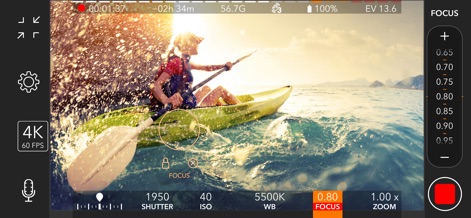
정확한 초점 잠금
이 도구는 사용자가 원하는 지점에 초점을 맞추고 잠글 수 있게 하여, 물보라 속에서도 4K 60FPS로 선명한 장면을 기록할 수 있게 합니다.

완벽한 구도와 확대
사용자는 그리드 가이드를 활용하여 구도를 정교하게 맞추고, 1080p 120FPS로 녹화하면서 최대 2.00x까지 줌을 조정하여 멀리 있는 피사체도 선명하게 포착할 수 있습니다.

유연한 촬영 설정
이 앱은 4K 해상도와 30FPS 프레임 레이트를 포함하여 사용자가 다양한 촬영 옵션을 선택할 수 있도록 하며, HEVC 코덱을 통해 파일 크기를 효율적으로 관리하면서 고품질 영상을 제작할 수 있습니다.

워터마크 없는 영상
이 앱은 인앱 구매를 통해 'ProMovie Recorder' 워터마크 없이 영상을 촬영할 수 있는 옵션을 제공하여, 사용자가 제작한 영상에 앱 로고가 표시되지 않도록 합니다.
설명
Download
비슷한 앱
유사한 기능과 사용자 경험을 가진 앱

Blackmagic Camera
Blackmagic Design Inc

飓风相机
Hangzhou Ostar Media Co.,Ltd.

ReLens Camera-DSLR Portrait
Pixl Concerto Technology Limited

Leica LUX - Pro Manual Camera
Leica Camera AG

FotorGear - Camera in Pocket
Shenzhen Fotorgear Technology Co., Ltd.

Unsharp
北北 宋

ProCam:Professional RAW Camera
BRAND CELLAR HOLDINGS PTE LTD

Vibe Cam - Moments Never Fade
森 林
Final Cut Camera
Apple Inc.
이 페이지는 앱이나 개발자의 공식 페이지가 아니며, 정보 제공 및 논평을 목적으로 작성된 독립 편집 간행물입니다. 명시적으로 달리 언급되지 않는 한, 해당 앱이나 개발자는 MWM, Apple, Google Play, 앱 퍼블리셔 또는 앱 개발자와 제휴, 보증, 후원, 승인 또는 공식적으로 연결되어 있지 않으며, 이 페이지의 어떤 내용도 해당 앱이 MWM의 서비스를 사용하여 개발되었음을 의미하지 않습니다. 모든 상표, 로고, 스크린샷 및 기타 콘텐츠는 해당 소유자의 자산입니다.