
이 페이지는 앱이나 개발자의 공식 페이지가 아니며, 정보 제공 및 논평을 목적으로 작성된 독립 편집 간행물입니다. 명시적으로 달리 언급되지 않는 한, 해당 앱이나 개발자는 MWM, Apple, Google Play, 앱 퍼블리셔 또는 앱 개발자와 제휴, 보증, 후원, 승인 또는 공식적으로 연결되어 있지 않으며, 이 페이지의 어떤 내용도 해당 앱이 MWM의 서비스를 사용하여 개발되었음을 의미하지 않습니다. 모든 상표, 로고, 스크린샷 및 기타 콘텐츠는 해당 소유자의 자산입니다.


Blackmagic Camera
아이폰은 이제 더 이상 전화기가 아니다. 이 앱은 일반 스마트폰을 할리우드급 영상 제작 도구로 탈바꿈시키며, 언제 어디서든 전문가의 시선을 구현하게 한다.
다운로드
12.5M+사용자 평점
총 평가 수
105.0K개발사
카테고리
Photo & Video지원 언어
9최신 버전
3.2크기
180.0 MB출시일
2023년 9월 14일Blackmagic Camera 앱 핵심 기능 분석
모바일 기기에서 구현하는 할리우드급 영상 제작 워크플로우
Blackmagic Cloud를 통한 효율적인 협업 워크플로우
이 앱은 영상을 Blackmagic Cloud에 직접 녹화하여 전 세계 어디에서든 DaVinci Resolve 프로젝트에서 편집자들과 실시간으로 협업할 수 있는 효율적인 클라우드 기반 워크플로우를 제공합니다. 프록시 파일 라이브 동기화를 통해 편집 시간을 단축시킬 수 있습니다.
시네마틱 '할리우드 룩' 구현
이 앱은 아이폰 및 아이패드로 할리우드 영화와 같은 시네마틱 '룩'을 구현할 수 있도록 지원하며, 유튜브 및 틱톡 콘텐츠와 방송 품질의 ENG 영상 제작에 필요한 전문 기능을 제공합니다.
전문적인 디지털 필름 카메라 제어
이 도구는 아이폰 및 아이패드에 디지털 필름 카메라 제어 기능과 운영 체제를 추가하여, 프레임 레이트, 셔터 각도, 화이트 밸런스, ISO와 같은 전문적인 설정을 한 번의 탭으로 조정할 수 있게 해줍니다.
산업 표준 Apple ProRes 4K 녹화
이 앱은 최대 4K 해상도로 산업 표준 10비트 Apple ProRes 파일을 녹화할 수 있는 기능을 갖추고 있어, 최고 품질의 영상을 캡처하고 전문적인 후반 작업을 위한 기반을 마련합니다.
고급 카메라 설정 및 사용자 지정
이 앱은 모니터링, 오디오, 카메라 설정, 녹화 등 다양한 고급 설정에 빠르게 접근할 수 있는 메뉴를 제공하며, 아나모픽 디스퀴즈, 렌즈 보정, 외부 마이크 지원 및 3D LUT 적용과 같은 사용자 지정 옵션을 포함합니다.
직관적인 사용자 인터페이스 및 HUD
이 앱은 수상 경력에 빛나는 Blackmagic Design 카메라와 동일한 직관적이고 사용자 친화적인 인터페이스를 제공하며, 상태, 녹화 매개변수, 히스토그램, 포커스 피킹, 프레임 가이드 등을 표시하는 대화형 HUD(Heads Up Display)를 통해 신속한 설정을 가능하게 합니다.
자주 묻는 질문
에 대해 알아야 할 모든 것 Blackmagic Camera
What is the Blackmagic Camera app?
Blackmagic Camera transforms an iPhone or iPad into a digital film camera. It provides professional controls and an operating system, enabling cinematic video production on mobile devices.
What advanced camera controls does Blackmagic Camera offer?
Blackmagic Camera offers digital film controls for frame rate, shutter angle, white balance, and ISO. Users adjust these settings with a single tap through the interactive interface and HUD.
Can Blackmagic Camera record 4K video?
Yes, Blackmagic Camera records industry-standard 10-bit Apple ProRes files up to 4K resolution. This ensures high-quality cinematic video capture on supported iPhone and iPad devices.
Does Blackmagic Camera support cloud collaboration?
Yes, Blackmagic Camera supports cloud collaboration by recording directly to Blackmagic Cloud. This feature allows users to work on DaVinci Resolve projects with editors globally.
What video recording formats are available in Blackmagic Camera?
Blackmagic Camera supports industry-standard Apple ProRes, H.264, and H.265 recording formats. Users manage video resolution and format through the dedicated settings menu.
How does Blackmagic Camera create cinematic video?
Blackmagic Camera provides professional features required for feature film, television, and documentaries. It enables users to achieve a cinematic look and broadcast quality for their content.
Does Blackmagic Camera feature an on-screen display (HUD)?
Yes, Blackmagic Camera features a Heads Up Display (HUD). This display shows status, record parameters, histogram, focus peaking, levels, and frame guides, which users can show or hide.
Can Blackmagic Camera record video vertically?
Yes, Blackmagic Camera allows recording in 16:9 or vertical aspect ratios. It also supports shooting 16:9 while holding the phone vertically for discrete recording.
How can I manage my media files within Blackmagic Camera?
Blackmagic Camera's media tab allows browsing, scrubbing, searching, and sorting clips. Users view upload status and can save files locally, to Blackmagic Cloud, or project libraries.
Does Blackmagic Camera support external microphones?
Yes, Blackmagic Camera supports external microphones. It offers professional audio options like AAC and PCM formats, with VU or PPM audio metering for precise sound control.
Can 3D LUTs be used with Blackmagic Camera?
Yes, Blackmagic Camera allows users to add 3D LUTs. This feature integrates specific film looks, providing creative control for achieving desired visual styles in recordings.
Does Blackmagic Camera offer live media syncing to the cloud?
Yes, Blackmagic Camera provides live sync to Blackmagic Cloud Storage. It instantly uploads proxy files, followed by camera originals, streamlining the workflow for quick editing access.
다음 스크린샷과 설명은 앱의 공식 스토어 목록에서 직접 가져온 것이며 앱 개발자의 자산입니다.
앱 스토어
스크린샷

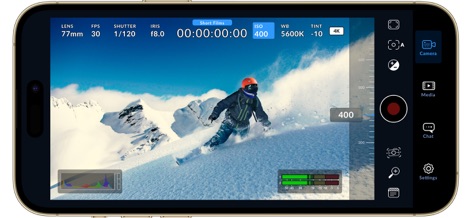
전문 촬영 제어
이 앱은 실시간으로 렌즈, 셔터 각도 등의 전문 카메라 설정을 보여주며, 하단에는 히스토그램과 오디오 레벨 미터를 제공하여 정밀한 촬영이 가능합니다.
즉각적인 설정 조정
사용자는 ISO 설정에 직접 접근하여 슬라이더를 통해 실시간으로 값을 변경할 수 있으며, 상단의 HUD에서 즉시 업데이트된 ISO 값을 확인할 수 있습니다.

정교한 초점 제어
이 앱은 포커스 피킹을 통해 피사체의 선명한 영역을 시각적으로 강조하며, 화면 우측의 슬라이더를 사용하여 초점을 정밀하게 조정할 수 있습니다.

스마트한 촬영 메타데이터
사용자는 디지털 슬레이트 기능을 활용하여 릴, 장면, 테이크 번호 등의 필수 촬영 정보를 입력할 수 있으며, 렌즈 데이터와 촬영 환경에 대한 메타데이터를 효율적으로 관리할 수 있습니다.

효율적인 미디어 관리
이 앱은 촬영된 모든 클립의 썸네일을 시각적으로 정리하여 보여주며, Blackmagic Cloud 로그인을 통해 클라우드 기반 미디어 접근 및 관리를 가능하게 합니다.

프로젝트별 미디어 구성
사용자는 Short Films, Documentary 등 프로젝트별로 미디어를 효율적으로 분류하고 관리할 수 있으며, 각 프로젝트에 속한 클립들을 썸네일 형태로 편리하게 탐색할 수 있습니다.
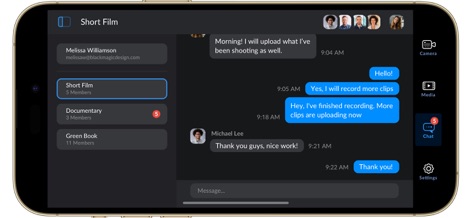
원활한 협업 채팅
이 앱은 촬영 팀원들과 실시간으로 소통할 수 있는 채팅 기능을 제공하며, Short Film이나 Documentary와 같은 프로젝트별 대화 그룹을 생성하여 협업 효율성을 높일 수 있습니다.
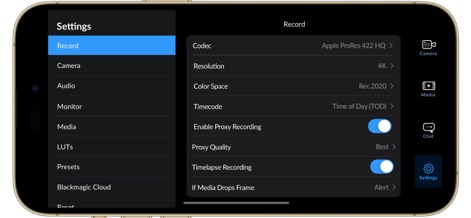
맞춤형 녹화 설정
이 앱은 Codec 및 Resolution과 같은 다양한 녹화 설정을 제공하여 사용자의 필요에 맞게 조정할 수 있으며, 업계 표준 Apple ProRes 422 HQ 코덱을 지원하여 고품질 촬영이 가능합니다.

수직 모드 고화질 촬영
이 앱은 수직 모드에서도 전체 HUD 정보를 제공하여 렌즈, ISO, 화이트 밸런스 등 주요 카메라 설정을 한눈에 확인할 수 있으며, 4K 해상도로 안정적인 영상 촬영이 가능합니다.

즉각적인 ISO 제어
사용자는 수직 촬영 모드에서도 ISO 값을 직접 탭하여 하단에 나타나는 슬라이더로 쉽게 조정할 수 있으며, 이로 인해 촬영 중에도 빛 조건에 맞춰 빠르게 대응할 수 있습니다.
설명
Download
비슷한 앱
유사한 기능과 사용자 경험을 가진 앱

飓风相机
Hangzhou Ostar Media Co.,Ltd.

ProMovie Recorder
Panda Apps Limited

ReLens Camera-DSLR Portrait
Pixl Concerto Technology Limited

Leica LUX - Pro Manual Camera
Leica Camera AG

FotorGear - Camera in Pocket
Shenzhen Fotorgear Technology Co., Ltd.

Unsharp
北北 宋

ProCam:Professional RAW Camera
BRAND CELLAR HOLDINGS PTE LTD

Vibe Cam - Moments Never Fade
森 林
Final Cut Camera
Apple Inc.
이 페이지는 앱이나 개발자의 공식 페이지가 아니며, 정보 제공 및 논평을 목적으로 작성된 독립 편집 간행물입니다. 명시적으로 달리 언급되지 않는 한, 해당 앱이나 개발자는 MWM, Apple, Google Play, 앱 퍼블리셔 또는 앱 개발자와 제휴, 보증, 후원, 승인 또는 공식적으로 연결되어 있지 않으며, 이 페이지의 어떤 내용도 해당 앱이 MWM의 서비스를 사용하여 개발되었음을 의미하지 않습니다. 모든 상표, 로고, 스크린샷 및 기타 콘텐츠는 해당 소유자의 자산입니다.