WinZip Pro: zip, unzip & rar

WinZip Pro: zip, unzip & rar


다운로드: App Store
로고: WinZip Pro: zip, unzip & rar

WinZip Pro: iPhone 및 iPad에서 데스크톱급 파일 파워

모든 파일을 zip, unzip 및 암호화하는 세계 최고의 유틸리티입니다. 모든 클라우드 계정을 연결하여 보관 파일을 관리하고 전문적인 수준의 보안으로 대용량 문서를 공유하세요.

개발사

WinZip Computing LLC

카테고리

Utilities

다운로드

517K+

사용자 평점

3.4/5

총 평가 수

1K+

지원 언어

6

한눈에 보는 파일 마스터리

이 인터페이스를 사용하는 517K+ 명의 사용자.

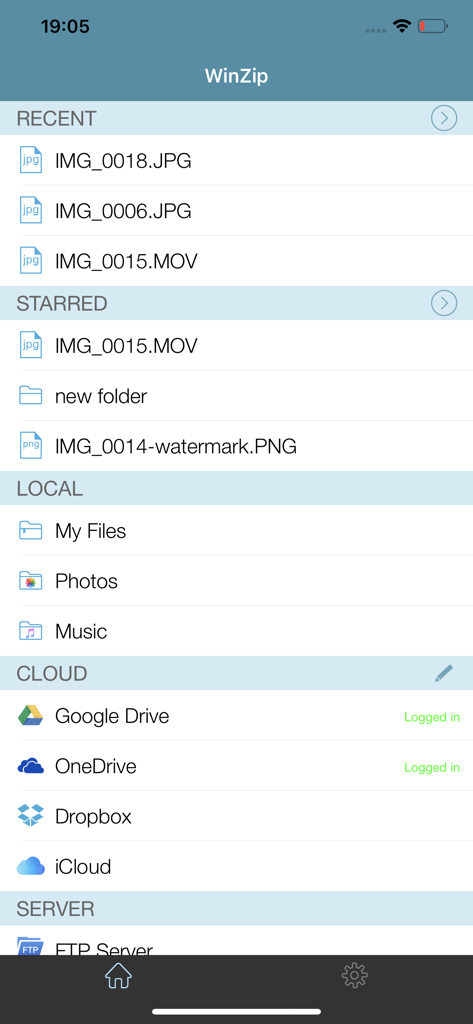
WinZip Pro 앱 인터페이스에 최근 파일 및 iPhone의 클라우드 저장소 통합이 표시됨

WinZip Pro 앱 인터페이스에 최근 파일 및 iPhone의 클라우드 저장소 통합이 표시됨

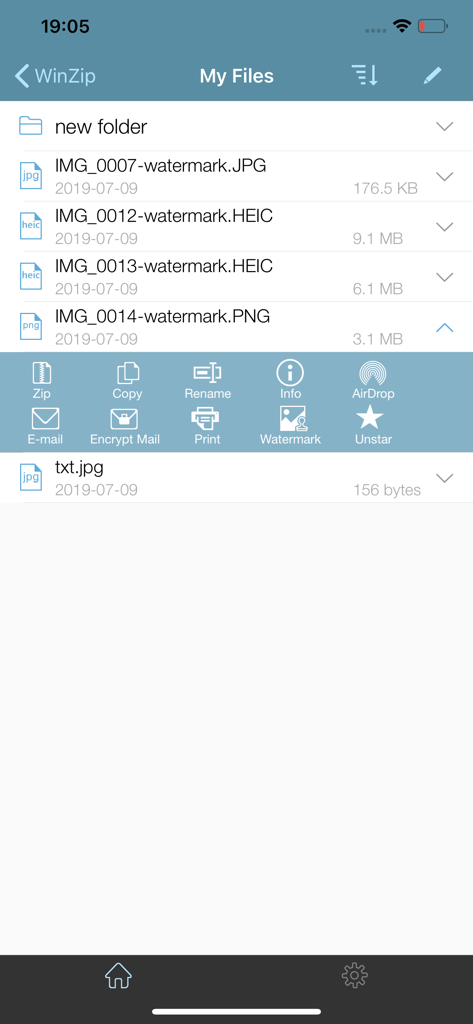
WinZip Pro iOS 앱 인터페이스에 이미지 파일 목록과 zip, 복사, 이름 바꾸기 및 암호화 옵션이 있는 메뉴가 표시됨

WinZip Pro iOS 앱 인터페이스에 이미지 파일 목록과 zip, 복사, 이름 바꾸기 및 암호화 옵션이 있는 메뉴가 표시됨

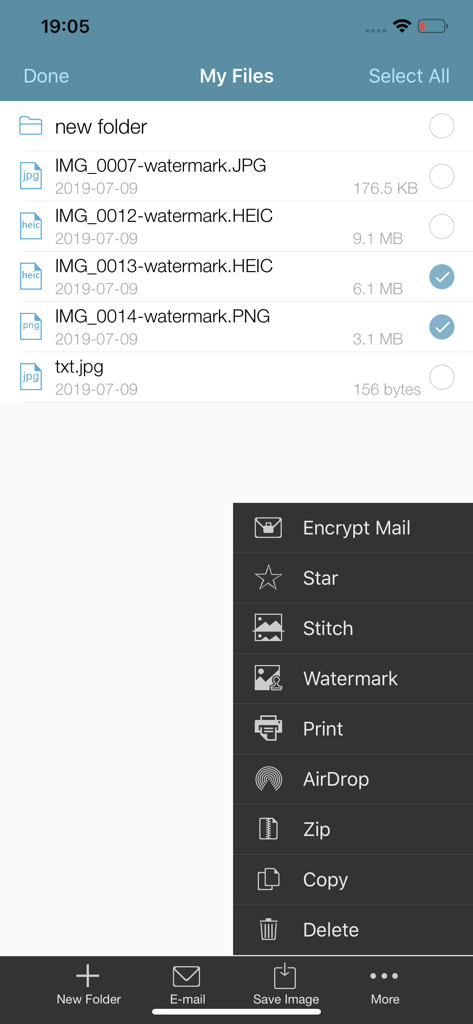
WinZip Pro 앱 인터페이스에 파일 목록과 암호화된 zip 및 워터마크 파일 옵션이 있는 메뉴가 표시됨

WinZip Pro 앱 인터페이스에 파일 목록과 암호화된 zip 및 워터마크 파일 옵션이 있는 메뉴가 표시됨

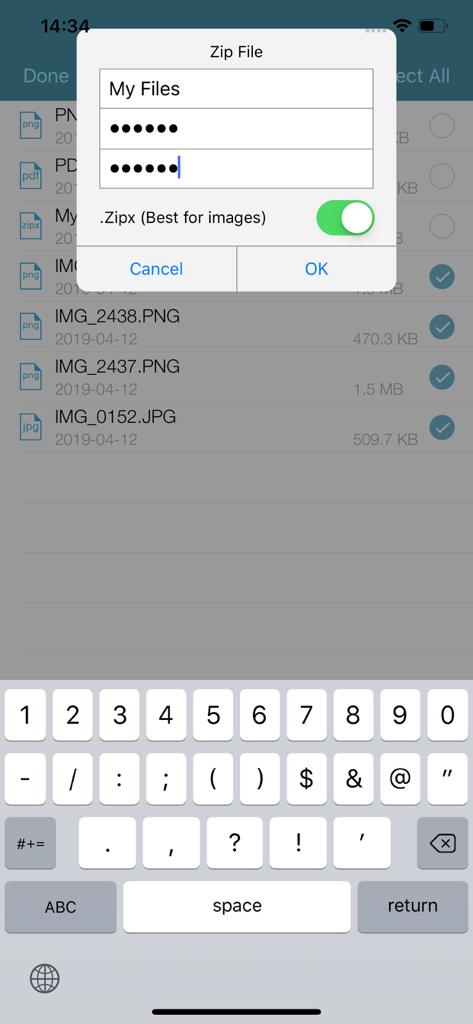
WinZip Pro 모바일 앱에서 암호로 보호되고 암호화된 zip 파일 생성

WinZip Pro 모바일 앱에서 암호로 보호되고 암호화된 zip 파일 생성

WinZip Pro iOS 앱 인터페이스에 빨간 장미 사진에 대한 소셜 미디어 공유 옵션이 표시됨

WinZip Pro iOS 앱 인터페이스에 빨간 장미 사진에 대한 소셜 미디어 공유 옵션이 표시됨

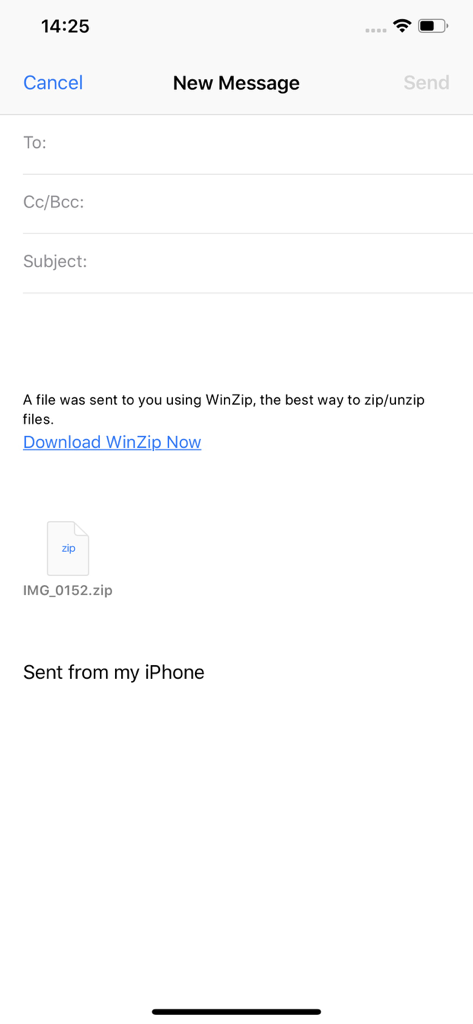
iPhone에서 WinZip Pro를 통해 전송된 zip 파일 첨부 파일이 표시된 새 이메일 초안

iPhone에서 WinZip Pro를 통해 전송된 zip 파일 첨부 파일이 표시된 새 이메일 초안

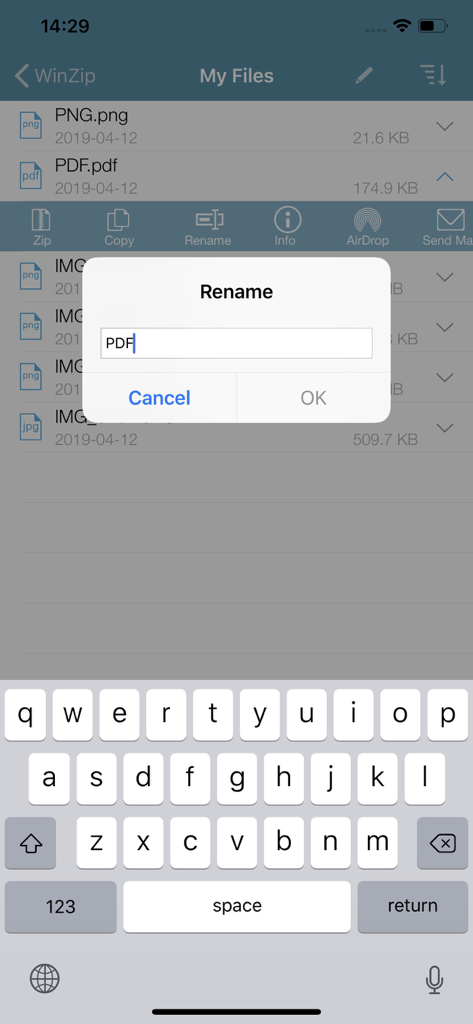
활성 모바일 키보드와 함께 문서 목록 위에 이름 바꾸기 대화 상자가 표시된 iPhone의 WinZip Pro 앱 스크린샷

활성 모바일 키보드와 함께 문서 목록 위에 이름 바꾸기 대화 상자가 표시된 iPhone의 WinZip Pro 앱 스크린샷

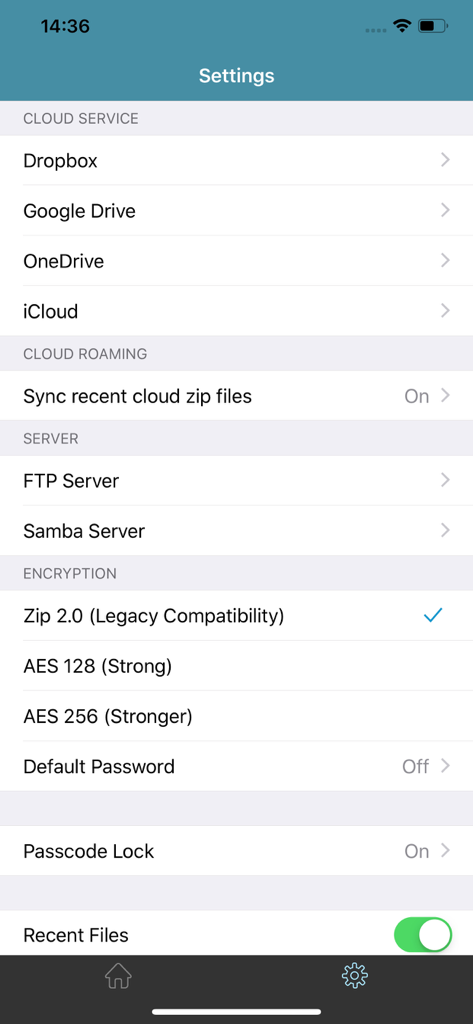
클라우드 서비스 및 암호화 옵션을 보여주는 WinZip Pro 설정 화면

클라우드 서비스 및 암호화 옵션을 보여주는 WinZip Pro 설정 화면

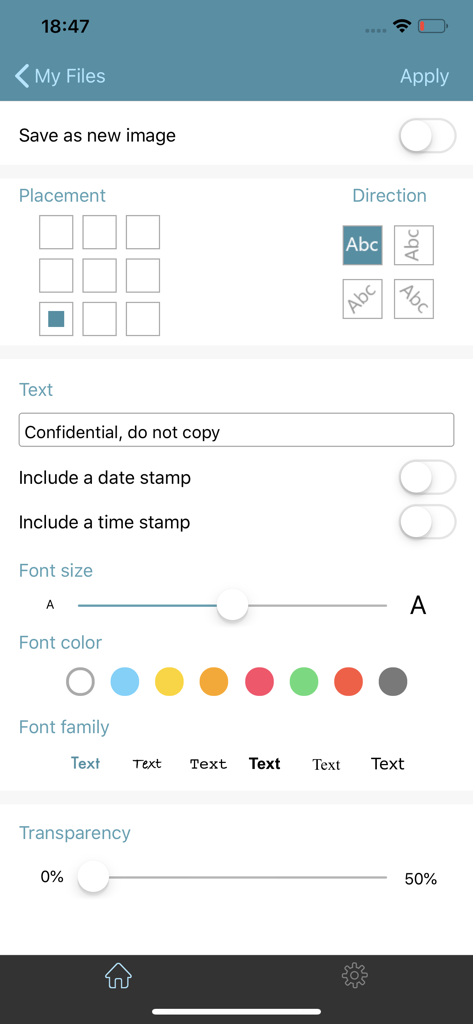
WinZip Pro에서 사용자 지정 워터마크 및 텍스트 오버레이를 추가하기 위한 인터페이스

WinZip Pro에서 사용자 지정 워터마크 및 텍스트 오버레이를 추가하기 위한 인터페이스

모바일 워크플로우를 위한 데스크톱 파워

이 앱을 돋보이게 하는 도구, 517K+ 명의 사용자가 선택.

☁️

원활한 클라우드 통합

Dropbox, Google Drive 및 iCloud에 직접 연결하세요. 다른 클라우드 저장소 간에 파일을 zip하고 이동하여 디지털 작업 공간을 정리하세요.

🔓

범용 파일 추출

Zip, RAR, 7z 및 Zipx 보관 파일을 즉시 열고 확인하세요. 전문적인 이메일 첨부 파일을 처리할 때 '지원되지 않는 형식' 오류에 작별을 고하세요.

🔒

은행 등급 암호화

강력한 128비트 또는 256비트 AES 암호화로 민감한 문서를 보호하세요. 클라우드 또는 AirDrop을 통해 공유하기 전에 데이터를 보호하세요.

리뷰 분석

사용자 리뷰 인사이트.

감정 점수

29%
부정적

요약

The WinZip app receives mixed to largely negative feedback from users. While some appreciate its core functionality as a "Best ZIP App" and its compression capabilities, many users express significant frustration due to a perceived lack of updates for the premium version compared to the free one. Common complaints include an outdated and problematic user interface, frequent crashes, and difficulties with basic features like unzipping certain file types or integrating with cloud services and local file systems. Users also report issues with password protection and accessing local storage on iOS devices.

주요 테마

Core Functionality(7)
Brand Reputation(4)
Customer Support(2)
Usefulness(2)
Recommendability(2)
Password Protection(1)

앱 소개

에 대해 알아야 할 모든 것 WinZip Pro: zip, unzip & rar.

설명

Get the world’s #1 zip file opener utility on iOS! Create Zip and Zipx files, extract files, encrypt, open Zip, Zipx, 7z, RAR or LHA files, send large files by email, share to Dropbox, Google Drive, OneDrive, iCloud, Twitter or Facebook. The reviews are unanimous! “Trying to open zip files a zip file on your mobile phone? Good luck -- unless you happen to have this handy tool installed. It launches directly from your inbox to give you a look inside those pesky file packages. “ - Mashable CNET (download.com) gives WinZip for iOS a 5 star rating, saying ""We love apps that are simple and straightforward to use. WinZip definitely fits that description. We recommend it for all users."" If you frequently use your iOS device to send and receive documents and large image files, you'll find a friend in the new WinZip app for iPhones and iPads. The full version costs $5, but it's worth the investment, according to CIO.com blogger James A. Martin. From AppPicker: ""Why not sink a few dollars into this fantastic full version of WinZip for your iPhone and iPad!"" WinZip makes it easy to handle major compressed types of files on your iPhone, iPad or iPod Touch! Whether you receive a Zip, Zipx, 7z, RAR or LHA file as an email attachment, or want to extract download and view the contents of a Zip, Zipx, 7z, RAR or LHA file from the web, just “Open with WinZip”. Sharing files is safe and simple too, with direct integration with Dropbox, Google Drive, OneDrive and iCloud, and support for AirDrop. Now you can: • Connect directly to your Dropbox, Google Drive, OneDrive and iCloud accounts to zip, unzip and share files • Zip your cloud storage files, unzip files to your accounts, and create and save .zip and .zipx files to your accounts • Send or copy links to your files in your cloud storage accounts • Copy files from your cloud storage accounts and save them on your device • Unzip major compressed file types, including .ZIP, .Zipx, .RAR, .7z and LHA with just a tap • Choose Zip or Zipx format to compress and email large files, photos and videos with ease • Zip and share photos and videos from your Camera Roll • Use WinZip to access music files on your device and save them to your cloud accounts • Send files to other iOS users with integrated support for AirDrop • Protect your files before you save and share with powerful 128- or 256-bit AES encryption • Open and save email attachments to your connected cloud storage accounts or My Documents folder on your iPhone or iPad • Easily view all images in a Zip file with the enhanced image viewer • Browse your Photo Album and easily multi-select, zip and share photo collections • Share photos in your zip files to Facebook and Twitter • Download or upload files from/to WinZip through iTunes/iTools • Unzip and view most common file types, including: .doc, .docx, .xls, .xlsx, .ppt, .pptx, .pages (including new iWork 13), .numbers (including new iWork 13), .key, .rtf, .pdf, .jpg, .png, .bmp, .gif, .tif, and more View any of the following types of files within your Zip or RAR file: • Word documents (.doc, .docx) • Excel spreadsheets (.xls, .xlsx) • PowerPoint presentations (.ppt, .pptx) • PDF files (.pdf) • Photos and images (.jpg, .jpeg, .png, .bmp, .gif, .tif, .tiff, .heic) • Text files (.txt, .ini, .inf, .bat, .js, .log, .xml, .css, .java, .cs, .h, .m, .cpp, .c, .sql) • Web documents (.htm, .html, .jsp, .asp) • Rich Text Format documents (.rtf) • Keynote presentations (.key) • Numbers spreadsheets (.numbers) • Pages documents (.pages) • Media files (.m4a, .mp3, .wav, .mp4, .mov)

최신 버전

6.3.1

크기

52.2 MB

출시일

2013년 8월 7일

주머니 속의 데스크톱급 파일 관리

500,000명 이상의 전문가가 WinZip Pro를 사용하여 모든 클라우드 계정에서 파일을 안전하게 관리, 압축 및 공유하고 있습니다.

다운로드: App Store

App information, icons, screenshots, and descriptions displayed on this page are sourced from the Apple App Store and are the property of their respective developers. Download estimates and rankings are based on MWM's proprietary models and may not reflect actual figures. This page is provided for informational and analytical purposes only.

Believe this page infringes your intellectual property? File a dispute