
이 페이지는 앱이나 개발자의 공식 페이지가 아니며, 정보 제공 및 논평을 목적으로 작성된 독립 편집 간행물입니다. 명시적으로 달리 언급되지 않는 한, 해당 앱이나 개발자는 MWM, Apple, Google Play, 앱 퍼블리셔 또는 앱 개발자와 제휴, 보증, 후원, 승인 또는 공식적으로 연결되어 있지 않으며, 이 페이지의 어떤 내용도 해당 앱이 MWM의 서비스를 사용하여 개발되었음을 의미하지 않습니다. 모든 상표, 로고, 스크린샷 및 기타 콘텐츠는 해당 소유자의 자산입니다.


다운로드
100k+사용자 평점
총 평가 수
13.7K개발사
카테고리
Utilities지원 언어
1최신 버전
1.1크기
16.5 MB출시일
2025년 8월 12일파일 관리 및 압축/해제에 특화된 다목적 모바일 도구
MT管理器 주요 기능 분석
고급 파일 관리
이 도구는 파일을 효율적으로 삭제, 공유, 복사 및 이동할 수 있는 고급 파일 관리 기능을 제공합니다.
다중 압축 형식 지원 및 빠른 해제
이 앱은 ZIP, TAR, TAR.BZ2 등 다양한 압축 파일 형식을 지원하며, 빠른 속도로 압축을 해제할 수 있게 해줍니다.
파일 압축 기능
사용자는 단일 파일 또는 여러 파일을 효율적으로 압축하여 저장 공간을 절약하고 공유를 용이하게 할 수 있습니다.
다양한 형식 파일 미리보기
이 도구는 다양한 형식의 파일을 앱 내에서 직접 미리 볼 수 있는 기능을 갖추고 있어, 사용자의 작업 효율성을 높여줍니다.
사진 갤러리 저장
이 앱은 처리된 사진이나 이미지 파일을 사용자의 기기 갤러리에 직접 저장하는 기능을 제공합니다.
시스템 파일 가져오기
사용자는 시스템 파일을 앱으로 가져와 관리할 수 있어, 보다 심층적인 파일 제어 기능을 활용할 수 있습니다.
자주 묻는 질문
에 대해 알아야 할 모든 것 MT管理器
What is MT管理器?
MT管理器 is a file management and compression/decompression tool. It offers features like file organization, viewing, archiving, and extracting files in various formats.
What file formats does MT管理器 support for decompression?
MT管理器 supports the decompression of multiple archive formats, including ZIP, TAR, TAR.ZP, and TAR.BZ2. It provides fast and efficient extraction for these types.
Can MT管理器 perform basic file operations like delete, copy, and share?
Yes, MT管理器 supports a comprehensive set of file operations. Users can delete, copy, share, cut, and save files to albums directly within the application interface.
Does MT管理器 allow users to save photos to their device's photo album?
Yes, MT管理器 enables users to save photos directly to their device's photo album. This feature is integrated to streamline image management within the app.
How can users import files into MT管理器?
MT管理器 supports multiple file import methods. Users can import files, import from photo albums, take new photos, or paste content directly into the application.
Does MT管理器 offer any image processing tools?
Yes, MT管理器 provides rich image processing tools. These include adding watermarks, compressing images, applying filters, and creating image collages directly within the application.
Can MT管理器 compress multiple files simultaneously?
Yes, MT管理器 supports compressing both single and multiple files. This feature allows users to efficiently archive several items together into a single compressed package.
다음 스크린샷과 설명은 앱의 공식 스토어 목록에서 직접 가져온 것이며 앱 개발자의 자산입니다.
앱 스토어
스크린샷
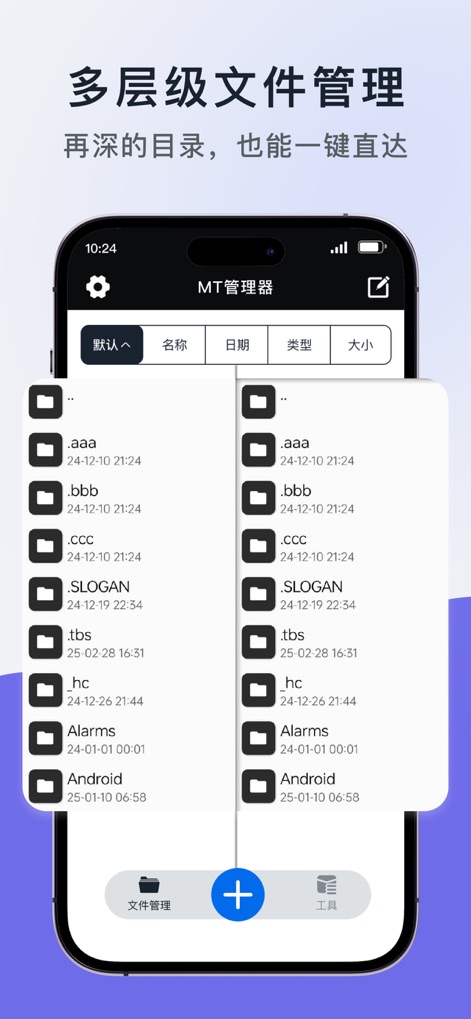
이 스크린샷은 폴더와 파일의 계층적 보기를 통해 깊은 디렉토리까지 빠르게 접근할 수 있는 기능을 명확하게 보여줍니다.
다층 파일 관리
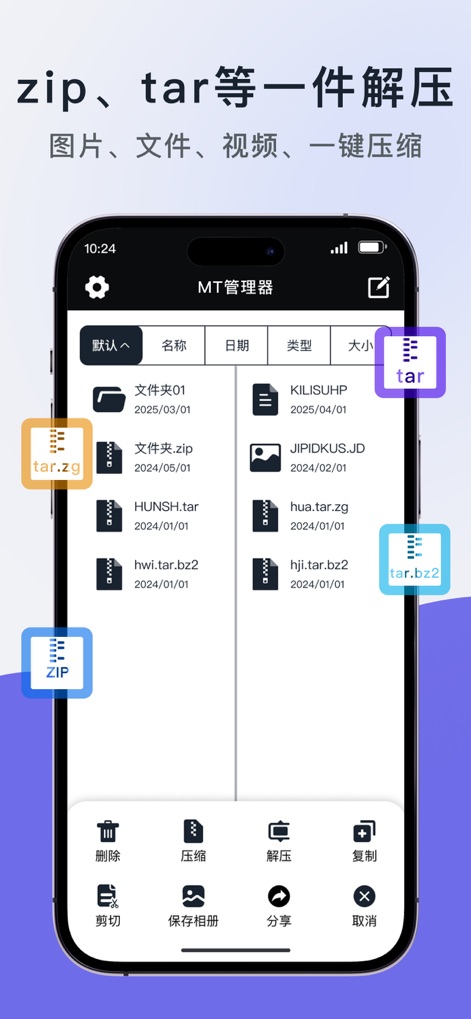
이 도구는 ZIP, TAR, TAR.BZ2와 같은 다양한 형식의 압축 파일을 한 번의 클릭으로 쉽게 해제할 수 있도록 지원합니다.
원 클릭 압축 해제

이 스크린샷은 삭제, 복사, 압축 해제와 같은 다양한 파일 처리 옵션을 제시하며, 여러 파일을 동시에 효율적으로 관리할 수 있습니다.
다중 파일 작업

이 앱은 새 파일 생성 및 사진 앨범 가져오기와 같은 다양한 파일 업로드 방법을 제공하여 콘텐츠 추가를 용이하게 합니다.
유연한 파일 가져오기
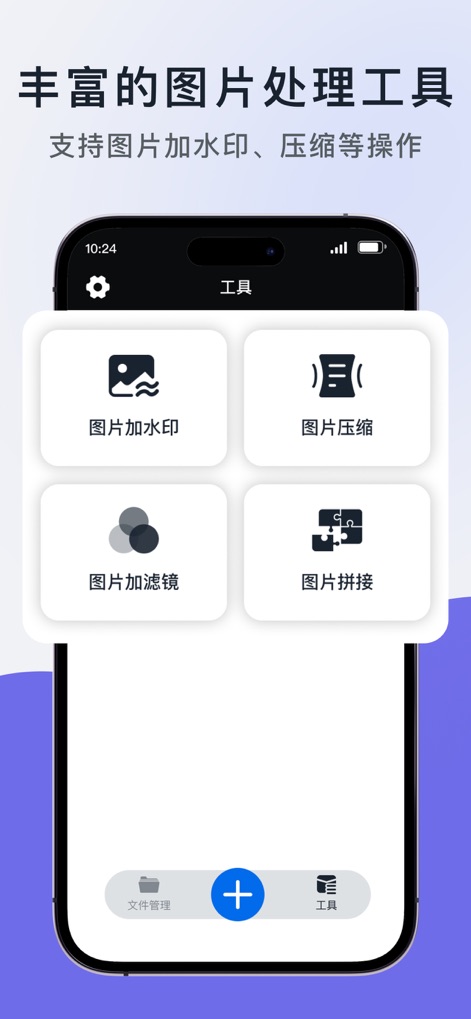
이 스크린샷은 사진 워터마크 추가 및 이미지 압축과 같은 풍부한 이미지 처리 도구를 보여주어 사용자가 사진을 효율적으로 관리할 수 있게 합니다.
풍부한 이미지 도구
설명
Download
비슷한 앱
유사한 기능과 사용자 경험을 가진 앱

Unzip – ZIP RAR 7Z Extractor
Little Sweet Technology Co., Ltd.

iRAR - zip,rar,7z file opener
书敏 贾

Unzip - zip,rar,7z file opener
书勇 贾

Zip & RAR File Extractor
PENGHUI ZHAO

iZip – Zip Unzip Unrar
ComcSoft Corporation

Zip, RAR, 7z File Extractor
FANGZHOU INTERACTIVE TECHNOLOGY CO., LIMITED

ZArchiver: UnZip, UnRar, 7Z
TIMON SOFTWARE SOLUTIONS COMPANY LIMITED

Zip & RAR & 7z File Extractor
琳 胡

iZip Pro -Zip Unzip Unrar Tool
ComcSoft Corporation
이 페이지는 앱이나 개발자의 공식 페이지가 아니며, 정보 제공 및 논평을 목적으로 작성된 독립 편집 간행물입니다. 명시적으로 달리 언급되지 않는 한, 해당 앱이나 개발자는 MWM, Apple, Google Play, 앱 퍼블리셔 또는 앱 개발자와 제휴, 보증, 후원, 승인 또는 공식적으로 연결되어 있지 않으며, 이 페이지의 어떤 내용도 해당 앱이 MWM의 서비스를 사용하여 개발되었음을 의미하지 않습니다. 모든 상표, 로고, 스크린샷 및 기타 콘텐츠는 해당 소유자의 자산입니다.