Audio Spectrum Monitor

Audio Spectrum Monitor

Download on App Store
Logo of Audio Spectrum Monitor

Audio Spectrum Monitor: Visualize Every Note with Real-Time Precision

The ultimate tool for musicians and audio engineers to analyze frequencies from C2 to B7. Track pitch in Hz, visualize music scales, and capture recordings with a lightweight, professional-grade interface.

Download on App Store

Publisher

Tadao Yamaoka

Category

Music

Downloads

18K+

User Rating

1.0/5

Total Ratings

0

Locales

1

Precision You Can See

Discover the interface used by 18K+ users.
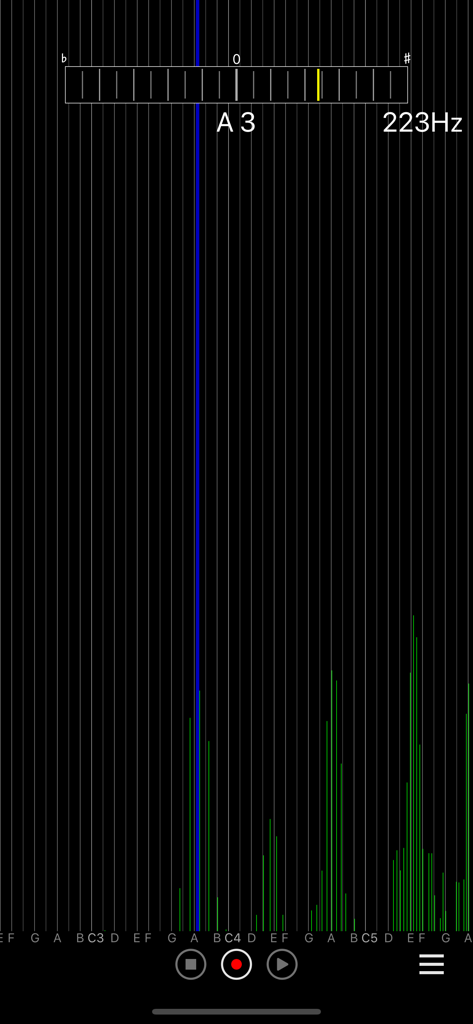
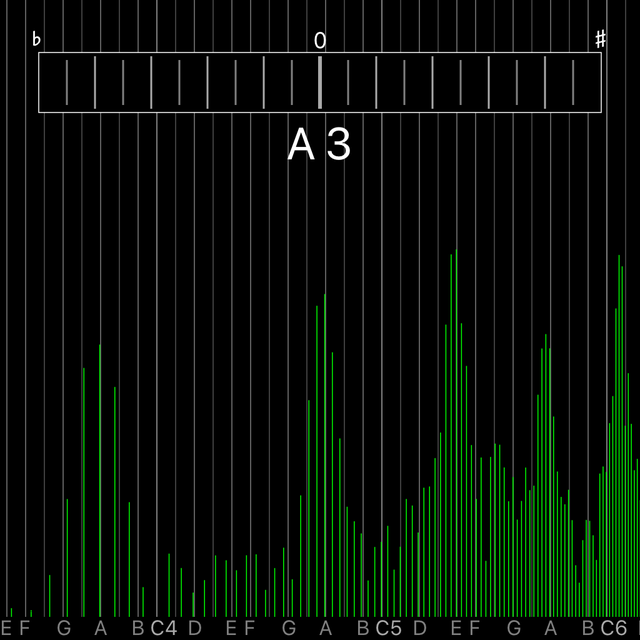
Interface of Audio Spectrum Monitor app displaying a real-time frequency spectrum and pitch detection for note A3

Interface of Audio Spectrum Monitor app displaying a real-time frequency spectrum and pitch detection for note A3

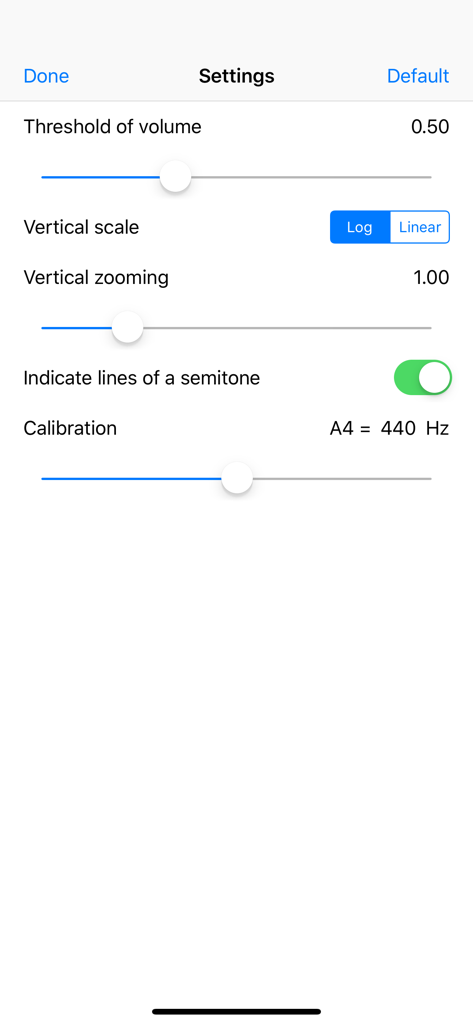
Settings screen of the Audio Spectrum Monitor app featuring volume threshold vertical scale and pitch calibration controls

Settings screen of the Audio Spectrum Monitor app featuring volume threshold vertical scale and pitch calibration controls

Precision Audio Visualization

The tools that make this app stand out, trusted by 18K+ users.

πŸ“Š

Real-Time Spectrum Mapping

Visualize your audio across 6 full octaves from C2 to B7. Pinpoint specific frequencies with high-fidelity Hz precision and a zoomable interface.

🎯

Instant Pitch Identification

Perfect your performance with intelligent pitch tracking. A visual blue indicator and live scale name display provide objective feedback for vocalists and instrumentalists.

πŸ“‚

Pro Workflow & Export

Capture up to 3 minutes of audio for immediate analysis. Seamlessly save, load, or export your recordings to your favorite desktop DAW for further production.

About the app

Everything you need to know about Audio Spectrum Monitor.

Description

It is an application program that in real time displays the spectrum of the voice input from your device's microphone. A horizontal axis is a music scale. A display position can be adjusted by dragging horizontally. Scaling of the display range of a scale can be carried out in pinch zoom operation. [ feature ] - The spectrum of the voice input from your device's microphone is in real time displayed. - A horizontal axis is displayed by the music scale. - Display 6 octaves from C2 to B7. - It corresponds to a horizontal rotation of the screen. - The basic frequency (pitch) is presumed and it displays it. - It correspond to a drug and pinch zoom. - Tuner - Recording and playback - Save/Load function - Import/Export function [ How to use ] Please input the voice from your device's microphone. The spectrum is in real time displayed. It corresponds to a horizontal rotation. [ Pitch detection ] When the pitch is presumed, a blue vertical line is displayed at the position of the music scale. Moreover, value (Hz) of the pitch and the music scale name are displayed in the top of the screen. When the voice contains two or more musical instruments and harmonies, it is not possible to analyze it correctly. [ Recording and playback ] Only 3 minute you can record.

Latest Version

1.2.0

Size

0.6 MB

First Released

Mar 10, 2014

Turn Your Device into a Professional Spectrum Analyzer

Get real-time pitch detection and Hz-level precision without the bloat. Join 18,000+ audio pros and musicians visualizing their sound with 6-octave accuracy today.

Download on App Store

App information, icons, screenshots, and descriptions displayed on this page are sourced from the Apple App Store and are the property of their respective developers. Download estimates and rankings are based on MWM's proprietary models and may not reflect actual figures. This page is provided for informational and analytical purposes only.

Believe this page infringes your intellectual property? File a dispute