Clap Finder:  Find My Phone !

Clap Finder: Find My Phone !

Download on App Store
Logo of Clap Finder:  Find My Phone !

Clap Finder: Find Your Phone Instantly with a Simple Clap or Whistle

The ultimate life-hack for busy multitaskers. Stop the frantic search and locate your misplaced device under cushions, in the dark, or across the house in seconds.

Download on App Store

Publisher

钰森 席

Category

Entertainment

Downloads

0

User Rating

4.3/5

Total Ratings

0

Locales

33

Peace of Mind, Visualized

Discover the interface used by 0 users.
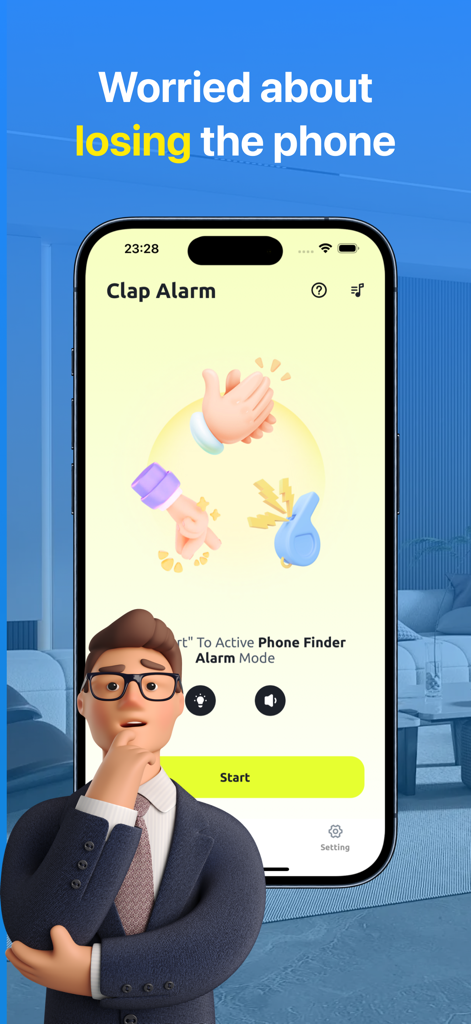
Clap Finder app interface showing the Clap Alarm mode with icons for clapping whistling and snapping fingers and a large Start button

Clap Finder app interface showing the Clap Alarm mode with icons for clapping whistling and snapping fingers and a large Start button

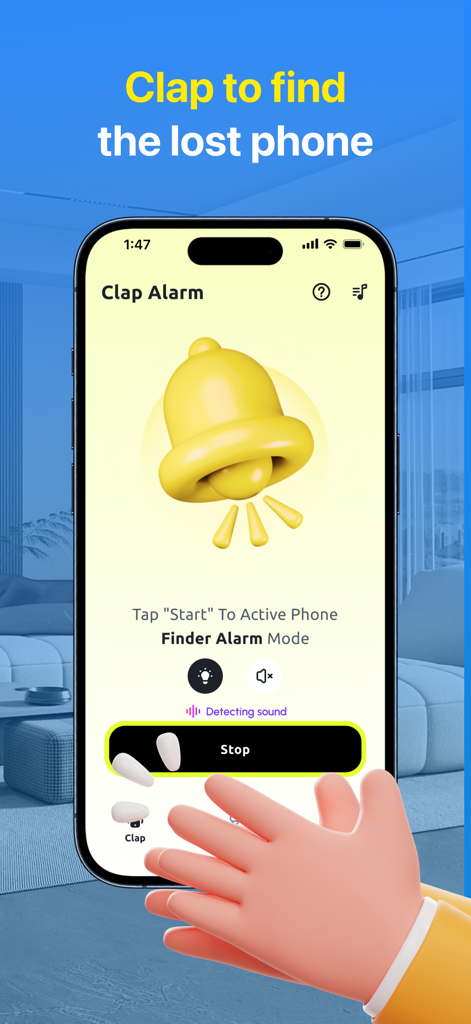
Screenshot of Clap Finder app showing the text Clap to Find Phone and a 3D illustration of clapping hands on a blue background

Screenshot of Clap Finder app showing the text Clap to Find Phone and a 3D illustration of clapping hands on a blue background

A smartphone screen displaying the Clap Finder app with a yellow bell icon and a hand clapping

A smartphone screen displaying the Clap Finder app with a yellow bell icon and a hand clapping

Stop Searching, Start Finding

The tools that make this app stand out, trusted by 0 users.

👏

Instant Sound Activation

Trigger a loud response by simply clapping, whistling, or snapping your fingers. Perfect for finding your phone under couch cushions or in different rooms.

🎵

Custom Alert Library

Choose from 20+ unique sounds or upload your own melody. Personalize your search experience so your phone's response is unmistakable and fun.

🔋

Unplugged Security Alarm

Keep your device safe in shared spaces or busy households. An automatic alarm sounds the moment anyone disconnects your phone from its charger.

About the app

Everything you need to know about Clap Finder: Find My Phone !.

Description

Clap Finder - Clap Finder is an application that allows you to locate your device by clapping. Our app offers a convenient way to easily locate your device. By activating the "Clap Finder" feature, all you need to do is clap, snap your fingers, whistle, or do all three, and wait for your phone to emit a response, enabling you to quickly locate it without any difficulties. Sound Collection You can select the phone's alarm sound from a list. As a signal emitted by your phone, you can choose one of our 20 custom sounds. Clap your hands and wait for the phone to "respond". You will definitely not confuse them with melodies from other devices. Not enough? You can also set your own melody from your files. Easily and quickly find your misplaced phone with the help of this app. The Clap to Find My Phone - Clap Finder application is designed to assist you in locating your device effortlessly, whether you're in a crowded area, in the dark, or somewhere at home. How to use Clap Finder: 1. Start our application (Clap Finder section). 2. Change the alarm sound (if necessary). 3. Choose what sound your phone should respond to (clap, whistle, finger snap, or all of them together). 4. Click the "START" button to activate the "Clap Finder" mode. 5. Lock your phone without closing the application. 6. Start clapping (whistling or snapping your fingers) if you forget where your phone is. 7. Our application will detect the search sound and respond with a sound signal. 8. Your phone has been found. Unplugged Charging Alarm Mode Do you often encounter a problem when someone unplugs your phone from charging? Now you can activate the continuous charging mode, and if someone disconnects your phone from charging, our application will start beeping to notify you about it. How to use Charging Alarm: 1. Go to the Charging Alarm section. 2. Make sure the phone is charging with a wire. 3. Press the "START" button and lock the application. 4. Now if someone disconnects your phone from charging, it will start beeping. ● Description of auto-renewal subscription: - Subscription service: Auto-renewal membership. - Subscription periods: 1 week (for continuous weekly payment products), 1 month (for continuous monthly payment products), 12 months (for continuous annual payment products). - Subscription prices: $3.99 per week for continuous weekly payment products, $9.99 per quarter for continuous monthly payment products, and $19.99 per year for continuous annual payment products. - Payment: After the user confirms the purchase and makes the payment, it will be credited to the iTunes account. - Renewal: The Apple iTunes account will deduct the fee within 24 hours before the expiration, and after the successful deduction, the subscription period will be extended by one subscription period. - Cancel renewal: If you need to cancel the renewal, please manually turn off the auto-renewal function in the iTunes/Apple ID setting management before 24 hours before the expiration of the current subscription period. - Privacy policy: https://note.youdao.com/s/MwqPjkpL - Term of us: https://note.youdao.com/s/Hut62bH7 - Membership service agreement: https://note.youdao.com/s/2k38ZoEc

Latest Version

1.9

Size

44.3 MB

First Released

Apr 4, 2024

Stop the Daily Hide-and-Seek

Buried in laundry or lost under couch cushions? Join thousands of busy parents and professionals who find their phone instantly with a simple clap. Download now and never lose your peace of mind again.

Download on App Store

App information, icons, screenshots, and descriptions displayed on this page are sourced from the Apple App Store and are the property of their respective developers. Download estimates and rankings are based on MWM's proprietary models and may not reflect actual figures. This page is provided for informational and analytical purposes only.

Believe this page infringes your intellectual property? File a dispute