다음 - Daum

다음 - Daum

Download on App StoreDownload on Google Play
Logo of 다음 - Daum

다음 - Daum: Your Essential Connection to Korea, Anywhere in the World

Experience the pulse of Korea with AI-powered news briefings, vibrant community discussions, and the latest K-trends. Stay informed, earn rewards, and enjoy a personalized content feed designed for your lifestyle.

Publisher

AXZ Corp.

Category

News

Downloads

2M+

User Rating

3.3/5

Total Ratings

8K+

Locales

2

A Glimpse Inside

Discover the interface used by 2M+ users.
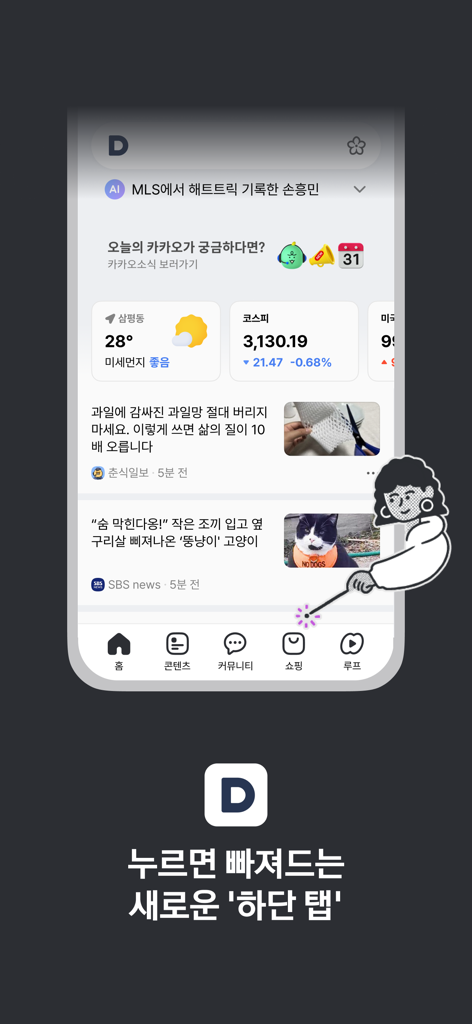
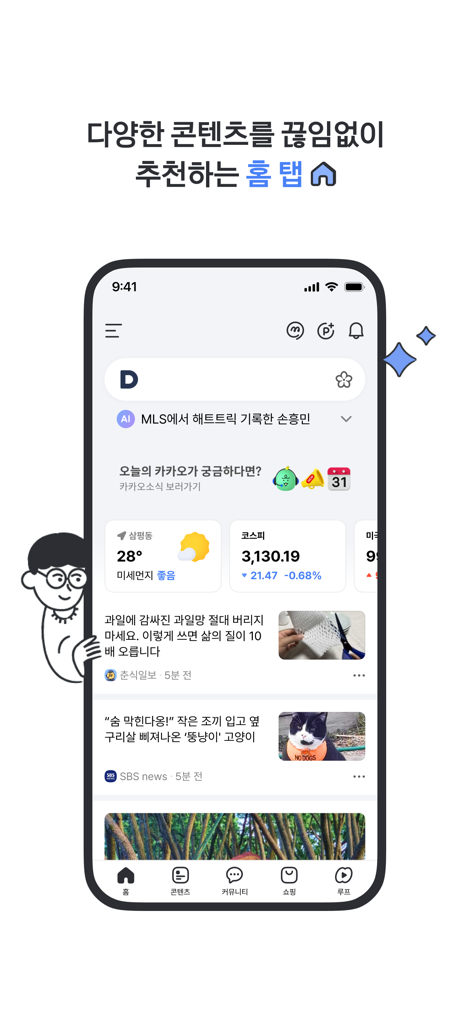
Daum mobile app home screen featuring news weather stock market widgets and a new bottom navigation menu

Daum mobile app home screen featuring news weather stock market widgets and a new bottom navigation menu

Daum app home screen showing Korean news weather and stock market updates

Daum app home screen showing Korean news weather and stock market updates

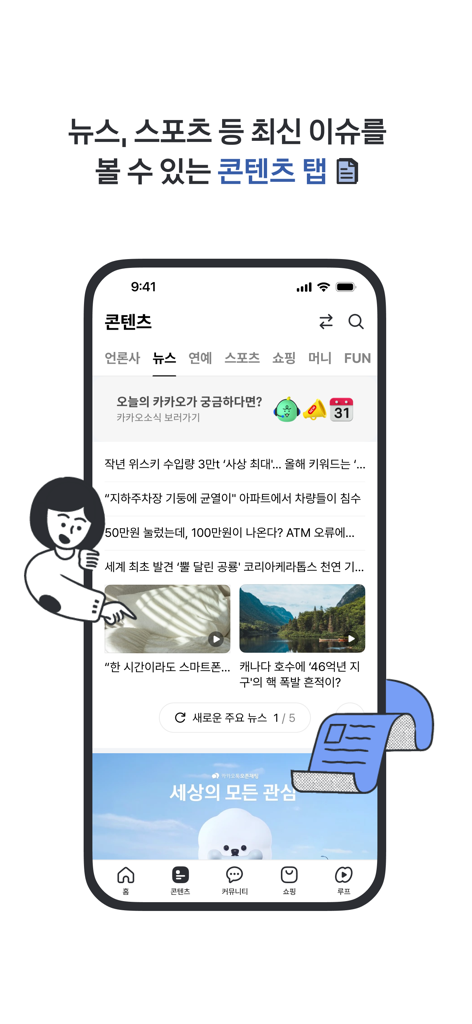
A screenshot of the Daum mobile app showing the Contents tab with various Korean news and entertainment categories.

A screenshot of the Daum mobile app showing the Contents tab with various Korean news and entertainment categories.

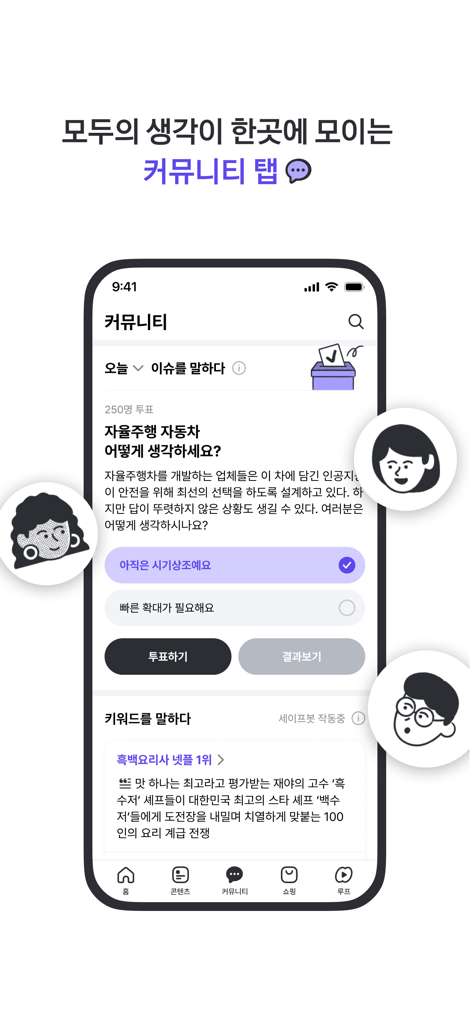
Daum app community tab showing a user poll about self-driving cars and trending Korean cultural news topics

Daum app community tab showing a user poll about self-driving cars and trending Korean cultural news topics

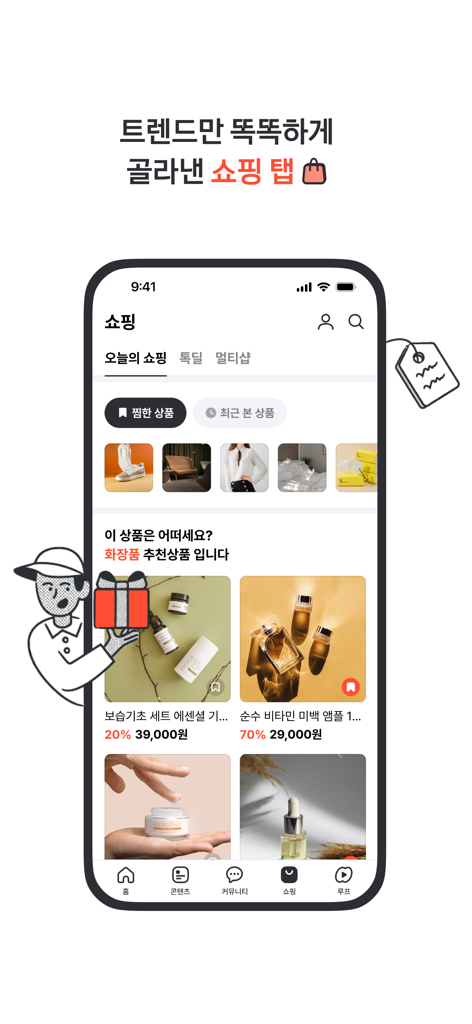
Daum app shopping interface featuring curated Korean lifestyle and beauty products

Daum app shopping interface featuring curated Korean lifestyle and beauty products

Daum app interface showing the Loop tab with short form video content featuring Kakao characters

Daum app interface showing the Loop tab with short form video content featuring Kakao characters

Your Cultural Bridge to Korea

The tools that make this app stand out, trusted by 2M+ users.

🗞️

Stay Informed Across Time Zones

Wake up to AI-powered briefings and breaking news from Korea. Our [Home] tab ensures you catch every critical update while you sleep, from stock shifts to trending headlines.

👥

Join the Global Korean Community

Access the legendary Daum Cafes to share advice, discuss interests, and stay grounded in the community. It’s the ultimate space for cultural exchange and immigrant life tips.

🤳

Discover the Latest K-Trends

Immerse yourself in 'Loop' short-form videos and the 'Contents' tab. Stay ahead of K-Beauty, fashion, and viral trends with a feed that learns what you love.

Review Analysis

Insights from user reviews.

Sentiment Score

12%
Negative

Summary

User reviews for this mobile app are overwhelmingly negative, with an average sentiment score of 12 out of 100. Many users express severe frustration with persistent navigation and back button issues, where returning to a previous page is often impossible or buggy; this particular problem has been noted by iPhone 13 Pro Max users. Intrusive advertisements, including auto-playing audio/video and accidental clicks due to sensitive scrolling, are a major source of dissatisfaction. Additionally, the app's overall UI/UX and recent design changes, such as the Cafe redesign, unwanted content on the homepage, and a perceived 'gloomy' logo, have been poorly received, alongside complaints about high data consumption and login difficulties, especially on iPads, and general performance issues like slow loading and image display errors. The only consistent positive feedback highlighted the utility of the 'Flower Search' feature.

Common Themes

UI/UX & Design Changes(12)
Navigation & Back Button Issues(11)
Intrusive Advertisements(8)
Performance & Stability(8)
Login & Account Issues(4)
High Data Consumption(3)
Flower Search Feature(1)

About the app

Everything you need to know about 다음 - Daum.

Description

Discover a world of endless content in the newly redesigned bottom tab section of the Daum app. ▶ Looking for a feed that’s all about you? The [ Home ] tab has everything essential: From breaking news, stock updates, and weather to AI-powered briefings that help you quickly catch trending topics. Stay informed and handle everything with Daum! Scroll down the [ Home ] tab to uncover endless content tailored just for you. ▶ Want personalized AI content recommendations? Watch a personalized feed at the [ Home ] tab. With [ DD ], you can easily and quickly find content that's recommended just for you! It analyzes your interests and engagement so you can enjoy an even more immersive content experience. ▶ Don’t want to miss out on the hottest trends and news? Check out the [ Contents ] tab for the latest buzz, top stories, and must-reads everyone’s talking about. Stay on top of every topic, all in one place! ▶ What’s on everyone’s mind right now? Find out in the [ Community ] tab, where all current interests converge. Share your thoughts, dive into your interests, and join the buzz! ▶ Trendy finds and seasonal must-haves all in one list! Discover daily hot picks and shopping trends in the [ Shopping ] tab. Enjoy smart shopping with our curated selection, from great deals to popular items. ▶ Enjoy a healthy dose of daily short-form content! Watch immersive short-form content in the [ Loop ] tab. Stay informed and engaged by exploring various content from current events to viral trends! ▶ Earn points just by checking in! Get Kakaopay points simply by checking in daily [ Benefits Plus ]. The more you use it, the more you gain—try Daum today! ▶ Curious about this flower, that book, or the song playing right now? Use [ Special Search ] by tapping the icon on the right of the search bar. Find flower names with ‘Flower Search,’ book details with ‘Code Search,’ and song titles with ‘Music Search.’ Whenever you want to know more about something, turn to the Daum app. ● Usage Guide · The Daum app is supported by iOS 16 or later. This ensures better service quality and protection of your personal information. · Video and music content in the Daum app are set to autoplay by default. To disable autoplay on mobile data (LTE, 5G, etc.), go to [More] > [Settings] > [Media Autoplay]. ● Please note: All permissions requested by Daum app are optional, so you can use the service even if you choose not to allow them. · Location: For location-based search results, weather updates, and displaying location info on websites (e.g., current location on maps). · Photos: For downloading and uploading files or images. · Microphone: For voice search, music identification, or recording features on web pages accessed through the app. · Camera: For special searches and camera usage on web pages accessed through the app. · Notifications: For weather, mail, cafe, and other content alerts ● About Daum App Team · Developer/Operator: AXZ Corp. · Email: daum_app@axzcorp.com · Phone: 1577-3321

Latest Version

8.4.6

Size

442.6 MB

First Released

Apr 9, 2010

Korea’s Pulse, Right in Your Pocket

Stay connected with AI-powered news, trending K-content, and vibrant communities. Download Daum and bring the best of Korea to your fingertips.

Download on App StoreDownload on Google Play
FAQ

Frequently Asked Questions

Everything you need to know about 다음 - Daum

What is the Daum app?

The Daum app is a content platform featuring a redesigned bottom tab section. It delivers personalized AI recommendations, news, community interaction, shopping, and short-form videos to users.

What content is available on the Home tab of the Daum app?

The Daum app's Home tab provides breaking news, stock market updates, and weather information. It also features AI-powered briefings and a personalized content feed tailored for individual users.

Does the Daum app offer personalized AI content?

Yes, the Daum app offers personalized AI content recommendations through its [ DD ] feature, located on the Home tab. It analyzes user interests and engagement to curate an immersive content experience.

What special search functions are included in the Daum app?

The Daum app includes ‘Special Search’ functions like ‘Flower Search,’ ‘Code Search,’ and ‘Music Search.’ Users access these features by tapping an icon on the right of the search bar.

What iOS version does the Daum app support?

The Daum app supports iOS 16 or later. This requirement ensures better service quality and enhances the protection of user personal information, maintaining app security and performance.

How do I turn off media autoplay in the Daum app?

Users can disable media autoplay in the Daum app by navigating to [More] > [Settings] > [Media Autoplay]. This setting applies to video and music content, particularly on mobile data.

Are app permissions mandatory for using the Daum app?

No, all permissions requested by the Daum app are optional. Users can utilize the service fully even if they choose not to allow access for location, photos, microphone, or camera.

Can I earn points by using the Daum app?

Yes, users can earn Kakaopay points in the Daum app through the [ Benefits Plus ] feature. Points are gained simply by checking in daily, with more usage leading to greater rewards.

App information, icons, screenshots, and descriptions displayed on this page are sourced from the Apple App Store and are the property of their respective developers. Download estimates and rankings are based on MWM's proprietary models and may not reflect actual figures. This page is provided for informational and analytical purposes only.

Believe this page infringes your intellectual property? File a dispute