Express Plus Centrelink

Express Plus Centrelink


Download on App StoreDownload on Google Play
Logo of Express Plus Centrelink

Express Plus Centrelink: Manage your services without the wait

Skip the phone queues and office visits. Report income, check payments, and upload documents securely on the go.

Publisher

Services Australia

Category

Productivity

Downloads

4M+

User Rating

2.2/5

Total Ratings

7K+

Locales

5

Skip the Queue

Discover the interface used by 4M+ users.

Welcome screen of the Express Plus Centrelink mobile app with a Start now button

Welcome screen of the Express Plus Centrelink mobile app with a Start now button

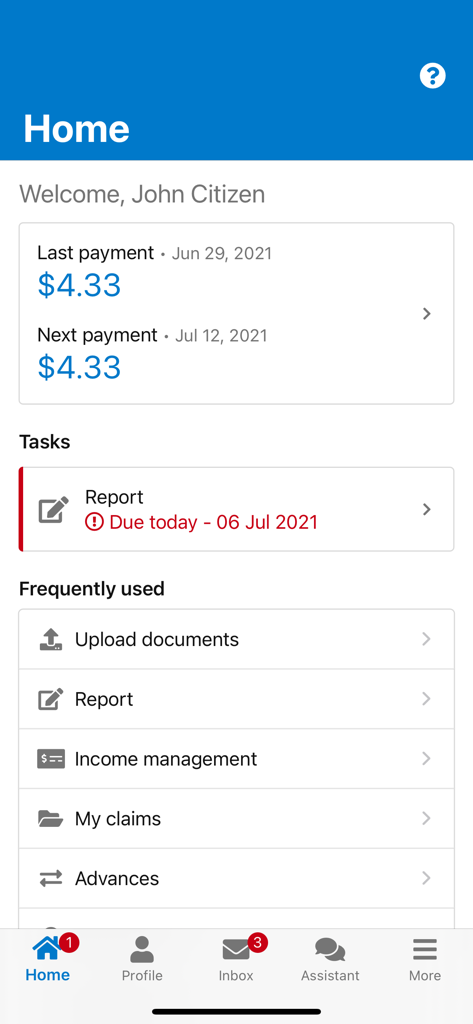
The home screen of the Express Plus Centrelink mobile app showing payment details and reporting tasks

The home screen of the Express Plus Centrelink mobile app showing payment details and reporting tasks

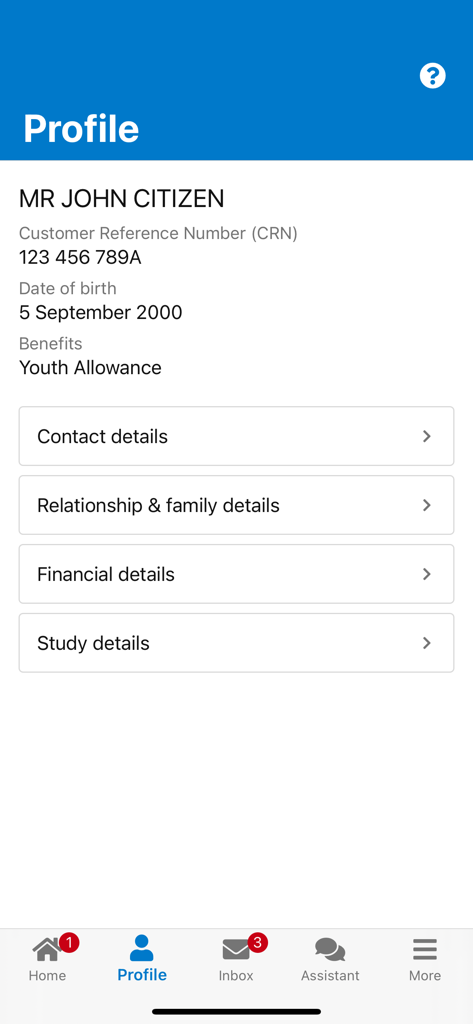
User profile screen in the Express Plus Centrelink app displaying personal information and account settings

User profile screen in the Express Plus Centrelink app displaying personal information and account settings

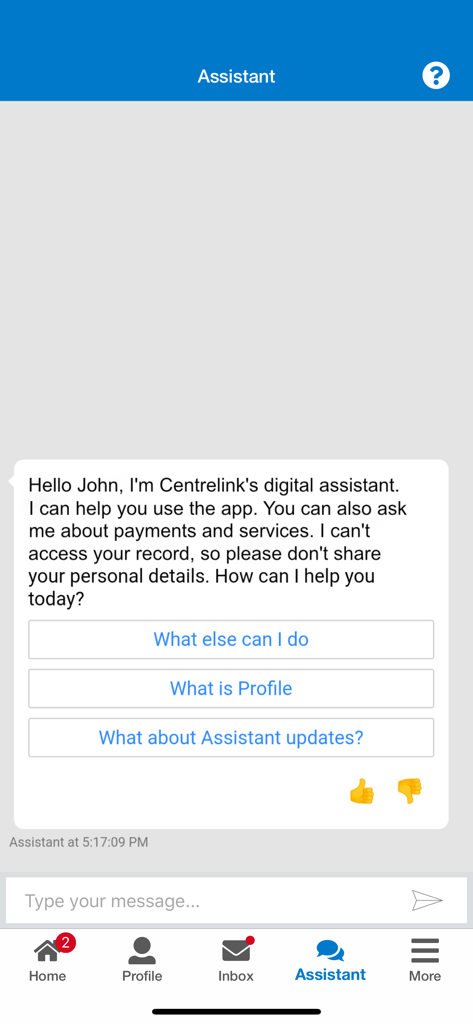
Digital assistant interface in the Express Plus Centrelink app showing a chatbot greeting a user named John.

Digital assistant interface in the Express Plus Centrelink app showing a chatbot greeting a user named John.

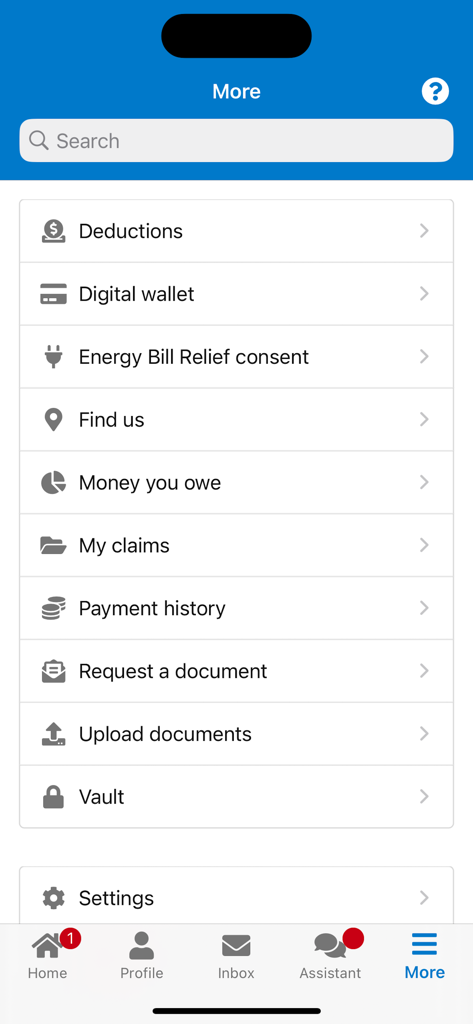
More menu screen of the Express Plus Centrelink app showing options like payment history and document uploads

More menu screen of the Express Plus Centrelink app showing options like payment history and document uploads

Skip the Line, Take Control

The tools that make this app stand out, trusted by 4M+ users.

🕒

Fast Income Reporting

Report your employment income in minutes to ensure your payments arrive on time, every time.

💰

Real-Time Payment Tracking

Stay on top of your budget by checking your payment history, upcoming dates, and subsidy details instantly.

📸

Instant Document Uploads

No more office visits. Snap a photo of your documents and submit them directly through the app for faster processing.

About the app

Everything you need to know about Express Plus Centrelink.

Description

The Express Plus Centrelink mobile app makes it easy for you to manage your Centrelink information online. To use the app, you'll need to have a Centrelink online account linked to your myGov account. With Express Plus Centrelink, you can do most things you can do in your Centrelink online account, without the need to visit an office or wait on hold. Here's what you can do using the app: • View and update your personal details, including study. • Report your employment income. • View and update your family income estimate and payment choices. • Check your payments. • Upload documents to Centrelink. • View your Child Care Subsidy details. • Apply for or repay an advance payment. • Track the progress of most online claims. • View your Centrelink letters. • Manage your Energy Bill Relief consent. • View and manage your Centrelink appointments by adding reminders to your personal calendar. • View digital copies of your Centrelink concession or health care cards. If you use a BasicsCard or if your payments are income managed, you can manage your own money to easily check your available balance and view recent transactions on your BasicsCard. To sign in to the app, use your myGov sign in details and create a myGov PIN. You can then use your myGov PIN to sign in to the app each time you use it. If you need help creating a myGov account, go to my.gov.au For help with linking Centrelink to your myGov account, go to servicesaustralia.gov.au/onlineguides For help using the app, go to servicesaustralia.gov.au/expresspluscentrelink

Latest Version

6.5.1

Size

57.1 MB

First Released

Jun 29, 2014

Skip the Hold Music and Manage Your Payments Fast

Join over 4 million users who save time by reporting income, checking payments, and uploading documents directly from their phone.

Download on App StoreDownload on Google Play
FAQ

Frequently Asked Questions

Everything you need to know about Express Plus Centrelink

What features are available in the Express Plus Centrelink mobile app?

The Express Plus Centrelink app allows users to view and update personal details, report income, check payments, upload documents, track claims, and manage Energy Bill Relief consent and appointments.

How do I log in to the Express Plus Centrelink app?

Users log in to the Express Plus Centrelink app using their myGov sign-in details. After initial setup, a myGov PIN provides quick access for subsequent logins.

Can I upload documents through the Express Plus Centrelink app?

Yes, the Express Plus Centrelink app supports document uploads. This feature is available via the "Frequently used" section on the home screen or the "Upload documents" option in the "More" menu.

How does the Express Plus Centrelink app display payment information?

The Express Plus Centrelink app displays current payment information on the home screen. It clearly shows both the last payment made and the upcoming next payment details.

Does the Express Plus Centrelink app offer assistance or support?

Yes, the Express Plus Centrelink app includes a digital assistant to help users. This assistant provides guidance on app usage, payments, and services.

Can I manage my personal details, such as study information, in Express Plus Centrelink?

Yes, the Express Plus Centrelink app allows users to view and update personal details, including contact, relationship, financial, and study information, within the 'Profile' section.

Can I track the progress of my claims using the Express Plus Centrelink app?

Yes, the Express Plus Centrelink app enables users to track the progress of most online claims. This feature helps monitor the status of submitted applications.

App information, icons, screenshots, and descriptions displayed on this page are sourced from the Apple App Store and are the property of their respective developers. Download estimates and rankings are based on MWM's proprietary models and may not reflect actual figures. This page is provided for informational and analytical purposes only.

Believe this page infringes your intellectual property? File a dispute