Graph Maker - easy combo chart

Graph Maker - easy combo chart


Download on App Store
Logo of Graph Maker - easy combo chart

Graph Maker - Professional charts in seconds, not hours

The fastest way to visualize your progress. Turn simple data into stunning combo, bar, and pie charts designed for quick sharing and smarter business decisions.

Download on App Store

Publisher

Motoki Takahashi

Category

Business

Downloads

7K+

User Rating

4.2/5

Total Ratings

100

Locales

2

Visualize in Seconds

Discover the interface used by 7K+ users.
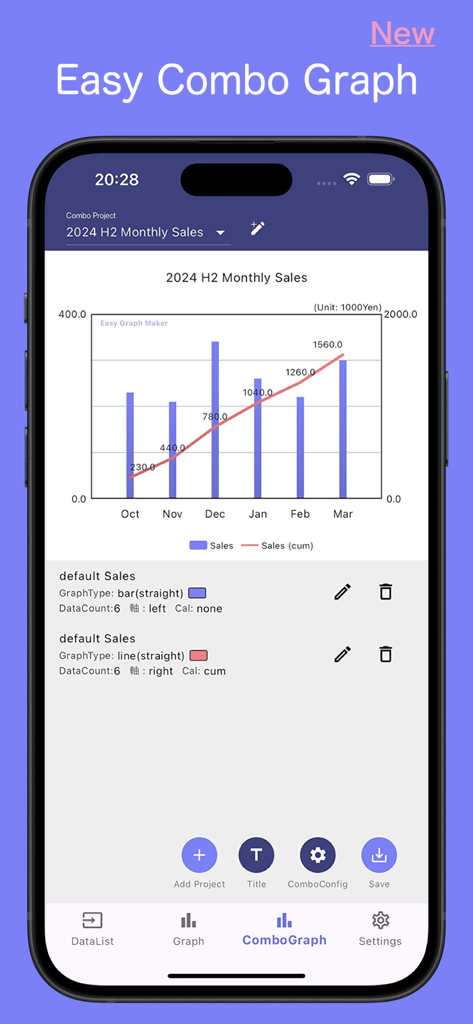
Mobile app interface of Graph Maker showing a combo chart with monthly sales bars and a cumulative line

Mobile app interface of Graph Maker showing a combo chart with monthly sales bars and a cumulative line

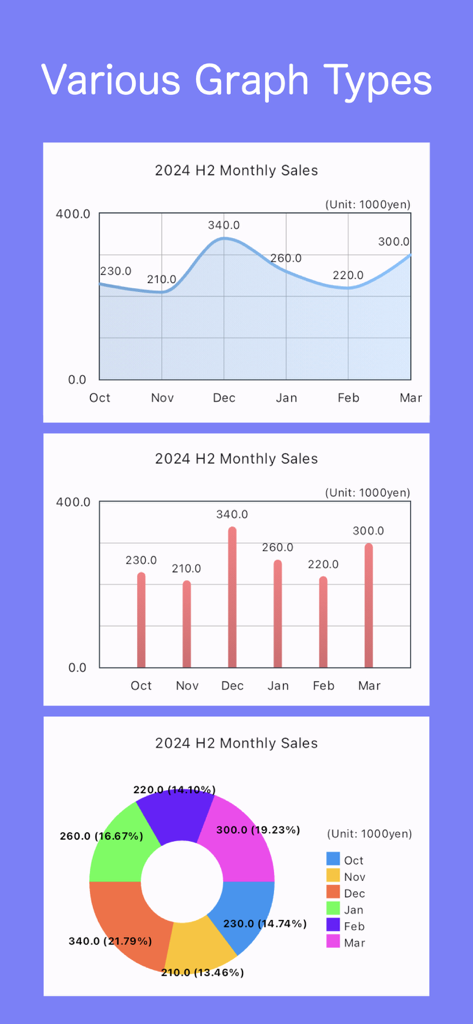
Line, bar, and pie charts for monthly sales data in the Graph Maker app.

Line, bar, and pie charts for monthly sales data in the Graph Maker app.

Customization menu for a curved line graph in the Graph Maker app showing color and area fill settings

Customization menu for a curved line graph in the Graph Maker app showing color and area fill settings

The data input screen of the Graph Maker mobile app showing monthly labels and numerical values

The data input screen of the Graph Maker mobile app showing monthly labels and numerical values

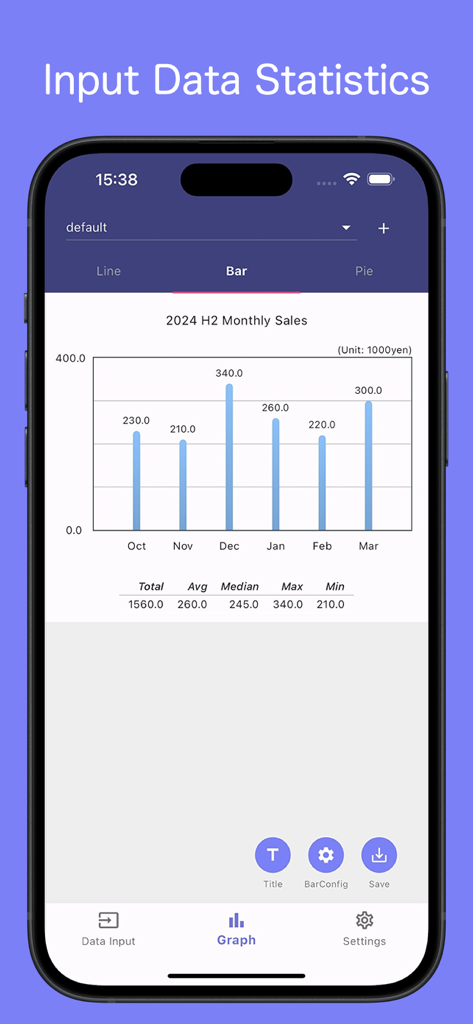
Mobile app interface showing a monthly sales bar chart with data statistics

Mobile app interface showing a monthly sales bar chart with data statistics

Turn Data Into Insight Instantly

The tools that make this app stand out, trusted by 7K+ users.

Frictionless Data Entry

Designed for speed. Simply enter your values and see your chart update live, with no complex spreadsheet setup required.

📊

Smart Combo Visuals

Visualize monthly performance and cumulative growth in a single view—the gold standard for business and sales reporting.

Presentation-Ready

Impress your team with auto-calculated percentages and clean layouts optimized for instant mobile sharing on Slack or Teams.

About the app

Everything you need to know about Graph Maker - easy combo chart.

Description

This app quickly creates graphs from simple input. Works with line, bar, and pie graphs. We've also implemented a new combo graph with lines and bars.  Combining a monthly bar graph with a cumulative line graph for each month makes the information much easier to understand. It's a bit quirky as it instantly draws graphs from input data. Please check the summary below. ・Data Values No strict input limits, but for a neat layout, keep characters short.  Adjust units to shorten characters (e.g., [Unit: 1,000 yen]). ・Data Labels: Adjusted for the longest notation '20231101.' To minimize data label characters, use '23/11/01' or '11/1' as labels, and include '2023-' in the title. Labels with 3 or fewer characters display horizontally. ・Pie Charts If input totals 100, it's % distribution on the graph. If not, it auto-calculates percentages.

Latest Version

1.1.0

Size

35.8 MB

First Released

Dec 3, 2023

Ready to Visualize Your Success in Seconds?

Stop struggling with clunky spreadsheets. Join thousands of small business owners and professionals who turn data into clear, professional combo charts instantly on their iPhone.

Download on App Store

App information, icons, screenshots, and descriptions displayed on this page are sourced from the Apple App Store and are the property of their respective developers. Download estimates and rankings are based on MWM's proprietary models and may not reflect actual figures. This page is provided for informational and analytical purposes only.

Believe this page infringes your intellectual property? File a dispute