
Green Day Pedometer

Green Day Pedometer

Download on App Store
Logo of Green Day Pedometer

Green Day Pedometer: Turn Your Progress Green Every Day

Reach your 10,000-step goal with a simple, privacy-first tracker. Follow your progress with intuitive color indicators, maintain your daily average, and plan your perfect walk with built-in sunrise and sunset times.

Publisher

Tapio Ahokas

Category

Health & Fitness

Downloads

105K+

User Rating

2.2/5

Total Ratings

0

Locales

33

Go for Green

Discover the interface used by 105K+ users.
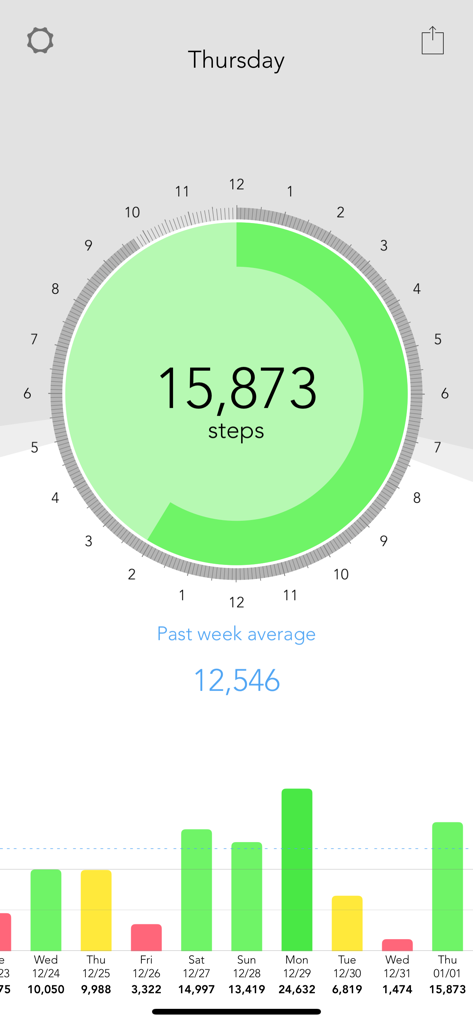
Green Day Pedometer mobile app interface showing a green daily step goal indicator and a weekly progress bar chart

Green Day Pedometer mobile app interface showing a green daily step goal indicator and a weekly progress bar chart

Everything You Need to Get to Green

The tools that make this app stand out, trusted by 105K+ users.

🟢

Clear Visual Motivation

Instantly see your progress as your screen shifts from red to yellow and finally to green when you reach your 10,000-step goal.

🔒

Privacy You Can Trust

Your data stays yours. We require no accounts, track no personal locations, and minimize battery impact for a worry-free experience.

🌅

Smart Daylight Planning

View accurate sunrise and sunset times directly in the app to help you safely plan your outdoor walks during the best daylight hours.

About the app

Everything you need to know about Green Day Pedometer.

Description

Green Day Pedometer is an app for iPhone 5S, iPhone 6, iPhone 6 Plus, iPhone 6S, iPhone 6S Plus, iPhone 7, iPhone 7 Plus, and iPod Touch (6th gen) designed to make it easier to reach a daily goal of 10,000 steps. You can also see your progress on your Apple Watch if you have one. When your progress indicator is red, you're under halfway there. Once it turns yellow, you're on the home stretch. It turns green when you reach your goal. Use the history view to keep your average step count above your goal. As long as the blue line is above the goal you're doing great. You can let Green Day Pedometer have access to your step history from the Health App. Watch out for red days. They really hurt your average. Green Day Pedometer displays time using a 24 hour clock so you can easily see how much time there is left in the day. By using your location, it shows you accurate sunrise and sunset times so you can make best use of the daylight hours all year round. Make every day a Green Day! Green Day Pedometer works with: • iPhone 5S • iPhone 6 • iPhone 6 Plus • iPhone 6S • iPhone 6S Plus • iPhone 7 • iPhone 7 Plus • iPod Touch (6th gen) • Apple Watch (with an iPhone listed above) • … and probably newer devices Green Day Pedometer does NOT work with: • iPhone (1st gen) • iPhone 3G or iPhone 3GS • iPhone 4 or iPhone 4S • iPhone 5 or iPhone 5C • iPad • iPod Touch (1st, 2nd, 3rd, 4th, 5th gen) Green Day Pedometer requires Motion & Fitness to display your step count. (Required) Your location is not tracked or logged by Green Day Pedometer. We do NOT send your location anywhere. Green Day Pedometer uses your rough location to display sunrise and sunset times. We have chosen to use the least accurate location that updates least often to minimise impact on battery life. (Not required) Green Day Pedometer requires access to Photos only if you want to share your progress. (Not required) Green Day Pedometer can use Steps data to show you your step history. Adjust settings inside Health app. (Not required) No personal information is sent from Green Day Pedometer without your consent. Your location is not tracked or logged by Green Day Pedometer. We do NOT send your location anywhere.

Latest Version

2.11

Size

2.2 MB

First Released

Dec 28, 2013

Ready to Make Every Day a Green Day?

Join 105,000+ walkers who hit their daily 10,000-step goal with simple, color-coded tracking. No accounts, no data sharing, and no battery drain—just you and your progress.

Download on App Store

App information, icons, screenshots, and descriptions displayed on this page are sourced from the Apple App Store and are the property of their respective developers. Download estimates and rankings are based on MWM's proprietary models and may not reflect actual figures. This page is provided for informational and analytical purposes only.

Believe this page infringes your intellectual property? File a dispute








