HDFC Bank MobileBanking

HDFC Bank MobileBanking


Download on App Store
Logo of HDFC Bank MobileBanking

HDFC Bank MobileBanking: Your Secure Financial Bridge to India

Manage NRE/NRO accounts, book high-yield Fixed Deposits, and handle 150+ transactions seamlessly from the USA. Experience world-class security and effortless banking for your global lifestyle.

Publisher

HDFC Bank Ltd

Category

Finance

Downloads

11M+

User Rating

3.9/5

Total Ratings

101K+

Locales

18

Banking Without Borders

Discover the interface used by 11M+ users.

Promotional banner for the HDFC Bank MobileBanking app featuring the login screen and people using their phones.

Promotional banner for the HDFC Bank MobileBanking app featuring the login screen and people using their phones.

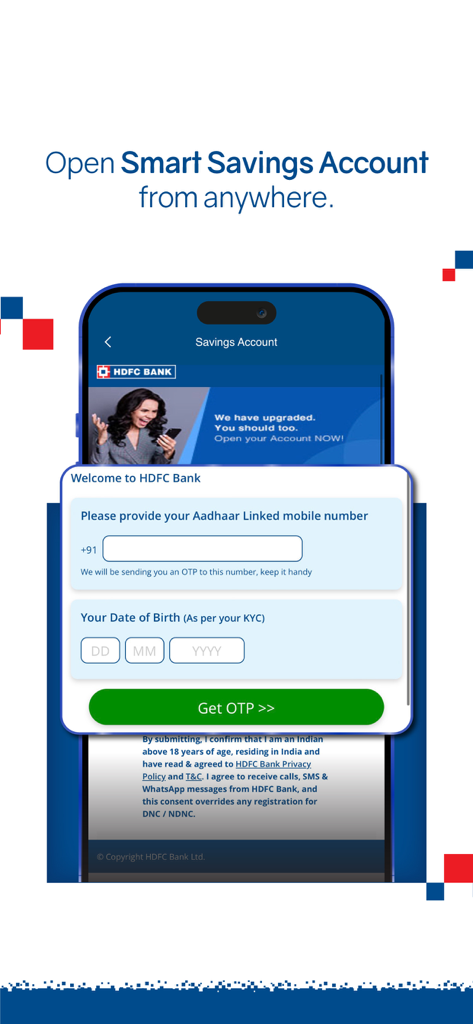
HDFC Bank MobileBanking app screen for opening a Smart Savings Account online

HDFC Bank MobileBanking app screen for opening a Smart Savings Account online

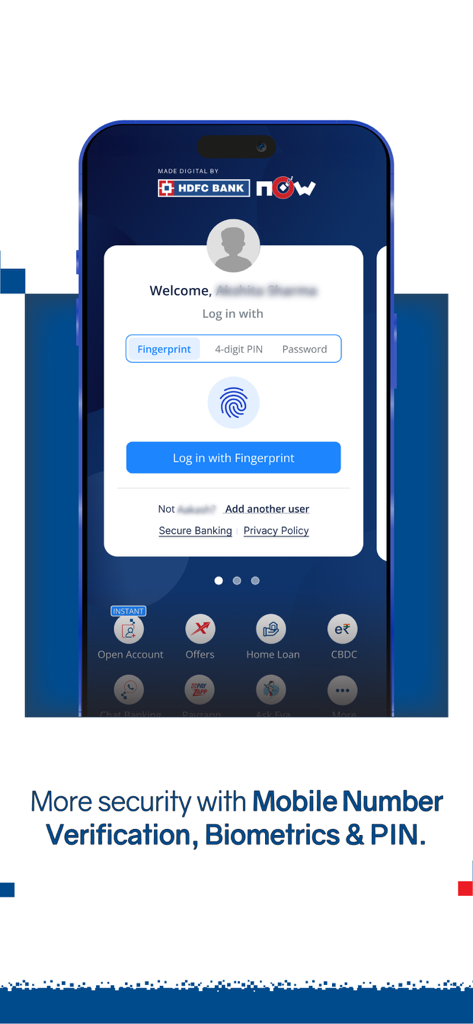
HDFC Bank mobile app login screen showing biometric fingerprint and 4-digit PIN security options.

HDFC Bank mobile app login screen showing biometric fingerprint and 4-digit PIN security options.

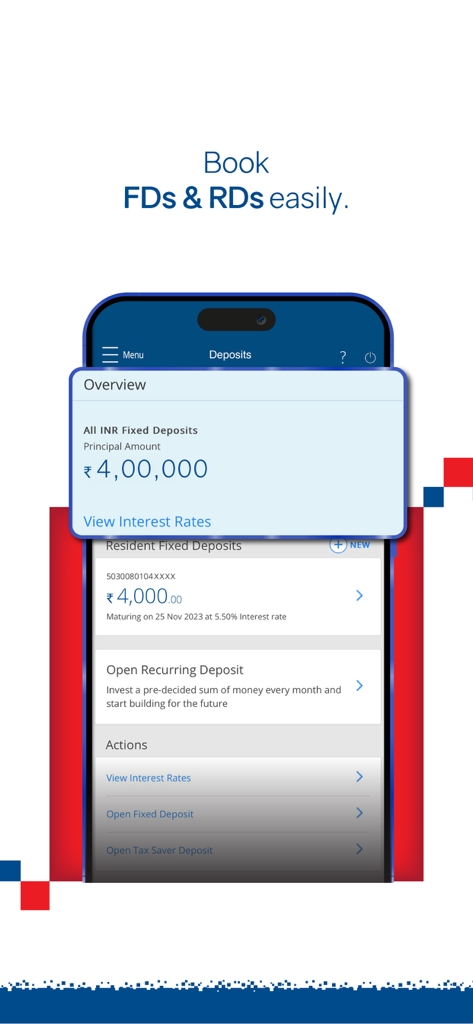
HDFC Bank mobile app screen for booking and managing fixed and recurring deposits

HDFC Bank mobile app screen for booking and managing fixed and recurring deposits

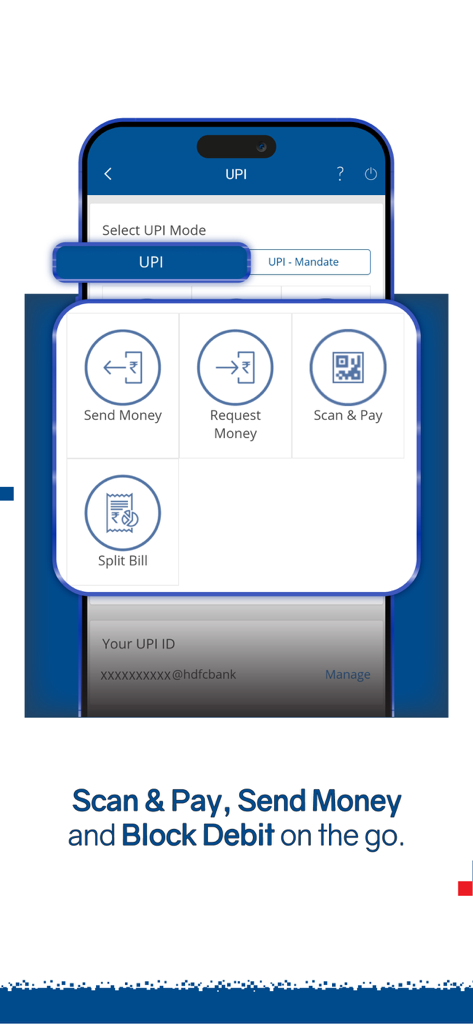
UPI payment menu in HDFC Bank app featuring Send Money and Scan and Pay options

UPI payment menu in HDFC Bank app featuring Send Money and Scan and Pay options

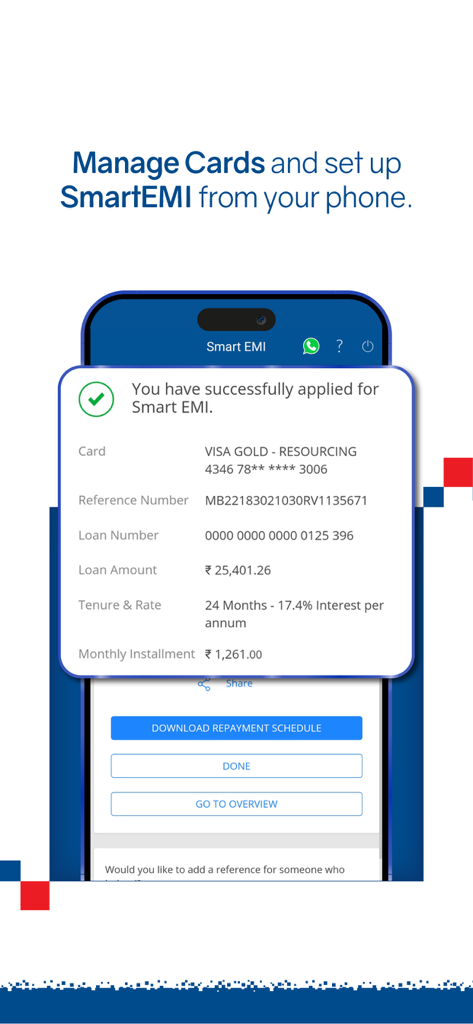
HDFC Bank mobile app screen showing a successful Smart EMI application confirmation with loan details and repayment options.

HDFC Bank mobile app screen showing a successful Smart EMI application confirmation with loan details and repayment options.

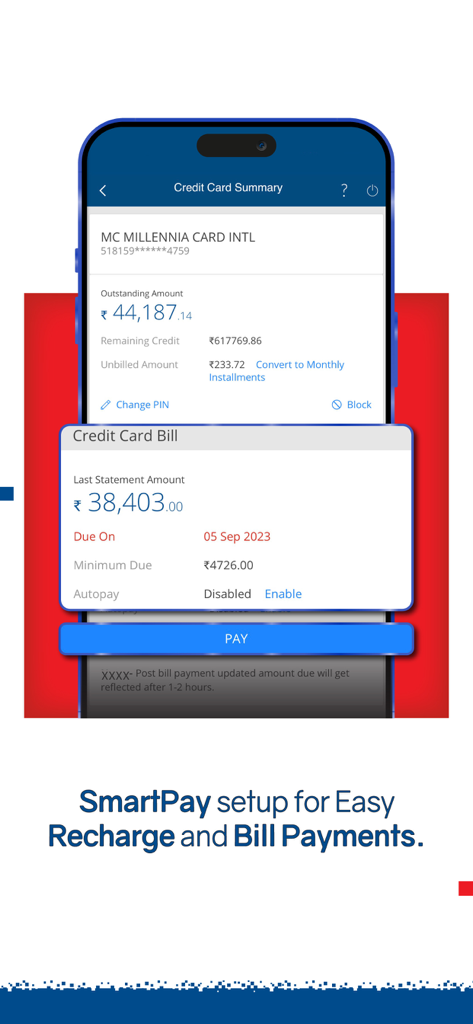
HDFC Bank MobileBanking app credit card bill summary and payment screen

HDFC Bank MobileBanking app credit card bill summary and payment screen

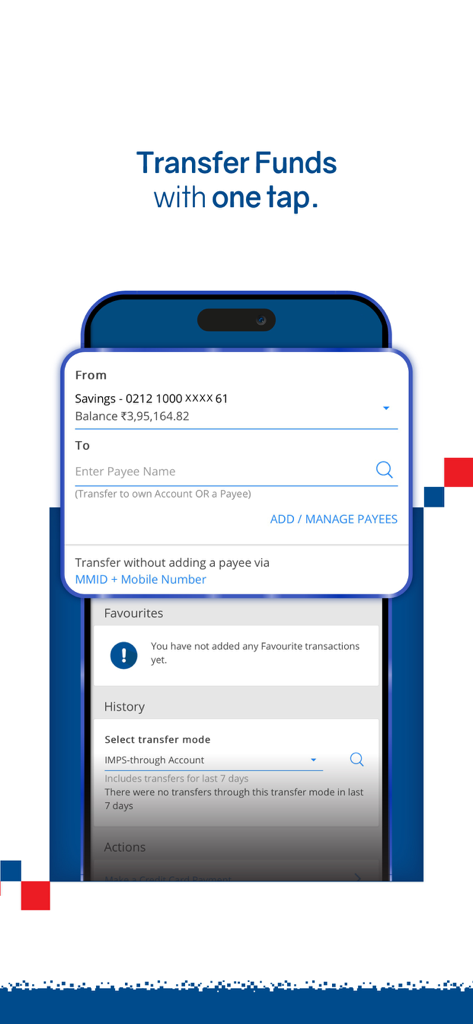
HDFC Bank mobile app interface for transferring funds quickly

HDFC Bank mobile app interface for transferring funds quickly

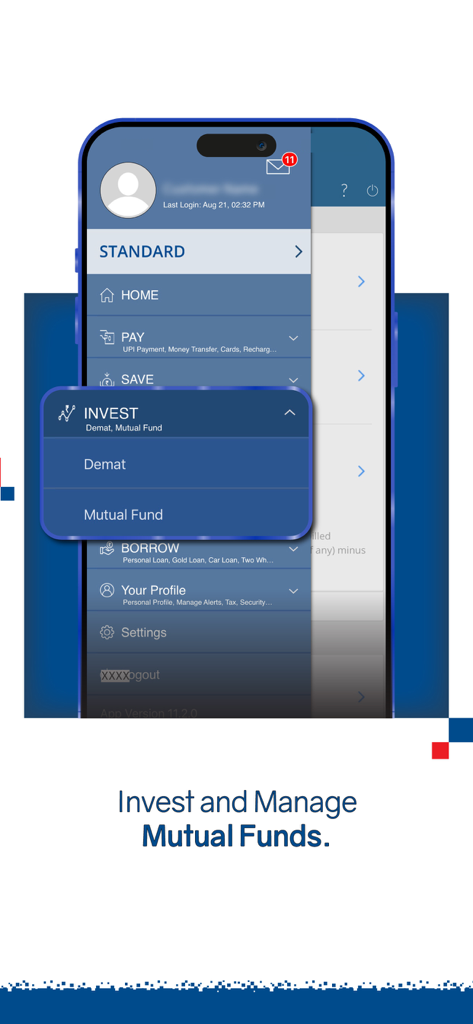
A screenshot of the HDFC Bank MobileBanking app menu highlighting the investment options for demat and mutual funds.

A screenshot of the HDFC Bank MobileBanking app menu highlighting the investment options for demat and mutual funds.

Your Financial Bridge to India

The tools that make this app stand out, trusted by 11M+ users.

🌏

Total NRI Wealth Management

Get a consolidated view of your NRE/NRO balances, book high-interest Fixed Deposits, and track your Indian Mutual Funds from anywhere in the world.

🛡️

Advanced Cross-Border Security

Bank with peace of mind using industry-leading SIM-binding and biometric protection, ensuring your Indian assets are accessible only by you.

💸

Seamless Family Support

Take care of home from afar by instantly paying utility bills, recharging mobile plans, and sending money to loved ones via UPI or IMPS.

Review Analysis

Insights from user reviews.

Sentiment Score

31%
Negative

Summary

The mobile app receives predominantly negative feedback, with users frequently encountering critical issues. Many report persistent problems with performance and stability, including frequent crashes, lagging, and screens failing to load or appearing blank after login. Users also face significant hurdles with login and registration processes, such as frustrating SIM binding issues and difficulties logging in after forced updates or when abroad. Furthermore, the app's user interface is a point of dissatisfaction for some, who find the new design complicated compared to previous versions and note deficiencies like missing payee management features for iOS. While a minority commend the app for its ease of use and overall positive banking experience, the prevalent issues related to updates and core functionality overshadow these positive aspects.

Common Themes

Performance & Stability Issues(14)
Login & Registration Hurdles(9)
Ease of Use(7)
Overall Positive Experience(7)
Impact of Updates(6)
UI/UX & Feature Deficiencies(5)

About the app

Everything you need to know about HDFC Bank MobileBanking.

Description

Introducing the enhanced HDFC Bank MobileBanking App, your one-stop solution to a seamless and secure banking experience. Experience the convenience of doing 150+ transactions through our MobileBanking app. Download now for effortless banking, fund transfers, card management, loans, investments, and many more. - Instant Access: Experience hassle-free logins via biometric options and a 4-digit login PIN, ensuring the security of your accounts. - Effortless Transactions: Make quick transfers using UPI, ensuring real-time fund transfer. Safeguard your account with the ability to block debit services against fraud. - Banking Simplified: Get a consolidated view of your account balances, fixed/recurring deposits, credit card bills, and utility bills—all in one dashboard. - Deposits Made Easy: Book FDs and RDs effortlessly with just a tap, providing a smart way to save money anytime, anywhere. - Manage Cards Seamlessly: Easily apply for credit cards, pay bills, manage cards limits, including blocking or hotlisting lost or stolen cards—all conveniently accessible from one place. - Investment Tracking: Track & manage your investments, demat account and effortlessly engage in mutual funds transactions. - Bill Payments On-the-Go: Pay utility bills, DTH, electricity, gas and mobile bills instantly. Set up automated monthly payments for added convenience. - Quick Money Transfers: Transfer funds effortlessly between HDFC Bank accounts or other accounts via IMPS, UPI, NEFT and various payment methods. - Security Enhancements: Your financial security is our top priority. We are continually enhancing the security features for the safety of your account and transactions. With Device Registration for login from a single trusted device and RASP (Runtime Application Security Protection), we protect you from frauds involving remote control apps, data leakage, and screen mirroring. We have an enhanced layer of security known as Mobile Number Verification. This feature ensures access to your MobileBanking App only through devices with the SIM card of your bank-registered mobile number, significantly boosting protection against cyber fraud and enhancing your account's security. Please Note, you need to - • Ensure the SIM card of your bank-registered mobile number is in your Mobile device. • Maintain an active SMS subscription for mobile number verification. • Have your Debit Card details or NetBanking password ready for one-time verification. - Smart Features: • One Touch Share: Share payment receipts effortlessly. • Set Up Favorites: Simplify frequent transactions by setting up favorites. • EVA ChatBot Support: Chat with EVA for instant query resolution—accepts both text and voice inputs. - Additional Services: Download e-TDS certificates, Apply for Loans(For resident Indians), Recharge & Buy FAS Tag, Savings Accounts, Credit Cards, Buy Insurance & Forex Cards. - Download Now & #BankTheWayYouLive: Continuous app updates and upgrades ensure you have the latest features. Important Disclosures: By downloading the HDFC Bank MobileBanking App: *you consent to the installation of this app and its future updates and upgrades. You can withdraw your consent at any time by deleting the app from your device, *you are agreeing and providing consent to have read and understood the privacy notice of HDFC Bank. To know more about the privacy notice, please click here. https://www.hdfcbank.com/aboutus/terms_conditions/privacy.htm

Latest Version

11.3.3

Size

224.9 MB

First Released

Apr 11, 2012

Ready to Manage Your Wealth in India from the USA?

Join over 11 million users. Securely manage your NRE/NRO accounts, book high-yield FDs, and track investments with the bank that understands your global lifestyle.

Download on App Store
FAQ

Frequently Asked Questions

Everything you need to know about HDFC Bank MobileBanking

What is the HDFC Bank MobileBanking app?

The HDFC Bank MobileBanking app provides a seamless and secure platform for over 150 banking transactions, including fund transfers, card management, loan applications, and investments, accessible directly from a mobile device.

How do I log in to the HDFC Bank MobileBanking app?

The HDFC Bank MobileBanking app supports hassle-free logins using biometric options, a 4-digit login PIN, or a password. Mobile Number Verification adds an extra layer of security for user accounts.

Can I transfer money using the HDFC Bank MobileBanking app?

Yes, the HDFC Bank MobileBanking app allows quick money transfers using UPI, IMPS, and NEFT. Users can transfer funds effortlessly between HDFC Bank accounts or to other bank accounts.

Does the HDFC Bank MobileBanking app offer bill payment services?

Yes, the HDFC Bank MobileBanking app enables users to pay utility bills, DTH, electricity, gas, and mobile bills instantly. It also supports setting up automated monthly payments for convenience.

Can I manage my credit and debit cards with the HDFC Bank MobileBanking app?

Yes, the HDFC Bank MobileBanking app allows users to apply for credit cards, pay bills, manage card limits, and block or hotlist lost/stolen cards. Users can also block debit services against fraud.

What security features does the HDFC Bank MobileBanking app have?

The HDFC Bank MobileBanking app enhances security with Device Registration for a single trusted device, RASP (Runtime Application Security Protection), and Mobile Number Verification requiring the bank-registered SIM card.

Can I book Fixed Deposits (FDs) or Recurring Deposits (RDs) using the HDFC Bank MobileBanking app?

Yes, the HDFC Bank MobileBanking app allows users to effortlessly book Fixed Deposits (FDs) and Recurring Deposits (RDs) with just a tap, anytime and anywhere, providing a smart way to save money.

Does the HDFC Bank MobileBanking app support investments in mutual funds?

Yes, the HDFC Bank MobileBanking app enables users to track and manage their investments, including demat accounts, and effortlessly engage in mutual fund transactions directly within the app.

Can I open a savings account through the HDFC Bank MobileBanking app?

Yes, the HDFC Bank MobileBanking app offers the ability to open a Smart Savings Account. This process requires providing an Aadhaar Linked mobile number and date of birth for KYC verification.

Does the HDFC Bank MobileBanking app offer customer support?

Yes, the HDFC Bank MobileBanking app provides EVA ChatBot Support for instant query resolution. EVA accepts both text and voice inputs for user convenience within the application.

What is Mobile Number Verification in the HDFC Bank MobileBanking app?

Mobile Number Verification is a security feature in the HDFC Bank MobileBanking app. It ensures app access only through devices containing the SIM card of the bank-registered mobile number, enhancing protection against cyber fraud.

App information, icons, screenshots, and descriptions displayed on this page are sourced from the Apple App Store and are the property of their respective developers. Download estimates and rankings are based on MWM's proprietary models and may not reflect actual figures. This page is provided for informational and analytical purposes only.

Believe this page infringes your intellectual property? File a dispute