Light heat cost management

Light heat cost management


Download on App Store
Logo of Light heat cost management

Light heat cost management: The Private Way to Visualize and Master Your Utility Bills

Stop guessing your monthly expenses. Securely track electricity, gas, and water usage with beautiful graphs—no bank account linking required. Spot seasonal trends, export PDF reports for roommates or taxes, and stay organized across all your Apple devices.

Download on App Store

Publisher

YUTAKA IZUMIYAMA

Category

Finance

Downloads

0

User Rating

1.0/5

Total Ratings

0

Locales

2

Insights at a Glance

Discover the interface used by 0 users.
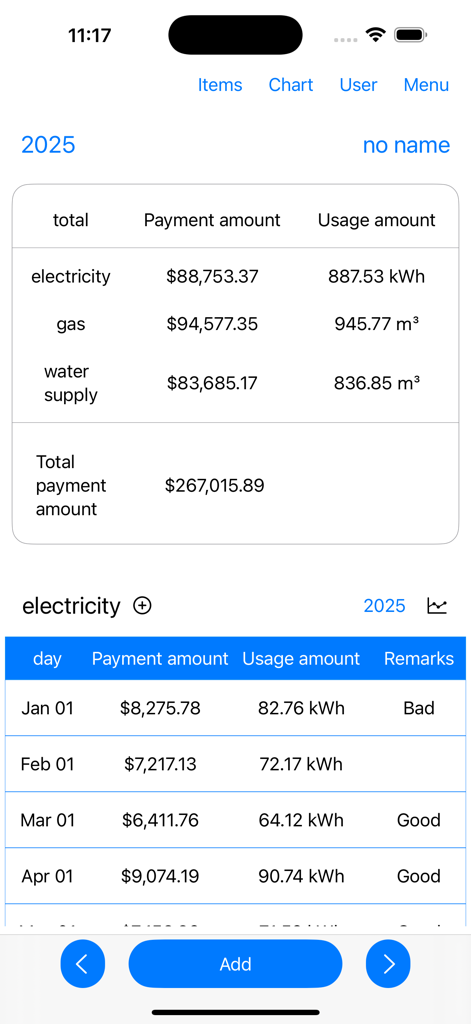
Mobile app interface showing monthly electricity gas and water bill totals and usage records

Mobile app interface showing monthly electricity gas and water bill totals and usage records

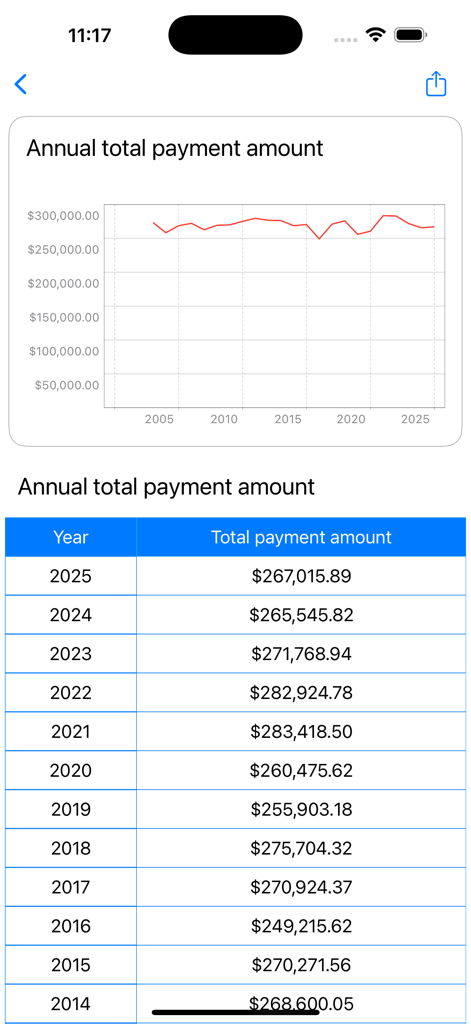
Annual total payment amount graph and table for utility costs tracking

Annual total payment amount graph and table for utility costs tracking

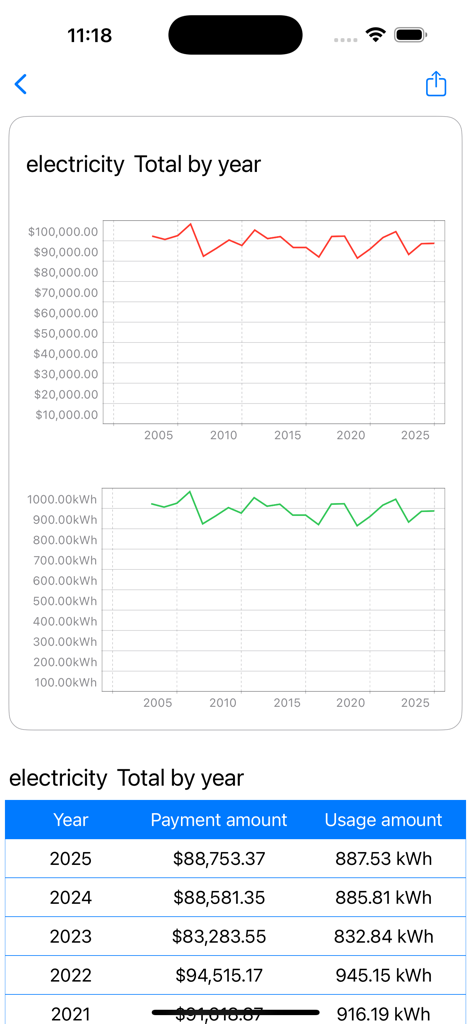
Yearly electricity cost and usage trends shown in line graphs and a data table

Yearly electricity cost and usage trends shown in line graphs and a data table

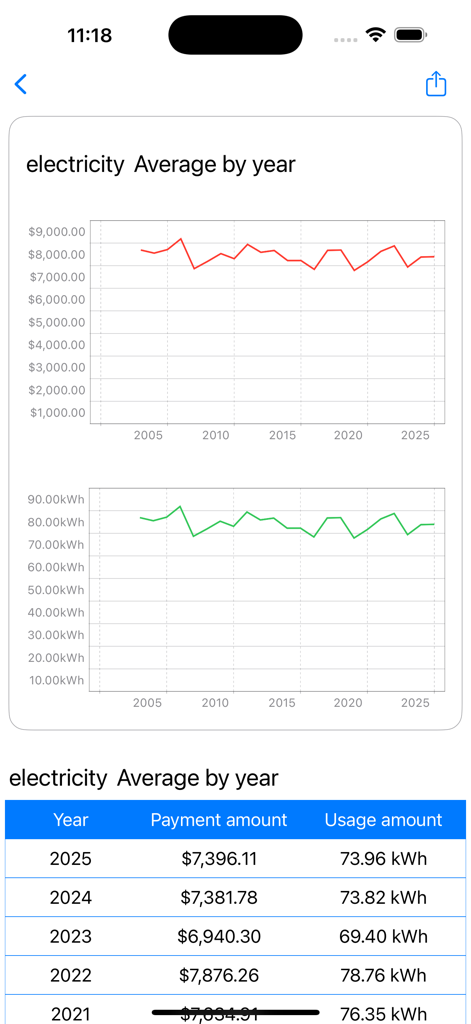
A mobile app screen showing annual average electricity costs and usage through line graphs and a detailed data table.

A mobile app screen showing annual average electricity costs and usage through line graphs and a detailed data table.

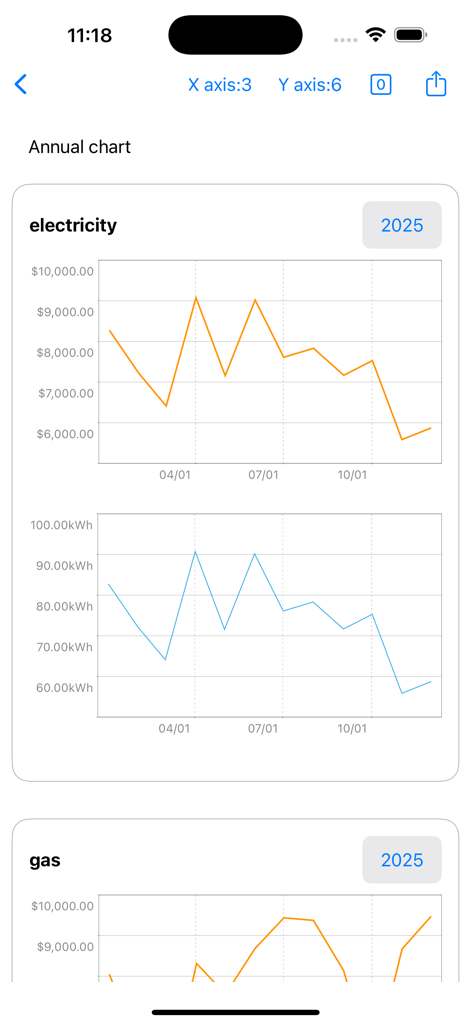
Annual line charts showing electricity cost in dollars and usage in kWh within the utility management app.

Annual line charts showing electricity cost in dollars and usage in kWh within the utility management app.

Smart Utility Tracking Made Simple

The tools that make this app stand out, trusted by 0 users.

🛡️

Privacy-First Tracking

No bank accounts to link and no data sharing. Log your bills manually and keep your financial information strictly between you and your iCloud.

📈

Analyze Seasonal Trends

Compare usage across years with intuitive line graphs. Identify high-cost months and optimize your household budget with ease.

📄

One-Tap PDF Export

Perfect for roommates, landlords, or WFH tax records. Generate and share professional reports of your utility history in seconds.

About the app

Everything you need to know about Light heat cost management.

Description

This is an app for recording utility bills and usage and displaying them as graphs. You can record utility bills and usage by specifying a date. When utility bills and usage are recorded, they are displayed as a graph. You can check the utility bills and usage for each record as a line graph. ▼Record utility bills and usage 1. Press the Add button. 2. Select from the items (electricity, gas, water). 3. Select the date and press Next. 4. Enter the amount and usage and press OK. 5. Enter any notes and press OK. ▼Utility bill graph 1. Click on the chart at the top. 2. Click on the full period graph, annual graph, or past year graph. 3. A line graph of utility bills for each record will be displayed. ▼ Change/delete/set item name Click on an item at the top. The following menu will be displayed. Add an item Sort items Edit/delete item The Edit/Delete Item menu contains the following items: -Edit item name -Edit units -Delete → Deletes the item name and all of its records. ▼Add item Press the item at the top. The following menu will appear. Add item Sort items Edit/delete items Press Add item. Enter the item name and unit and press OK. ▼ Sort items Press an item at the top. The following menu will appear. Add an item Sort items Edit/delete an item Press sort items. The item list screen will open. To rearrange an item, press and hold the item name. ▼Delete one record 1. Press Record. 2. Press Delete. 3. Confirm the details to be deleted and press the Delete button. ▼Add user Tap User at the top. If you add a name from Add User, you can record them separately. To edit, tap Edit/Delete User to open the editing screen. You can switch users by tapping the user name in user selection. ▼Create PDF file (top right menu) Create a PDF file. You can create a PDF file by specifying the year. If you want to print, please share the PDF file to an app that can print before printing. ▼Dark mode (top right menu) Select dark mode ON/OFF from the menu on the top right Press Dark Mode to switch to a screen display with a color scheme based on black. If you press Light mode, the screen will be displayed in the normal white color. ▼Delete all records (top right menu) From the menu on the top right, select Erase all data. You can delete all records. ・Model change data migration For users with the same Apple ID Because records are stored in iCloud View the same recording on a new iPhone/iPad

Latest Version

25.11.11

Size

4.7 MB

First Released

Apr 29, 2025

Take Control of Your Utility Spending Today

Join privacy-conscious homeowners and renters tracking electricity, gas, and water without linking a bank account. Visualize your trends, export professional PDF reports, and master your household budget with ease.

Download on App Store

App information, icons, screenshots, and descriptions displayed on this page are sourced from the Apple App Store and are the property of their respective developers. Download estimates and rankings are based on MWM's proprietary models and may not reflect actual figures. This page is provided for informational and analytical purposes only.

Believe this page infringes your intellectual property? File a dispute