MyRogers - Manage your account

MyRogers - Manage your account


Download on App Store
Logo of MyRogers - Manage your account

MyRogers: Total control over your 5G connectivity and services

Experience the ultimate convenience of managing your account on the go. Track real-time data, pay bills securely, and upgrade your devices—all on Canada’s most reliable network.

Download on App Store

Publisher

Rogers Communications Inc.

Category

Utilities

Downloads

3M+

User Rating

4.3/5

Total Ratings

269K+

Locales

2

Control at Your Fingertips

Discover the interface used by 3M+ users.
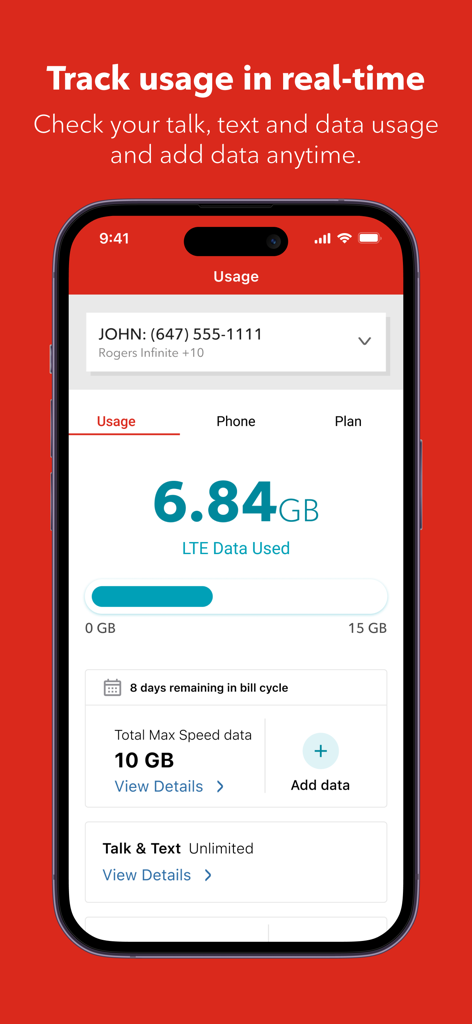
A screenshot of the MyRogers mobile app showing real-time data usage with a progress bar, LTE data used, and days remaining in the billing cycle.

A screenshot of the MyRogers mobile app showing real-time data usage with a progress bar, LTE data used, and days remaining in the billing cycle.

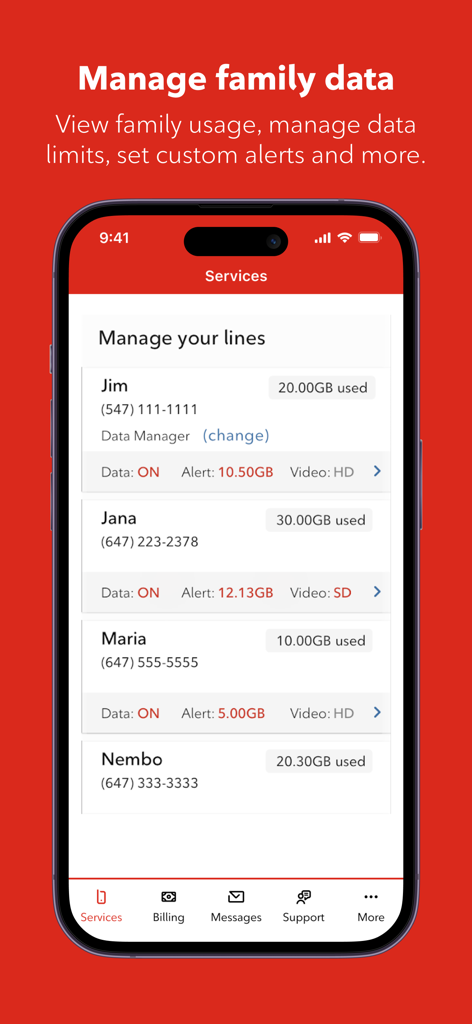
MyRogers app interface showing family data usage and management for multiple account lines.

MyRogers app interface showing family data usage and management for multiple account lines.

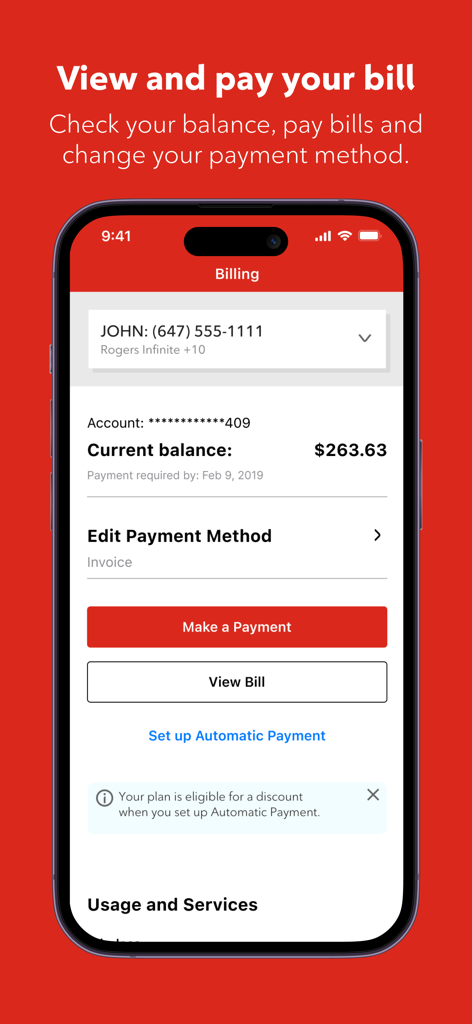
MyRogers app billing screen showing current account balance and payment options.

MyRogers app billing screen showing current account balance and payment options.

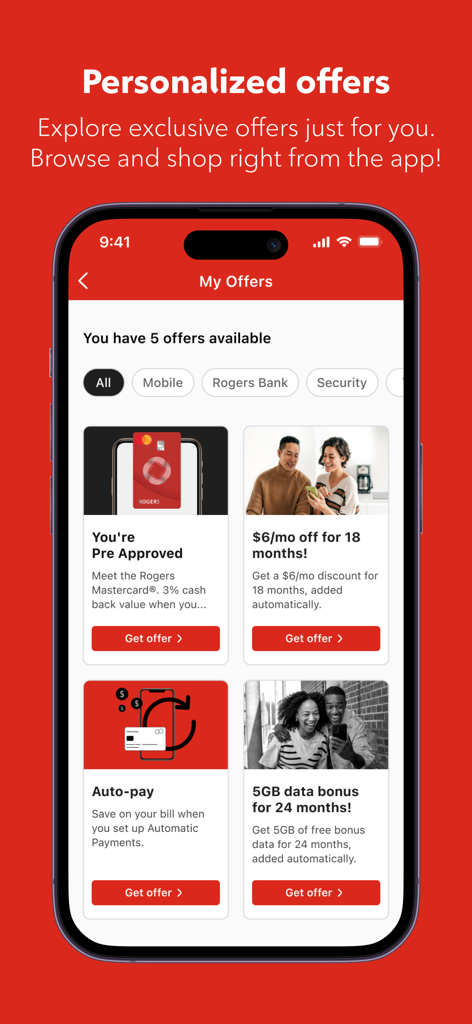
MyRogers app screen displaying personalized customer offers and discounts

MyRogers app screen displaying personalized customer offers and discounts

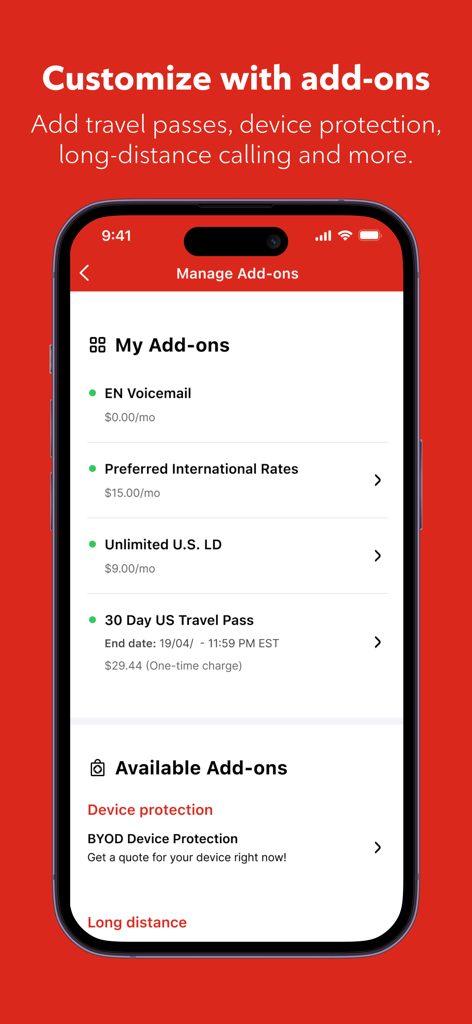
Interface of the MyRogers app showing the Manage Add-ons screen with options for travel passes and international calling

Interface of the MyRogers app showing the Manage Add-ons screen with options for travel passes and international calling

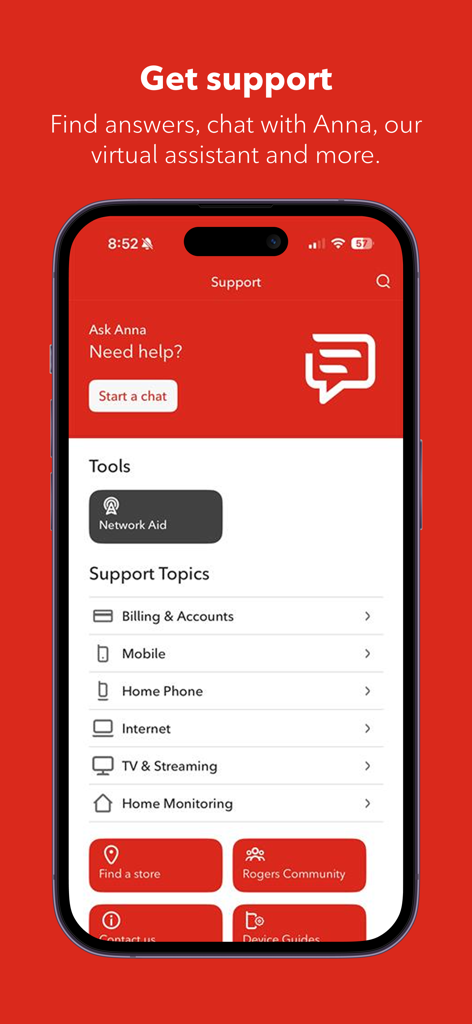
Support page of the MyRogers app showing virtual assistant chat and help topics

Support page of the MyRogers app showing virtual assistant chat and help topics

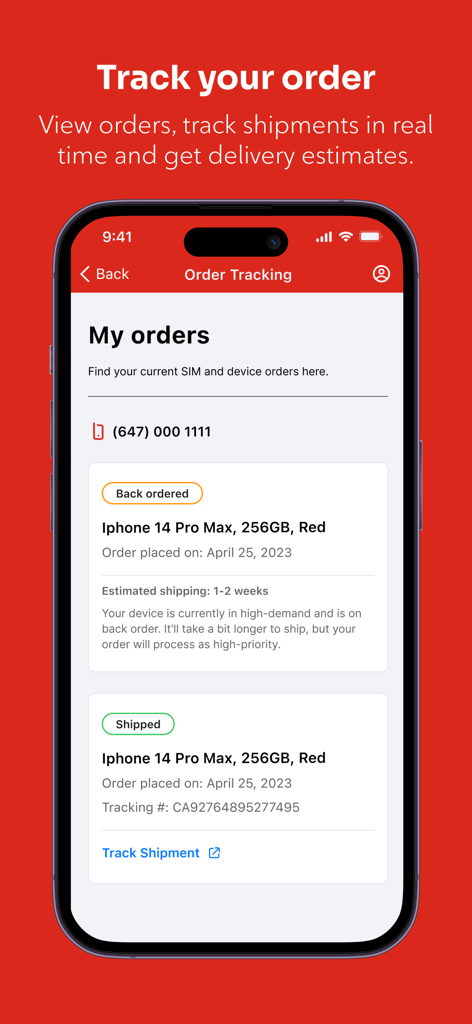
Screenshot of the MyRogers app order tracking screen showing status and shipment details for mobile devices

Screenshot of the MyRogers app order tracking screen showing status and shipment details for mobile devices

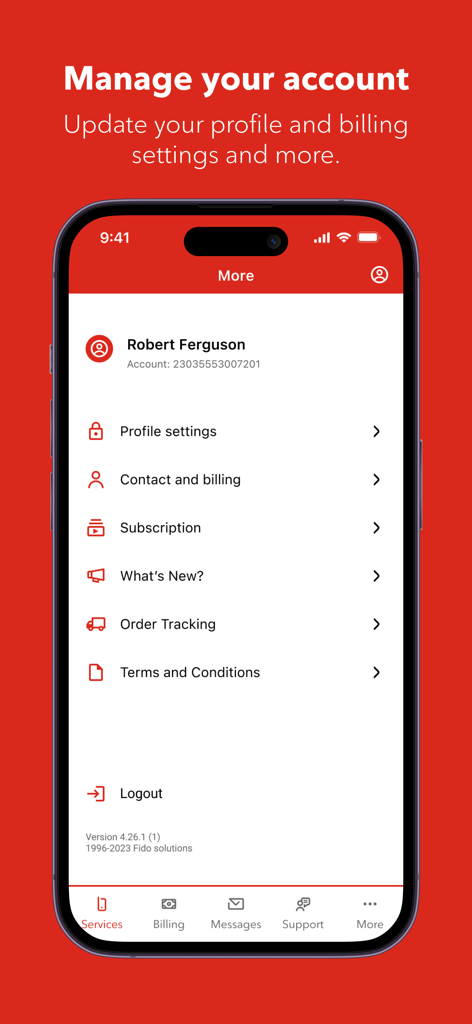
MyRogers app interface for managing account profile settings and billing information

MyRogers app interface for managing account profile settings and billing information

Effortless Management for Your Connected Life

The tools that make this app stand out, trusted by 3M+ users.

📊

Eliminate Bill Shock

Monitor your data usage in real-time and set instant alerts so you can stay on budget and avoid unexpected overage fees.

Skip the Support Queue

Take charge with self-service tools to activate eSIMs, upgrade your device, or manage multiple family lines without ever waiting on hold.

🌍

Travel-Ready Flexibility

Easily toggle roaming, check international travel options, or suspend your service while away to ensure you are always connected on your terms.

Review Analysis

Insights from user reviews.

Sentiment Score

29%
Negative

Summary

Users express widespread dissatisfaction with the Rogers mobile app and its associated services, citing pervasive issues with customer support and app reliability. Frequent complaints highlight long wait times, unhelpful staff, and an inability to reach live agents, alongside billing inaccuracies and network performance problems like slow speeds and frequent outages. The app itself often fails to open, crashes, or presents login difficulties, further compounded by unwanted and inescapable marketing notifications. Despite these significant drawbacks, some users appreciate the app's core functionalities and overall usefulness when it does work as intended.

Common Themes

App Functionality(4)
Customer Support(1)
Network Reliability(1)
Login Experience(1)
Billing & Payments(1)
App Notifications(1)

About the app

Everything you need to know about MyRogers - Manage your account.

Description

Rogers is Canada’s largest and most reliable 5G network and fastest, most reliable internet provider, delivering seamless connectivity and lightning-fast speeds for all your needs. Get the MyRogers app so you can manage your account and services. It’s never been easier. Pay bills, track mobile data usage, set data alerts and log in securely to access your account safely, anytime and anywhere. Stay on top of your plan and usage Quickly check your plan details, upgrade options and account balance. Compare rates, review other plans and select add-ons to customize your services. You can also upgrade your device or check eligibility directly in the app. Track data usage and set alerts Keep an eye on your data usage with real-time tracking and set up notifications to avoid going over your data. Staying within your plan and budget has never been simpler. Manage SIM and eSIM • Activate, swap or manage your SIM or eSIM directly in the app. • Manage your family’s mobile lines all in one place to keep everyone connected. 24/7 support anytime you need it • Get support whenever you need it with our robust selection of support articles. • Chat with our virtual assistant, always ready to help. Access to 5G network • Connect to Canada’s most reliable 5G network wherever you go. • Explore the latest 5G mobile plans from the app and make a switch. Travelling • If you’re travelling out of the country or province, you can check travel options and features on your plan • Turn roaming off or on • Choose when you to hold or suspend your service for a short while, if you’re going out of town. Exclusive Rogers Bank offers • Discover special offers from Rogers Bank directly through the app. • With the Rogers Red Mastercard, you can earn unlimited cash-back rewards on all your purchases, redeemable any where Mastercard is accepted. • Enjoy the benefits of no annual fee and get rewarded for everyday spending. Customize add-ons and services • Choose the add-ons you need, like device protection, extra data, long distance and voicemail. • Change your number or add roaming options to match your plans. Bundle and save • Combine your Rogers services to save more. • Check out streaming options and enjoy seamless connectivity across all your devices with Rogers Internet. Track orders and stay updated • Track your orders in real-time • Stay informed with our “What’s New” section to learn about the latest app features. Why choose the MyRogers app? • Manage account and services: Pay bills, check mobile data usage and set mobile data alerts • Secure login: Safe and easy access to your account • Plan and add-ons: Check plans, upgrade options, and customize add-ons • Device upgrades: Upgrade your device or check eligibility • SIM/eSIM: Activate or swap your SIM or eSIM seamlessly in the app • 24/7 support: Get help anytime with our virtual assistant • 5G network: Access Canada’s largest 5G network • Travel options: Manage roaming and travel settings on the go • Exclusive Rogers Bank offers • Family management: Manage all your family’s lines in one place • Bundle and save: Combine plans with Rogers Internet Download MyRogers app today to manage your Rogers account and services right at your fingertips and stay connected wherever you go. Love us? Give us a follow on social: https://www.facebook.com/Rogers https://www.instagram.com/Rogers https://x.com/Rogers Learn more at https://www.rogers.com

Latest Version

6.31.0

Size

182.8 MB

First Released

Jul 30, 2014

Take Full Control of Your Rogers Account

Join millions of Canadians managing their 5G plans, tracking data, and paying bills securely with just a tap.

Download on App Store
FAQ

Frequently Asked Questions

Everything you need to know about MyRogers - Manage your account

How can I track my data usage with the MyRogers app?

The MyRogers app allows users to track mobile data usage in real-time. It displays current usage, remaining data, and the days left in the bill cycle. You can also set notifications to avoid exceeding your data limit.

Can I pay my bills using the MyRogers app?

Yes, you can pay your bills directly through the MyRogers app. It also allows you to view your current balance, review past bills, and set up automatic payments for convenience.

Does the MyRogers app support managing multiple family mobile lines?

Yes, the MyRogers app allows you to manage your family’s mobile lines all in one place. You can view individual usage, manage data limits, and set custom alerts for each line.

How do I get customer support through the MyRogers app?

The MyRogers app offers 24/7 support. You can access a robust selection of support articles or chat with a virtual assistant named Anna for immediate help with your inquiries.

Can I upgrade my device or check eligibility within the MyRogers app?

Yes, you can upgrade your device or check your eligibility for an upgrade directly within the MyRogers app. This feature helps you stay on top of your plan and usage.

What kind of exclusive offers are available through the MyRogers app?

The MyRogers app provides exclusive offers, including special deals from Rogers Bank like the Rogers Red Mastercard for cash-back rewards. You can also find mobile discounts and data bonuses.

Does the MyRogers app allow me to activate or swap a SIM/eSIM?

Yes, the MyRogers app allows you to activate, swap, or manage your SIM or eSIM directly. This streamlines the process of getting connected or changing your service.

Can I track my orders within the MyRogers app?

Yes, the MyRogers app allows you to track your orders in real-time. It provides updates on shipments, delivery estimates, and the current status of your device or SIM orders.

Is it possible to customize add-ons and services using the MyRogers app?

Yes, the MyRogers app enables you to customize add-ons like device protection, extra data, long distance, and voicemail. You can also change your number or add roaming options.

App information, icons, screenshots, and descriptions displayed on this page are sourced from the Apple App Store and are the property of their respective developers. Download estimates and rankings are based on MWM's proprietary models and may not reflect actual figures. This page is provided for informational and analytical purposes only.

Believe this page infringes your intellectual property? File a dispute