NINA

NINA

Download on App Store
Logo of NINA

NINA: Your Official Safety Companion in Germany

Protect what matters most with real-time emergency alerts, weather warnings, and actionable checklists from the German Federal Office of Civil Protection—available in English.

Publisher

Bundesamt fuer Bevoelkerungsschutz und Katastrophenhilfe

Category

Utilities

Downloads

3M+

User Rating

2.7/5

Total Ratings

5K+

Locales

8

Safety at a Glance

Discover the interface used by 3M+ users.
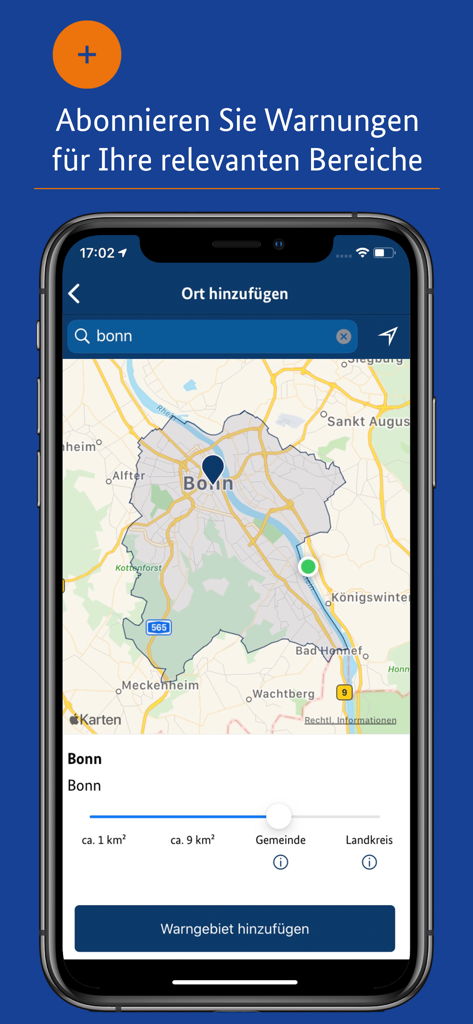
Smartphone screen showing the NINA app map interface to add a location for emergency alerts

Smartphone screen showing the NINA app map interface to add a location for emergency alerts

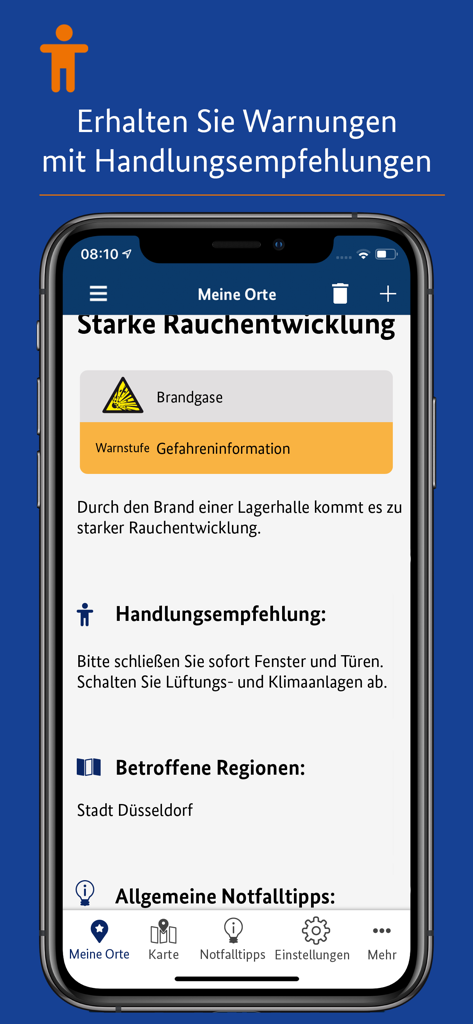
Screenshot of the NINA app showing an emergency alert for heavy smoke in Duesseldorf with safety recommendations to close windows.

Screenshot of the NINA app showing an emergency alert for heavy smoke in Duesseldorf with safety recommendations to close windows.

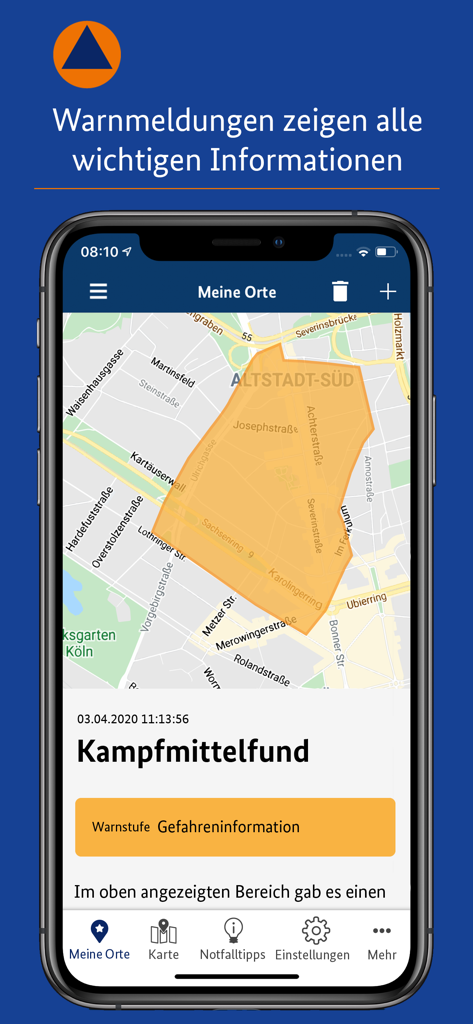
The NINA app displaying a localized emergency warning on a city map for an unexploded ordnance find.

The NINA app displaying a localized emergency warning on a city map for an unexploded ordnance find.

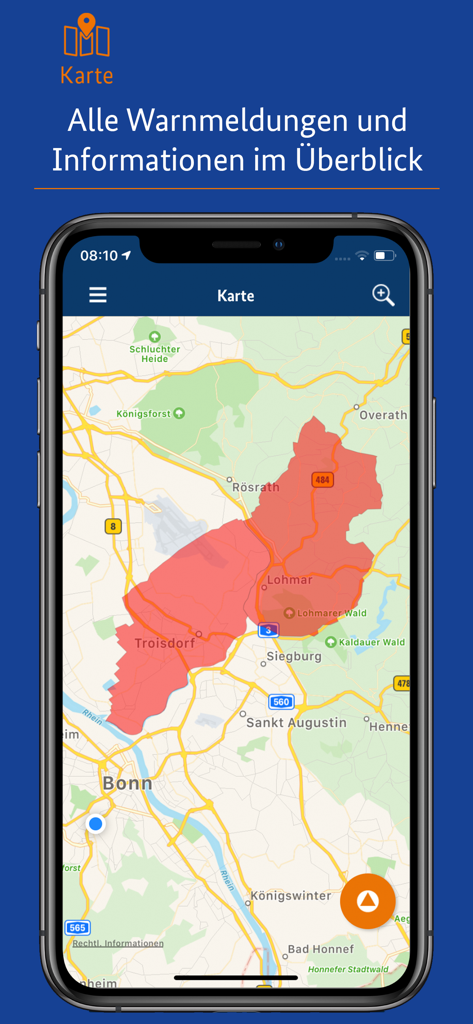
NINA app map interface displaying a red highlighted emergency warning zone over a geographical area

NINA app map interface displaying a red highlighted emergency warning zone over a geographical area

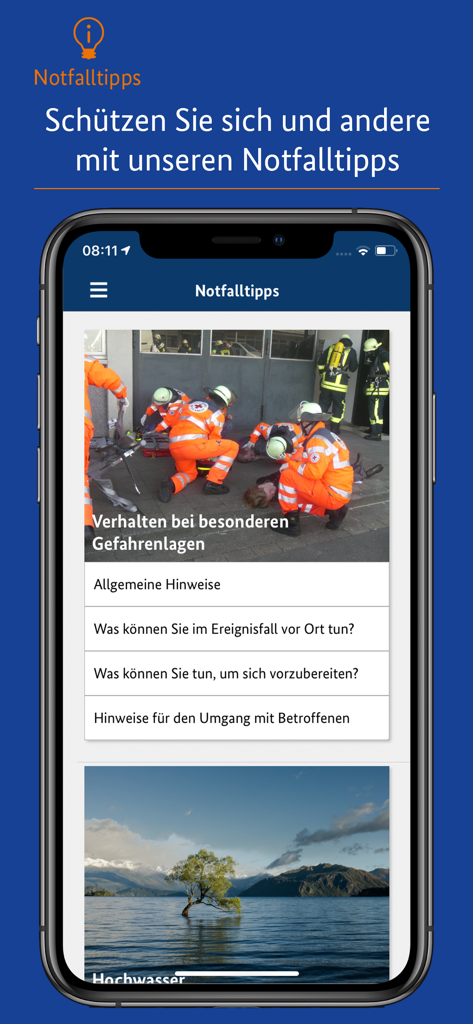
A smartphone displaying the NINA app interface with emergency tips and behavioral instructions for hazardous situations.

A smartphone displaying the NINA app interface with emergency tips and behavioral instructions for hazardous situations.

Your Digital Safeguard in Germany

The tools that make this app stand out, trusted by 3M+ users.

🔔

Hyper-Local Warning System

Receive instant push notifications based on your current GPS location or custom 'My Places,' ensuring you're the first to know about local threats.

🇺🇸

Language-Barrier Free

Navigate emergencies with confidence. Get official civil protection warnings and meteorological data translated into English for complete clarity.

🛡️

Actionable Safety Checklists

Access expert guides and offline-ready checklists on how to react to floods, storms, or power outages, keeping your family prepared for any scenario.

Review Analysis

Insights from user reviews.

Sentiment Score

33%
Negative

Summary

User reviews for this warning app are overwhelmingly negative, primarily due to severe notification reliability issues where critical alerts are either not received, arrive too late, or only when the app is actively open. Many users also report an overwhelming frequency of exaggerated warnings for minor events, leading to 'alarm fatigue' and causing them to ignore or uninstall the app. Persistent problems include app crashes, high battery consumption, and the need to re-grant privacy consents after updates, impacting functionality on national warning days across various iOS versions, particularly on the iPhone 13 Pro running iOS 15.4, 16.2, and 18.5.

Common Themes

Notification Reliability(18)
Over-warning & Duplicate Alerts(13)
National Warning Day Failure(7)
App Stability & Performance(5)
Privacy Consent Management(4)
UI/UX & Missing Features(4)

About the app

Everything you need to know about NINA.

Description

Die Warn-App NINA (Notfall-Informations- und Nachrichten-App) warnt Sie deutschlandweit vor Gefahren, auf Wunsch auch für Ihren aktuellen Standort. Bei Fragen oder Problemen stehen wir Ihnen unter NINA@bbk.bund.de gerne zur Verfügung. Technischer Ausgangspunkt für NINA ist das modulare Warnsystem des Bundes (MoWaS). Dieses wird vom BBK für bundesweite Warnungen des Zivilschutzes betrieben. Seit 2013 können auch alle Lagezentren der Länder und viele bereits angeschlossenen Leitstellen von Städten und Kommunen das Warnsystem nutzen (http://www.bbk.bund.de/DE/NINA/Warnung/Warnung.html). HINWEIS: nicht überall sind auch Warnmeldungen zu lokalen Ereignissen erhältlich. Bitte informieren Sie sich bei Ihrem Landkreis oder Ihrer Stadt, welche Möglichkeiten zur Warnung der Bevölkerung dort eingesetzt werden. Mit NINA erhalten Sie: • Warnmeldungen des Bevölkerungsschutzes mit Handlungsempfehlungen • Wetterwarnungen des DWD (deutschlandweit für alle Landkreis und Städte) • Hochwasserwarnungen • allgemeine Notfalltipps, damit Sie sich und andere vor möglichen Gefahren schützen können. Mit NINA können Sie Orte auswählen, für die Sie Warnmeldungen erhalten möchten. Diese werden in der Übersicht „Meine Orte“ angezeigt. Im Einstellungsmenü können Sie festlegen, bei welcher Warnstufe Sie per Push-Benachrichtigung informiert werden sollen. Optional können Sie auch Warnmeldungen für Ihren aktuellen Standort erhalten. Dabei werden keine Standortdaten auf unseren Servern gespeichert. Bitte beachten Sie: Um standortbezogene Warnungen korrekt darstellen zu können, muss NINA Ihren Standort bestimmen können. Bei schlechtem Empfang kann es zu fehlerhaften Anzeigen kommen. Das Gefahrengebiet einer Warnmeldung kann in der Kartenansicht angezeigt werden. Die Hochwasserinformationen werden aktuell nur auf Bundeslandebene herausgegeben. In der Karte werden alle vorliegenden Warnmeldungen angezeigt, auch wenn Sie den Ort nicht ausgewählt haben. Die Notfalltipps enthalten Empfehlungen zu Themen wie Hochwasser, Unwetter, Stromausfall, Feuer und besondere Gefahrenlagen. Informieren Sie sich, wie Sie sich auf solche Ereignisse vorbereiten können. Ebenso finden Sie Verhaltenshinweise für den Fall, dass Sie von einem Ereignis betroffen sind. Mit den praktischen Checklisten können Sie gleich loslegen. Hinweise zu den Berechtigungen in der App: Daten speichern: Die App verfügt über einen Offline-Modus, um auch bei mangelnder Internetverbindung (nach dem erstmaligen Download) Zugriff auf die Notfalltipps und bereits vorhandene Warnungen und Informationen zu ermöglichen. Dazu ist es erforderlich, die Offline-Inhalte im Dateisystem anzulegen. Die App liest keinerlei weitere Daten von Ihrem Gerät aus. Eigener Standort: Warnmeldungen für Ihren aktuellen Standort sind nur bei Nutzung von GPS, WLAN und anderen Geolokalisierungsdiensten möglich. Haben Sie diese Dienste auf Ihrem Gerät deaktiviert, können Sie keine standortbezogenen Warnmeldungen erhalten. Sie haben Fragen zur Warn-App NINA oder möchten uns Ihr Feedback geben? Dann wenden Sie sich bitte an nina@bbk.bund.de. Weitere Informationen erhalten Sie auch unter http://www.bbk.bund.de/NINA. Wichtig: Warnungen und Informationen können Sie nur mit einer Datenverbindung (per WLAN oder mobil) empfangen. Verfügt Ihr Gerät über keine Datenverbindung, wird der letzte auf dem Gerät gespeicherte Stand angezeigt. Warnmeldungen für Ihren Standort können nur korrekt angezeigt werden, wenn die App im Hintergrund liegt, also nicht geschlossen ist. Nach Aussage von Apple können einzelne Apps aber auch vom Betriebssystem geschlossen werden. Dies ist nicht vorhersehbar und auch nicht kontrollierbar. Dadurch können wir nicht garantieren, dass jede standortbezogene Warnung auch wirklich auf dem Gerät angezeigt wird. Die fortwährende Nutzung von GPS im Hintergrund kann die Lebensdauer des Akkus stark verringern.

Latest Version

3.6.2

Size

133.3 MB

First Released

Jun 8, 2015

Be Prepared for Every Situation in Germany

Join millions who trust NINA for official, real-time emergency alerts and actionable safety tips in English. Download the government's official warning app today for total peace of mind.

Download on App Store
FAQ

Frequently Asked Questions

Everything you need to know about NINA

What is the NINA app?

The NINA (Notfall-Informations- und Nachrichten-App) app warns users across Germany about hazards. It provides civil protection warnings, DWD weather warnings, flood warnings, and general emergency tips.

How does the NINA app provide warnings?

NINA uses the federal modular warning system (MoWaS) operated by the BBK. It delivers warnings from federal, state, and municipal centers, including civil protection, DWD weather, and flood warnings.

Does the NINA app offer location-based warnings?

Yes, NINA offers optional warnings for your current location. To receive these, your device must have GPS, WLAN, or other geolocation services enabled.

Does the NINA app store user location data?

No, the NINA app does not store your location data on its servers. It determines your location locally for current location warnings.

What emergency tips are available in the NINA app?

NINA provides emergency tips for situations like floods, severe weather, power outages, fires, and other special hazards. It includes recommendations for preparation and behavior during events.

Can users select specific locations for warnings in the NINA app?

Yes, users can select specific locations to receive warning messages, which appear in the 'Meine Orte' overview. You can define the warning area (e.g., ca. 1 km², ca. 9 km², Gemeinde, Landkreis).

Does the NINA app work offline?

Yes, the NINA app features an offline mode. This allows access to emergency tips and previously received warnings even without an internet connection, after initial download.

Will NINA provide location-based warnings if the app is closed?

Location-based warnings are only reliably displayed if NINA runs in the background. The operating system may close apps, which is unpredictable and not controllable, potentially affecting warning delivery.

What details are included in NINA app warning messages?

NINA warning messages provide important information, including the warning level (e.g., Gefahreninformation) and recommended actions to take during the hazard, such as closing windows and turning off ventilation.

How does the NINA app display warning areas?

The NINA app displays the danger area of a warning message in a map view. This map shows all available warnings, even for locations not explicitly selected by the user.

App information, icons, screenshots, and descriptions displayed on this page are sourced from the Apple App Store and are the property of their respective developers. Download estimates and rankings are based on MWM's proprietary models and may not reflect actual figures. This page is provided for informational and analytical purposes only.

Believe this page infringes your intellectual property? File a dispute