Paperless Music: The Ultimate Digital Library for Professional Musicians
Ditch the heavy binders and experience the most reliable way to organize, annotate, and perform your sheet music. No subscriptions, no ads, and no limits—just you and your music.
Publisher
Agilstream, LLC
Category
Music
Downloads
24K+
User Rating
4.8/5
Total Ratings
1K+
Locales
1
Master Your Performance
Discover the interface used by 24K+ users.
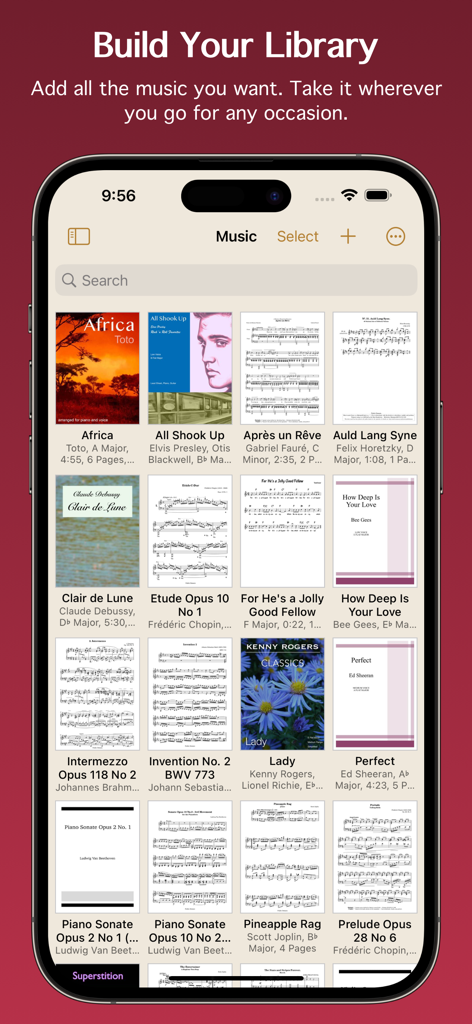
Digital music library grid in Paperless Music app displaying various sheet music covers and scores
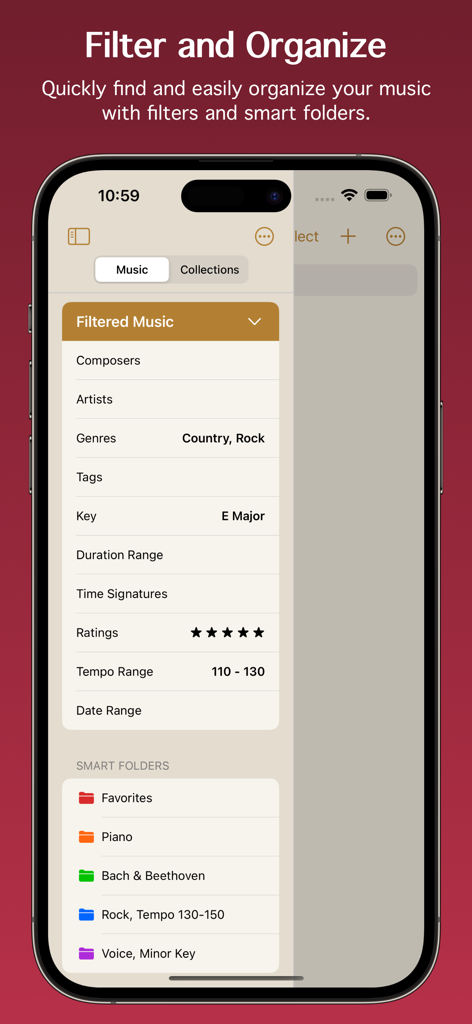
Paperless Music app interface showing music filters and smart folders for organizing digital sheet music
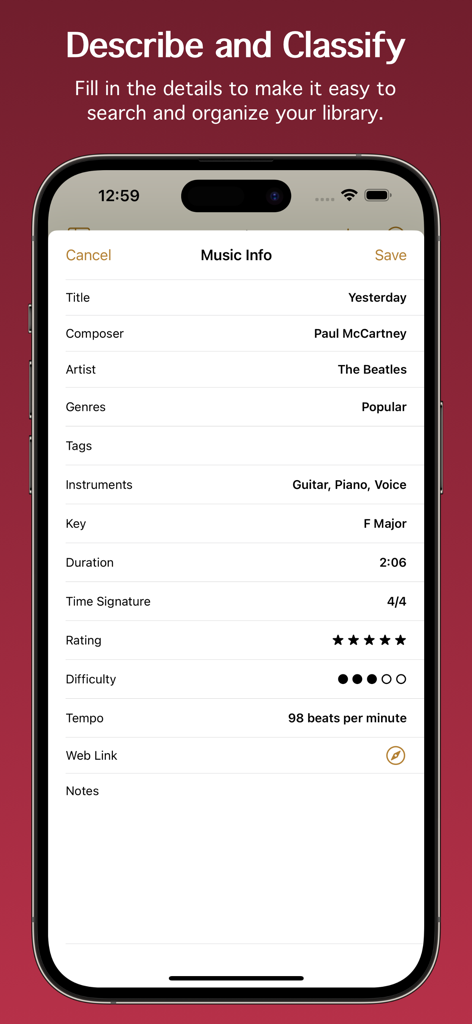
Screenshot of the Music Info screen in Paperless Music app showing metadata fields like title, composer, key, and tempo for the song Yesterday.
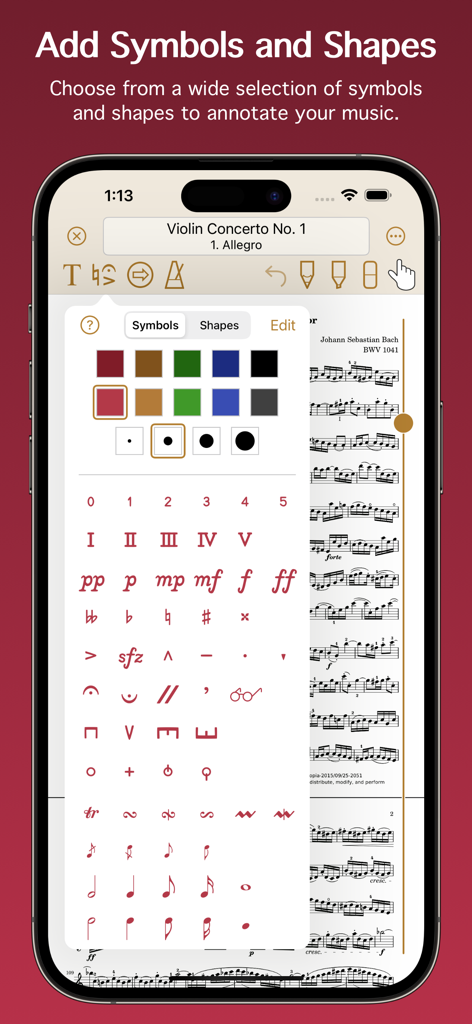
A mobile interface for Paperless Music showing a wide selection of musical symbols, dynamics, and shapes for annotating digital scores.
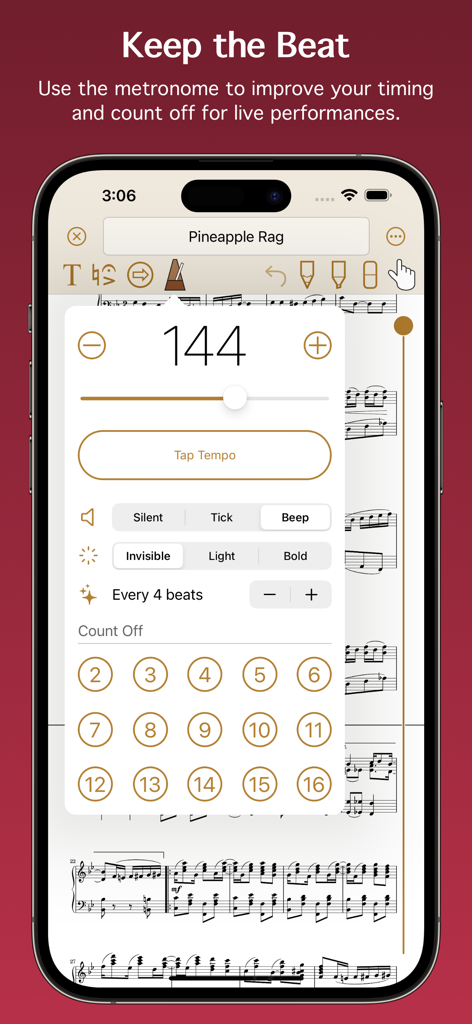
Metronome interface in the Paperless Music app for setting tempo and count off.
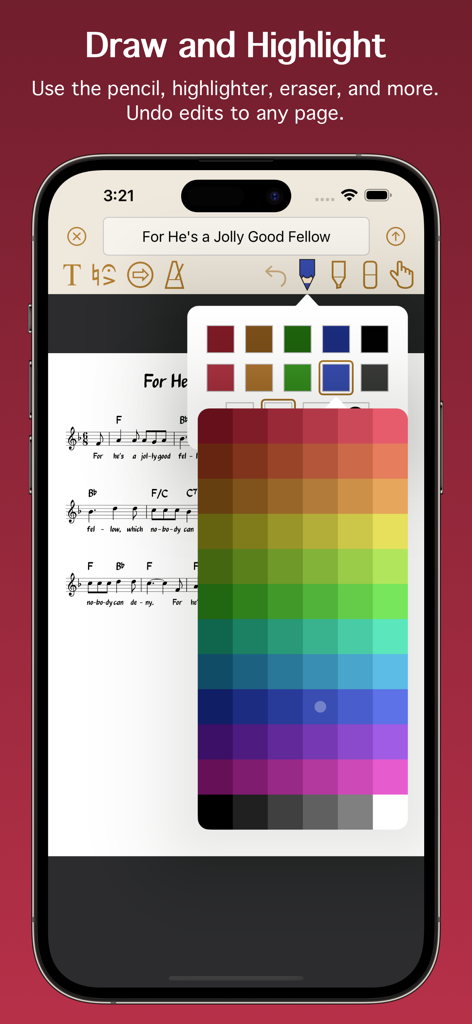
Interface showing digital sheet music with annotation tools and a color selection palette.
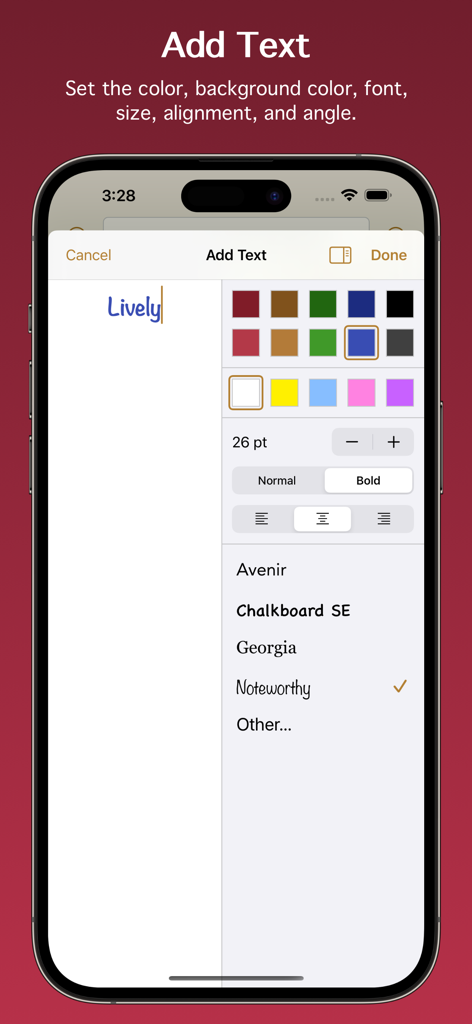
Interface for adding and formatting text annotations in the Paperless Music app
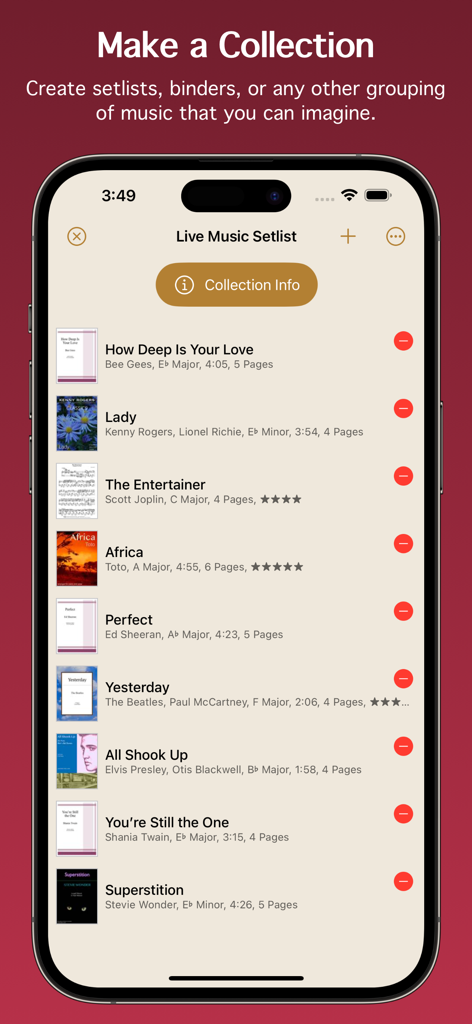
Screenshot of the Paperless Music app showing a organized live music setlist with song titles and details
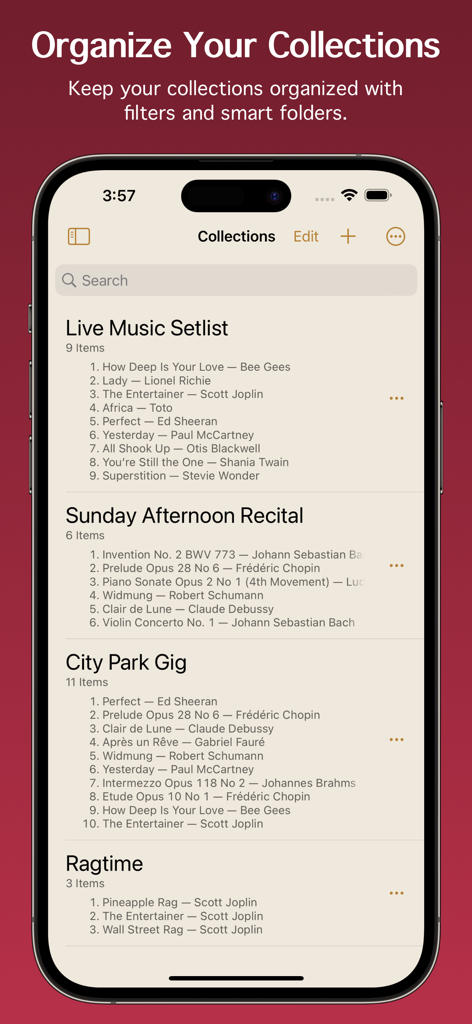
Organized music setlists and collections displayed in the Paperless Music app interface
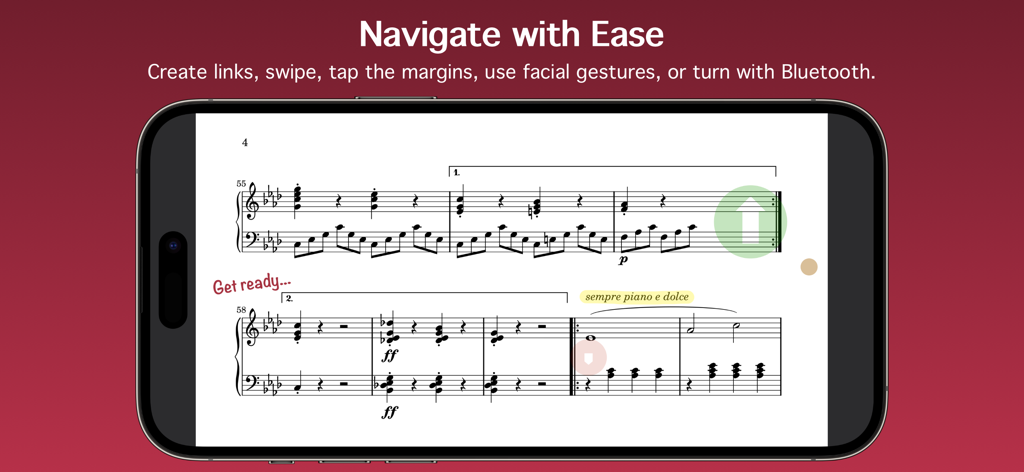
The Paperless Music app displaying digital sheet music with navigation links and annotations on a smartphone
Everything You Need to Perform Your Best
The tools that make this app stand out, trusted by 24K+ users.
📂
Advanced Smart Library
Organize thousands of scores with metadata like key, tempo, and duration. Use smart folders and powerful filters to find the exact piece you need in seconds.
✨
Hands-Free Performance
Focus entirely on your music with seamless page turning via facial gestures or Bluetooth pedals. Built for reliability, so you can perform on stage without worry.
✏️
Precision Digital Markup
Annotate scores naturally with Apple Pencil support. Add musical symbols, highlights, or text, and use the integrated metronome and tuner to perfect every session.
About the app
Everything you need to know about Paperless Music.
Description
Free 90-day trial!
Add your sheet music, guitar tabs, fake books, and scores, and leave your paper behind. Organize, annotate, practice, and perform with the most powerful yet easy-to-use music viewer and manager.
Whether you’re a student or teacher, whether you play in a band, sing in a choir, or gig on the weekends, and no matter what your style of music is, you can count on the app’s reliability for live performances and go paperless with confidence.
Build Your Library
• Import PDF files from the Files app, a web browser, or from many other apps and sources.
• Scan your music with the camera-based document scanner.
• Import images from the Photos app.
Organize Your Music
• Describe and classify your music in great detail with information like title, composer, artist, genres, tags, instruments, key, duration, time signature, rating, difficulty, tempo, web link, and notes.
• Add scores with multiple movements or books with multiple songs, then organize them into sections.
• Create collections to make groups of music, such as setlists, virtual binders, or books.
• Easily find the music and collections you’re looking for with filters. With a few taps, for example, you can see all music that’s in a major key with a 4/4 or 6/8 time signature, having a tempo between 120 - 135 beats per minute.
• Create smart folders to automatically keep your music and collections organized.
Add Audio Tracks
• Add tracks from the Music app.
• Record your own audio.
• Import audio files.
• Adjust pitch and playback speed.
• Turn pages automatically while audio plays.
Stay In Tune
• Tune your instrument using the device microphone.
• Generate a tone using a variety of instruments and sounds.
• Adjust the A4 frequency.
• Select from 10 temperaments to customize the tuning.
Practice and Perform
• View music in portrait or landscape mode.
• Scroll music horizontally or vertically.
• Turn pages by swiping, moving the slider, using a Bluetooth page turner, tapping the edge of the screen, following a link, making a facial gesture, or playing audio that has automatic page turning enabled. (Facial gestures require a device with a TrueDepth camera.)
• Create links to jump or scroll to another page. Links are great for music with repeats or codas. They also allow music to be automatically scrolled with precise timing.
• Use the pencil and highlighter tools to write on music with your finger or with the Apple Pencil. All Apple Pencil settings are supported.
• Add text with options for size, rotation, color, font, and justification.
• Choose from a wide selection of symbols and shapes to add fingerings, dynamics, accidentals, and more.
• Use the low-latency metronome with options for sound, visuals, accent, and count off.
See More with Second Screen
• Connect two devices and see more of your music.
• When viewing music on the main device, it will extend onto the other device’s screen.
Share and Back Up
• Share your music and collections with other Paperless Music users, with or without your annotations or audio tracks.
• Share music in native format to preserve all information, or share in PDF format for general sharing and printing.
• Create a backup of your library to keep your data extra safe and to easily transfer everything to other devices.
And Much More
• Set the page color of your music.
• Undo changes made to any page while the viewer is open.
• Choose from six library view modes for music and three modes for collections.
• Batch edit genres, tags, and instruments.
• Adjust the text size in the Settings app to boost or shrink the size of text throughout Paperless Music.
• Search using Spotlight. Find and launch right into your music even when the app isn’t running.
Learn more by reading the integrated, searchable user guide, accessible from the app’s home screen and from the website.
Paperless Music has no ads and no subscriptions. There is no sign-in and there are no accounts.
www.paperlessmusic.com
Latest Version
7.0.1
Size
7.1 MB
First Released
Jan 3, 2015
Your Entire Library, Ready for Center Stage
Join thousands of musicians performing with confidence. Start your 90-day free trial today and experience a professional-grade workspace with no subscriptions and no ads.
App information, icons, screenshots, and descriptions displayed on this page are sourced from the Apple App Store and are the property of their respective developers. Download estimates and rankings are based on MWM's proprietary models and may not reflect actual figures. This page is provided for informational and analytical purposes only.
Believe this page infringes your intellectual property? File a dispute