pic2shop PRO - The Customizable Barcode Scanner for Your Web Apps
Transform iOS devices into industrial-grade scanners. Bridge the gap between physical inventory and your custom database, ERP, or FileMaker system with zero subscription fees.
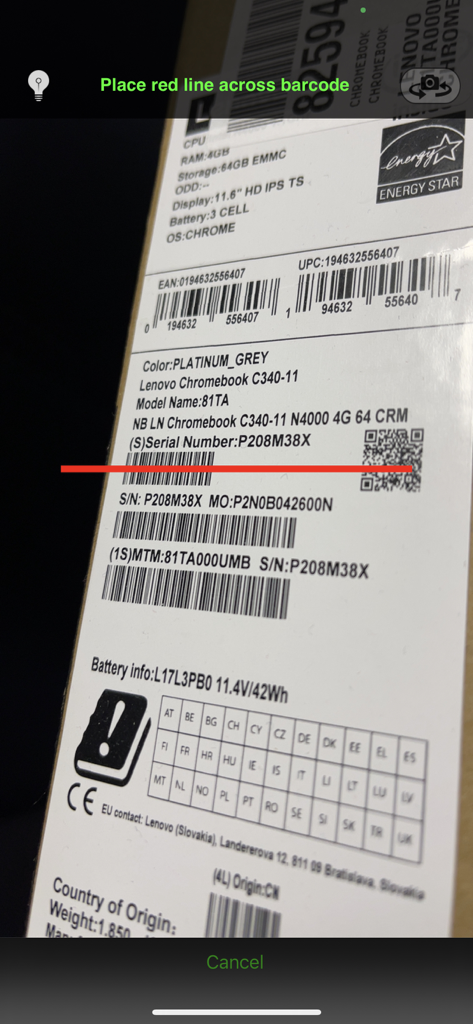
Professional barcode scanner app interface scanning a product serial number and QR code on a box
Embedded web application interface placeholder in pic2shop PRO
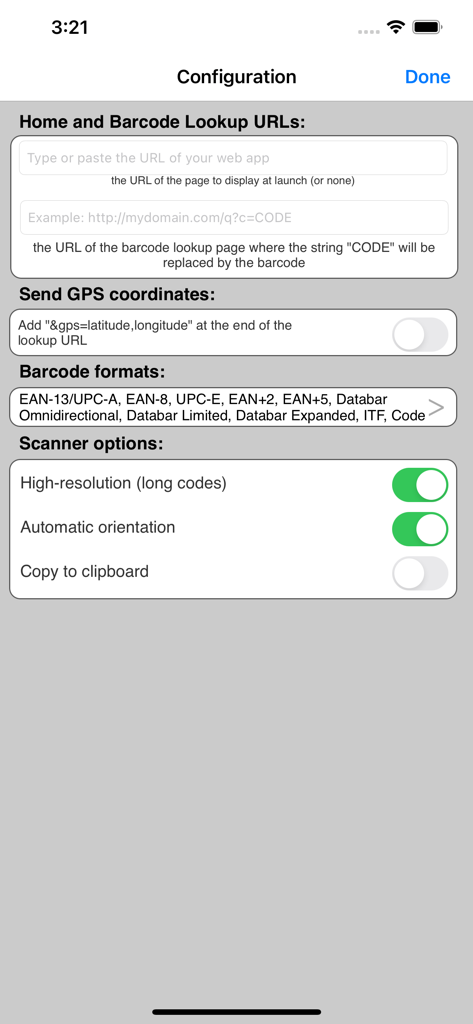
Configuration screen of pic2shop PRO showing custom URL settings and scanner options
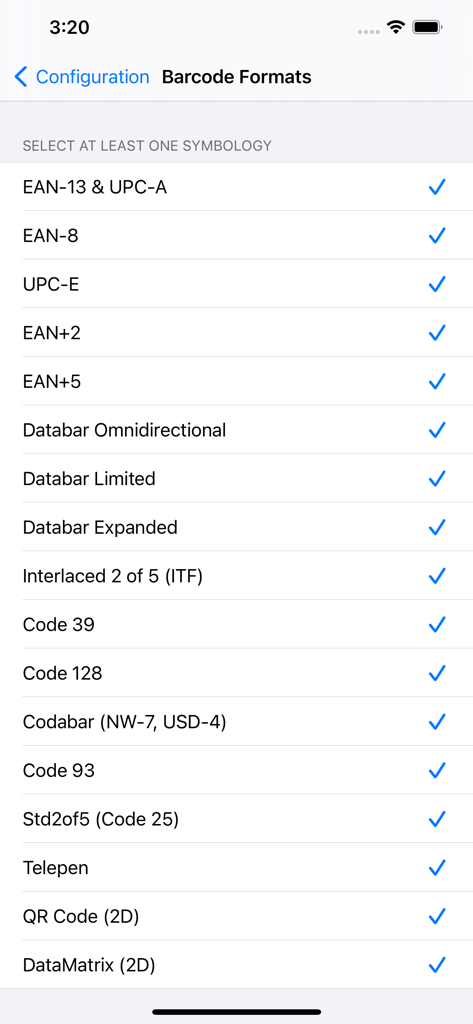
List of selectable barcode symbologies including EAN UPC Code 128 and QR in the pic2shop PRO app settings screen
Tailor-Made Barcode Integration
The tools that make this app stand out, trusted by 181K+ users.
🌐
Direct Web & ERP Integration
Configure custom lookup URLs to send scanned data directly to your private web portal, SQL database, or Google Sheets. Supports HTML5, JavaScript, and secure HTTPS for a seamless enterprise experience.
📦
Industrial-Grade Symbology
Read EAN, UPC, Code 128, DataMatrix, and more with high-resolution accuracy. Optimized to work even on older iOS devices without autofocus, perfect for cost-effective BYOD deployments.
⚙️
Automated Workflow Control
Trigger scans from apps like FileMaker Go, capture GPS coordinates automatically, and use developer-friendly callback URLs to build sophisticated asset tracking systems in minutes.
About the app
Everything you need to know about pic2shop PRO - DIY Barcode.
Description
Display your own web site in the embedded browser and configure the barcode scanner to send it the scanned codes.
Or use pic2shop PRO as an external scanner from another app.
Or copy the barcode to the clipboard for use anywhere.
The embedded web browser supports HTML5, CSS, cookies, javascript, https, etc. You can easily and inexpensively build a rich barcode scanning app for your own use. For example, give your employees access to a product information or an asset tracking app on their iPhone, over the internet or your intranet.
EAN and UPC barcodes can be read even on devices without autofocus.
THIS IS NOT A SHOPPING APP. WE DO NOT PROVIDE THE HOSTING SERVICE NOR THE WEB APPLICATION. YOUR ARE RESPONSIBLE FOR DEVELOPING THE WEB APPLICATION AND HOSTING IT ON YOUR OWN SERVER.
= SUPPORTED BARCODE SYMBOLOGIES =
EAN-13, ISBN
EAN+2, EAN+5
EAN-8
UPC-A
UPC-E
GS1 DataBar Omnidirectional (& Stacked)
GS1 DataBar Expanded (& Stacked)
GS1 DataBar Limited
Code 39
Code 128
Code 93
Interleaved 2 of 5 (ITF)
Standard 2 of 5 (Code 25)
Codabar (NW-7, USD-4)
Telepen
QR
DataMatrix
= CONFIGURATION =
There are seven in-app configuration parameters, and one general setting:
1. Home Page URL: the url of the web page displayed when the app launches (optional).
2. Barcode Lookup URL: the url fetched when a barcode is scanned. The string CODE is replaced by the barcode content, and the string FORMAT is replaced by the symbology of the decoded barcode. That is how the barcode information is transmitted to your web app, and how the response is displayed to the user.
3. Send GPS coordinates: add a "&gps=latitude,longitude" to the lookup URL.
4. Formats: select which formats the scanner needs to look for. We recommend turning off the formats that are not needed for speed.
Please note that you can include as many other parameters as you like in either URL, they will be passed as is to your server. For example, you could give to each user a URL with a different "&userid=NNN" parameter to automatically identify them with the web application.
A quick way to configure pic2shop PRO is to send a link to each user (by email or on a web page). When they click the link after they have installed pic2shop PRO, the three parameters will be set automatically. The link has the form:
p2spro://configure?lookup={lookupURL}&home={homeURL}&formats=EAN13,EAN8,UPCE,ITF,CODE39,CODE128,CODABAR,QR&gps={YES|NO}&settings={YES|NO}
where any special character in {lookupURL} and {homeURL} is replaced by its % encoding. For example, to make pic2shop PRO lookup the UPC database:
p2spro://configure?lookup=http%3A//www.upcdatabase.com/item/CODE
5. Auto Orientation: scan Code39, Code128, ITF and Codabar in landscape (as they can be wider than UPCs)
6. High Resolution: use high resolution scanning (for large barcodes)
7. Copy to clipboard
In addition, one can switch off the in-app configuration in the general iOS settings list to help lock down the config.
= PIC2SHOP PRO AS EXTERNAL SCANNER =
Pic2shop PRO, can be launched by another app or by a web page to scan a barcode, then pass the result back to the calling app or web page. A popular use is to import barcodes into the Filemaker Go application.
The syntax of the custom URL is the following:
p2spro://scan?formats=EAN13,EAN8,UPCE,ITF,CODE39,CODE128,CODABAR,QR&callback={callbackURL}
The callback URL should be percent-encoded and contain the strings CODE and FORMAT, which will be replaced by the barcode content (or 'CANCELLED') and symbology, respectively.
= START SCANNER FROM IN-APP BROWSER =
The barcode scanner can also be started from the embedded browser with link to a "p2spro://scan" URL like described above, which overrides the lookup URL and barcode formats for a single scan. Javascript callbacks are supported.
= NOTES =
For security reasons, HTTPS will not work with self-signed certificates.
Latest Version
7.3
Size
1.8 MB
First Released
Aug 2, 2010
Replace Expensive Industrial Scanners Today
Join 180,000+ professionals using pic2shop PRO to bridge the gap between physical assets and digital databases. Turn any iOS device into a professional data collection tool and connect it directly to your own web apps.
App information, icons, screenshots, and descriptions displayed on this page are sourced from the Apple App Store and are the property of their respective developers. Download estimates and rankings are based on MWM's proprietary models and may not reflect actual figures. This page is provided for informational and analytical purposes only.
Believe this page infringes your intellectual property? File a dispute