Pixelmator: Professional Image Editing for Your iPhone and iPad
Unleash your creativity with a powerful, layer-based editor designed for mobile. From ML-powered retouching to stunning graphic design, create professional artwork anywhere.
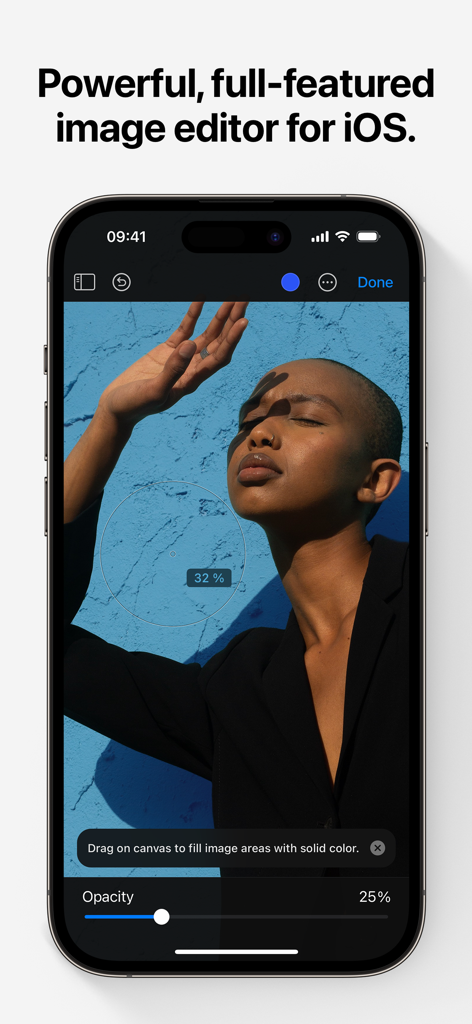
The Pixelmator app interface on an iPhone displaying photo editing tools and a portrait image.
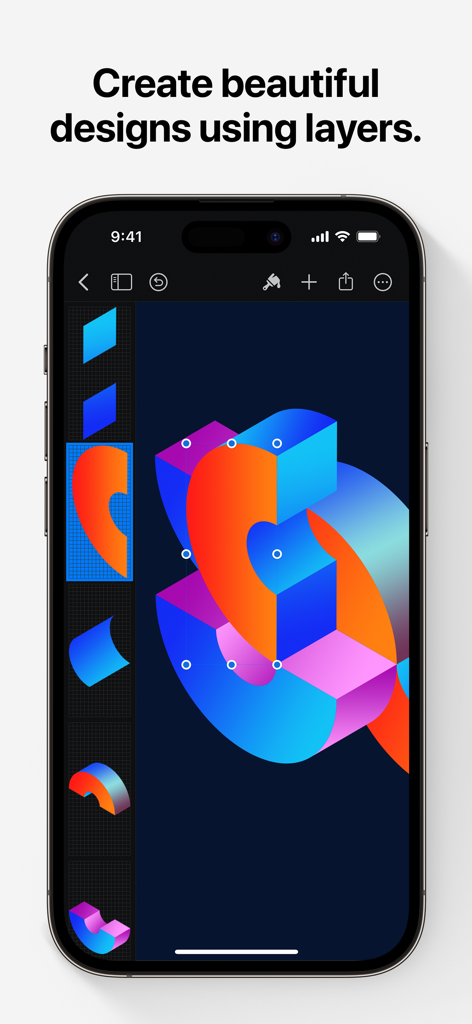
Pixelmator interface on iPhone showing a vibrant graphic design with multiple layers
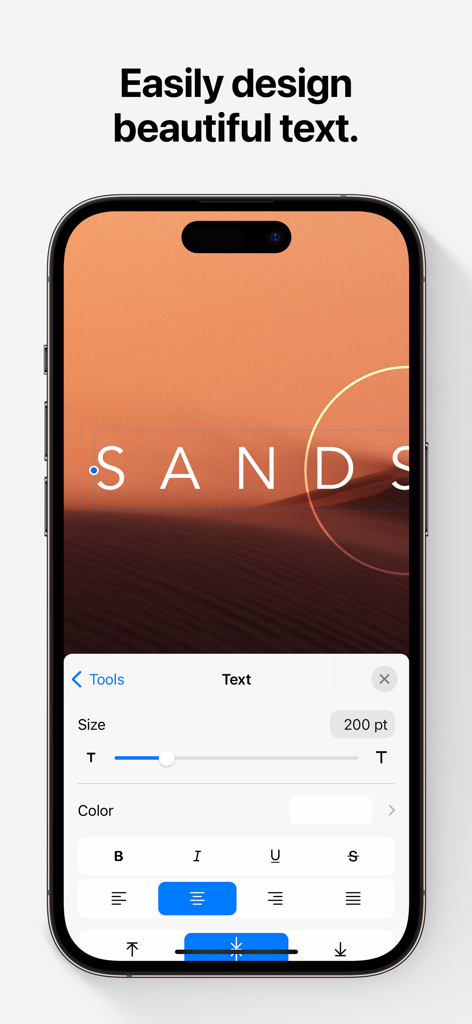
iPhone screen showing the Pixelmator app text editing interface
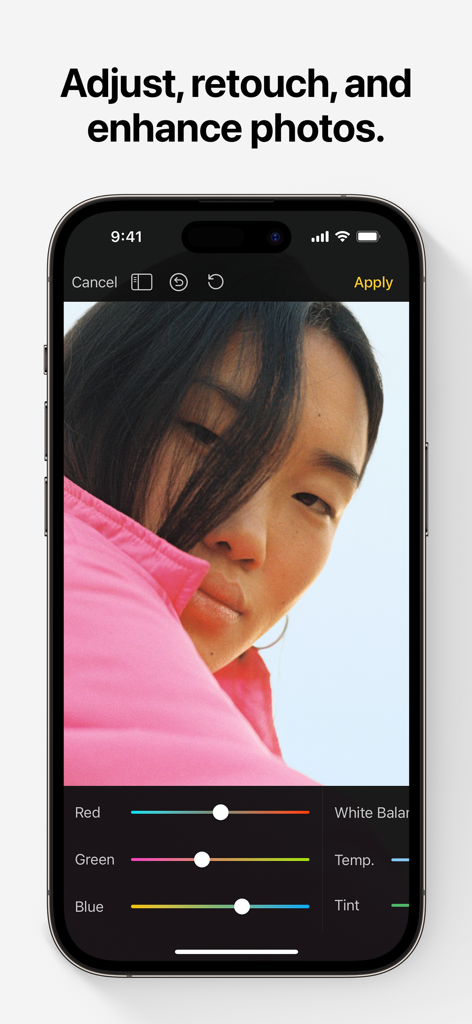
Pixelmator photo editing interface on iPhone with color adjustment tools
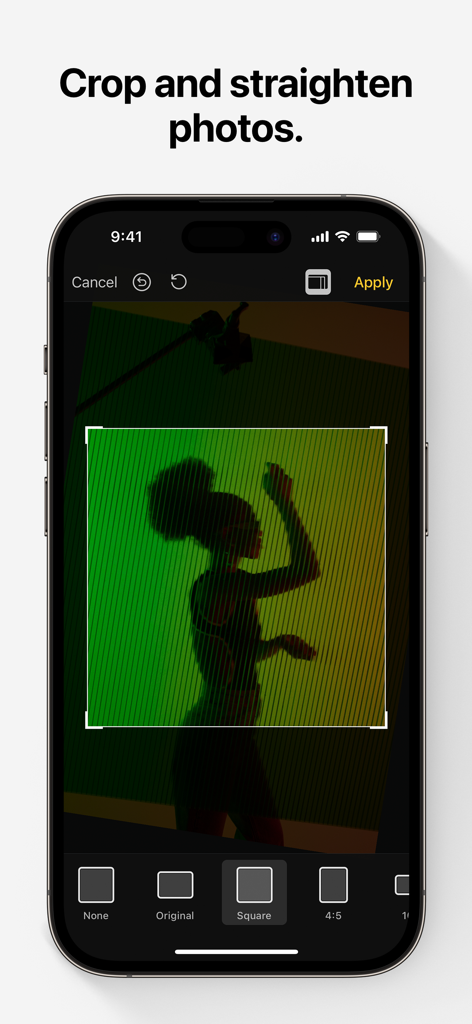
Pixelmator photo editing app interface showing the crop and straighten feature on an iPhone
Professional Design Tools, Perfected for Mobile
The tools that make this app stand out, trusted by 817K+ users.
✨
AI-Powered Magic
Save time with machine learning tools that automatically select subjects, remove backgrounds, and wipe away imperfections with a single tap.
🎨
Advanced Layering
Create professional flyers, logos, and art using non-destructive layer styles, blending modes, and precise vector shapes for total creative control.
✏️
Natural Digital Painting
Turn your iPad into a canvas with artist-designed brushes and full Apple Pencil support, featuring pressure, tilt, and palm rejection for a true-to-life feel.
About the app
Everything you need to know about Pixelmator.
Description
Pixelmator is a powerful, full-featured, layer-based image editor that lets you add shapes, images, and text to create beautiful image compositions, touch up and enhance images, sketch, and paint on iPad and iPhone alike.
Designed exclusively for iOS and iPadOS, Pixelmator takes full advantage of the latest iOS and iPadOS 17 features and technologies, giving you innovative, fast, and powerful tools.
Create Eye-Catching Designs
- Combine words, shapes, and images to create breathtaking artwork right on your iPhone and iPad
- Apply non-destructive layer styles like shadows, outlines, gradient fills, and more
- Insert, group, and blend layers of an image
- Easily add, combine, and customize shapes
- Blend layers, shapes, and text using any of the blending modes
- Use precise selection tools to edit areas of an image
- Automatically select subjects in images with the machine learning-powered Select Subject
- Crop, arrange, and rotate objects and layers with pixel-perfect precision
- Easily remove the background of images or cut and paste objects from one image to another
Add Shapes and Text
- Create flyers, logos, and other compositions using vector shapes and their styling options
- Customize Smart Shapes with easy-to-use controls
- Add text and make it look gorgeous with 24 pre-designed text styles
- Change the font, size, alignment, line spacing, use custom fonts, and more
Paint and Sketch
- Paint stunning images right on your iPhone and iPad
- Choose from over artist-designed brushes and numerous painting techniques
- Paint with near-natural wetness effect of watercolor and crayon brushes
- Create stunning pixel art images with the custom-designed Pixel brush
- Paint with incredible detail thanks to the double texture brush technology
- Vary the speed of your stroke to change the thickness of some of the brushes
- Easily select and fine-tune colors with a full-featured color picker
- Instantly choose colors right from your image with the Eyedropper
- Paint more naturally than ever with the Apple Pencil, featuring palm rejection, pressure, tilt, and acceleration sensitivity
Edit and Enhance Photos
- Get started with dozens of beautifully designed templates
- Instantly improve your photos with single-tap color presets
- Take full control over the tonal range of your image with levels and curves
- Easily remove color casts and set the right white balance
- Wipe away image imperfections, skin blemishes, and unwanted objects with the Repair tool
- Duplicate areas of your image with the easy-to-use Clone tool
- Pinch, bump, twirl, or warp areas of an image with powerful, Metal-based Distort tools
- Blur, sharpen, lighten, or darken areas of an image
- Choose from dozens of breathtaking effects to subtly improve or completely change the look of an image
- Open and edit images of up to 256 megapixels
Export and Share Images
- Optimize images for the web using quality, color depth, and size settings
- Export images to Files, iCloud, or open in other apps using a file format of your choice
- Using the integrated share extension, easily share your artwork with friends and family using Mail, AirDrop, or post it to social platforms like Instagram, Twitter, or Facebook
Compatibility
- Open and save images using HEIF, JPEG, PNG, and TIFF formats
- Work with multilayered Pixelmator Pro and Adobe Photoshop documents
- Save your edited images directly to Photos
- Create, edit, and keep all your images up to date on all your devices thanks to iCloud support
- External keyboard support with over 70 keyboard shortcuts
Built for iPhone and iPad
- Pixelmator is meticulously thought through and created from the ground up for iPhone and iPad devices
- Designed to take full advantage of powerful iOS and iPadOS features and technologies — iCloud Drive, Photos extension, Split View, and more
- Thanks to Apple silicon, Metal, Core Image, and Core Animation, Pixelmator delivers state-of-the-art performance and real-time responsiveness
Latest Version
3.1.16
Size
409.8 MB
First Released
Oct 24, 2014
Ready to Design Without Boundaries?
Join over 800,000 creators and experience professional-grade image editing, painting, and design right on your iPhone and iPad.
FAQ
Frequently Asked Questions
Everything you need to know about Pixelmator
What is Pixelmator Classic iOS?
Pixelmator Classic iOS is a powerful, full-featured, layer-based image editor for iPad and iPhone. It allows users to create compositions, touch up photos, sketch, and paint directly on their devices.
Is Pixelmator Classic iOS available on Android devices?
No, Pixelmator Classic iOS is designed exclusively for iOS and iPadOS. It leverages the latest features and technologies of these Apple operating systems, ensuring optimized performance.
Can Pixelmator Classic iOS remove backgrounds from images?
Yes, Pixelmator Classic iOS easily removes image backgrounds. It also features a machine learning-powered "Select Subject" tool for automatic subject selection and allows cutting and pasting objects.
Does Pixelmator Classic iOS support layer-based editing?
Yes, Pixelmator Classic iOS is a layer-based image editor. It supports inserting, grouping, blending layers, and applying non-destructive layer styles like shadows and gradient fills for complex designs.
How can I add text to images in Pixelmator Classic iOS?
Pixelmator Classic iOS allows adding text to images. It provides 24 pre-designed text styles and comprehensive controls to change font, size, alignment, line spacing, and use custom fonts.
Does Pixelmator Classic iOS support Apple Pencil for painting?
Yes, Pixelmator Classic iOS supports Apple Pencil. It offers palm rejection, pressure, tilt, and acceleration sensitivity, providing a natural and detailed painting and sketching experience on compatible devices.
What photo adjustment tools are available in Pixelmator Classic iOS?
Pixelmator Classic iOS includes a Repair tool, Clone tool, and Metal-based Distort tools. It also offers levels, curves, white balance, and various effects to adjust, retouch, and enhance photos.
What is the maximum image size Pixelmator Classic iOS can open?
Pixelmator Classic iOS can open and edit images up to 256 megapixels. This capability ensures support for high-resolution photography and detailed graphic design projects on iOS and iPadOS.
What file formats does Pixelmator Classic iOS support?
Pixelmator Classic iOS supports opening and saving images in HEIF, JPEG, PNG, and TIFF formats. It also works with multilayered Pixelmator Pro and Adobe Photoshop documents for broad compatibility.
Can I crop photos using Pixelmator Classic iOS?
Yes, Pixelmator Classic iOS allows users to crop and straighten photos. Screenshot #5 displays the cropping interface, offering various aspect ratio options like Square and 4:5 for precise adjustments.
App information, icons, screenshots, and descriptions displayed on this page are sourced from the Apple App Store and are the property of their respective developers. Download estimates and rankings are based on MWM's proprietary models and may not reflect actual figures. This page is provided for informational and analytical purposes only.
Believe this page infringes your intellectual property? File a dispute