Sketchbook: Create Digital Art

Sketchbook: Create Digital Art


Download on App Store
Logo of Sketchbook: Create Digital Art

Sketchbook: Create Digital Art with Professional Precision

Turn your mobile device into a powerful studio. Experience an award-winning, distraction-free drawing environment with 60+ realistic brushes and pro-grade tools designed for your creative flow.

Publisher

Loyal Foundry, Inc.

Category

Graphics & Design

Downloads

766K+

User Rating

3.9/5

Total Ratings

1K+

Locales

1

Your Vision, Realized

Discover the interface used by 766K+ users.
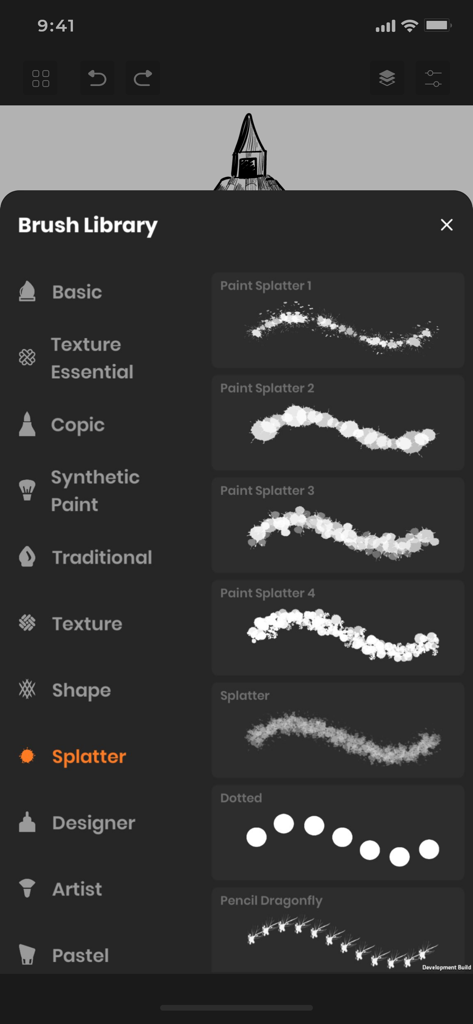
The brush library menu in Sketchbook app showing different paint splatter brush types

The brush library menu in Sketchbook app showing different paint splatter brush types

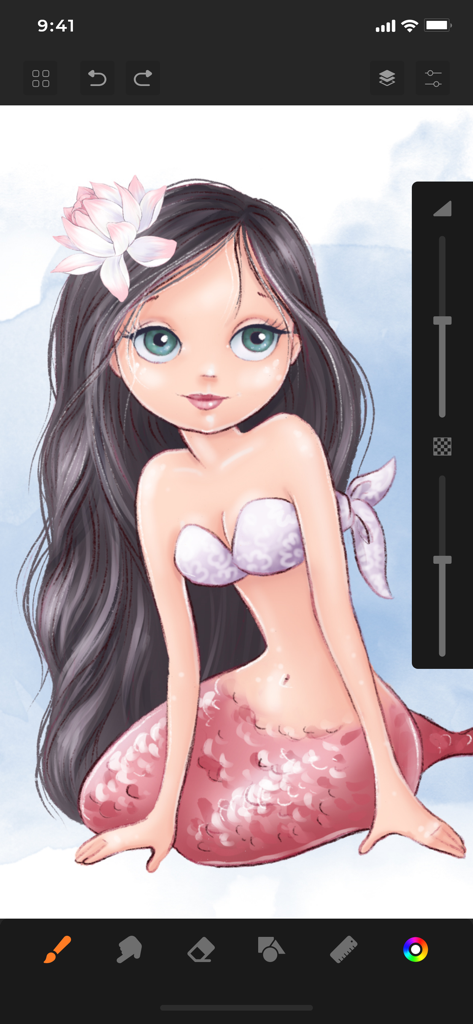
Digital illustration of a mermaid character being created in the Sketchbook app interface

Digital illustration of a mermaid character being created in the Sketchbook app interface

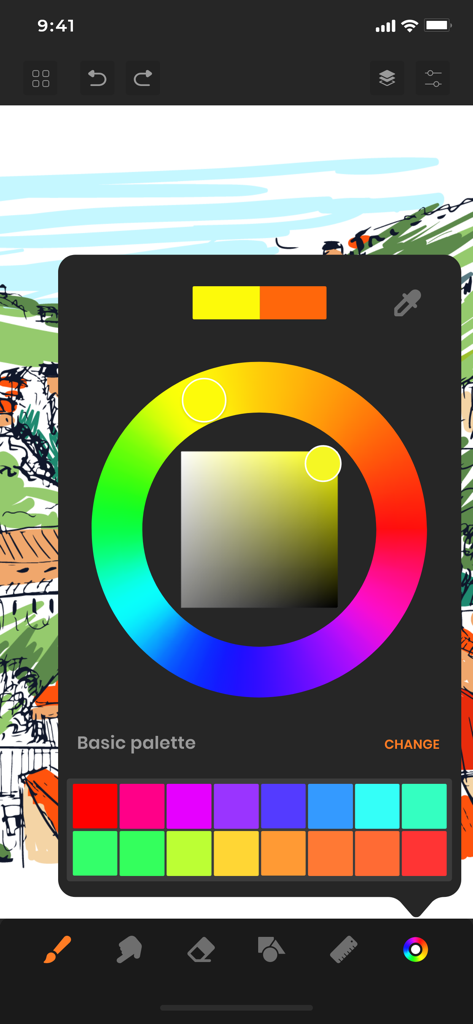
Interface of the Sketchbook app featuring a color wheel and custom palette over a digital sketch.

Interface of the Sketchbook app featuring a color wheel and custom palette over a digital sketch.

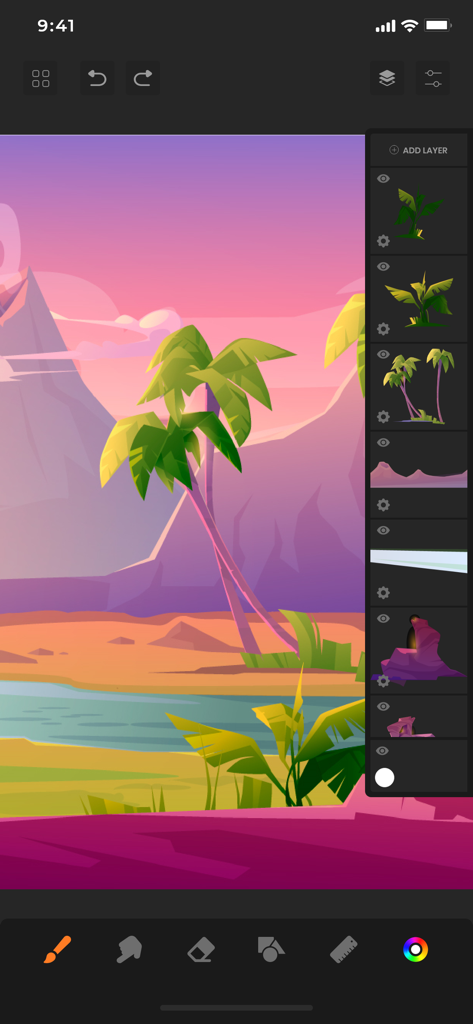
Digital illustration of a tropical landscape in Sketchbook app with layers panel visible

Digital illustration of a tropical landscape in Sketchbook app with layers panel visible

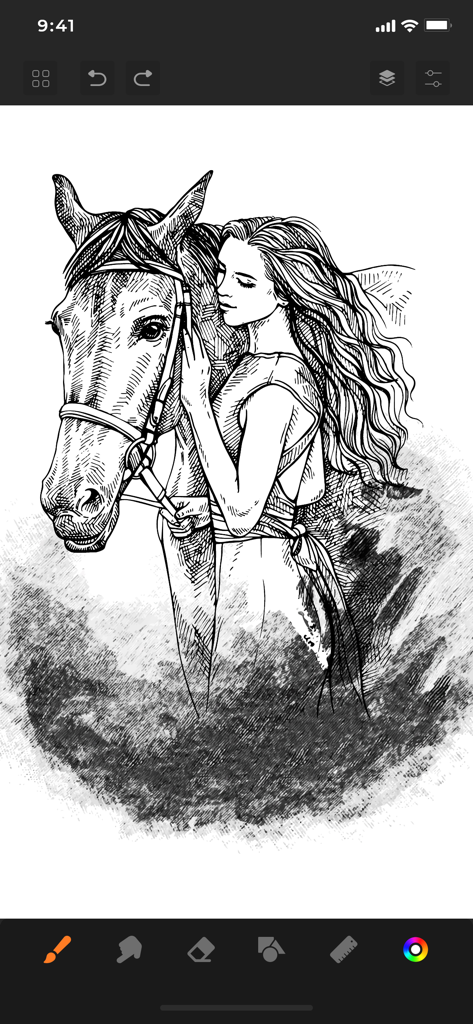
Digital black and white sketch of a woman hugging a horse in Sketchbook app

Digital black and white sketch of a woman hugging a horse in Sketchbook app

Professional Tools for Your Creative Flow

The tools that make this app stand out, trusted by 766K+ users.

🖌️

Hyper-Realistic Art Tools

Master your craft with 60+ professional brushes, including Copic markers and textures that mimic the feel of real-world media.

🏗️

Advanced Layering & Precision

Build complex illustrations effortlessly using multiple layers, shape assist guides, and specialized rulers for perfect perspective.

Distraction-Free Workspace

Focus entirely on your art with a clean, reflexive interface that maximizes your drawing space and minimizes interruptions.

Review Analysis

Insights from user reviews.

Sentiment Score

24%
Negative

Summary

The app receives overwhelmingly negative feedback, primarily due to aggressive paywalls and mandatory subscriptions that restrict basic functionalities like saving and exporting drawings. Many users report frequent, intrusive advertisements, even appearing when switching apps, and numerous critical bugs such as the app not opening, crashing, or drawing functionality not working. While some users praise the full version for its good features and intuitive design, a significant number express frustration over lost work and the inability to use core drawing tools without payment. Overall, the app is perceived as a scam attempting to force subscriptions.

Common Themes

Paywall & Subscriptions(18)
App Functionality & Bugs(11)
Aggressive Ads(8)
Saving & Export Issues(8)
Limited Free Features(7)
Positive User Experience(6)
Unintuitive UI/UX(4)

About the app

Everything you need to know about Sketchbook: Create Digital Art.

Description

SketchBook is the most practical, versatile and user-friendly sketching app designed for mobile gadgets. This exhaustive artist's toolbox helps users create dazzling sketches, cheerful paintings and smashing illustrations on the go. A reflexive way to produce a custom drawing! Whether you want to create graffiti or you want to create a doodle, or you want to learn to paint and draw, SketchBook is your tool of choice. Sketchbook is an award-winning sketching, artwork, and drawing app for anyone who loves to draw. Artists and illustrators love Sketchbook for its professional-grade characteristic set and highly customizable mechanisms. Everyone loves Sketchbook for its elegant interface and natural drawing experience, free of distractions so you can focus on capturing and articulating your idea. FEATURES - Shape draw assist - Paint. Draw, Sketch. Repeat - Draw smoothly like never before on iPad or iPhone with super realistic brushes. - Draw creative sketches using 60 brushes and tools - Enhance your drawing by importing pictures and photos - Zoom to paint fine details - Share instantly - Import photos for Reference - Ruler - 16 Shape Rulers - Color Palette - Custom Color Wheel - Multiple Layers drawings - Layer settings - Undo - Redo steps - Hard and soft Eraser with opacity settings Beautiful tools make beautiful drawings, we endlessly refined SketchBook brushes to create the most realistic drawing tools. List of BRUSH tools - Basic - Texture Essentials - Copic - Pen Brush - Synthetic Paint - Traditional - Texture - Shape - Splatter - Designer - Artist - Pastel - Eraser - Cutter - Smudge tool Create amazing drawing ideas to life. Use SketchBook state-of-the-art brushes and tools to sketch, type, paint, and draw. Take your drawing creations to wherever your thoughts want to go! Unlimited access to all the premium features and future updates during the subscription period. The subscriptions are $6.99 per month with 3 days trial period and $24.99 yearly or equal to the same price tier as Apple App Store Matrix, determined as the equivalent of subscription price in $USD. You may cancel a subscription or free-trial anytime via the subscription setting through your iTunes account. This must be done 24 hours before the end of the free trial or subscription period to avoid being charged. The subscription will automatically renew unless auto-renew is turned off at least 24 hours before the end of the current period. No cancellation of the current subscription is allowed during the active subscription period. Any unused portion of a free trial period will be forfeited when the user purchases a SketchBook Premium Features subscription. Privacy Policy and Terms of Use : https://www.loyal.app/privacy-policy

Latest Version

6.1.3

Size

198.5 MB

First Released

Feb 28, 2021

Ready to Bring Your Vision to Life?

Join over 766,000 artists and turn your iPad into a professional digital studio. Start your 3-day free trial today and experience the power of 60+ realistic brushes in the palm of your hand.

Download on App Store
FAQ

Frequently Asked Questions

Everything you need to know about Sketchbook: Create Digital Art

What is Sketchbook: Create Digital Art?

Sketchbook: Create Digital Art is an award-winning, versatile drawing app for mobile devices. It offers an exhaustive artist's toolbox, enabling users to create sketches, paintings, and illustrations with a natural drawing experience.

How many brushes and tools does Sketchbook: Create Digital Art offer?

Sketchbook: Create Digital Art provides 60 brushes and tools for creative sketches. These include categories like Basic, Copic, Splatter, Designer, and Synthetic Paint, offering a wide range of artistic options.

Does Sketchbook: Create Digital Art allow custom color selection?

Yes, Sketchbook: Create Digital Art allows custom color selection. The app features a Color Palette and a Custom Color Wheel, enabling users to choose and define precise colors for their artwork.

Can I use layers in Sketchbook: Create Digital Art?

Yes, Sketchbook: Create Digital Art supports multiple layers for drawings. Users can manage these layers and adjust their settings to create complex and organized artwork.

What are the subscription prices for Sketchbook: Create Digital Art?

Sketchbook: Create Digital Art offers a monthly subscription for $6.99, which includes a 3-day trial. A yearly subscription is available for $24.99, providing unlimited access to all premium features.

How do I cancel my Sketchbook: Create Digital Art subscription or trial?

You cancel your Sketchbook: Create Digital Art subscription or trial via your iTunes account settings. Cancellation must occur at least 24 hours before the current period ends to avoid automatic renewal charges.

Does Sketchbook: Create Digital Art support importing images?

Yes, Sketchbook: Create Digital Art supports importing images. Users can import pictures and photos to enhance their drawings or to use them as reference material within the app.

Does Sketchbook: Create Digital Art have undo and redo functions?

Yes, Sketchbook: Create Digital Art features undo and redo steps. This functionality allows users to easily correct actions and manage their drawing progress effectively during creation.

Are rulers available in Sketchbook: Create Digital Art?

Yes, rulers are available in Sketchbook: Create Digital Art. The app includes a Ruler feature and provides 16 Shape Rulers to help users create precise and structured drawings.

App information, icons, screenshots, and descriptions displayed on this page are sourced from the Apple App Store and are the property of their respective developers. Download estimates and rankings are based on MWM's proprietary models and may not reflect actual figures. This page is provided for informational and analytical purposes only.

Believe this page infringes your intellectual property? File a dispute