Skincare Routine

Skincare Routine

Download on App StoreDownload on Google Play
Logo of Skincare Routine

Skincare Routine: Master Your Product Layering & Avoid Ingredient Conflicts

Take the guesswork out of your glow-up. Automatically organize your AM/PM rituals, track progress with photo diaries, and manage complex actives with a one-off purchase—absolutely no subscriptions required.

Publisher

Mento Apps Ltd

Category

Health & Fitness

Downloads

279K+

User Rating

4.6/5

Total Ratings

1K+

Locales

16

Your Glow-Up, Visualized

Discover the interface used by 279K+ users.
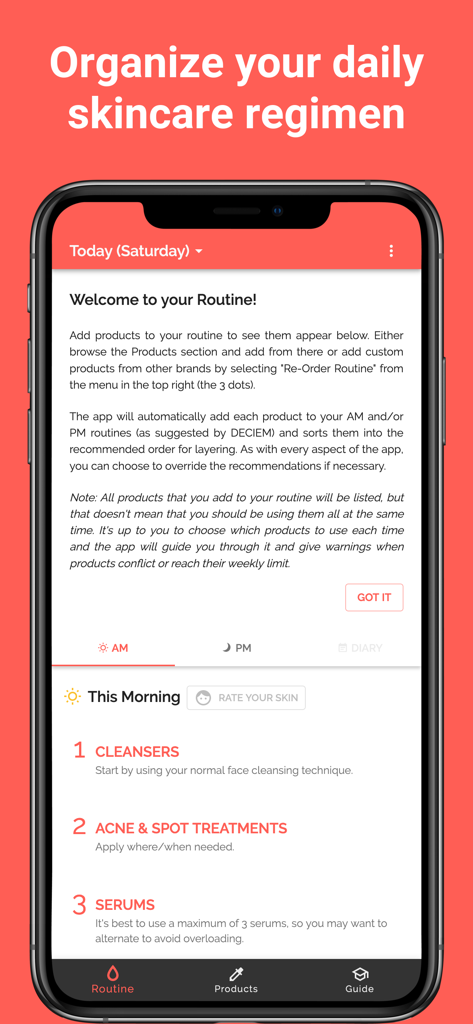
Mobile app interface for organizing a daily skincare routine with morning layering steps

Mobile app interface for organizing a daily skincare routine with morning layering steps

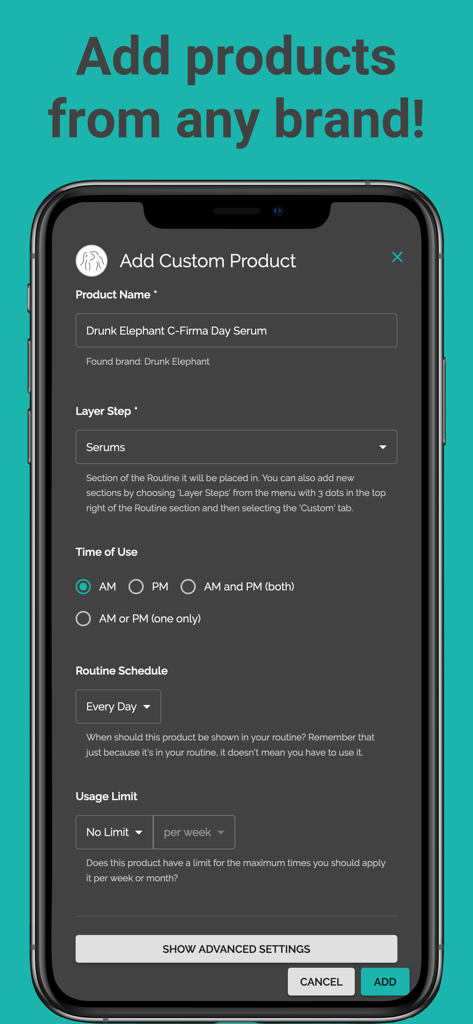
A smartphone showing the Add Custom Product screen in the Skincare Routine app with a serum from Drunk Elephant being added.

A smartphone showing the Add Custom Product screen in the Skincare Routine app with a serum from Drunk Elephant being added.

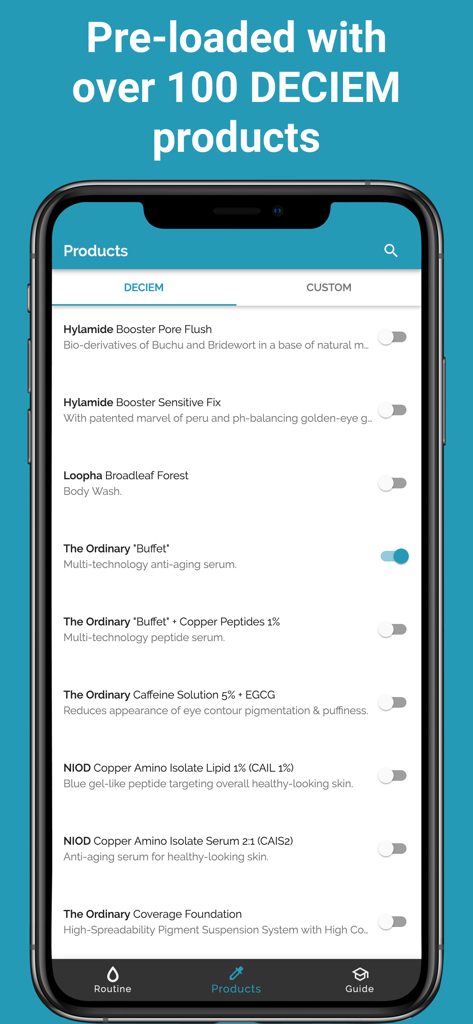
A smartphone displaying a list of pre-loaded DECIEM and The Ordinary products in the Skincare Routine app.

A smartphone displaying a list of pre-loaded DECIEM and The Ordinary products in the Skincare Routine app.

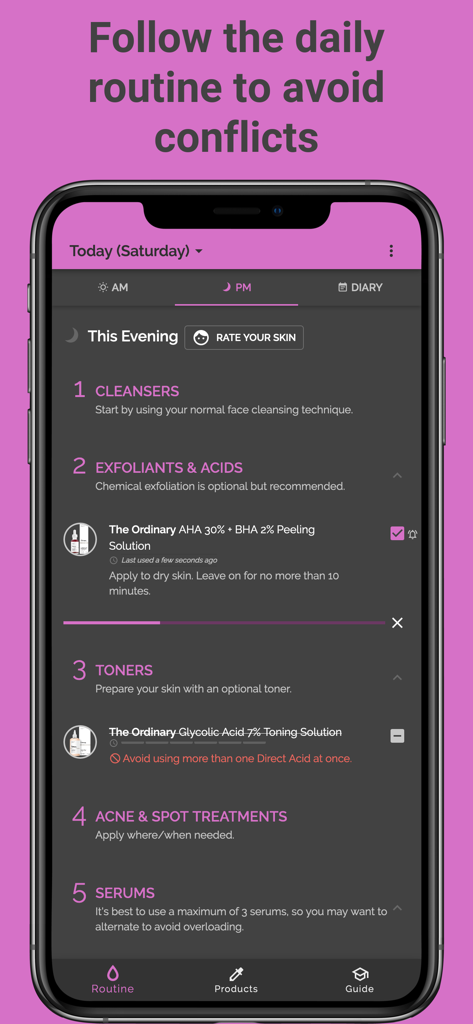
A mobile app interface showing a nightly skincare routine with product layering steps and ingredient conflict warnings.

A mobile app interface showing a nightly skincare routine with product layering steps and ingredient conflict warnings.

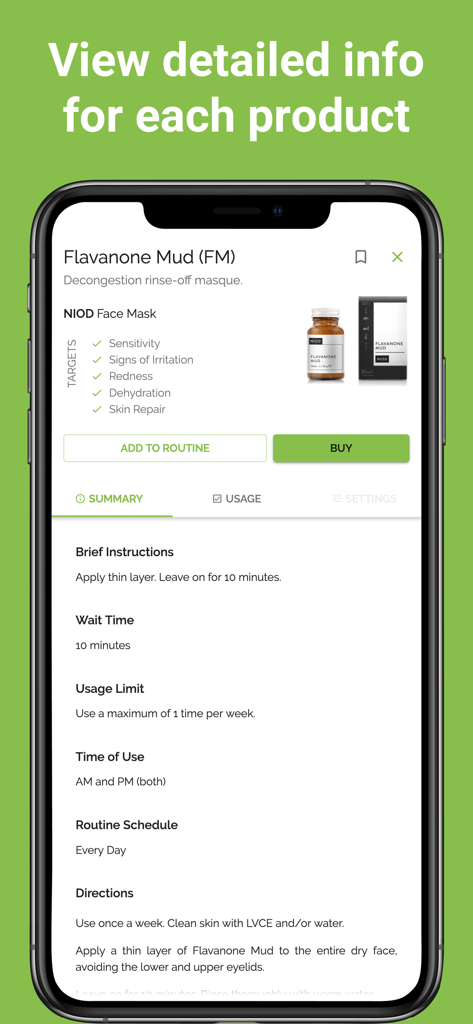
A mobile screen showing detailed product information including instructions and usage limits for a skincare face mask.

A mobile screen showing detailed product information including instructions and usage limits for a skincare face mask.

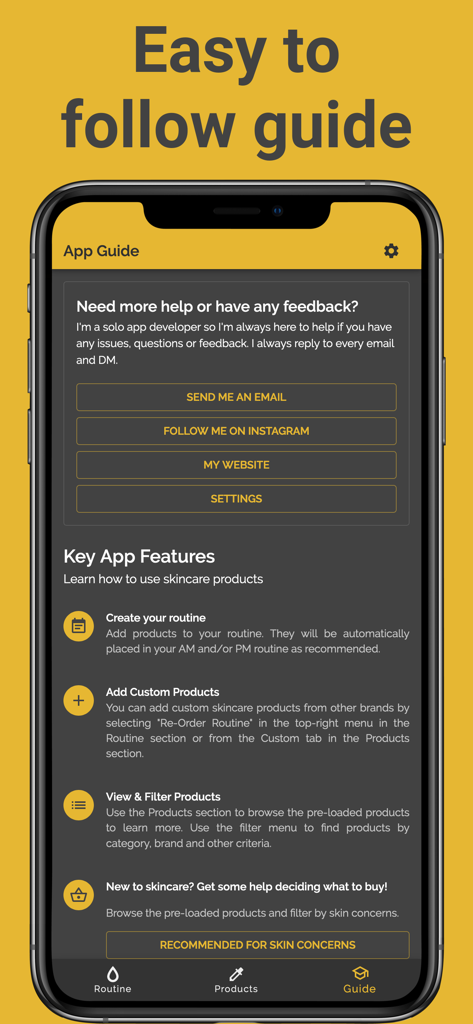
Mobile app screenshot showing the easy to follow guide and key features of the Skincare Routine app.

Mobile app screenshot showing the easy to follow guide and key features of the Skincare Routine app.

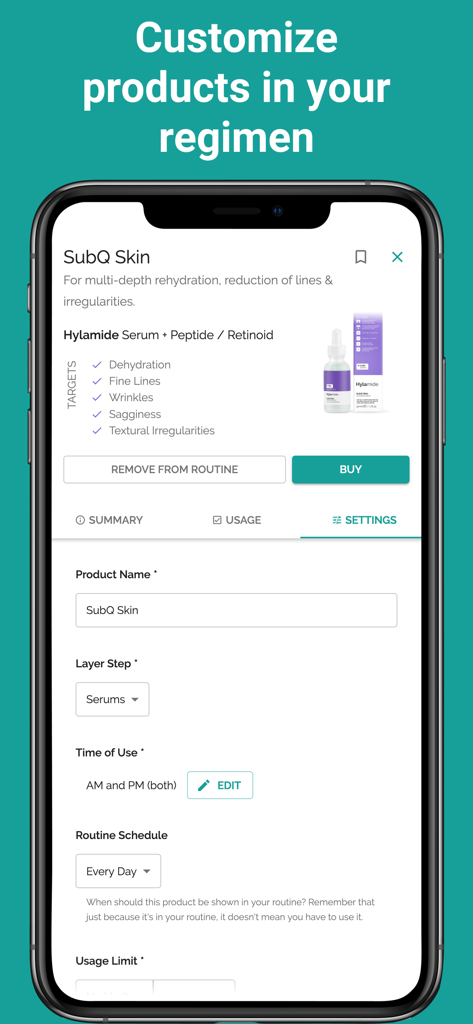
A mobile screen from the Skincare Routine app showing product settings including name, layer step, and usage schedule.

A mobile screen from the Skincare Routine app showing product settings including name, layer step, and usage schedule.

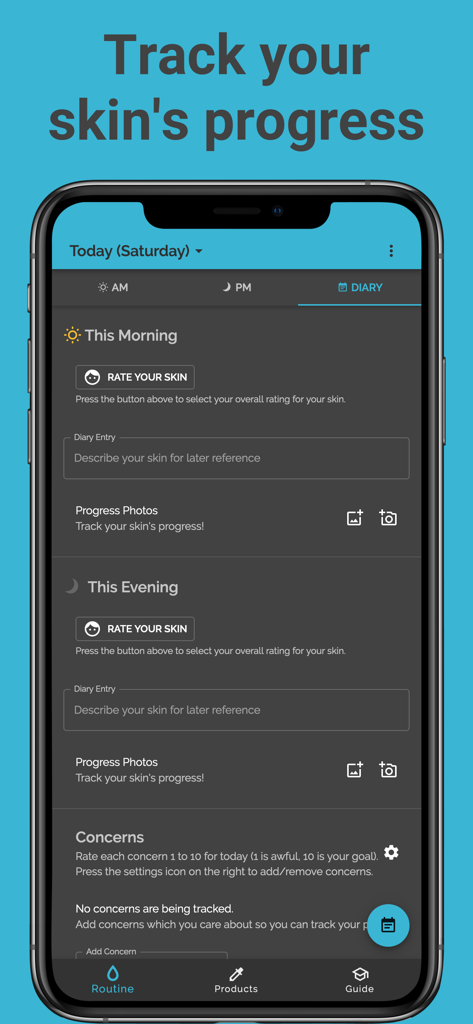
Screenshot of the Skincare Routine app showing the diary section to track daily skin progress with photos and ratings

Screenshot of the Skincare Routine app showing the diary section to track daily skin progress with photos and ratings

Master Your Daily Glow

The tools that make this app stand out, trusted by 279K+ users.

🧪

Smart Layering & Conflict Protection

No more skin barrier damage or wasted products. Our algorithm automatically orders your routine and alerts you if actives like Retinol and Vitamin C shouldn't mix.

📸

Visual Progress Tracking

Document your 'Glow Up' with a dedicated skin diary. Pair photos with daily notes to identify exactly which products are delivering your best skin ever.

💎

Zero Subscriptions, Full Customization

Break free from monthly fees. Pay once to unlock a lifetime of skin health, with the power to add products from any brand and schedule them to fit your lifestyle.

About the app

Everything you need to know about Skincare Routine.

Description

Personalised Skin Tracker & Layering Guide – No Subscription! One-off purchase • Automatically orders your AM/PM routine • Avoids ingredient conflicts • Diary with photos. Transform your skincare and beauty regimen with a personalized routine! Skincare Routine helps you discover the best order to apply your skincare and makeup products, track your usage, and achieve your best skin ever. The app comes pre-loaded with DECIEM (The Ordinary, NIOD, Hylamide & Fountain) products but you can add any skin treatments from any brand including Drunk Elephant, Pixi Beauty, Paula's Choice, The Inkey List and any of your favourite brands! Note: The app price is a one-off payment and there are currently no subscriptions or recurring payments. *** Key App Features *** • CREATE YOUR ROUTINE Add products to your routine. They will be automatically placed in your AM and/or PM routine as recommended. • ADD CUSTOM PRODUCTS You can add custom skincare products from other brands by selecting the option in the top-right menu in the Routine section or from the Custom tab in the Products section. • USE YOUR ROUTINE FOR LAYERING ADVICE The products are listed in the recommended layering order, along with advice for when and how to use each product. • KEEP TRACK OF USAGE TO AVOID CONFLICTS Each morning and evening, check each product off your list to keep track of which treatments you have used. This will allow the app to prevent any conflicts by showing you which products should be avoided. • TRACK YOUR SKIN'S PROGRESS Any time you notice your skin is looking particularly good or bad, you can make a note of it by pressing on the face icon next to the morning or evening routine. You can also add a comment to note down more details for your own record and add photos to track your progress. • ADD PHOTOS You can add photos of your skin to your diary tracker and also add photos of custom products. • REMINDERS & TIMERS You can set up notifications to remind you about your daily skin regimen. You can also set timers for products which require a specific wait time. Both can be found in the Settings. *** Advanced App Customisation *** • RE-ORDER YOUR ROUTINE If you don't wish to follow the recommended layering order, you can choose to re-order the products to fully customise your routine by selecting the option from the top right menu (with 3 dots) of the Routine section. You can also change the order of the layer steps, for instance DECIEM recommends oils before moisturisers but some users prefer the other way around. • USE CONFLICTING PRODUCTS When we recommend not using a product due to conflicts with other products or because you've reached the usage limit, you can choose to ignore the warning and use it anyway. You will then have the option to permanently ignore conflicts on that specific product. • SCHEDULE PRODUCTS You can choose specific days of the week for a product if you wish. For instance, you may wish to make it so that the "AHA 30% + BHA 2% Peeling Solution" only appears in your routine on Tuesdays and Fridays. You can also choose dates of the month, e.g. the 1st and 15th of every month. Another useful option is to schedule products for every X days, so you could choose every 2 days to alternate. *** Recommended for skin concerns... *** • Dry & Dehydrated Skin: Achieve plump, healthy-looking hydrated skin. • Acne-Prone Skin: Reduce inflammation to help support clear skin. • Blemishes & Congestion: Reduce inflammation and brighten the skin. • Sensitive Skin: Keep your skin moisturised with this gentle routine. • Mature Skin & Wrinkles: Promote youthful skin and reduce the signs of ageing. • Pigmentation Problems: Gently exfoliate and brighten skin tone. • Oily Skin: Rebalance your skin for a healthy, fresh look. Please note, Skincare Routine (previously known as "Skincare Regimen Organiser") has no connection with DECIEM, The Ordinary or any other skincare brand.

Latest Version

7.4.64

Size

26.6 MB

First Released

Aug 18, 2018

Master Your Glow Without the Guesswork

Join over 279,000 users who have perfected their layering. Get your personalized routine and conflict-checker today for a one-time purchase—no subscriptions, ever.

Download on App StoreDownload on Google Play
FAQ

Frequently Asked Questions

Everything you need to know about Skincare Routine

Does the Skincare Routine app require a subscription?

No, the Skincare Routine app does not require a subscription. It is available as a one-off purchase without any recurring payments.

Can I add custom skincare products from any brand to the Skincare Routine app?

Yes, the Skincare Routine app allows you to add custom skincare products from any brand. You can add them from the Custom tab in the Products section or via the top-right menu in the Routine section.

How does the Skincare Routine app automatically order AM/PM routines?

The Skincare Routine app automatically places added products into your AM and/or PM routine. It recommends a layering order, which you can choose to re-order if desired.

How does Skincare Routine app help avoid ingredient conflicts?

The Skincare Routine app tracks your usage of products. By checking off used treatments, the app identifies and displays which products should be avoided to prevent conflicts.

Can I track my skin's progress with photos in the Skincare Routine app?

Yes, the Skincare Routine app allows you to track your skin's progress. You can make notes, add comments, and include photos in your diary to record changes.

Which skincare brands come pre-loaded in the Skincare Routine app?

The Skincare Routine app comes pre-loaded with DECIEM products, including The Ordinary, NIOD, Hylamide, and Fountain. Users can also add products from other brands.

Can I schedule specific products for certain days in the Skincare Routine app?

Yes, the Skincare Routine app allows product scheduling. You can choose specific days of the week, dates of the month, or set products to appear every X days.

Can users re-order the recommended layering sequence in the Skincare Routine app?

Yes, users can re-order products in the Skincare Routine app. This option is available in the top-right menu of the Routine section, allowing full customization of the layering steps.

Does the Skincare Routine app offer reminders for daily regimens?

Yes, the Skincare Routine app provides reminders. You can set up notifications for your daily skincare regimen and timers for products requiring specific wait times, both found in Settings.

App information, icons, screenshots, and descriptions displayed on this page are sourced from the Apple App Store and are the property of their respective developers. Download estimates and rankings are based on MWM's proprietary models and may not reflect actual figures. This page is provided for informational and analytical purposes only.

Believe this page infringes your intellectual property? File a dispute