Sound Game Training

Sound Game Training

Download on App Store
Logo of Sound Game Training

Sound Game Training: Master Any Chart and Reach All Perfect

Analyze difficult patterns with slow-motion, A-B looping, and mirror mode. Build the muscle memory needed to hit your next Full Combo without wasting in-game stamina.

Publisher

hiroki kawakami

Category

Music

Downloads

377K+

User Rating

4.8/5

Total Ratings

13K+

Locales

5

Analyze Every Frame

Discover the interface used by 377K+ users.
Sound Game Training app banner featuring an anime character celebrating with headphones and confetti

Sound Game Training app banner featuring an anime character celebrating with headphones and confetti

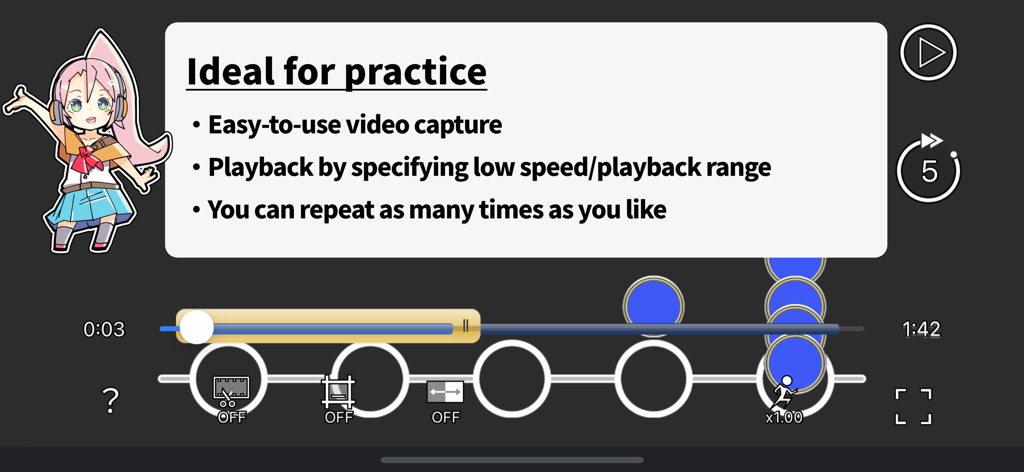
The practice interface of the Sound Game Training app showing a rhythm game chart with playback speed and range controls.

The practice interface of the Sound Game Training app showing a rhythm game chart with playback speed and range controls.

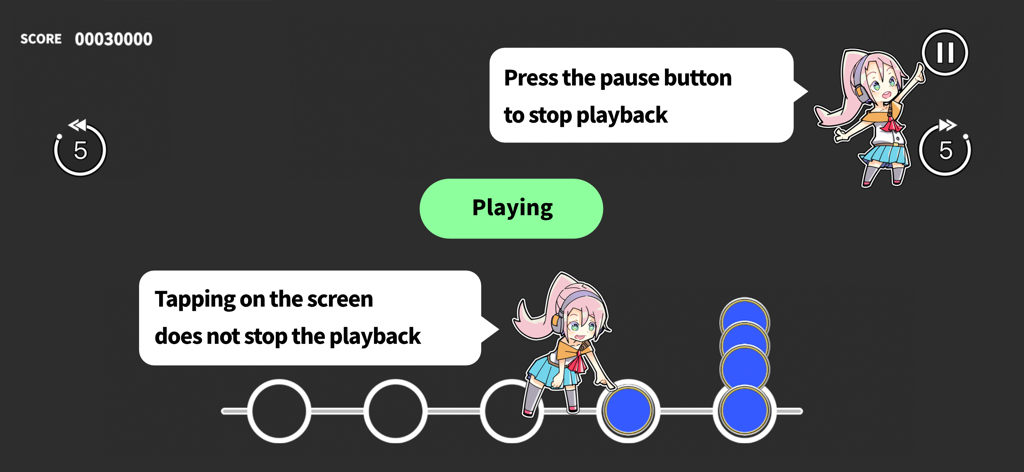
Interface of Sound Game Training app showing video playback controls and touch-through practice instructions

Interface of Sound Game Training app showing video playback controls and touch-through practice instructions

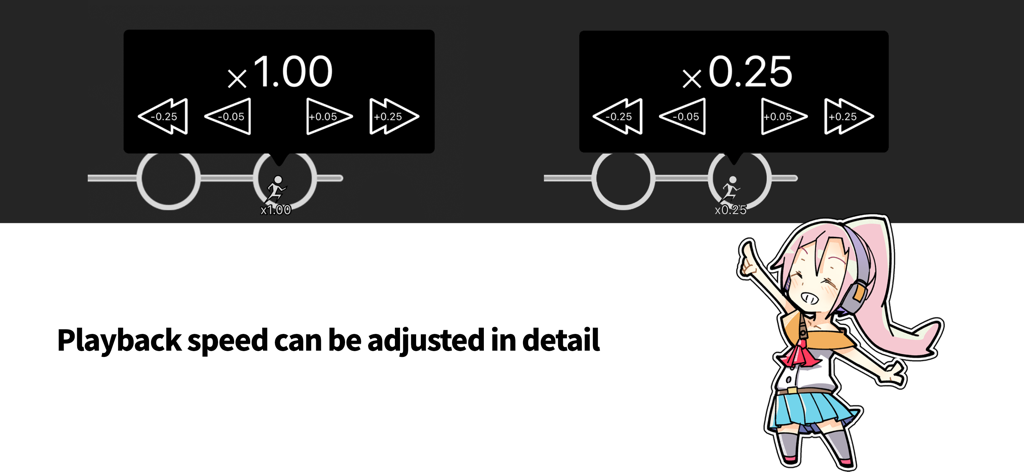
Interface of the Sound Game Training app showing detailed playback speed adjustment controls from 1.00x to 0.25x

Interface of the Sound Game Training app showing detailed playback speed adjustment controls from 1.00x to 0.25x

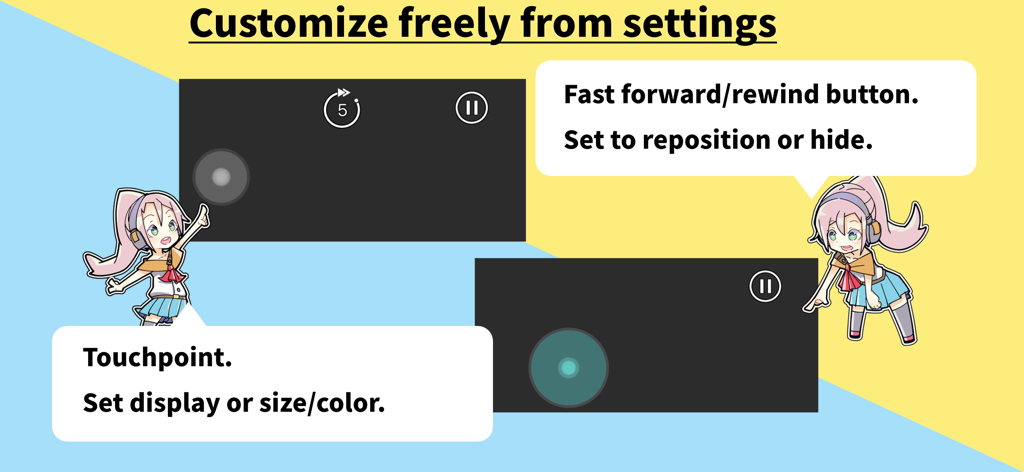
Interface of Sound Game Training app showing customizable touchpoints and playback buttons with anime character guides.

Interface of Sound Game Training app showing customizable touchpoints and playback buttons with anime character guides.

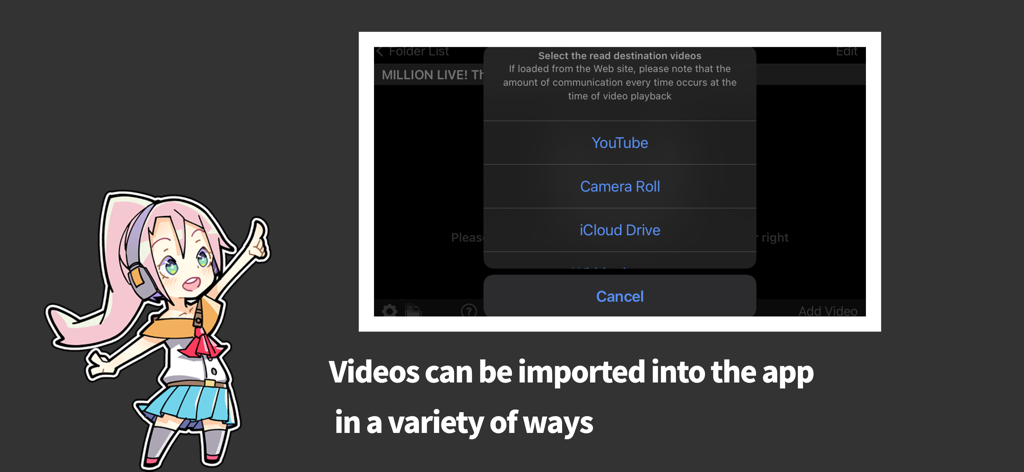
Interface showing video import options from YouTube Camera Roll and iCloud Drive in the Sound Game Training app

Interface showing video import options from YouTube Camera Roll and iCloud Drive in the Sound Game Training app

Master Your Favorite Charts

The tools that make this app stand out, trusted by 377K+ users.

⏱️

Frame-Perfect Analysis

Slow down the action to 0.25x speed to decode complex 'note salads' and rapid-fire patterns that are too fast for the naked eye.

🔁

Target Your 'Walls'

Don't waste time on the easy parts. Set custom loop points to repeat difficult sections over and over until your muscle memory is flawless.

🖐️

Penalty-Free Practice

Tap directly on the video without pausing. Practice with mirrored or zoomed views to build dexterity without spending in-game stamina or energy.

About the app

Everything you need to know about Sound Game Training.

Description

I can't do a full combo... I want to improve my score... I can't get the All Perfect... If you're like this, you need to train! This app specializes in training sound games with video. You can do the things you need to do to improve your score: memorize the chart, memorize the rhythm, and think about how to move your fingers. For example, to practice, you can do the following - Play the video at "slow speed" to see where you missed it. - Play full combo videos that others have uploaded to YouTube and learn the rhythm by touching the judging line. It's a video, so you can play it over and over again to review. Try to stay calm and review the difficult parts one at a time. Keep practicing the videos "at low speed" and "only the difficult parts over and over again" and you'll be able to improve your skills! ______________________________ MAIN FUNCTIONS - Play video in "Camera Roll", "iCloud Drive", "Transfer from iTunes", "YouTube". - Touching the screen during video playback will not pause the video. - Adjust the start/end position of video playback. - Zoom in or out on the video. - Adjust the video playback position. - Set the video playback speed from 0.25 to 2.00 times. - Set an area of the video playback. - Flip the video from left to right. - Support portrait and landscape video orientation. - Display the tap position line for some applications. - Easily rewind and fast forward during playback. What this app doesn't do - Video playback is not included. SUPPORTED APPLICATION The following mobile games support displaying the tap position line. - Deemo - VOEZ - Arcaea - Dynamix - BanG Dream! - HATSUNE MIKU: COLORFUL STAGE! - THE IDOLM@STER MILLION LIVE! Theater Days - THE IDOLM@STER CINDERELLA GIRLS STARLIGHT STAGE - THE IDOLM@STER SideM GROWING STARS - THE IDOLM@STER SHINY COLORS Song for Prism - Love Live! School idol festival - Love Live! School idol festival 2 - HYPNOSISMIC -A.R.B- - Ensemble Stars!! Music - Re:Stage! Prism Step - D4DJ Groovy Mix - HoneyWorks Premium Live - Tokyo 7th Sisters - Uta Macross - Girlfriend (note) - Touhou Danmaku Kagura - World Dai Star -Stellarium of Dreams- *You may not be able to adjust the touch position, depending on the device where you recorded the playback video. STAFF App development: hyoromo Character design: Sin:cK TERMS AND CONDITIONS FOR IN-APP PURCHASES https://hyoromo.github.io/sound-game-training/in-app-purchase-terms/

Latest Version

2.5.7

Size

40.2 MB

First Released

Mar 8, 2016

Master Every Chart. Achieve Your All Perfect.

Stop wasting stamina and start training smarter. Loop difficult sections, slow down the speed, and build the muscle memory you need to conquer the leaderboard.

Download on App Store
FAQ

Frequently Asked Questions

Everything you need to know about Sound Game Training

What is the Sound Game Training app?

Sound Game Training is an app designed to help users improve their scores in rhythm games. It specializes in training with video playback, allowing detailed analysis and practice of charts and rhythms.

How does Sound Game Training improve rhythm game skills?

Sound Game Training helps by allowing users to practice with video. Features like slow-speed playback, adjustable video ranges, and repeated reviews enable memorization of charts and rhythms, and refinement of finger movements.

Can I adjust video playback speed in Sound Game Training?

Yes, Sound Game Training allows users to adjust video playback speed. You can set the speed from 0.25 to 2.00 times, with fine-tuned adjustments available using 0.05 and 0.25 increments.

What video sources does Sound Game Training support for practice?

Sound Game Training supports video playback from Camera Roll, iCloud Drive, YouTube, and transfers from iTunes. Users can import their practice videos from these various sources.

Does touching the screen pause the video in Sound Game Training?

No, touching the screen during video playback in Sound Game Training does not pause the video. Playback continues uninterrupted to facilitate continuous practice.

Does Sound Game Training provide practice videos?

No, Sound Game Training does not include video playback content within the app itself. Users must provide their own videos from supported sources like Camera Roll or YouTube for practice.

Which rhythm games are supported by Sound Game Training's tap position line feature?

Sound Game Training supports displaying the tap position line for mobile games including Deemo, VOEZ, Arcaea, BanG Dream!, HATSUNE MIKU: COLORFUL STAGE!, and various THE IDOLM@STER titles.

Can I set specific playback ranges for videos in Sound Game Training?

Yes, Sound Game Training allows users to adjust the start and end positions of video playback. This enables focused practice on specific, difficult sections of a song.

Are there in-app purchases in Sound Game Training?

Yes, Sound Game Training includes in-app purchases. The terms and conditions for these purchases are accessible via a provided link within the app's description.

App information, icons, screenshots, and descriptions displayed on this page are sourced from the Apple App Store and are the property of their respective developers. Download estimates and rankings are based on MWM's proprietary models and may not reflect actual figures. This page is provided for informational and analytical purposes only.

Believe this page infringes your intellectual property? File a dispute