TwistedWave Recorder

TwistedWave Recorder


Download on App Store
Logo of TwistedWave Recorder

TwistedWave Recorder: Professional Studio Power in Your Pocket

The fast, fluid, and high-fidelity audio engine built for prosumers. Record in 24-bit, edit with precision, and manage massive files without ever slowing down your creative workflow.

Publisher

TwistedWave Software Ltd.

Category

Music

Downloads

144K+

User Rating

4.7/5

Total Ratings

800

Locales

2

Precision at Your Fingertips

Discover the interface used by 144K+ users.
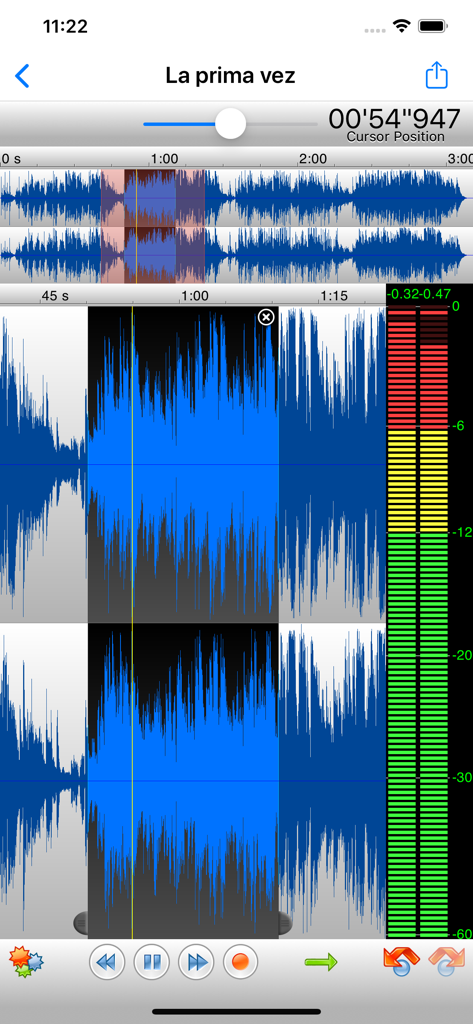
TwistedWave Recorder mobile app showing stereo audio waveforms and recording levels

TwistedWave Recorder mobile app showing stereo audio waveforms and recording levels

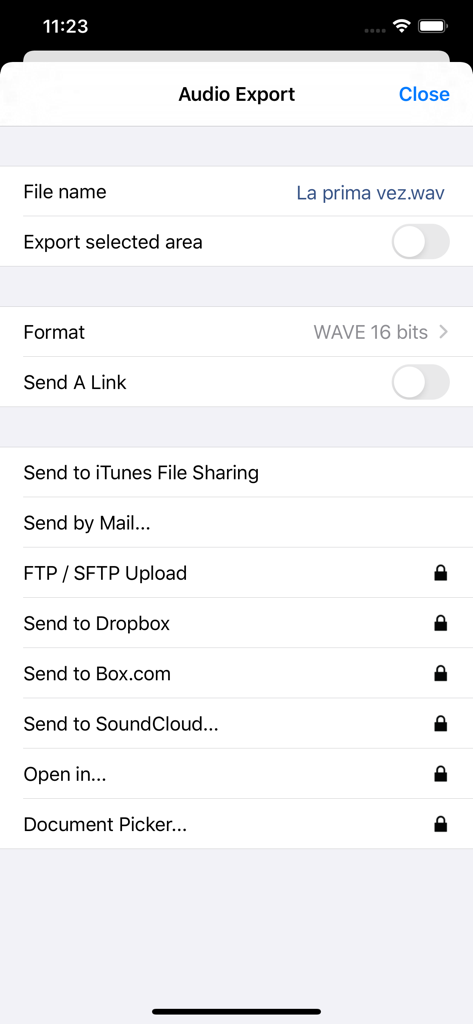
TwistedWave Recorder audio export menu with cloud storage and file format options.

TwistedWave Recorder audio export menu with cloud storage and file format options.

Desktop-Class Power in Your Mobile Studio

The tools that make this app stand out, trusted by 144K+ users.

Lag-Free High-Res Performance

Record in 24-bit/96kHz with zero latency. Our engine is built to handle massive files fluidly, so you never have to worry about memory limits or crashes during critical sessions.

🎚️

Professional Grade Processing

Transform your audio with industry-standard ZTX time-stretching and full AUv3 extension support. Access unlimited undo/redo and a suite of professional filters and effects instantly.

🌐

Frictionless Pro Workflow

Move files effortlessly with WiFi browser access or direct exports to SoundCloud, Dropbox, and FTP. Integrate your external microphones and Audiobus apps for a complete mobile setup.

About the app

Everything you need to know about TwistedWave Recorder.

Description

TwistedWave is a very fast and easy to use audio editor and recorder. Even when working with huge files, it will remain very fast and fluid, and will never run out of memory. TwistedWave Recorder is the free version of TwistedWave Audio Editor. You can use it to record and send audio by email. Once the full editing functionality and the extra export options have been purchased, "TwistedWave Recorder" and "TwistedWave Audio Editor" offer the same feature set. UNIQUE TO TWISTEDWAVE • Very fluid, even with very large files • Unlimited undo / redo history, happens instantly RECORD AUDIO • No duration limit other than the available storage • Up to 24 bit / 96 kHz audio if your audio interface supports it • Record stereo audio with the built-in microphone (iPhone XS or more recent) • Record studio quality audio with an external microphone • Record audio from other music applications with Audiobus APPLY EFFECTS (with in-app purchase) • Precision Time Stretching & Pitch Shifting technology licensed from ZTX • All the AudioUnit extensions (AUv3) available on the App Store can be used with TwistedWave • Cut, copy / paste audio around • Fade in / out • Reverb • Delay / echo • Distortion • Equalizer (parametric, or iPod EQ) • Dynamics processor, can be used as a compressor or a noise gate • Peak limiter to amplify audio without causing distortion • Amplify or normalize the audio to a given level • Filters (low-pass, high-pass, band-pass, low-shelf, high-shelf) • Convert the sampling rate (with SoX' very high quality resampler) • Reverse. Play the file backwards, mostly for fun! MANY FILE FORMATS SUPPORTED • WAV • M4A (AAC or Apple Lossless) • MP3 (Encoded with the LAME MP3 encoder for the best quality) • FLAC • AIFF • CAF MANY IMPORT OPTIONS • Import songs from the music library • Import files from the Files app • Import files from an SD card or USB drive, with the right adapter • Open files sent from other apps • Browser access, send a file to TwistedWave from a device on the same WiFi network MANY EXPORT OPTIONS (with in-app purchase) • Send your files by - Email (available free, without the in-app purchase) - iMessage - SoundCloud - Dropbox - AudioCopy - An FTP or SFTP account - Any app that accepts audio files • Export multiple files in a single ZIP file • Browser access to allow downloading and uploading files from/to TwistedWave • File too large? Just send a link. (30 days for free on TwistedWave's servers) BROWSER ACCESS (with in-app purchase) Connect to the TwistedWave app from a web browser on another device or computer on the same WiFi network, and: • Play and download the files directly from a browser • Send files to TwistedWave by drag and dropping them in the browser

Latest Version

1.91

Size

32.7 MB

First Released

Dec 20, 2013

Ready to Transform Your iPhone into a Professional Studio?

Join 144,000+ creators using the most fluid, high-performance audio recorder on iOS. Get started for free and experience zero-lag recording and studio-grade 24-bit quality today.

Download on App Store

App information, icons, screenshots, and descriptions displayed on this page are sourced from the Apple App Store and are the property of their respective developers. Download estimates and rankings are based on MWM's proprietary models and may not reflect actual figures. This page is provided for informational and analytical purposes only.

Believe this page infringes your intellectual property? File a dispute