
Diese Seite ist keine offizielle Seite der App oder ihres Entwicklers, sondern eine unabhängige redaktionelle Veröffentlichung, die zu Informations- und Kommentarzwecken erstellt wurde. Sofern nicht ausdrücklich anders angegeben, sind weder die App noch ihr Entwickler mit MWM, Apple, Google Play, dem App-Herausgeber oder dem Entwickler der App verbunden, von ihnen unterstützt, gesponsert, autorisiert oder anderweitig offiziell verbunden, und nichts auf dieser Seite impliziert, dass die App unter Verwendung der Dienste von MWM entwickelt wurde. Alle Marken, Logos, Screenshots und andere Inhalte bleiben Eigentum ihrer jeweiligen Inhaber.


Affinity Publisher 2 for iPad
Gestalte überall, erobere den Druck. Diese App eliminiert Kompromisse bei Layout und Design – auf dem iPad.
Downloads
1M+Bewertung
Bewertungen gesamt
807Herausgeber
Kategorie
Graphics & DesignSprachen
8Neueste Version
2.6.4Größe
1.7 GBErstveröffentlichung
9. Nov. 2022Eine Bewertung der wichtigsten Merkmale, die das Desktop-Publishing auf dem iPad neu definieren, basierend auf ihrer Relevanz für professionelle Anwender und Selbstständige.
Analyse: Affinity Publisher 2 for iPad – Kernfunktionen für Kreativprofis
Professionelle Ausgabe für Druck und Export
Die App gewährleistet professionelle Druckergebnisse durch Unterstützung von End-to-End CMYK, PANTONE und Sonderfarben sowie Live-Preflight-Prüfungen und den Export in branchenüblichen PDF/X-Formaten.
Nahtlose Integration über StudioLink
Mittels StudioLink können Nutzer sofort zu den erweiterten Fotobearbeitungsfunktionen von Affinity Photo oder den präzisen Vektorwerkzeugen von Affinity Designer wechseln, ohne die App verlassen zu müssen, was einen einzigartig flüssigen Workflow in der Affinity Suite schafft.
iPad-Optimierung und Apple Pencil Unterstützung
Die App ist vollständig für iPad-Gesten, den Command Controller und Quick Menus optimiert, was den Workflow beschleunigt. Sie nutzt die volle Präzision des Apple Pencil und die Metal-Beschleunigung für schnelle Leistung.
Umfassende Produktivitäts-Tools
Dieses Tool verfügt über einen Sektionen-Manager, automatische Index- und Inhaltsverzeichnis-Generierung, intelligente Master-Seiten und die Möglichkeit, Dokumente als Vorlagen zu speichern, was die Effizienz in komplexen Projekten erheblich steigert.
Professionelle Layout-Werkzeuge
Es bietet eine umfassende Suite an Layout-Funktionen wie gegenüberliegende Seiten, Live-Master-Seiten, fortschrittliche Hilfslinien und Rasten sowie Textumfluss um Objekte, was präzises und komplexes Seitendesign ermöglicht.
Erweiterte Typografie-Kontrolle
Die App ermöglicht volle Kontrolle über Zeichen- und Absatzstile, umfassende OpenType-Unterstützung und die Möglichkeit, Text entlang beliebiger Pfade zu platzieren, was anspruchsvolle Textgestaltung sicherstellt.
Flexible Inhaltsplatzierung und Dateikompatibilität
Die App bietet erweiterte Optionen für die Platzierung von Inhalten, einschließlich der Unterstützung für IDML- und XLSX-Import, und ermöglicht den Import/Export aus Adobe InDesign und anderen Programmen. Es unterstützt auch verknüpfte Webbilder und AutoCAD-Dateien.
Präzise Bild- und Grafikbearbeitung
Es unterstützt das Verknüpfen oder Einbetten verschiedenster Bildformate und bietet nicht-destruktive Anpassungsebenen. Präzisionswerkzeuge für Vektorgrafiken und Boolesche Operationen sind ebenfalls integriert.
Häufig gestellte Fragen
Alles, was Sie über wissen müssen Affinity Publisher 2 for iPad
What is Affinity Publisher 2 for iPad?
Affinity Publisher 2 for iPad is an on-the-go page layout and design app. It enables users to create books, brochures, posters, reports, and more, offering the power of its desktop publishing software.
Is Affinity Publisher 2 for iPad optimized for iPad features?
Yes, Affinity Publisher 2 for iPad is optimized for iPad. It features gesture controls, a Quick Menu, Apple Pencil support, Metal acceleration for performance, and iCloud Drive integration for file management.
Does Affinity Publisher 2 for iPad support Apple Pencil?
Yes, Affinity Publisher 2 for iPad supports Apple Pencil. The app is sensitive to pressure, tilt, and angle, harnessing the full power and precision of the Apple Pencil for design tasks.
Does Affinity Publisher 2 for iPad integrate with iCloud Drive?
Yes, Affinity Publisher 2 for iPad includes full iCloud Drive integration. This feature allows for seamless file management, storage, and sharing of documents directly within the app.
Can Affinity Publisher 2 for iPad handle professional page layouts?
Yes, Affinity Publisher 2 for iPad provides professional layout tools. These include facing page spreads, live master pages, advanced guides, tables, text wrapping, and the ability to link multiple text frames.
Does Affinity Publisher 2 for iPad support footnotes and endnotes?
Yes, Affinity Publisher 2 for iPad supports footnotes, sidenotes, and endnotes. Users can incorporate these elements into their documents for academic or reference purposes.
What typography features does Affinity Publisher 2 for iPad offer?
Affinity Publisher 2 for iPad offers advanced typography features. These include full control over character and paragraph styles, comprehensive OpenType support, text along any path, and advanced flow options.
Does Affinity Publisher 2 for iPad support OpenType fonts?
Yes, Affinity Publisher 2 for iPad provides comprehensive OpenType support. This allows users to access advanced typographic features for detailed text formatting in their designs.
What image and graphic formats can Affinity Publisher 2 for iPad import?
Affinity Publisher 2 for iPad can import PSD, AI, PDF, JPG, TIFF, PNG, DWG, or Affinity files. Users can link or embed these images and graphics into their documents.
Does Affinity Publisher 2 for iPad support non-destructive image editing?
Yes, Affinity Publisher 2 for iPad supports non-destructive image editing. Users can correct and enhance images using adjustment layers, preserving original image data.
How does Affinity Publisher 2 for iPad enhance productivity?
Affinity Publisher 2 for iPad enhances productivity with features like a section manager, savable undo history, smart master pages, automatic index/TOC generation, and the Package feature for collating document resources.
Can Affinity Publisher 2 for iPad package documents for sharing?
Yes, Affinity Publisher 2 for iPad can package documents. The Package feature collates the document with all used image and font resources into a folder, facilitating collaboration and sharing.
Does Affinity Publisher 2 for iPad have PDF passthrough?
Yes, Affinity Publisher 2 for iPad features PDF passthrough. This allows users to flag imported PDFs, ensuring professional output and integration within their layouts.
Does Affinity Publisher 2 for iPad support auto-flow for content?
Yes, Affinity Publisher 2 for iPad supports auto-flow. It offers autoflow for multiple images and multi-page PDFs, which helps save time during document creation and layout.
Can Affinity Publisher 2 for iPad create multi-page spreads?
Yes, Affinity Publisher 2 for iPad allows users to easily create multi-page spreads. This feature is part of its professional layout tools for designing publications effectively.
Can Affinity Publisher 2 for iPad import InDesign files?
Yes, Affinity Publisher 2 for iPad supports importing from Adobe InDesign® and other programs via IDML. This facilitates transferring existing projects into the application.
Does Affinity Publisher 2 for iPad integrate with Dropbox?
Yes, Affinity Publisher 2 for iPad includes Dropbox API integration. This feature helps retain placed resource linkage across multiple devices for seamless workflow and collaboration.
What professional output options are available in Affinity Publisher 2 for iPad?
Affinity Publisher 2 for iPad offers professional output options. These include end-to-end CMYK, PANTONE©, spot color, live preflight checking, and PDF/X-1a, PDF/X-3, PDF/X-4 output.
Does Affinity Publisher 2 for iPad support PANTONE colors?
Yes, Affinity Publisher 2 for iPad supports PANTONE© and spot colors. It provides end-to-end CMYK and color management for professional print output.
Does Affinity Publisher 2 for iPad integrate with other Affinity apps?
Yes, Affinity Publisher 2 for iPad integrates fully with other Affinity apps via StudioLink. Users can instantly switch to Affinity Photo's photo editing or Affinity Designer's vector tools without leaving Publisher.
What is StudioLink in Affinity Publisher 2 for iPad?
StudioLink is a feature in Affinity Publisher 2 for iPad that enables seamless integration with other Affinity apps. It allows users to access Affinity Photo's and Designer's tools directly within Publisher.
Does Affinity Publisher 2 for iPad offer extensive color control?
Yes, Affinity Publisher 2 for iPad provides full color control. It supports end-to-end CMYK, PANTONE©, spot color, and includes vast swatch libraries for precise color management.
Can users create and format tables in Affinity Publisher 2 for iPad?
Yes, Affinity Publisher 2 for iPad allows users to create and format tables. The app provides tools for custom table formats, enhancing document organization and presentation.
Die folgenden Screenshots und die Beschreibung stammen direkt aus dem offiziellen Store-Eintrag der App und sind Eigentum des Entwicklers.
App Store
Screenshots

Dieses Tool ermöglicht die Erstellung von kreativen Seitenlayouts, wie dem dynamischen Textfluss um Objekte und der detaillierten Textformatierung über die intuitive Benutzeroberfläche.
Dynamisches Textlayout

Nutzer können effizient Master-Seiten verwalten, um konsistente Layouts zu erstellen, wie hier in einem Produktkatalog mit verschiedenen Artikeln und zugehörigen Preisinformationen.
Master-Seiten im Einsatz

Die App unterstützt die Einfügung von Fußnoten für wissenschaftliche Arbeiten und bietet über das Notizen-Panel eine präzise Kontrolle über deren Formatierung und Positionierung.
Akademische Präzision

Dieses Tool bietet umfassende Kontrolle über fortgeschrittene Typografie, sichtbar an den stilisierten Text-Elementen des Buchcovers und den vielfältigen OpenType-Optionen zur Anpassung von Schriftzeichen.
Kreative Typografie-Kunst

Die App ermöglicht die nahtlose Integration von PDF-Dateien durch die PDF-Passthrough-Funktion, die im Ebenen-Panel als verknüpfte Datei sichtbar ist und ein professionelles Dokumentenlayout unterstützt.
Integrierte PDF-Dokumente

Nutzer können Dokumente mühelos organisieren und für die Zusammenarbeit vorbereiten, erkennbar an der übersichtlichen Mehrseiten-Vorschau und den intuitiven Optionen zur Seiten- und Abschnittsverwaltung.
Projekt-Organisation

Dieses Tool beschleunigt den Workflow durch automatisches Einfügen von Bildern, wie es die Produktgalerie mit verschiedenen Schmuckstücken demonstriert, und bietet über das Platzierungs-Panel eine schnelle Auswahl und Vorschau von Assets.
Effiziente Bildplatzierung
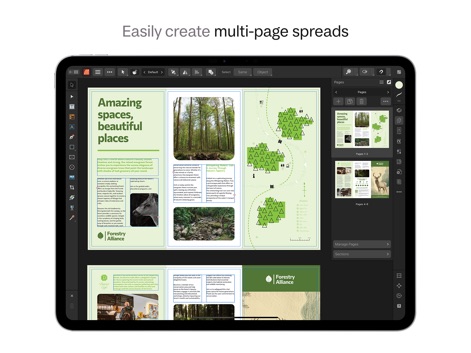
Die App erleichtert die Gestaltung mehrseitiger Spreads für Broschüren, ersichtlich an dem Spaltenlayout mit Text und Bildern sowie der übersichtlichen Seitenverwaltung, die eine schnelle Navigation ermöglicht.
Umfangreiche Broschüren

Nutzer profitieren von vollständiger Farbkontrolle, wie sie die leuchtende Plakatgestaltung zeigt, und können auf umfangreiche Farbfelder-Bibliotheken, inklusive PANTONE, für professionelle Druckergebnisse zugreifen.
Präzise Farbgestaltung

Die App ermöglicht die flexible Erstellung und Formatierung von Tabellen, wie in diesem Yoga-Stundenplan gezeigt, und bietet über das spezielle Tabellen-Panel detaillierte Einstellungen für Linienführung und Zellattribute.
Flexible Tabellenlayouts
Beschreibung
Download
Ähnliche Apps
Apps mit ähnlichen Funktionen und Nutzererfahrung

Brochure Maker, Pamphlet Maker
Bhavesh Gabani

Zine - Enjoy Writing
Aura Marker Studio Co., Ltd.

Pages: Create Documents
Apple Inc.

Price List & Menu Maker
Desygner Pty Ltd

Story Creator - Easy Story Book Maker for Kids
Innovative Mobile Apps Ltd

Book Creator for iPad
Tools for Schools Limited

Book Creator One
Tools for Schools Limited
Diese Seite ist keine offizielle Seite der App oder ihres Entwicklers, sondern eine unabhängige redaktionelle Veröffentlichung, die zu Informations- und Kommentarzwecken erstellt wurde. Sofern nicht ausdrücklich anders angegeben, sind weder die App noch ihr Entwickler mit MWM, Apple, Google Play, dem App-Herausgeber oder dem Entwickler der App verbunden, von ihnen unterstützt, gesponsert, autorisiert oder anderweitig offiziell verbunden, und nichts auf dieser Seite impliziert, dass die App unter Verwendung der Dienste von MWM entwickelt wurde. Alle Marken, Logos, Screenshots und andere Inhalte bleiben Eigentum ihrer jeweiligen Inhaber.