Compass 55. Map & GPS kit.
Herunterladen auf App Store

Diese Seite ist keine offizielle Seite der App oder ihres Entwicklers, sondern eine unabhängige redaktionelle Veröffentlichung, die zu Informations- und Kommentarzwecken erstellt wurde. Sofern nicht ausdrücklich anders angegeben, sind weder die App noch ihr Entwickler mit MWM, Apple, Google Play, dem App-Herausgeber oder dem Entwickler der App verbunden, von ihnen unterstützt, gesponsert, autorisiert oder anderweitig offiziell verbunden, und nichts auf dieser Seite impliziert, dass die App unter Verwendung der Dienste von MWM entwickelt wurde. Alle Marken, Logos, Screenshots und andere Inhalte bleiben Eigentum ihrer jeweiligen Inhaber.


Logo von Compass 55. Map & GPS kit.
Herunterladen auf App Store

Compass 55. Map & GPS kit.

Meistern Sie jedes Gelände mit hochpräzisen MGRS-Koordinaten, Offline-Karten und technischen Tracking-Tools. Eine robuste, datenschutzorientierte Navigations-Suite für Abenteurer und Profis, die volle Kontrolle und keine Datenweitergabe fordern.

Kennzahlen

Downloads

987K+

Bewertung

4.7/5

Bewertungen gesamt

5K+

Herausgeber

Kalimex-Consulting s.r.o.

Kategorie

Navigation

Sprachen

7

Neueste Version

5.2.3

Größe

70.2 MB

Erstveröffentlichung

23. Sept. 2016
Funktionen

Entwickelt für den technischen Abenteurer

Vom Hinterland bis zum Cockpit – Compass 55 liefert professionelle GPS-Tools und absolute Offline-Zuverlässigkeit, ohne Ihren Datenschutz zu gefährden.

Professionelle Präzision

Beherrschen Sie Ihren Standort mit MGRS-, UTM- sowie Breiten- und Längengrad-Koordinaten. Konvertieren, bearbeiten und teilen Sie Wegpunkte mit militärischer Genauigkeit.

Über das Netz hinausgehen

Laden Sie Offline-Karten herunter und importieren Sie benutzerdefinierte Kachelserver. Navigieren Sie in entlegener Wildnis oder auf hoher See, ganz ohne Mobilfunkempfang.

Die folgenden Screenshots und die Beschreibung stammen direkt aus dem offiziellen Store-Eintrag der App und sind Eigentum des Entwicklers.

App Store

Screenshots
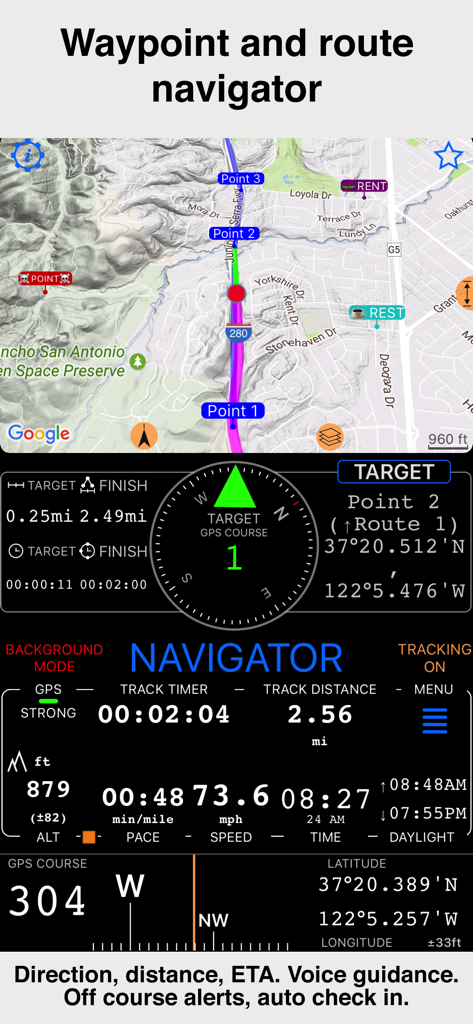
Compass 55. Map & GPS kit. - Compass 55-Benutzeroberfläche mit Wegpunkt- und Routennavigation sowie Geschwindigkeits- und Höhendaten
Compass 55-Benutzeroberfläche mit Wegpunkt- und Routennavigation sowie Geschwindigkeits- und Höhendaten

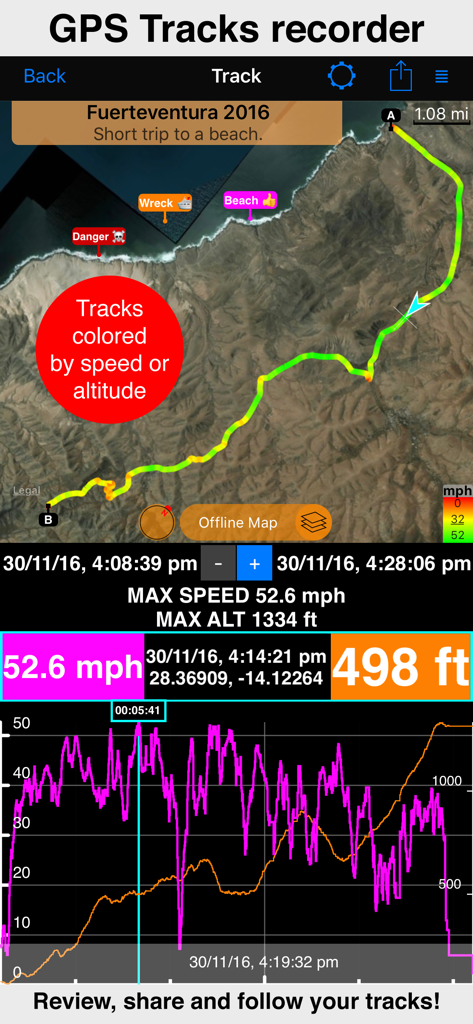
Compass 55. Map & GPS kit. - Bildschirm zur GPS-Track-Aufzeichnung mit Geschwindigkeits- und Höhenstatistiken auf der Karte
Bildschirm zur GPS-Track-Aufzeichnung mit Geschwindigkeits- und Höhenstatistiken auf der Karte

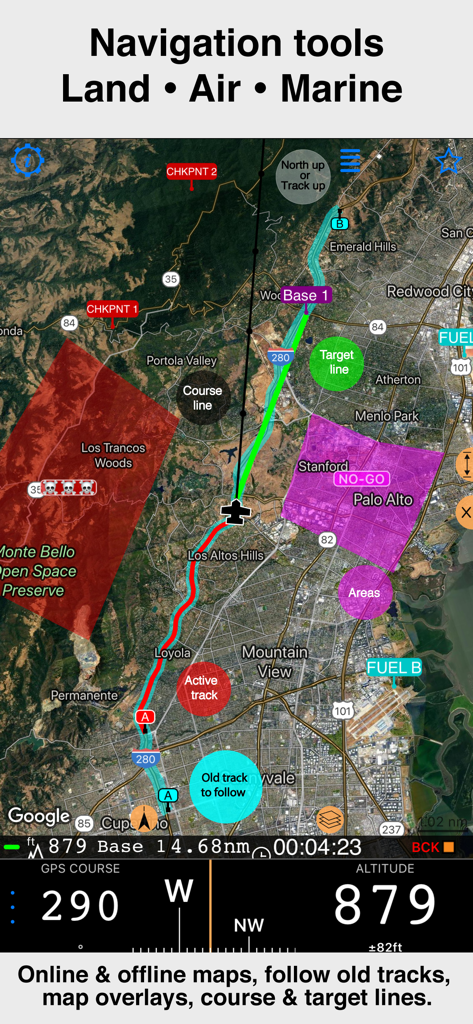
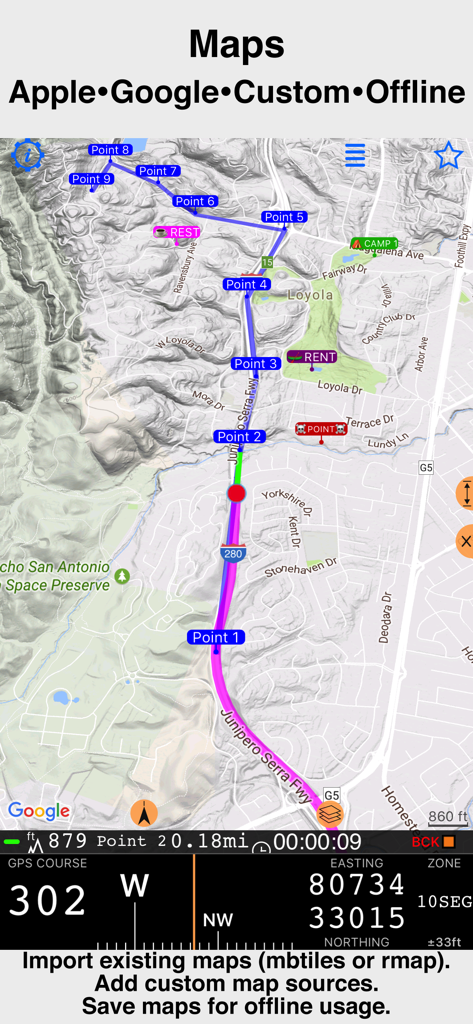
Compass 55. Map & GPS kit. - Professionelle Navigations-Benutzeroberfläche von Compass 55 mit Satellitenkarte, Track-Overlays und Höhendaten
Professionelle Navigations-Benutzeroberfläche von Compass 55 mit Satellitenkarte, Track-Overlays und Höhendaten

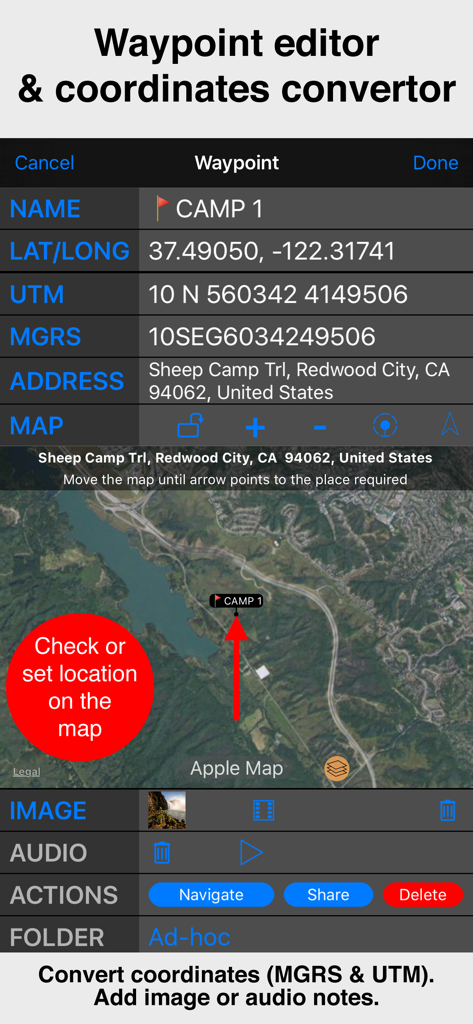
Compass 55. Map & GPS kit. - Benutzeroberfläche des Wegpunkt-Editors von Compass 55 mit MGRS- und UTM-Koordinaten sowie einer Satellitenkartenansicht.
Benutzeroberfläche des Wegpunkt-Editors von Compass 55 mit MGRS- und UTM-Koordinaten sowie einer Satellitenkartenansicht.

Compass 55. Map & GPS kit. - Professionelle Navigationskarte von Compass 55 mit technischen GPS-Koordinaten
Professionelle Navigationskarte von Compass 55 mit technischen GPS-Koordinaten

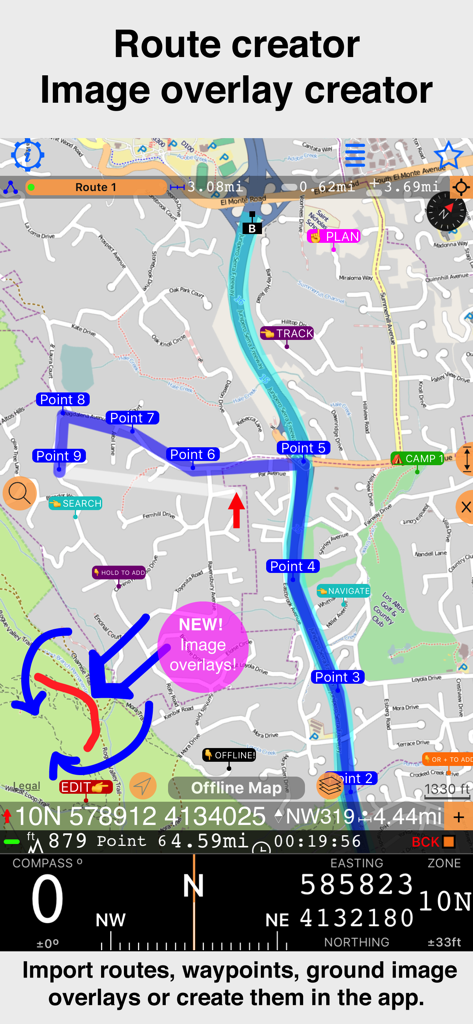
Compass 55. Map & GPS kit. - App-Oberfläche von Compass 55 mit Routenerstellung inklusive Wegpunkten und neuer Bild-Overlay-Funktion auf einer topografischen Karte.
App-Oberfläche von Compass 55 mit Routenerstellung inklusive Wegpunkten und neuer Bild-Overlay-Funktion auf einer topografischen Karte.

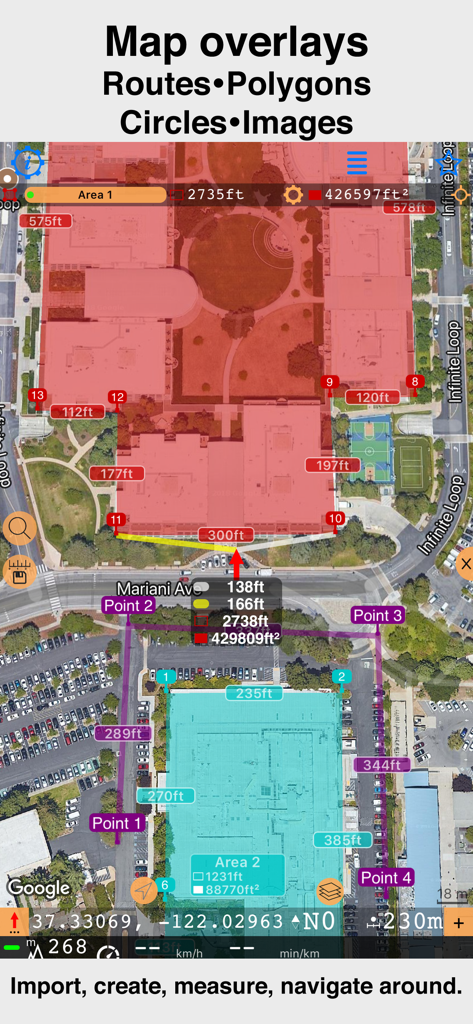
Compass 55. Map & GPS kit. - Satellitenkarten-Oberfläche mit benutzerdefinierten Polygonen und Entfernungsmessungen in Compass 55
Satellitenkarten-Oberfläche mit benutzerdefinierten Polygonen und Entfernungsmessungen in Compass 55

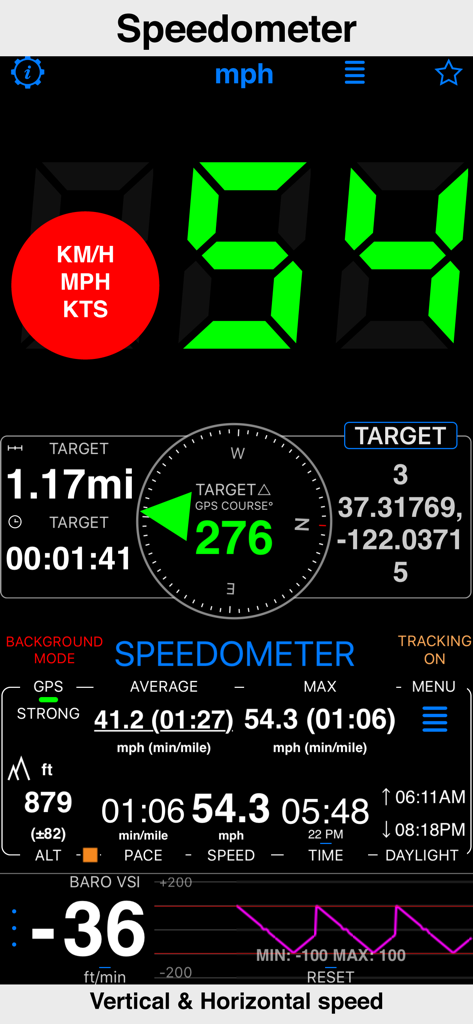
Compass 55. Map & GPS kit. - Tachometer-Oberfläche der Compass 55-App mit horizontaler und vertikaler Geschwindigkeit sowie GPS-Daten
Tachometer-Oberfläche der Compass 55-App mit horizontaler und vertikaler Geschwindigkeit sowie GPS-Daten

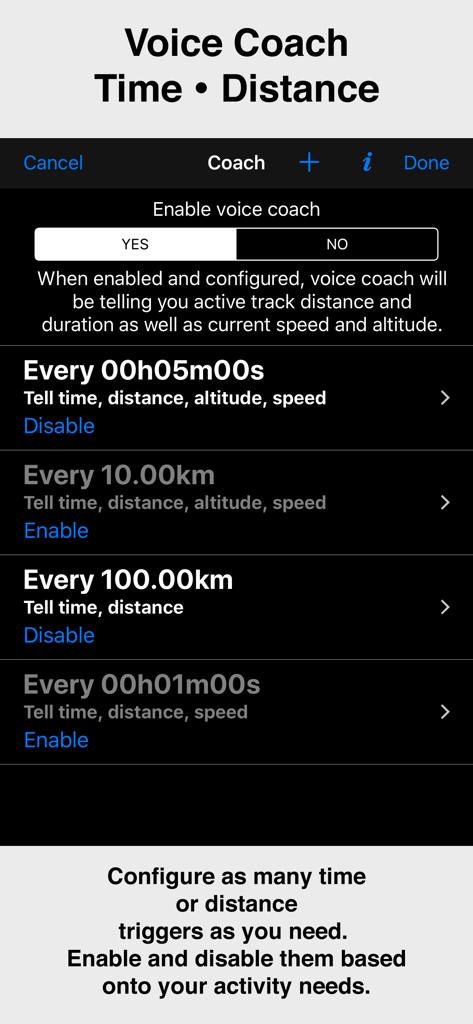
Compass 55. Map & GPS kit. - Konfigurationsbildschirm für die Voice-Coach-Funktion in der Compass 55-App mit Zeit- und Distanz-Triggern
Konfigurationsbildschirm für die Voice-Coach-Funktion in der Compass 55-App mit Zeit- und Distanz-Triggern

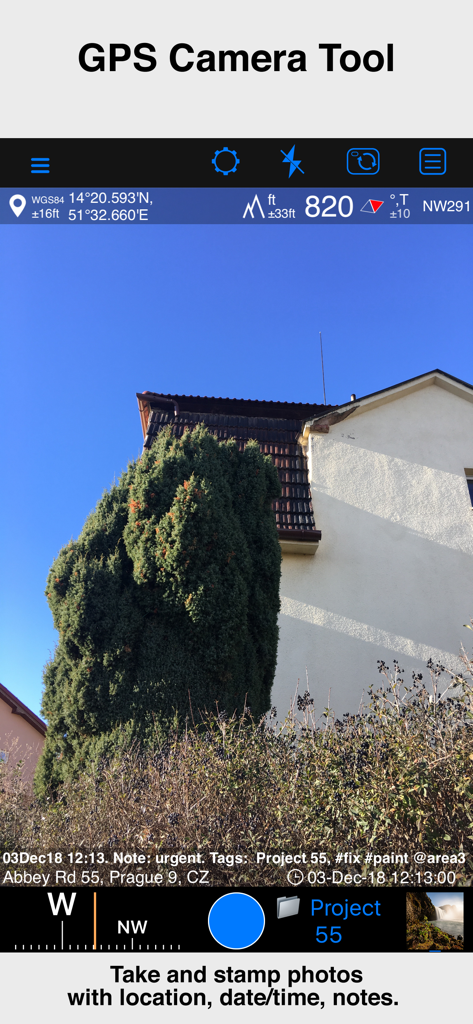
Compass 55. Map & GPS kit. - GPS-Kamera-Tool der Compass 55-App mit einem Foto inklusive Standortkoordinaten, Höhe, Datum und Notiz-Overlay

GPS-Kamera-Tool der Compass 55-App mit einem Foto inklusive Standortkoordinaten, Höhe, Datum und Notiz-Overlay

Beschreibung

All-in-one assistant with a map, compass, GPS coordinates to view and share in 6 formats, altitude, distance, sunset/sunrise, speedometer with top and average speed, navigator to your target or along the route and a whole lot more! + Advanced target/waypoint editor. Can be also used as a coordinates converter. You can use map to check or set waypoint location and add photo or audio note. + Share your location via email, text message, Facebook or Twitter. This includes UTM, MGRS and Latitude/Longitude (MENU>Share my location). + You can use UTM, MGRS or Lat/Long, just pick your preference in settings (Coordinate Format). + Speedometer. Shows you the speed and pace. Speedometer also gives you options to control average and max speed and pace counters (MENU > RESET and PAUSE/RESUME counters). + Compass. Instant reaction compass, no delays. Automatically pickups the direction based on magnetic or GPS course. If you mostly walk or drive, you can change this automatic mode in app settings > Compass or GPS course. NATO mils? Same place in settings to set. + Magnetic declination δ for the current location and any location on the map (via World Magnetic Model, WMM, no need for data/internet). + Sunset and sunrise. So you can plan your travel better. + Arrow pointing to your target waypoint. Distance and bearing to it. + Create/measure routes and areas. + Barometric Vertical Speed Indicator (VSI, IVSI) in both scale and graph forms. + Integration of bluetooth sensors: Cycling cadence, Heart rate, Cycling speed. All above belong to a basic version. PRO Pack upgrade will add following capabilities: + Recording and sharing GPS tracks. + Moving waypoints between folders. + Showing ETA to a target as this requires GPS tracking. + Native Google map with fantastic terrain map, amazing 3D and real night mode. + Adding own/custom tile map servers. + Downloading offline maps. Offline maps import in .sqlitedb, rmaps, mbtiles formats. Support for overzoom and underzoom - offline map is shown even for zoom levels that are not downloaded. + GPX import and export for waypoints, tracks and routes. + Google Earth KML support for waypoints and tracks import/export. KMZ support for waypoints and tracks export, waypoints import. + Ground overlays. Import KMZ ground overlay or draw your own on the map in the app and share as kmz files! + CSV import/export for waypoints. + Voice coach to tell you active track distance and duration, current speed and altitude without need to open the app. + Support for Siri shortcuts in IOS 12 for starting and stopping GPS tracks. + From version 4.2 - support for OSGB (including grid shifts) and SK 42 in the coordinates converter. + BACKGROUND MODE. App will work in background automatically when tracking. You can use other apps while Compass 55 does its job in the background! + PRIVACY. Compass 55 never shares your location data with 3rd parties or ad agencies. Location data is used solely for telling you direction to a target and recording GPS tracks and never leave the app unless you decide to share by means of a track export. It always lets you know when background mode is on and never runs in background unless the track is being recorded. ! You can use this app on your iPhone as well as on any cellular iPad. **App will not work properly on iPods and wifi only iPads as they don't have GPS (external GPS module is required). As quite a lot of us are using external GPS modules, app is available for wifi only iPads and iPods. ! Please note that as with all GPS apps, continued use of GPS running in the background can dramatically decrease battery life. Terms of Use: https://www.apple.com/legal/internet-services/itunes/dev/stdeula/

Download

Herunterladen auf App Store

Diese Seite ist keine offizielle Seite der App oder ihres Entwicklers, sondern eine unabhängige redaktionelle Veröffentlichung, die zu Informations- und Kommentarzwecken erstellt wurde. Sofern nicht ausdrücklich anders angegeben, sind weder die App noch ihr Entwickler mit MWM, Apple, Google Play, dem App-Herausgeber oder dem Entwickler der App verbunden, von ihnen unterstützt, gesponsert, autorisiert oder anderweitig offiziell verbunden, und nichts auf dieser Seite impliziert, dass die App unter Verwendung der Dienste von MWM entwickelt wurde. Alle Marken, Logos, Screenshots und andere Inhalte bleiben Eigentum ihrer jeweiligen Inhaber.