
Diese Seite ist keine offizielle Seite der App oder ihres Entwicklers, sondern eine unabhängige redaktionelle Veröffentlichung, die zu Informations- und Kommentarzwecken erstellt wurde. Sofern nicht ausdrücklich anders angegeben, sind weder die App noch ihr Entwickler mit MWM, Apple, Google Play, dem App-Herausgeber oder dem Entwickler der App verbunden, von ihnen unterstützt, gesponsert, autorisiert oder anderweitig offiziell verbunden, und nichts auf dieser Seite impliziert, dass die App unter Verwendung der Dienste von MWM entwickelt wurde. Alle Marken, Logos, Screenshots und andere Inhalte bleiben Eigentum ihrer jeweiligen Inhaber.


Document Scanner · Scan to PDF
Papierkram frisst Zeit? Diese App macht Schluss damit.
Downloads
1M+Bewertung
Bewertungen gesamt
16.1KHerausgeber
Kategorie
BusinessSprachen
12Neueste Version
2.5Größe
35.8 MBErstveröffentlichung
29. Juli 2020Eine Bewertung der wichtigsten Leistungsmerkmale für produktivitätsorientierte Nutzer.
Analyse der Kernfunktionen: 'Document Scanner · Scan to PDF'
Schnelle, klare Scans
Die App ermöglicht die schnelle Digitalisierung von Dokumenten mit gestochen scharfen und präzisen Ergebnissen, was für eine effiziente Erfassung unerlässlich ist.
Intelligente OCR
Dieses Tool verfügt über eine intelligente OCR-Funktion, die Text aus Scans extrahiert und so eine schnelle Bearbeitung und Durchsuchbarkeit der digitalisierten Inhalte ermöglicht.
Dateisicherheit
Es ermöglicht Nutzern, vertrauliche Dokumente durch Passwörter, Face ID oder Touch ID zu schützen, was die Datensicherheit erheblich verbessert.
Cloud-Synchronisierung
Die App bietet eine nahtlose Cloud-Synchronisierung, die das Speichern und den Zugriff auf Dateien über Dienste wie Dropbox, Google Drive oder OneDrive ermöglicht.
Einfaches Teilen
Dieses Tool vereinfacht das Teilen von Dateien über E-Mail, Messaging-Apps oder drahtloses Drucken und erleichtert so die Weitergabe von Dokumenten.
Professionelle PDFs
Es ermöglicht Nutzern, Dokumente in professionelle PDFs zu konvertieren, die ihr ursprüngliches Format beibehalten und somit eine hohe Qualität gewährleisten.
Häufig gestellte Fragen
Alles, was Sie über wissen müssen Document Scanner · Scan to PDF
What is the "Document Scanner · Scan to PDF" app?
The Document Scanner · Scan to PDF app transforms your iPhone or iPad into a powerful, portable PDF scanner. It allows you to scan, organize, and share documents easily for work, school, or travel.
Does the Document Scanner · Scan to PDF app provide clear scans?
Yes, the Document Scanner · Scan to PDF app provides fast and clear scans. It digitizes documents in seconds with crisp, accurate results, ensuring high-quality output for all your needs.
Can I extract text from scanned documents using "Document Scanner · Scan to PDF"?
Yes, the Document Scanner · Scan to PDF app features Smart OCR (Optical Character Recognition). This allows you to extract text from your scans for quick editing and searching purposes directly within the app.
What file formats does the "Document Scanner · Scan to PDF" app support for saving?
The Document Scanner · Scan to PDF app converts documents into polished PDFs that retain their original format. You can also save your scanned documents as JPGs, offering flexibility for various uses.
What editing features are available in the Document Scanner · Scan to PDF app?
The Document Scanner · Scan to PDF app offers effortless editing, including options to crop, rotate, or highlight your scanned files. You can also quickly edit images with various filters and tools.
Can I sync my documents with cloud services using "Document Scanner · Scan to PDF"?
Yes, the Document Scanner · Scan to PDF app supports Cloud Sync. You can save and access your files using popular cloud services such as Dropbox, Google Drive, or OneDrive for convenient access.
How can I protect my scanned documents in the "Document Scanner · Scan to PDF" app?
The Document Scanner · Scan to PDF app allows you to secure confidential documents. You can protect your files with passwords, Face ID, or Touch ID for enhanced privacy and data security.
What are the sharing options for documents in the "Document Scanner · Scan to PDF" app?
The Document Scanner · Scan to PDF app provides easy sharing. You can send your files via email, messaging apps, Wi-Fi Transfer, or print them wirelessly directly from the app's interface.
How do I manage my premium subscription for "Document Scanner · Scan to PDF"?
You can manage your premium subscription for Document Scanner · Scan to PDF and turn off auto-renewal in your iTunes account settings after purchase. Auto-renewal must be off 24 hours before the period ends.
Do subscriptions for "Document Scanner · Scan to PDF" automatically renew?
Yes, subscriptions for Document Scanner · Scan to PDF automatically renew. Payment is charged to your iTunes account upon purchase, and renewal charges occur within 24 hours prior to the end of the current period.
Can I sign documents within the "Document Scanner · Scan to PDF" app?
Yes, the Document Scanner · Scan to PDF app allows you to sign documents directly within the application. This feature streamlines the process of finalizing paperwork digitally and efficiently.
Where can I find the Privacy Policy for the "Document Scanner · Scan to PDF" app?
The Privacy Policy for the Document Scanner · Scan to PDF app is accessible at: https://lazy-solutions.com/privacy-policy-scanner/. Users agree to these terms by using the application.
Die folgenden Screenshots und die Beschreibung stammen direkt aus dem offiziellen Store-Eintrag der App und sind Eigentum des Entwicklers.
App Store
Screenshots

Die App ermöglicht das schnelle Erfassen von Dokumenten, wobei eine blaue Scanlinie den aktiven Scanbereich hervorhebt und diverse Kameraeinstellungen wie "A4" für optimale Ergebnisse zur Verfügung stehen.
Schnelles Scannen leicht gemacht

Dieses Tool bietet eine übersichtliche Dokumentenverwaltung mit kategorisierten Ordnern wie "Receipts" und "Private", die eine einfache Organisation ermöglichen, während Miniaturansichten der gescannten Dokumente wie "Contract" einen schnellen Überblick bieten.
Dokumentenverwaltung effizient
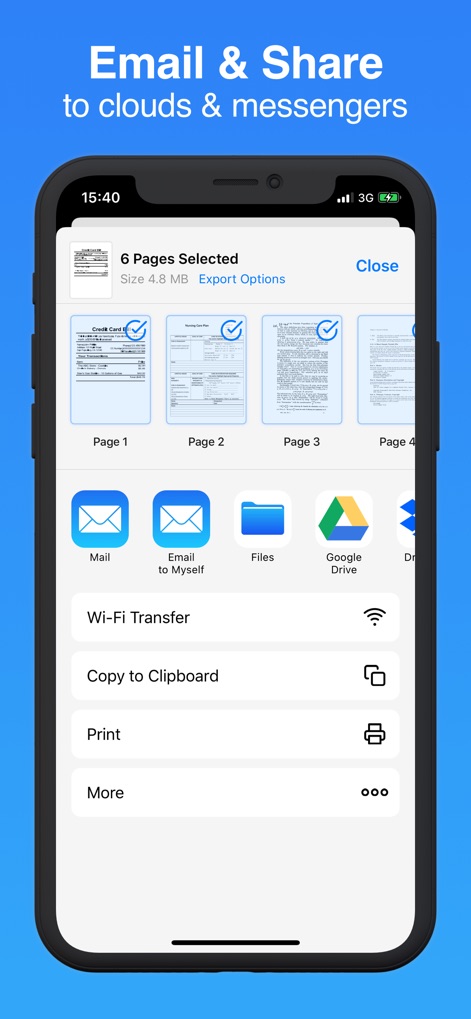
Nutzer können ihre Dokumente mühelos über vielfältige Exportoptionen teilen, darunter die direkte Integration mit Cloud-Diensten wie "Google Drive" und die Möglichkeit, Dateien über E-Mail- oder Messaging-Apps zu versenden.
Vielfältige Exportoptionen
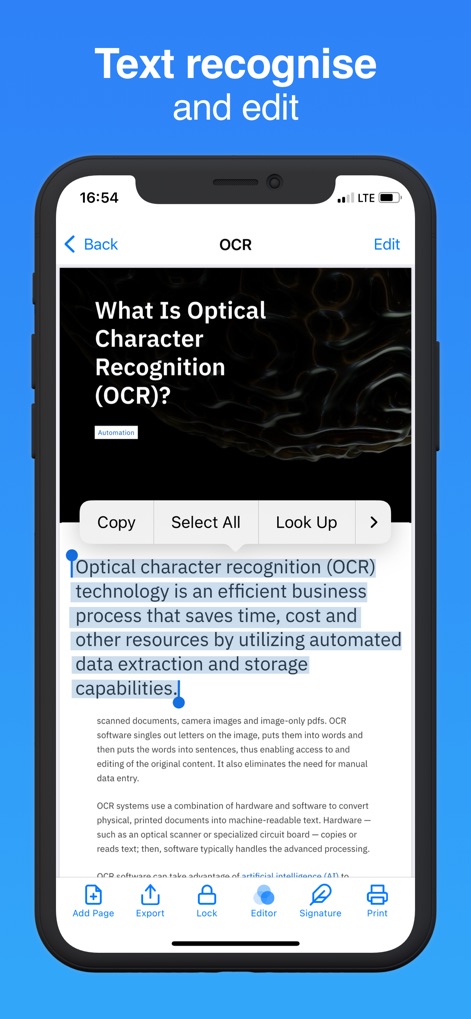
Die App demonstriert ihre intelligente Texterkennung (OCR) durch einen hervorgehobenen Textabschnitt und ermöglicht Nutzern die Bearbeitung mit Funktionen wie "Copy" oder "Select All" direkt im Dokument.
Intelligente Texterkennung (OCR)

Nutzer können Dokumente direkt in der App signieren, wobei eine bewegliche Signatur über dem Dokument platziert wird und spezifische Bearbeitungsoptionen wie "Signature" am unteren Bildschirmrand zur Verfügung stehen.
Dokumente direkt signieren
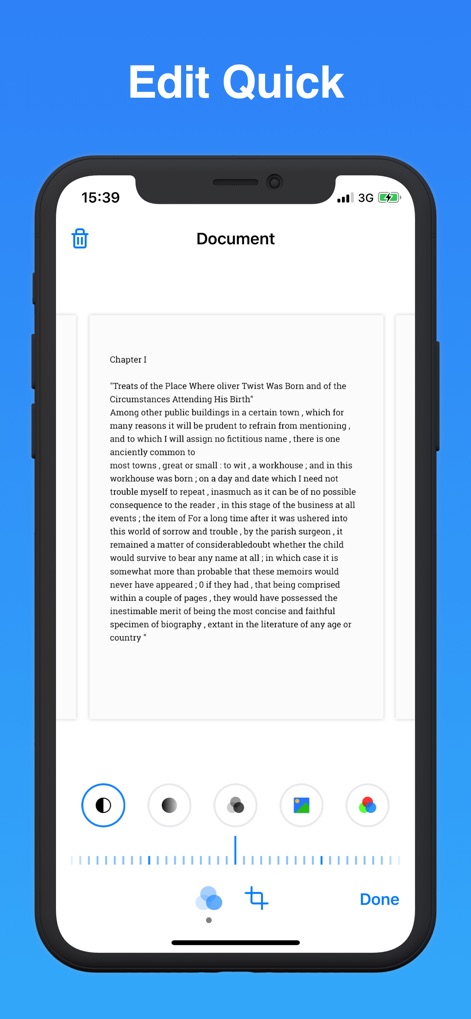
Dieses Tool bietet schnelle Bildbearbeitungsfunktionen für gescannte Dokumente, die verschiedene Farbfilteroptionen zur Optimierung der Darstellung umfassen und ein präzises Zuschneiden-Werkzeug für die perfekte Anpassung bereithalten.
Schnelle Bildbearbeitung

Die App ermöglicht die umfangreiche Digitalisierung verschiedenster Dokumente, wie hier durch mehrere Seiten mit gescannten Reisepassstempeln veranschaulicht, und bietet die Funktion "Add Page" zur Erweiterung bestehender Scans.
Umfassende Digitalisierung

Dieses Tool gewährleistet eine sichere Dokumentenverwaltung, indem es biometrische Sicherheitsoptionen wie das Face ID Symbol zur Entsperrung bietet und eine explizite Eingabeaufforderung für das PDF-Passwort zur weiteren Absicherung integriert.
Sichere Dokumentenverwaltung
Beschreibung
Download
Ähnliche Apps
Apps mit ähnlichen Funktionen und Nutzererfahrung

PDF PRO Scan Image & Documents
Balzo srl

The PDF Scanner, PDF editor HQ
NEXT K.U.M. LTD

CamScanner - PDF Scanner App
INTSIG Information Co., Ltd

Adobe Scan: PDF & OCR Scanner
Adobe Inc.

WPS Office: PDF, Docs, Sheets
KINGSOFT OFFICE SOFTWARE CORPORATION LIMITED

iLovePDF - PDF Editor & Scan
ILOVEPDF S.L.

Scanner App: Genius Scan
The Grizzly Labs

Microsoft Lens: PDF Scanner
Microsoft Corporation

Clear Scan: Doc Scanner App
INDY MOBILE APP COMPANY LIMITED
Diese Seite ist keine offizielle Seite der App oder ihres Entwicklers, sondern eine unabhängige redaktionelle Veröffentlichung, die zu Informations- und Kommentarzwecken erstellt wurde. Sofern nicht ausdrücklich anders angegeben, sind weder die App noch ihr Entwickler mit MWM, Apple, Google Play, dem App-Herausgeber oder dem Entwickler der App verbunden, von ihnen unterstützt, gesponsert, autorisiert oder anderweitig offiziell verbunden, und nichts auf dieser Seite impliziert, dass die App unter Verwendung der Dienste von MWM entwickelt wurde. Alle Marken, Logos, Screenshots und andere Inhalte bleiben Eigentum ihrer jeweiligen Inhaber.