
Diese Seite ist keine offizielle Seite der App oder ihres Entwicklers, sondern eine unabhängige redaktionelle Veröffentlichung, die zu Informations- und Kommentarzwecken erstellt wurde. Sofern nicht ausdrücklich anders angegeben, sind weder die App noch ihr Entwickler mit MWM, Apple, Google Play, dem App-Herausgeber oder dem Entwickler der App verbunden, von ihnen unterstützt, gesponsert, autorisiert oder anderweitig offiziell verbunden, und nichts auf dieser Seite impliziert, dass die App unter Verwendung der Dienste von MWM entwickelt wurde. Alle Marken, Logos, Screenshots und andere Inhalte bleiben Eigentum ihrer jeweiligen Inhaber.


Drawing ▫
Digitale Leinwände sind oft ein Krampf. Diese App eliminiert die Hürden und macht aus jedem eine Kreativmaschine.
Downloads
2.5M+Bewertung
Bewertungen gesamt
17.2KHerausgeber
Kategorie
ProductivitySprachen
1Neueste Version
4.13.1Größe
177.8 MBErstveröffentlichung
29. Nov. 2019Eine Bewertung der wesentlichen Merkmale, die 'Drawing ▫' zu einem vielseitigen Kreativwerkzeug für ein breites Publikum machen.
Analyse der App 'Drawing ▫': Kernfunktionen
Vielseitige Pinsel und Farbpaletten
Die App bietet eine riesige Auswahl an über 40 handgefertigten Pinseln und Millionen von Farboptionen, die eine detaillierte und kreative Gestaltung ermöglichen.
Präzise Bearbeitungswerkzeuge
Es ermöglicht Nutzern eine detaillierte Kontrolle über den Zeichenprozess durch Zoom-Funktionen für feine Details, Anpassung von Pinselgröße und Deckkraft sowie flexible Rückgängig-/Wiederherstellen-Optionen.
Erweiterte Stift- und Drucksensitivitätsunterstützung
Die App optimiert das Zeichenerlebnis auf kompatiblen Geräten durch die Unterstützung des Apple Pencil für iPad Pro und 3D Touch-Sensitivität für iPhones, inklusive Winkel- und Druckerkennung.
Bildimport und -integration
Dieses Tool verfügt über die Möglichkeit, Bilder und Fotos zu importieren und direkt in die Kunstwerke zu integrieren oder auf ihnen zu zeichnen, was die kreativen Möglichkeiten erweitert.
Einfaches Teilen und Speichern
Die App ermöglicht Nutzern das einfache Speichern ihrer Kunstwerke in der Galerie sowie das sofortige Teilen auf sozialen Netzwerken und bietet die Funktion, den Zeichenprozess aufzunehmen und zu teilen.
Umfangreiche Malbuch-Funktionen
Es bietet eine umfangreiche Sammlung von über 20 Kategorien von Ausmalseiten, einschließlich der Möglichkeit, individuelle Mandalas zu erstellen, was sowohl zur Entspannung als auch zur kreativen Entfaltung beiträgt.
Häufig gestellte Fragen
Alles, was Sie über wissen müssen Drawing ▫
What is DrawingApp?
DrawingApp is a mobile application for iPhone and iPad designed for creating drawing art. It offers tools for sketching, typing, painting, and drawing, enabling users to bring creative ideas to life.
Which devices does DrawingApp support?
DrawingApp supports both iPhone and iPad devices. It also offers support for Apple Pencil on iPad Pro and 3D Touch sensitivity for iPhones.
Can I use Apple Pencil with DrawingApp?
Yes, DrawingApp supports Apple Pencil for iPad Pro. It provides angle and pressure sensitivity with tools like Water Color, Pencil, and Pen.
How many brushes are available in DrawingApp's Sketch Desk?
DrawingApp's Sketch Desk offers over 40 handcrafted style paintbrushes and various tools like a ruler and eraser. It also provides millions of colors.
Can I import photos into DrawingApp?
Yes, DrawingApp allows users to import pictures and photos to enhance their drawings in the Sketch Desk and to draw on photos in the Doodle Desk.
What features does DrawingApp's Doodle Desk include?
DrawingApp's Doodle Desk allows users to draw, sketch, paint, customize colors, import and rotate photos, adjust brush size/opacity, and utilize undo/redo options. Users can also record and share artwork.
Does DrawingApp offer custom color options?
Yes, DrawingApp provides extensive color customization. In Doodle Desk, users can customize colors, and in Coloring Desk, they can create custom palettes by combining any colors.
Can I create custom mandalas in DrawingApp?
Yes, DrawingApp features a Coloring Desk with a specific mandala creation mode. This allows users to bring their unique designs to life as custom mandalas.
How many coloring pages are in DrawingApp's Kids Desk?
DrawingApp's Kids Desk includes over 50 educational coloring pages. It also provides more than 10 drawing tools, shapes, and magical pattern brushes for children.
What are the subscription options for DrawingApp Premium?
DrawingApp Premium offers a weekly subscription at $4.99 USD (with a 3-day free trial), a monthly subscription for $7.99 USD, or a yearly subscription for $29.99 USD. A one-time lifetime purchase is $35.99.
Does DrawingApp Premium include a free trial?
Yes, DrawingApp Premium offers a 3-day free trial with its weekly subscription option. Subscription payments begin after the trial unless canceled at least 24-hours prior.
What benefits does DrawingApp Premium provide?
Upgrading to DrawingApp Premium grants unlimited access to Sketch Desk, Coloring Desk, Kids Desk, and Doodle Desk. Premium also removes all ads and watermarks from the app.
Can I adjust brush opacity in DrawingApp?
Yes, DrawingApp allows users to change brush opacity settings. This feature is available in the Doodle Desk, and visually confirmed by an opacity slider.
Where can I find DrawingApp's Privacy Policy?
DrawingApp's Privacy Policy is available at the link provided in the app description: http://drawingapp.me/privacy-policy.html.
Can I share my artwork created with DrawingApp?
Yes, DrawingApp enables users to save artworks to their gallery and share them instantly to any social network. The Doodle Desk also includes a record and share artwork option.
Die folgenden Screenshots und die Beschreibung stammen direkt aus dem offiziellen Store-Eintrag der App und sind Eigentum des Entwicklers.
App Store
Screenshots
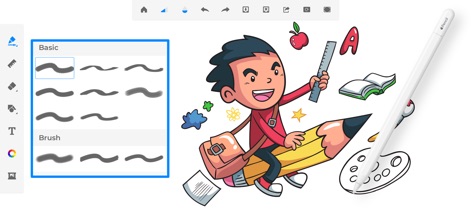
Die App bietet eine intuitive Auswahl an verschiedenen Pinselstilen und unterstützt gleichzeitig präzises Zeichnen mit dem Apple Pencil.
Pinsel Auswahl

Nutzer können ihre Kunstwerke mit einer unendlichen Farbpalette gestalten und fein abgestimmte Farbübergänge hinzufügen, um lebendige Szenen zu erstellen.
Farbpalette entdecken
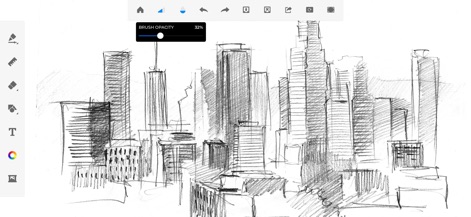
Dieses Tool ermöglicht das präzise Anpassen der Pinsel-Deckkraft für feine Schattierungen und bietet eine detaillierte Darstellung urbaner Skylines.
Deckkraft anpassen

Die App stellt eine vielfältige Auswahl an Textur- und Formpinseln zur Verfügung, um detaillierte Landschaften und einzigartige visuelle Effekte zu erzeugen.
Texturen & Formen

Der Kids Desk bietet kindgerechte Malszenen und eine bunte Auswahl an Farben in kleinen Töpfen, um die Kreativität der Kleinsten zu fördern.
Kreativität für Kinder

Der Doodle Desk lädt zum spontanen Kritzeln ein und bietet verschiedene Zeichenwerkzeuge, um farbenfrohe und verspielte Kunstwerke zu kreieren.
Doodle Spaß erleben

Nutzer können entspannende Malbuch-Designs ausfüllen und dabei aus einer breiten Palette an vordefinierten Farben für ihre Kunstwerke wählen.
Malbuch entspannen

Die App erlaubt es, Fotos mit kreativen Elementen wie bunten Zeichnungen und verspielten Herzen zu personalisieren und zu verschönern.
Fotos verschönern

Dieses Tool bietet eine Fülle von dekorativen Stickern und Mustern, um Fotos individuell zu gestalten und visuell ansprechende Kompositionen zu erstellen.
Sticker & Muster
Beschreibung
Download
Ähnliche Apps
Apps mit ähnlichen Funktionen und Nutzererfahrung

Sketchbook®
Sketchbook, Inc.

Mental Canvas Draw
Mental Canvas, Inc.

ibis Paint
ibis inc.

ibis Paint X
ibis inc.

Paper: Sketch, Draw & Create
Evernote Corporation

Adobe Fresco: Draw & Paint App
Adobe Inc.

Art Set 4
Lofopi Ltd

MediBang Paint – Drawing & Art
MediBang inc.

Tayasui Sketches
SKETCHES SRL
Diese Seite ist keine offizielle Seite der App oder ihres Entwicklers, sondern eine unabhängige redaktionelle Veröffentlichung, die zu Informations- und Kommentarzwecken erstellt wurde. Sofern nicht ausdrücklich anders angegeben, sind weder die App noch ihr Entwickler mit MWM, Apple, Google Play, dem App-Herausgeber oder dem Entwickler der App verbunden, von ihnen unterstützt, gesponsert, autorisiert oder anderweitig offiziell verbunden, und nichts auf dieser Seite impliziert, dass die App unter Verwendung der Dienste von MWM entwickelt wurde. Alle Marken, Logos, Screenshots und andere Inhalte bleiben Eigentum ihrer jeweiligen Inhaber.