DXF File Reader Viewer PDF
Herunterladen auf App Store

Diese Seite ist keine offizielle Seite der App oder ihres Entwicklers, sondern eine unabhängige redaktionelle Veröffentlichung, die zu Informations- und Kommentarzwecken erstellt wurde. Sofern nicht ausdrücklich anders angegeben, sind weder die App noch ihr Entwickler mit MWM, Apple, Google Play, dem App-Herausgeber oder dem Entwickler der App verbunden, von ihnen unterstützt, gesponsert, autorisiert oder anderweitig offiziell verbunden, und nichts auf dieser Seite impliziert, dass die App unter Verwendung der Dienste von MWM entwickelt wurde. Alle Marken, Logos, Screenshots und andere Inhalte bleiben Eigentum ihrer jeweiligen Inhaber.


Logo von DXF File Reader Viewer PDF
Herunterladen auf App Store

DXF File Reader Viewer PDF

Das unverzichtbare mobile Toolkit für Architekten, Ingenieure und Maker, um hochpräzise CAD-Zeichnungen direkt vom Einsatzort oder der Werkstatt aus anzuzeigen, zu konvertieren und zu teilen.

Kennzahlen

Downloads

5K+

Bewertung

4.2/5

Bewertungen gesamt

0

Herausgeber

Marouane Baid

Kategorie

Photo & Video

Sprachen

1

Neueste Version

17.0.0

Größe

40.1 MB

Erstveröffentlichung

1. Feb. 2024
Funktionen

Entwickelt für professionelle Produktivität

Das unverzichtbare mobile Toolkit für Architekten, Ingenieure und Maker, um DXF-Dateien ohne Kompromisse bei Qualität oder Präzision anzuzeigen und zu konvertieren.

Hochpräzise Anzeige

Inspizieren Sie jede Ebene und jedes Detail Ihrer CAD-Zeichnungen vor Ort. Erleben Sie einen robusten Viewer, der für die von Profis geforderte Genauigkeit entwickelt wurde.

Sofortige PDF-Konvertierung

Wandeln Sie komplexe DXF-Dateien in universell kompatible PDFs oder hochauflösende Bilder um. Überbrücken Sie die Lücke zwischen technischer Software und kundenfertigen Formaten in Sekundenschnelle.

Die folgenden Screenshots und die Beschreibung stammen direkt aus dem offiziellen Store-Eintrag der App und sind Eigentum des Entwicklers.

App Store

Screenshots
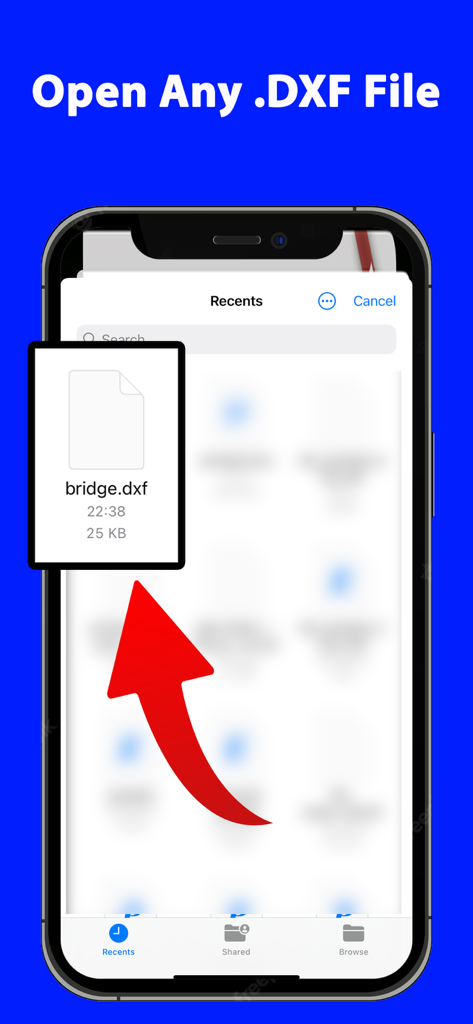
DXF File Reader Viewer PDF - iPhone-Bildschirm, der die DXF File Reader-App beim Öffnen einer bridge.dxf-Datei zeigt
iPhone-Bildschirm, der die DXF File Reader-App beim Öffnen einer bridge.dxf-Datei zeigt

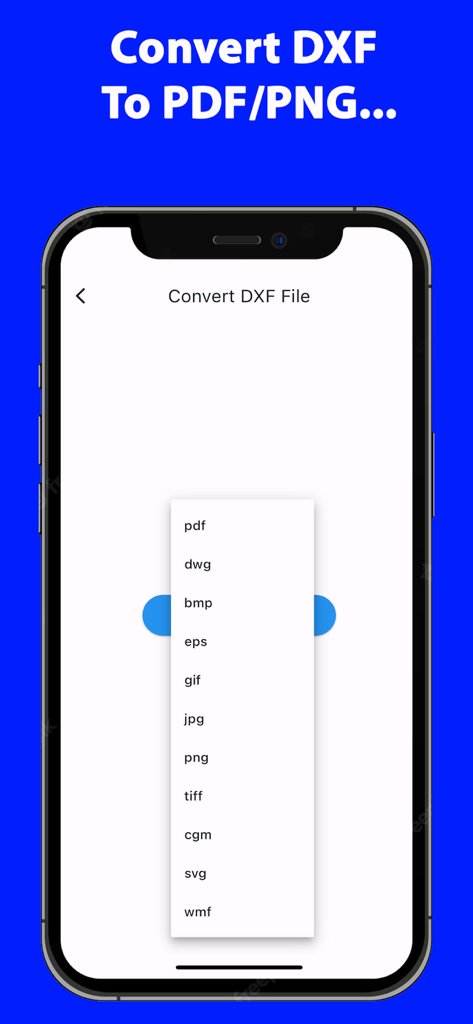
DXF File Reader Viewer PDF - Oberfläche der DXF File Reader-App mit einem Dropdown-Menü mit verschiedenen Konvertierungsformaten wie PDF, DWG, PNG und SVG

Oberfläche der DXF File Reader-App mit einem Dropdown-Menü mit verschiedenen Konvertierungsformaten wie PDF, DWG, PNG und SVG

Beschreibung

DXF File Reader Viewer PDF is an all-in-one application tailored to cater to professionals, students, and hobbyists who frequently work with DXF files. As an advanced tool, it not only allows you to view DXF files with ease but also offers extensive conversion capabilities, particularly to PDF format, among others. Core Features: Versatile DXF Viewing: The app provides robust features to view DXF files, presenting a detailed and clear display of CAD drawings. It accommodates various layers and elements within DXF files, ensuring a comprehensive viewing experience. Seamless Conversion to PDF: Recognizing the widespread use and compatibility of PDFs, the app specializes in converting DXF files to PDF format. This feature is invaluable for sharing designs easily across different platforms and devices. Support for Multiple Formats: Beyond PDF, the app supports conversion to formats like DWG, BMP, EPS, GIF, JPG, PNG, TIFF, CGM, SVG, and WMF. This extensive range caters to diverse needs, from graphic design to engineering. Intuitive User Interface: The app boasts a user-friendly interface, making it accessible to users of all skill levels. Navigation is straightforward, and functionalities are easily accessible, streamlining the user experience. High-Quality Output: Whether viewing or converting DXF files, the app ensures the highest quality. It maintains the integrity of the original file, ensuring that no detail is lost in the process. Batch Processing Capability: For users dealing with multiple files, the app offers efficient batch processing. This feature saves valuable time and effort, allowing for simultaneous conversions. Integration with Cloud Services: The app offers integration with popular cloud storage services, enabling easy access and management of DXF files stored online. Regular Updates and Support: DXF File Reader Viewer PDF is committed to continuous improvement. Regular updates enhance functionality, add new features, and ensure compatibility with the latest technologies. Target Audience: The app serves a diverse audience, including but not limited to: Architects and Engineers: Professionals who need a reliable tool to view and convert their CAD drawings for various purposes. Graphic Designers: Creatives who integrate CAD designs into their work or require conversion to compatible formats. Educators and Students: Individuals in academic settings who utilize CAD drawings for teaching or learning purposes. DIY Enthusiasts and Hobbyists: Those involved in 3D printing, modeling, or crafting, who benefit from easy access and conversion of DXF files. Conclusion: DXF File Reader Viewer PDF stands as a premier solution for anyone working with DXF files. Its blend of viewing prowess, conversion flexibility, and user-friendly design positions it as an essential tool in various fields. Whether for professional use, educational purposes, or personal projects, this app simplifies and enhances the way you interact with DXF files, ensuring efficiency and quality in every task. The app uses a weekly subscription for 50 conversions per week.  Terms of Use (EULA): https://sites.google.com/view/termsofuseeulanewspfaosdhf/home Privacy Policy: https://sites.google.com/view/djvuviewerconverterreader/home

Download

Herunterladen auf App Store

Diese Seite ist keine offizielle Seite der App oder ihres Entwicklers, sondern eine unabhängige redaktionelle Veröffentlichung, die zu Informations- und Kommentarzwecken erstellt wurde. Sofern nicht ausdrücklich anders angegeben, sind weder die App noch ihr Entwickler mit MWM, Apple, Google Play, dem App-Herausgeber oder dem Entwickler der App verbunden, von ihnen unterstützt, gesponsert, autorisiert oder anderweitig offiziell verbunden, und nichts auf dieser Seite impliziert, dass die App unter Verwendung der Dienste von MWM entwickelt wurde. Alle Marken, Logos, Screenshots und andere Inhalte bleiben Eigentum ihrer jeweiligen Inhaber.








