
Diese Seite ist keine offizielle Seite der App oder ihres Entwicklers, sondern eine unabhängige redaktionelle Veröffentlichung, die zu Informations- und Kommentarzwecken erstellt wurde. Sofern nicht ausdrücklich anders angegeben, sind weder die App noch ihr Entwickler mit MWM, Apple, Google Play, dem App-Herausgeber oder dem Entwickler der App verbunden, von ihnen unterstützt, gesponsert, autorisiert oder anderweitig offiziell verbunden, und nichts auf dieser Seite impliziert, dass die App unter Verwendung der Dienste von MWM entwickelt wurde. Alle Marken, Logos, Screenshots und andere Inhalte bleiben Eigentum ihrer jeweiligen Inhaber.


Filmmaker Pro - Video Editor
Mobile Schnitt-Apps sind oft Blender. Hier aber, erweist sich MWMs Kreation als Werkzeug, das dein iOS-Gerät zur ernstzunehmenden Produktionsmaschine macht – ohne Datensammelwut.
Downloads
12.5M+Bewertung
Bewertungen gesamt
358.8KHerausgeber
Kategorie
Photo & VideoSprachen
13Neueste Version
12.6.4Größe
1.1 GBErstveröffentlichung
7. Apr. 2016Analyse der Filmmaker Pro - Video Editor App
Eine tiefgehende Bewertung der Kernfunktionen für fortgeschrittene Videoproduzenten auf iOS.
Datenschutz und lokale Verarbeitung
Die App garantiert einen umfassenden Datenschutz, da alle Verarbeitungen und KI-Modelle direkt auf dem Gerät erfolgen und keinerlei Nutzerdaten gesammelt oder gespeichert werden. Dies ist für Content Creator und Unternehmen, die Wert auf Sicherheit legen, von höchster Bedeutung.
Professionelle Chroma Key Funktion
Die Anwendung bietet eine leistungsstarke Chroma Key (Green Screen) Funktion, die es Nutzern ermöglicht, Hintergründe präzise zu entfernen und durch andere visuelle Elemente zu ersetzen. Dies ist entscheidend für die Erstellung professioneller und kreativer Videoinhalte.
Erweiterte Keyframe-Animation & Motion Tracking
Dieses Tool integriert Keyframe-Animationen und Motion Tracking, wodurch präzise Steuerung über visuelle Effekte und Objekte im Video ermöglicht wird. Es eröffnet fortgeschrittenen Nutzern immense kreative Möglichkeiten zur Dynamisierung ihrer Inhalte.
4K-Videounterstützung & unbegrenzte Assets
Die App unterstützt die Bearbeitung von 4K-Videos auf kompatiblen Geräten und erlaubt die Nutzung einer unbegrenzten Anzahl von Videoclips, Audiospuren, Voiceovers und Text-Overlays. Dies bietet die Flexibilität, komplexe Projekte mit hoher Auflösung zu realisieren.
Intelligentes Audio Ducking
Die Anwendung bietet die Funktion des Audio Ducking, welche die Lautstärke der Hintergrundmusik automatisch absenkt, wenn ein Voiceover oder Dialog erkannt wird. Dies sorgt für eine professionelle Klangqualität und bessere Verständlichkeit der gesprochenen Inhalte.
Umfassendes Video Grading & Farbkorrektur
Es ermöglicht eine detaillierte Farbkorrektur durch Anpassung von Helligkeit, Kontrast, Sättigung, Belichtung und Weißabgleich. Ergänzt durch 30 professionelle Filter können Nutzer ihren Videos einen konsistenten und ansprechenden Look verleihen.
Umfangreiche Text- und Grafikbibliotheken
Die App bietet eine enorme Auswahl an Schriftarten, darunter spezielle und animierte Sammlungen, sowie Hunderte von Grafiken und animierten Stickern. Dies gibt Content Creatorn vielfältige Möglichkeiten zur visuellen Gestaltung und Individualisierung ihrer Projekte.
Flexible Picture-in-Picture Funktion
Die App ermöglicht das einfache Hinzufügen von Videos, Fotos und GIFs als Picture-in-Picture-Elemente. Dies ist ideal für Tutorials, Reaktionen oder das Einblenden von zusätzlichen Informationen, was die Komplexität und den Informationsgehalt von Videos erhöht.
Kreative Effekte und dynamische Übergänge
Die Anwendung bietet 46 professionelle Übergänge, die Möglichkeit zur Anpassung der Wiedergabegeschwindigkeit für Zeitlupen- oder Zeitraffer-Effekte und ein Tool zum Rückwärtsabspielen von Videos. Diese Funktionen erlauben es Nutzern, ihren Videos eine einzigartige und dynamische Ästhetik zu verleihen.
Automatische Voice-to-Text Untertitel
Dieses Feature generiert automatisch Untertitel aus gesprochenem Text, was die Barrierefreiheit verbessert und die Reichweite von Videoinhalten erheblich steigert. Es spart Content Creatorn zudem wertvolle Zeit bei der Postproduktion.
Häufig gestellte Fragen
Alles, was Sie über wissen müssen Filmmaker Pro - Video Editor
Does Filmmaker Pro collect or store user data?
No, Filmmaker Pro does not collect or store any user data. All processing occurs locally on the device, and all AI models are included within the app bundle.
Does Filmmaker Pro support 4K video editing?
Yes, Filmmaker Pro supports 4K video editing. This feature is available on iPhone SE and later models, as well as all iPad Pro devices.
What video editing features are available in Filmmaker Pro?
Filmmaker Pro offers a wide range of video editing capabilities, including trimming, splitting, duplicating clips, adjusting playback speed, volume control, reverse video, 46 transitions, 30 filters, video grading, and real-time effects playback.
Does Filmmaker Pro - Video Editor have a green screen feature?
Yes, Filmmaker Pro includes Chroma Key (Green Screen) functionality. This feature allows users to perform green screen effects directly within the app.
How many royalty-free music tracks are included with Filmmaker Pro?
Filmmaker Pro offers 256 royalty-free music tracks and a Sound Effects Collection for use in your projects. Users can trim audio tracks and adjust playback speed.
Does Filmmaker Pro offer Picture-in-Picture effects?
Yes, Filmmaker Pro provides Picture-in-Picture (PiP) functionality. This includes support for Picture-in-Picture Video, Picture-in-Picture Photo, and Picture-in-Picture GIF effects.
Are there text animation options in Filmmaker Pro?
Filmmaker Pro provides 17 premium text animation options, 9 standard text animation options, and a "Stroke Path" animation for drawing text on videos. Users can curve text and adjust its duration.
Does Filmmaker Pro - Video Editor have an auto-save feature?
Yes, Filmmaker Pro includes an auto-save feature. This ensures that all edits made within the app are continuously saved and not lost during usage.
Is motion tracking available in Filmmaker Pro?
Yes, Filmmaker Pro offers motion tracking. This advanced video editing feature is included to allow users to track movement within their videos.
Does Filmmaker Pro support audio ducking?
Yes, Filmmaker Pro includes audio ducking. This feature allows users to automatically reduce the volume of background audio when a voiceover or other primary audio track is present.
Does Filmmaker Pro include face editing tools?
Yes, Filmmaker Pro offers various face editing tools, including options to adjust nose, lips, eyes, and eyebrows for pose, size, slimness, and width.
How does the Filmmaker Pro All Access Subscription work?
The All Access Subscription in Filmmaker Pro is billed monthly or annually, based on the selected plan. Subscriptions auto-renew unless cancelled 24 hours before the current period ends.
How do I cancel my Filmmaker Pro subscription?
You can manage your Filmmaker Pro subscription and turn off auto-renewal by accessing your Account Settings after purchase through iTunes.
Die folgenden Screenshots und die Beschreibung stammen direkt aus dem offiziellen Store-Eintrag der App und sind Eigentum des Entwicklers.
App Store
Screenshots
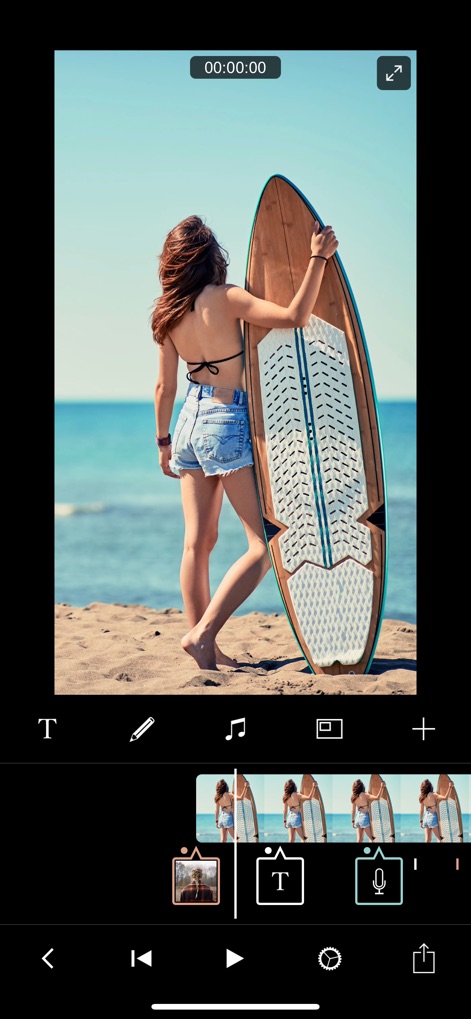
Professionelle Videobearbeitung
Nutzer können ihre Projekte in einer übersichtlichen, farbkodierten Zeitleiste organisieren und intuitiv Text-Overlays sowie Voiceovers hinzufügen, um ihre Geschichten zu vertonen.
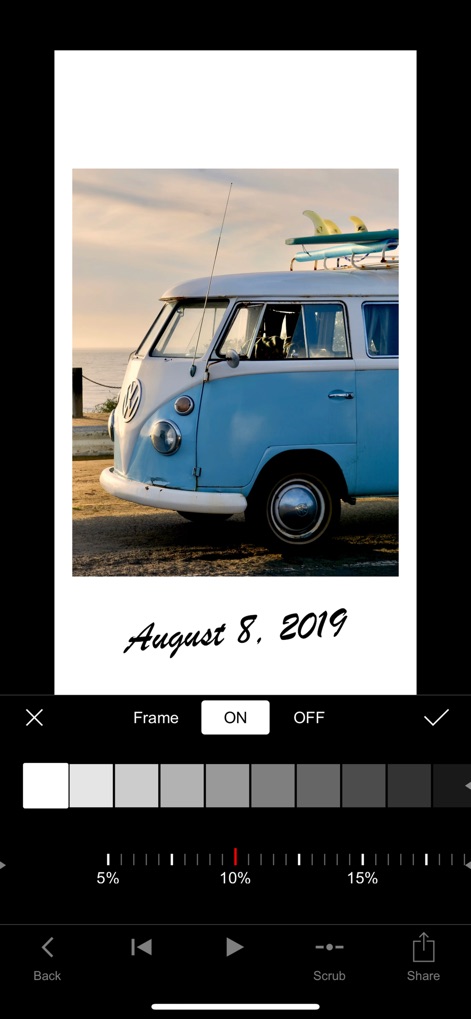
Kreative Bildanpassungen
Dieses Tool ermöglicht detaillierte Bildanpassungen mit aktivierbaren Rahmenoptionen und bietet präzise Steuerelemente für Graustufenanpassungen, um den gewünschten visuellen Stil zu erzielen.

Audiotracks Entdecken
Die App bietet Zugang zu einer umfangreichen Musikbibliothek mit 256 lizenzfreien Audiotracks und kategorisierten Playlists, damit Nutzer den perfekten Soundtrack für ihre Projekte finden.

Dynamische Text-Overlays
Nutzer können aus einer Vielzahl von Textstilen und Animationen wählen, um ihre Botschaften hervorzuheben, und diese nahtlos in ihre Videos integrieren.

Kreative Typografie Gestalten
Die App stellt exklusive Schriftarten wie 'FLUX' und 'Graffiti' zur Verfügung, die Nutzer mit einfachen Gesten zur Repositionierung, Größenänderung und Drehung anpassen können.
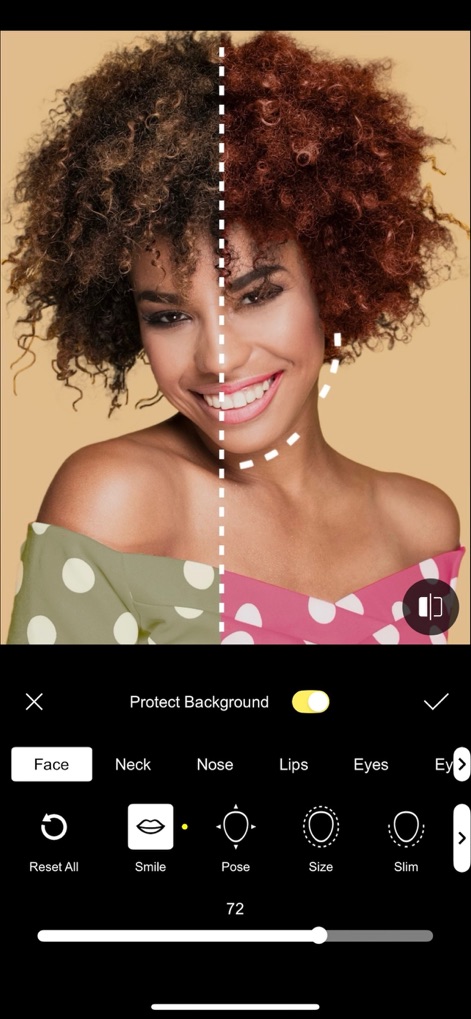
Fortschrittliche Gesichtsretusche
Dieses Tool bietet umfassende Funktionen zur Gesichtsretusche, mit denen Nutzer präzise Anpassungen an Merkmalen wie Lippen und Augen über intuitive Schieberegler vornehmen können.
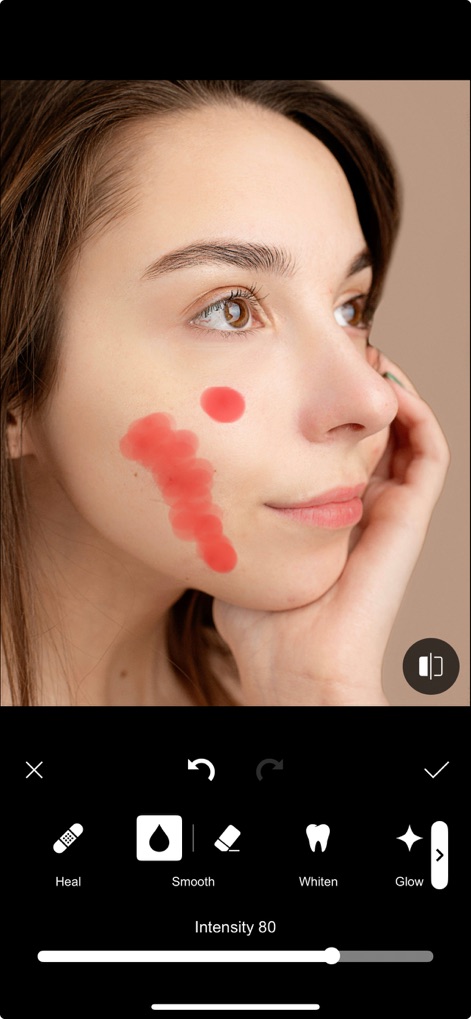
Hautbild Perfektionieren
Die App ermöglicht detaillierte Hautbearbeitung durch Funktionen wie 'Glätten' und 'Aufhellen', um Unregelmäßigkeiten zu korrigieren und ein makelloses Ergebnis zu erzielen.

Audiomix Präzision
Nutzer profitieren von detaillierter Audio-Steuerung, einschließlich präziser Fade-In-/Out-Optionen und Audio-Ducking-Effekten, um die Lautstärke von Hintergrundmusik automatisch anzupassen.

Kreative Bild-Integration
Die App bietet vielseitige Bild-in-Bild-Funktionalität, mit der Nutzer Videos und Fotos flexibel in ihren Projekten platzieren und deren Größe sowie Position anpassen können.

Visuelle Akzente Setzen
Nutzer können aus einer Sammlung von 80 animierten Stickern wählen, darunter interaktive Social-Media-Elemente wie 'Like'- und 'Subscribe'-Buttons, um ihre Videos ansprechender zu gestalten.
Beschreibung
Download
Ähnliche Apps
Apps mit ähnlichen Funktionen und Nutzererfahrung

VN: AI Video Editor
Ubiquiti Labs, LLC

Splice - Video Editor & Maker
Bending Spoons Apps ApS

Blurrr-Music video editor
TBPS INTERNATIONAL TECHNOLOGY PTE. LTD.

Node Video
小为 罗

Time Cut: Smooth Slow Motion
立亚 林

LumaFusion
Luma Touch LLC

Slow Motion Video Fx Editor
Brain Craft Ltd

WEILO - My Last Video Editor
vimosoft

Video Effects Editor: Riveo
Forge and Form GmbH
Diese Seite ist keine offizielle Seite der App oder ihres Entwicklers, sondern eine unabhängige redaktionelle Veröffentlichung, die zu Informations- und Kommentarzwecken erstellt wurde. Sofern nicht ausdrücklich anders angegeben, sind weder die App noch ihr Entwickler mit MWM, Apple, Google Play, dem App-Herausgeber oder dem Entwickler der App verbunden, von ihnen unterstützt, gesponsert, autorisiert oder anderweitig offiziell verbunden, und nichts auf dieser Seite impliziert, dass die App unter Verwendung der Dienste von MWM entwickelt wurde. Alle Marken, Logos, Screenshots und andere Inhalte bleiben Eigentum ihrer jeweiligen Inhaber.