
Diese Seite ist keine offizielle Seite der App oder ihres Entwicklers, sondern eine unabhängige redaktionelle Veröffentlichung, die zu Informations- und Kommentarzwecken erstellt wurde. Sofern nicht ausdrücklich anders angegeben, sind weder die App noch ihr Entwickler mit MWM, Apple, Google Play, dem App-Herausgeber oder dem Entwickler der App verbunden, von ihnen unterstützt, gesponsert, autorisiert oder anderweitig offiziell verbunden, und nichts auf dieser Seite impliziert, dass die App unter Verwendung der Dienste von MWM entwickelt wurde. Alle Marken, Logos, Screenshots und andere Inhalte bleiben Eigentum ihrer jeweiligen Inhaber.


Focus Stack Camera
Verbessern Sie Ihre Makrofotografie mit automatischem 10-Schichten-Fokus-Stacking. Erfassen Sie jedes kleinste Detail von Blumen, Miniaturen und Schmuck mit professioneller Klarheit direkt auf Ihrem iPhone.
Downloads
1K+Bewertung
Bewertungen gesamt
0Herausgeber
Kategorie
Photo & VideoSprachen
2Neueste Version
1.8Größe
13.2 MBErstveröffentlichung
8. Jan. 2025Professionelle Schärfe in jedem Detail
Schließen Sie die Lücke zwischen mobiler Fotografie und DSLR-Ergebnissen mit automatisiertem Fokus-Stacking, das für Makro-Enthusiasten und Perfektionisten entwickelt wurde.
Automatisiertes Fokus-Stacking
Erfassen Sie sofort 10 präzise Fokusebenen, um ein beeindruckendes Bild zu erstellen, das von vorne bis hinten scharf ist.
Pro-Objektiv-Optimierung
Schöpfen Sie das volle Potenzial der Tele- und Ultra-Weitwinkelobjektive Ihres iPhones mit speziellem Autofokus-Support für Makro-Motive aus.
Häufig gestellte Fragen
Alles, was Sie über wissen müssen Focus Stack Camera
Was ist Focus Stack Camera?
Focus Stack Camera ist eine App, die zehn Fotos mit unterschiedlichen Fokusebenen aufnimmt. Anschließend werden diese Bilder zu einem einzigen Foto kombiniert, das von vorne bis hinten scharf ist und sich ideal für die Makrofotografie eignet.
Wie funktioniert die Focus Stack Camera App?
Die Focus Stack Camera App nimmt 10 Fotos nacheinander auf, jedes mit einer anderen Fokusebene. Diese 10 Fotos werden dann zusammengeführt, um ein einziges Kompositbild zu erstellen, das von vorne bis hinten Schärfe erzielt.
Unterstützt Focus Stack Camera den HDR-Modus?
Ja, Focus Stack Camera unterstützt den HDR-Modus. Diese Funktion verbessert das Bild weiter und verstärkt die Farbschärfe im endgültigen gestapelten Foto.
Kann ich den Blitz mit der Focus Stack Camera App verwenden?
Ja, die Focus Stack Camera App ermöglicht es Benutzern, den Blitz einzuschalten. Sie bietet auch eine Helligkeitsregelung für den Blitz.
Welche Kameraobjektive unterstützt Focus Stack Camera?
Focus Stack Camera unterstützt den Wechsel zwischen Ultraweitwinkel-, Weitwinkel-, Tele- und Selfie-Kameras. Kompatibilität und Autofokusfähigkeiten variieren je nach spezifischem iPhone-Modell.
Ist eine Internetverbindung erforderlich, um Focus Stack Camera zu verwenden?
Nein, eine Internetverbindung ist nicht erforderlich, um Focus Stack Camera zu verwenden. Eine Internetverbindung wird jedoch für eine optimale Leistung empfohlen.
Empfiehlt Focus Stack Camera die Verwendung eines Stativs?
Ja, Focus Stack Camera empfiehlt die Verwendung eines Stativs für stabile Aufnahmen. Dieser Vorschlag wird gemacht, um die bestmögliche Schärfe beim Fokussieren von Fotos zu erzielen.
Wie viele Fotos kombiniert Focus Stack Camera?
Die Focus Stack Camera App nimmt 10 Fotos auf und kombiniert sie. Jedes Foto wird mit einer anderen Ebene der Fokussierung oder Schärfe aufgenommen, um ein einziges, vollständig scharfes Bild zu erstellen.
Können Benutzer Fotos, die mit Focus Stack Camera aufgenommen wurden, in der Vorschau anzeigen?
Ja, Focus Stack Camera bietet eine Vorschau der direkt in der App aufgenommenen Fotos. Benutzer können auch ein Fotoalbum öffnen, um ihre aufgenommenen Bilder anzuzeigen.
Was ist der maximale Zoom in Focus Stack Camera?
Focus Stack Camera ermöglicht es Benutzern, bis zu 4x zu zoomen. Diese Funktion bietet Flexibilität beim Einrahmen von Motiven für das Fokussieren.
Was ist die minimale Fokussierentfernung für Focus Stack Camera?
Die minimale Fokussierentfernung für Focus Stack Camera beträgt 2 cm. Dies ermöglicht sehr nahe Makrofotografie.
Die folgenden Screenshots und die Beschreibung stammen direkt aus dem offiziellen Store-Eintrag der App und sind Eigentum des Entwicklers.
App Store
Screenshots
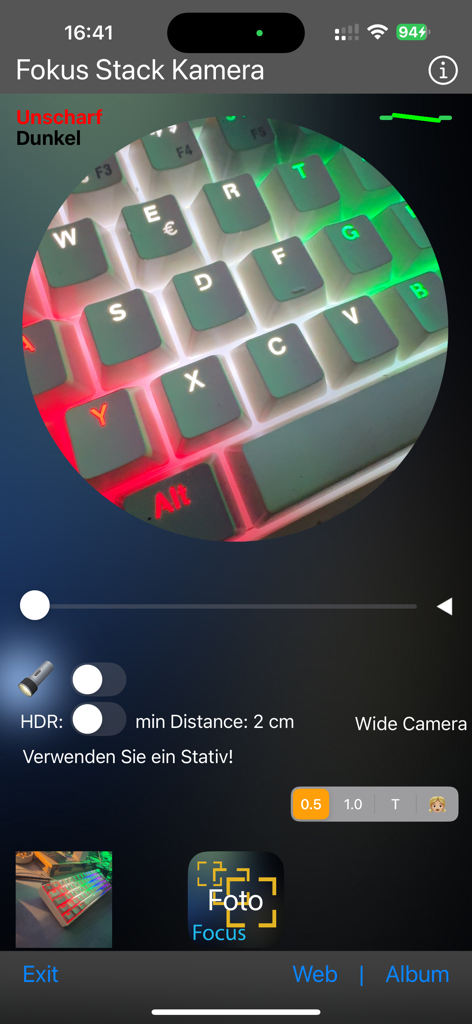
Fokus Stack Camera App-Oberfläche, die ein Makrofoto einer bunten, hintergrundbeleuchteten Tastatur zeigt.
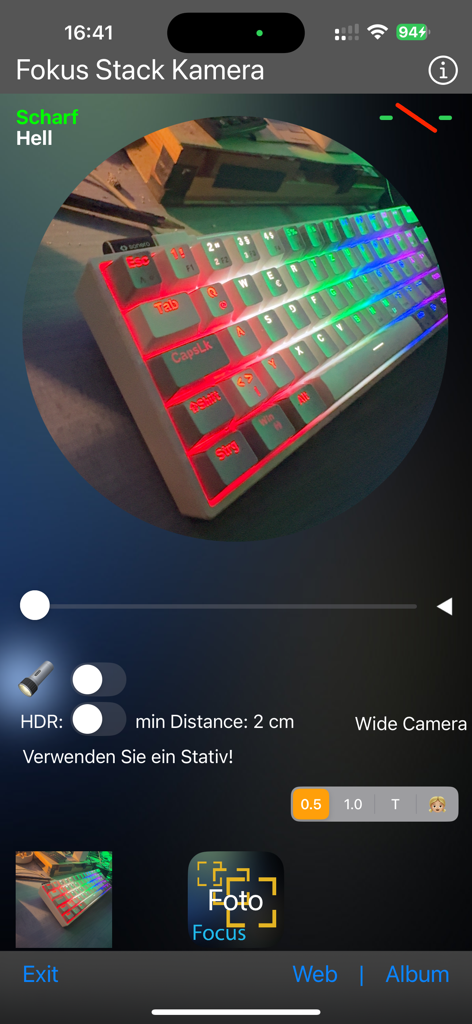
Fokus Stack Camera App-Oberfläche mit Makrofotografie-Steuerelementen und einer Vorschau einer hintergrundbeleuchteten Tastatur
Beschreibung
Download
Ähnliche Apps
Top-gerankte Apps in derselben Kategorie

CapCut: Photo & Video Editor
BYTEDANCE PTE. LTD.

Instagram, Inc.

YouTube
Google LLC

Canva: AI Photo & Video Editor
Canva Pty Ltd

Snapchat
Snap, Inc.

快手
Beijing Kwai Technology Co., Ltd.

Edits: Video Editor
Instagram, Inc.

Meitu- AI Photo & Video Editor
Xiamen Meitu Technology Co., Ltd.

Google Photos: Backup & Edit
Google LLC
Diese Seite ist keine offizielle Seite der App oder ihres Entwicklers, sondern eine unabhängige redaktionelle Veröffentlichung, die zu Informations- und Kommentarzwecken erstellt wurde. Sofern nicht ausdrücklich anders angegeben, sind weder die App noch ihr Entwickler mit MWM, Apple, Google Play, dem App-Herausgeber oder dem Entwickler der App verbunden, von ihnen unterstützt, gesponsert, autorisiert oder anderweitig offiziell verbunden, und nichts auf dieser Seite impliziert, dass die App unter Verwendung der Dienste von MWM entwickelt wurde. Alle Marken, Logos, Screenshots und andere Inhalte bleiben Eigentum ihrer jeweiligen Inhaber.