
Diese Seite ist keine offizielle Seite der App oder ihres Entwicklers, sondern eine unabhängige redaktionelle Veröffentlichung, die zu Informations- und Kommentarzwecken erstellt wurde. Sofern nicht ausdrücklich anders angegeben, sind weder die App noch ihr Entwickler mit MWM, Apple, Google Play, dem App-Herausgeber oder dem Entwickler der App verbunden, von ihnen unterstützt, gesponsert, autorisiert oder anderweitig offiziell verbunden, und nichts auf dieser Seite impliziert, dass die App unter Verwendung der Dienste von MWM entwickelt wurde. Alle Marken, Logos, Screenshots und andere Inhalte bleiben Eigentum ihrer jeweiligen Inhaber.

GPS Map Camera : Geo Photos
Nie wieder rätseln, wo dieses Foto entstand. MWMs Kreation brennt Ort und Zeit direkt ins Bild, eine digitale Tätowierung der Wahrheit.
Downloads
7.5M+Bewertung
Bewertungen gesamt
300.8KHerausgeber
Kategorie
Photo & VideoSprachen
11Neueste Version
1.8.1Größe
96.6 MBErstveröffentlichung
30. März 2020Eine Bewertung der Schlüsselmerkmale und ihrer Bedeutung für detailorientierte Nutzer.
Analyse der Kernfunktionen der GPS Map Camera : Geo Photos App
Umfassende Kontextinformationen für Fotos
Die App ermöglicht das präzise Hinzufügen einer breiten Palette von Kontextinformationen wie Datum, Uhrzeit, Karte, Breiten- und Längengrad, Höhe, Wetterdaten, Magnetfeld und Kompass direkt auf Fotos.
Präzises Geotagging mit Live-Standorterfassung
Die App erfasst präzise die Live-Standortdaten zusammen mit den aufgenommenen Fotos und bietet die Option, GPS-Koordinaten im DMS- oder Dezimalformat für den Stempel festzulegen, was eine hohe geografische Genauigkeit gewährleistet.
Integration detaillierter Umweltdaten
Dieses Tool integriert umfassende Umweltdaten wie Wetterbedingungen, Kompassrichtung, Magnetfeldstärke, Windgeschwindigkeit, Luftfeuchtigkeit, Luftdruck und Höhe direkt in die Fotos.
Automatische Adress- und Datums-/Zeitstempelung
Fügt automatisch die ausgewählte Adresse des Aufnahmeorts sowie Datums- und Zeitstempel in verschiedenen Formaten direkt auf dem Foto ein, was die Dokumentation und Identifizierung von Standorten erleichtert.
Vielseitige Kartenansichten für visuellen Kontext
Ermöglicht die Auswahl verschiedener Kartentypen (Normal, Satellit, Gelände, Hybrid) für die Anzeige der Standortinformationen auf den Fotos, was eine vielseitige visuelle Kontextualisierung des Aufnahmeorts bietet.
Professionelle Markenintegration
Bietet die Möglichkeit, ein eigenes Markenlogo hochzuladen und auf die Fotos zu stempeln, was für professionelle Nutzung, Branding und Authentifizierung der Inhalte vorteilhaft ist.
Häufig gestellte Fragen
Alles, was Sie über wissen müssen GPS Map Camera : Geo Photos
How do I add GPS location stamps to my photos using GPS Map Camera?
To add GPS location stamps, install GPS Map Camera, select Advance or Classic Templates, arrange stamp formats, and adjust settings. The app automatically adds GPS location stamps to your clicked pictures.
What types of map data can the GPS Map Camera app display on photos?
The GPS Map Camera app can display map data as Normal, Satellite, Terrain, and Hybrid options. Users can select these custom map types within the Advance Template section.
Can I customize the date and time format on my GPS Map Camera photo stamps?
Yes, GPS Map Camera allows users to add Date & Timestamp from various formats as an image tag. This customization is available within the Advance Template section settings.
Does GPS Map Camera support adding custom logos to photo stamps?
Yes, GPS Map Camera supports adding custom brand logos to photo stamps. This feature is available in the Advance Template settings for personalized branding.
What environmental details can GPS Map Camera stamp onto photos?
GPS Map Camera stamps environmental details including Weather (Fahrenheit/Celsius), Wind speed, Humidity, Pressure, Altitude, and Magnetic Field directly onto photos.
Can GPS Map Camera geotag photos with both Latitude and Longitude?
Yes, GPS Map Camera geotags photos with both Latitude and Longitude. Users can set GPS Coordinates from DMS or Decimal Options for the GPS Stamp in the Advance Template.
Is the GPS Map Camera app useful for real estate professionals?
Yes, the GPS Map Camera app is useful for real estate professionals. They can easily apply GPS Map Location stamps to their site photos for clear documentation and client communication.
Can users add notes or hashtags to photos with GPS Map Camera?
Yes, users can add relatable notes and hashtags to their photos using the GPS Map Camera app. This customization option is available within the Advance Template settings.
Does the GPS Map Camera app track live location with captured photos?
Yes, the GPS Map Camera app tracks the live location along with captured photos. This feature helps users geotag their memories and movements accurately.
What custom camera features does GPS Map Camera offer?
GPS Map Camera offers a custom camera with Grid, Ratio, Front & Selfie camera support, Flash, Focus, Mirror, Timer, and capture sound support.
Die folgenden Screenshots und die Beschreibung stammen direkt aus dem offiziellen Store-Eintrag der App und sind Eigentum des Entwicklers.
App Store
Screenshots
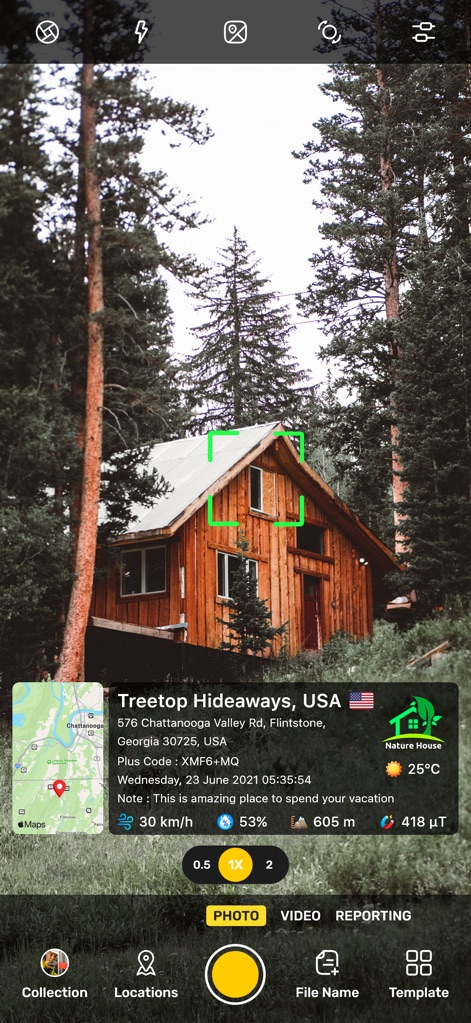
Nutzer können präzise Standortinformationen wie die Adresse und Wetterdaten direkt auf ihren Fotos einbetten, während ein Fokusrahmen die Bildmitte hervorhebt.
Hütten-Idylle Geo-Daten
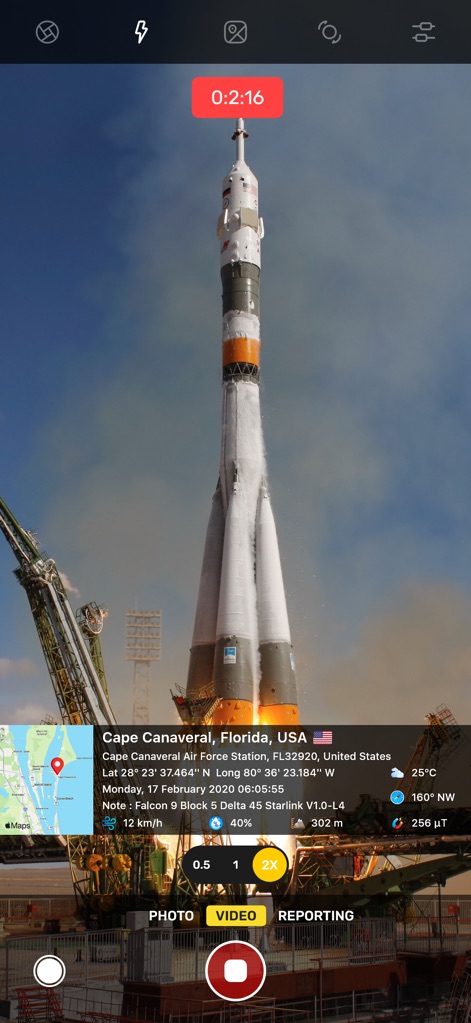
Dieses Bild zeigt, wie Geo-Tagging-Informationen wie der Standort und Umgebungsparameter auf Fotos festgehalten werden, während eine Videoaufnahme-Anzeige die fortlaufende Dokumentation signalisiert.
Raketenstart Geo-Tagging
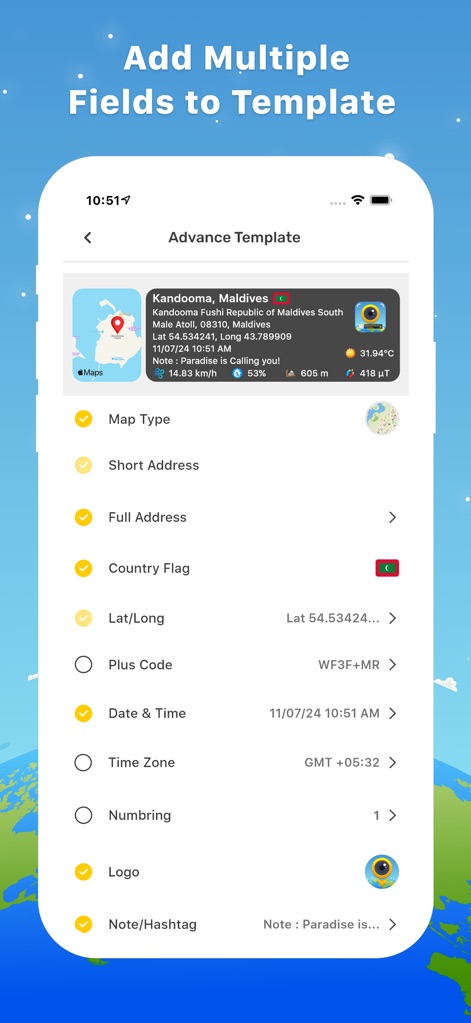
Die App bietet eine erweiterte Vorlagenkonfiguration, bei der Nutzer verschiedene Felder wie Kartentyp und Logo auswählen und anpassen können, um detaillierte Informationen in ihre Fotos zu integrieren.
Vorlagen Anpassen
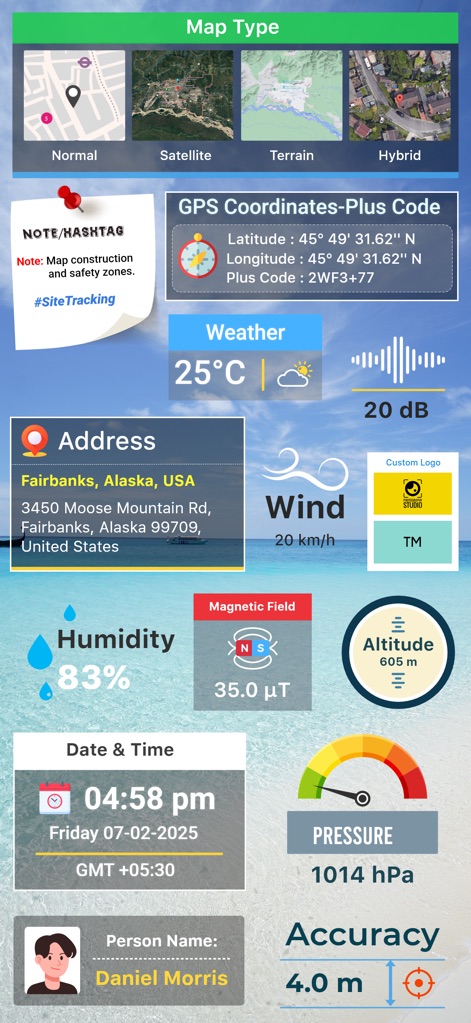
Diese Übersicht demonstriert die Vielzahl an verfügbaren Datenstempeln, von anpassbaren Kartenoptionen bis hin zu detaillierten Umweltdaten wie Wind und Feuchtigkeit.
Umfassende Datendarstellung
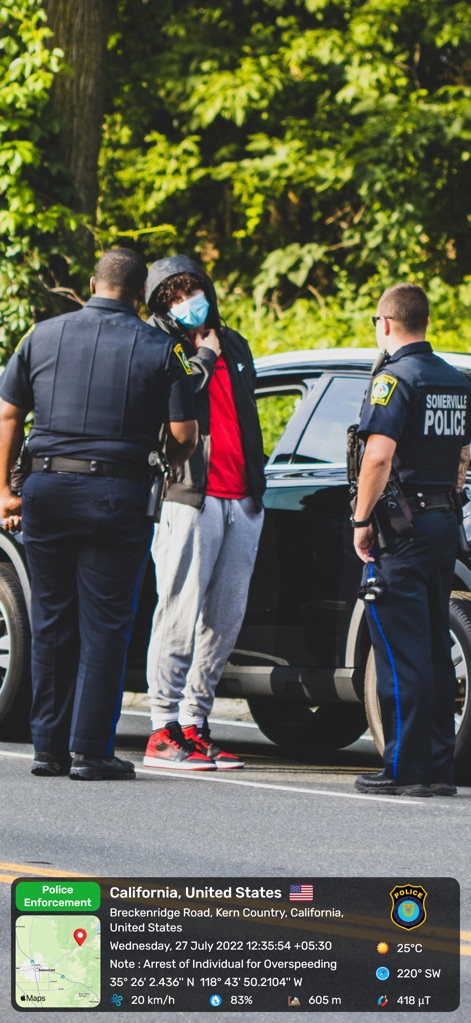
Für professionelle Anwendungen bietet die App die Möglichkeit, Standort- und Zeitstempel zusammen mit einem spezifischen 'Police Enforcement'-Label einzublenden, was die Authentizität und den Kontext von Ereignisfotos sichert.
Rechtliche Dokumentation
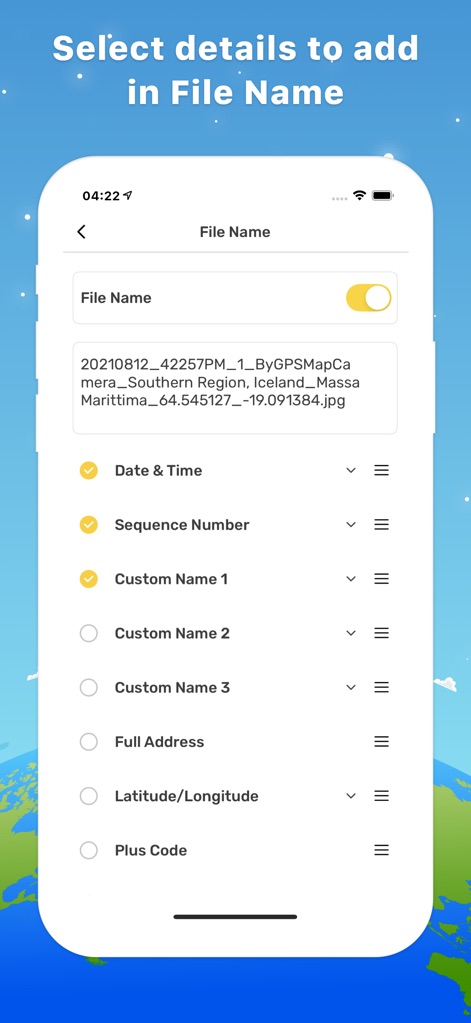
Nutzer können den Dateinamen ihrer Fotos detailliert konfigurieren, indem sie Elemente wie Datum & Uhrzeit sowie Breiten-/Längengrade auswählen, um die Organisation und Auffindbarkeit zu optimieren.
Dateinamen Konfigurieren
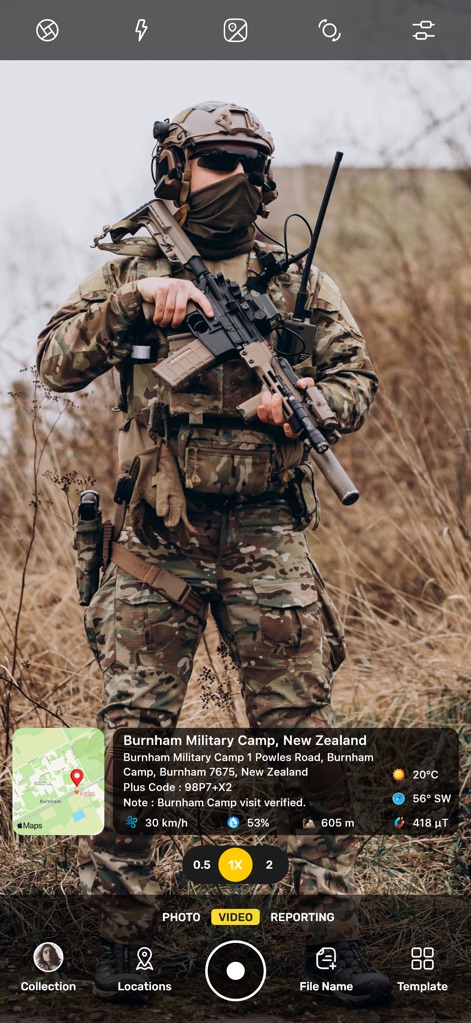
Dieses Beispiel veranschaulicht die Anwendung der App zur Dokumentation militärischer Operationen mit präzisen Geodaten und einer speziellen Notizfunktion zur Verifizierung von Besuchen.
Militärische Felddokumentation
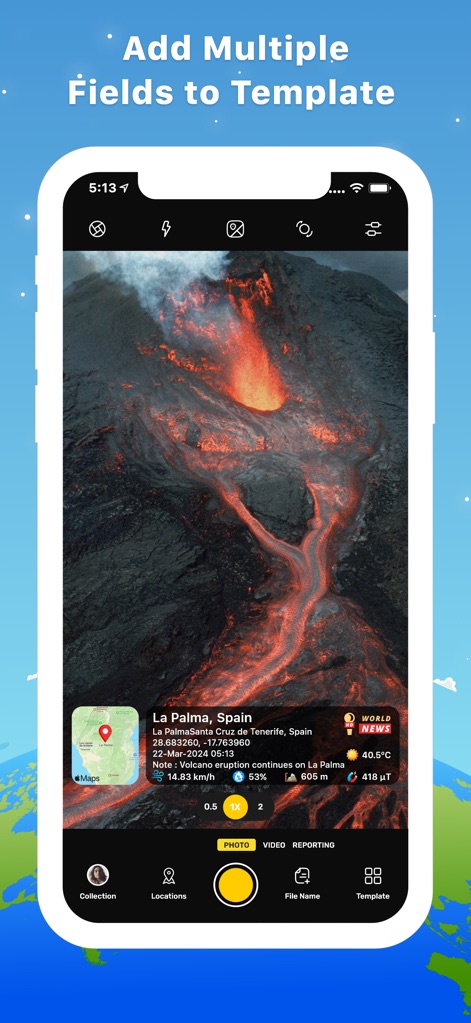
Die App ermöglicht die genaue Erfassung von Naturereignissen mit Geo-Daten und spezifischen Hinweisen wie der fortlaufenden Eruption, ergänzt durch ein thematisches Logo für Nachrichten.
Naturereignisse Dokumentieren
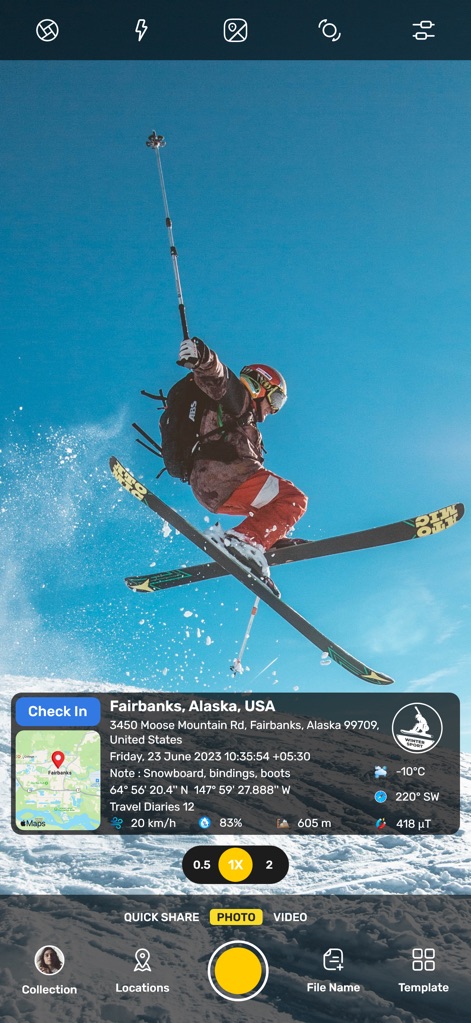
Abenteuerlustige können ihre sportlichen Erlebnisse mit präzisen Standortdaten und einer 'Check In'-Funktion dokumentieren, die den Aufnahmeort hervorhebt und kontextualisiert.
Sportliche Aktivitäten Erfassen
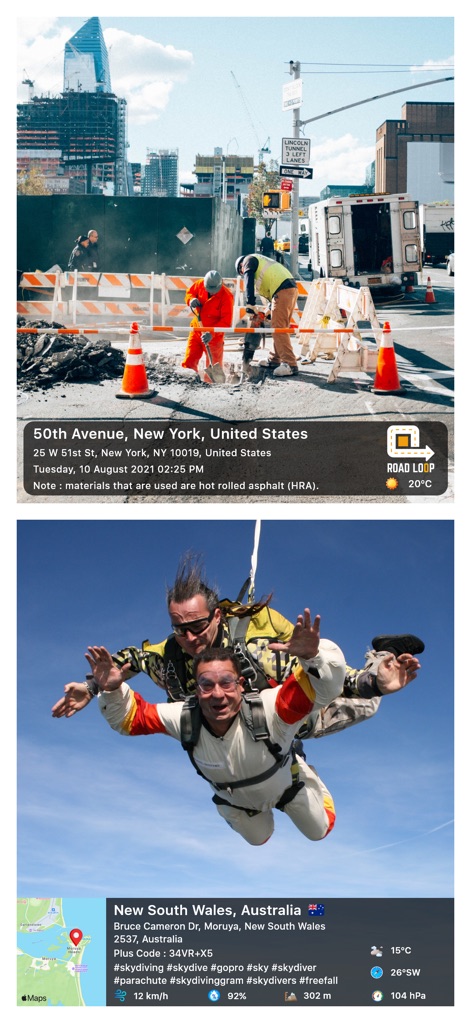
Die App demonstriert ihre Vielseitigkeit durch die Dokumentation unterschiedlicher Szenarien, von Baustellen mit spezifischen Notizen und einem 'ROAD LOOP'-Logo bis hin zu Extremsportarten mit detaillierten Umgebungs- und Hashtag-Informationen.
Vielseitige Anwendungsszenarien
Beschreibung
Download
Ähnliche Apps
Apps mit ähnlichen Funktionen und Nutzererfahrung

Timestamp Camera -AI Timestamp
Shanghai Zongchong Information Technology Co., Ltd

Timestamp Camera - Date Stamp
Artify Inc.

Timestamp Camera: Time & GPS
Practical Apps from Sweden AB

Timestamp camera - gps cam
Guangzhou Siyue Network Technology Co., Ltd.

DateStamper
Jordan Hipwell

Timestamp Camera Basic
玉彬 陈

Timestamp Camera: Time stamp
燕倩 费

Timestamp Camera - Time & GPS
Shaanxi Ruidebao Technology Co.,Ltd

Timestamp Camera - Aio GPS Cam
周萍 黄
Diese Seite ist keine offizielle Seite der App oder ihres Entwicklers, sondern eine unabhängige redaktionelle Veröffentlichung, die zu Informations- und Kommentarzwecken erstellt wurde. Sofern nicht ausdrücklich anders angegeben, sind weder die App noch ihr Entwickler mit MWM, Apple, Google Play, dem App-Herausgeber oder dem Entwickler der App verbunden, von ihnen unterstützt, gesponsert, autorisiert oder anderweitig offiziell verbunden, und nichts auf dieser Seite impliziert, dass die App unter Verwendung der Dienste von MWM entwickelt wurde. Alle Marken, Logos, Screenshots und andere Inhalte bleiben Eigentum ihrer jeweiligen Inhaber.