iMPC Pro 2 for iPhone
Herunterladen auf App Store

Diese Seite ist keine offizielle Seite der App oder ihres Entwicklers, sondern eine unabhängige redaktionelle Veröffentlichung, die zu Informations- und Kommentarzwecken erstellt wurde. Sofern nicht ausdrücklich anders angegeben, sind weder die App noch ihr Entwickler mit MWM, Apple, Google Play, dem App-Herausgeber oder dem Entwickler der App verbunden, von ihnen unterstützt, gesponsert, autorisiert oder anderweitig offiziell verbunden, und nichts auf dieser Seite impliziert, dass die App unter Verwendung der Dienste von MWM entwickelt wurde. Alle Marken, Logos, Screenshots und andere Inhalte bleiben Eigentum ihrer jeweiligen Inhaber.

Logo von iMPC Pro 2 for iPhone
Herunterladen auf App Store

iMPC Pro 2 for iPhone

Hole dir den legendären Akai Professional Workflow in dein mobiles Studio. Sample, schneide und mixe Tracks nach Industriestandard mit einem 64-Spuren-Mixer, AU-Integration und der ikonischen 16-Pad-Oberfläche – wo immer die Inspiration dich trifft.

Kennzahlen

Downloads

214K+

Bewertung

4.5/5

Bewertungen gesamt

2K+

Herausgeber

Akai Professional

Kategorie

Music

Sprachen

1

Neueste Version

2.2.2

Größe

202.7 MB

Erstveröffentlichung

10. Dez. 2018
Funktionen

Der Goldstandard der mobilen Produktion

iMPC Pro 2 vereint den legendären MPC-Workflow mit fortschrittlichen Werkzeugen zur Songerstellung und verwandelt dein iPhone in ein professionelles Tonstudio.

Legendäres Sampling & Chopping

Erlebe die Präzision des Chop-Shops. Sample direkt von Spotify und nutze die intuitive Multi-Touch-Bearbeitung, um Sounds wie ein Profi zu bearbeiten.

64-Spuren-Studio-Power

Erstelle komplexe Arrangements mit einem riesigen Mixer, Vocal-Spuren und Audio Unit-Unterstützung. Dein Handy ist jetzt ein Produktions-Kraftpaket.

Die folgenden Screenshots und die Beschreibung stammen direkt aus dem offiziellen Store-Eintrag der App und sind Eigentum des Entwicklers.

App Store

Screenshots
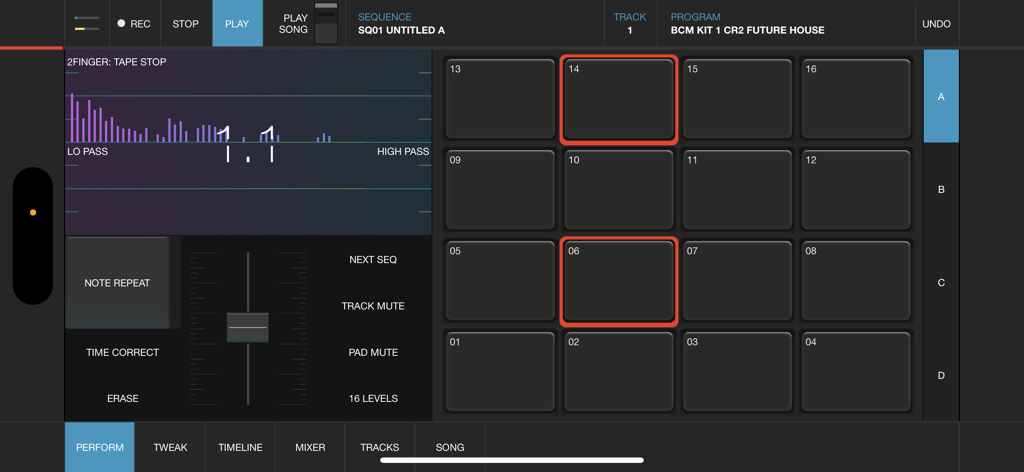
iMPC Pro 2 for iPhone - Professionelle Beat-Making-Oberfläche für iMPC Pro 2 auf dem iPhone mit dem legendären 16-Pad-Gitter und Audio-Performance-Steuerelementen
Professionelle Beat-Making-Oberfläche für iMPC Pro 2 auf dem iPhone mit dem legendären 16-Pad-Gitter und Audio-Performance-Steuerelementen

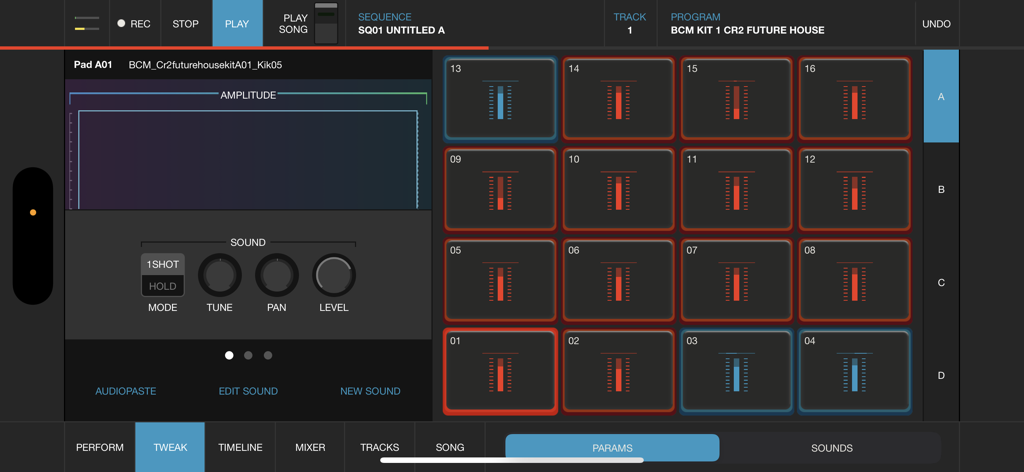
iMPC Pro 2 for iPhone - iMPC Pro 2 für iPhone-Oberfläche mit 16 Drum-Pads und einem Wellenform-Sound-Editor für mobiles Beat-Making
iMPC Pro 2 für iPhone-Oberfläche mit 16 Drum-Pads und einem Wellenform-Sound-Editor für mobiles Beat-Making

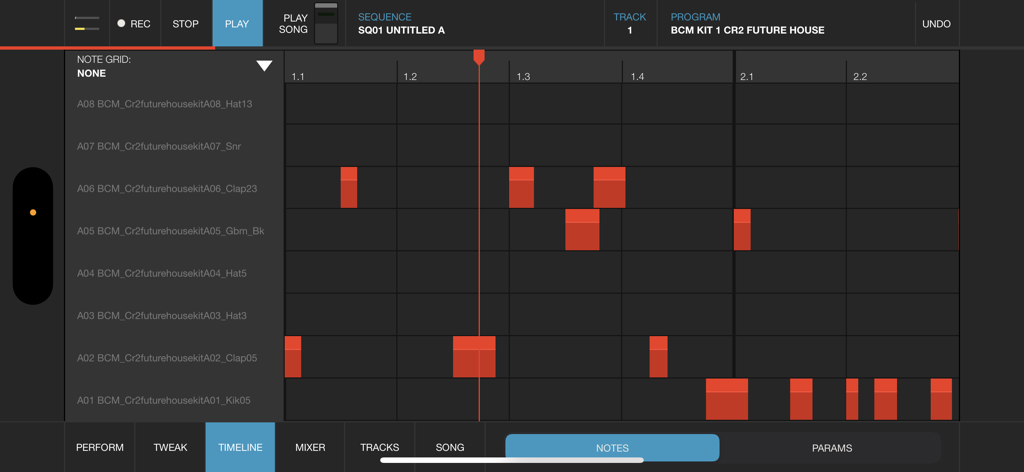
iMPC Pro 2 for iPhone - iMPC Pro 2 für iPhone-Timeline-Ansicht mit Notenraster für Musikproduktions-Sequenzierung
iMPC Pro 2 für iPhone-Timeline-Ansicht mit Notenraster für Musikproduktions-Sequenzierung

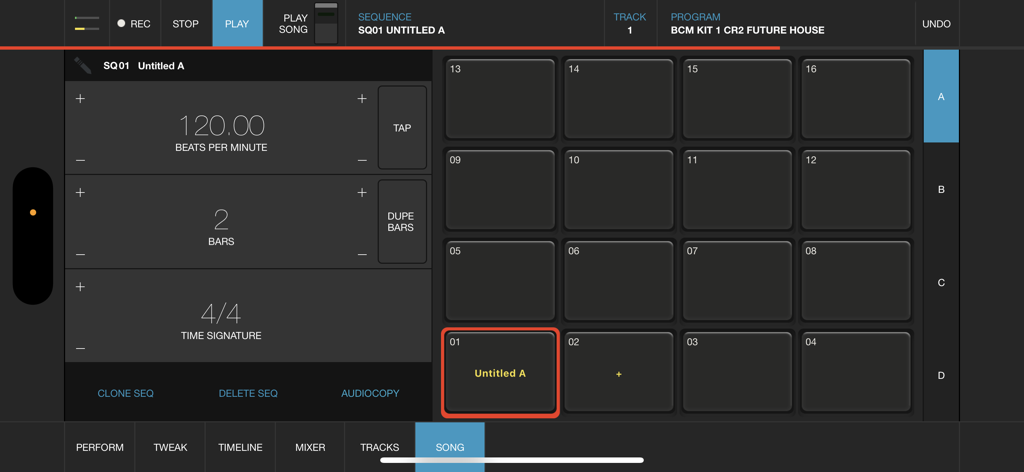
iMPC Pro 2 for iPhone - iMPC Pro 2 für iPhone-Songmodus-Oberfläche mit 16-Pad-Gitter und Sequenzeinstellungen
iMPC Pro 2 für iPhone-Songmodus-Oberfläche mit 16-Pad-Gitter und Sequenzeinstellungen

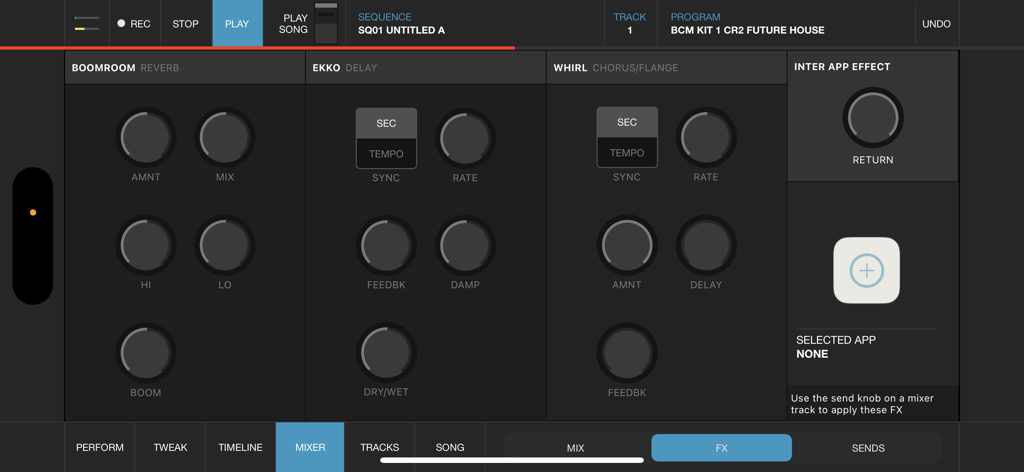
iMPC Pro 2 for iPhone - Die Effektmixer-Oberfläche von iMPC Pro 2 für iPhone mit Reverb-, Delay- und Chorus-Steuerelementen

Die Effektmixer-Oberfläche von iMPC Pro 2 für iPhone mit Reverb-, Delay- und Chorus-Steuerelementen

Beschreibung

iMPC Pro 2 for iPhone fuses innovative song creation with the iconic MPC workflow. It’s a powerhouse in your pocket. Whether you’re using the powerful sampler, dropping in some vocals, or integrating an Audio Unit, you’re sure to find everything you need. AUDIO TRACKS: Within the audio tracks, you can time warp, pitch shift, and rearrange your audio clips in real time. The sophistication of real time manipulation is captured in a simple workflow and sleek interface. You can choose from multiple input sources to record, including external mic channels, hardware audio interfaces, and IAA. AUDIO UNIT TRACKS: You can now load any Audio Units instrument into an Audio Unit Track! Control your AU instrument with a classic piano keyboard interface and an iMPC interface with note variation, Flux Link, Note Repeat, 16 Levels, and more. The app also features an improvement to the workflow for song creation. Song sequencing is faster, more powerful, and more flexible, so you have complete creative control. 100% NEW SOUND KIT AND MORE: Designed exclusively for iMPC Pro 2 for iPhone, these kits cover some of the most iconic and cutting-edge beat genres available, from a range of beloved producers, all chosen from the Akai Professional vault. Each kit includes samples featuring sounds from punchy 808’s to melodic hits and stabs, designed for the best user experience possible. The app also comes with 4 additional Sound Packs for FREE (valued at $20). Grab these packs in the AudioCopy Content Store: Bryson’s Soul, Dark Swang, and Metro Bang. iMPC University students have the opportunity to earn an additional Sound Pack, The Diploma! You can use them in hundreds of AudioCopy compatible apps (including iMPC for iPhone). iMPC UNIVERSITY: Unlock producer secrets and learn how to become a full fledged song creator with this tutorial series. iMPCU unlocks one course per day and gives you the tools you need to take your music to the next level. Fun for both new and experienced users, iMPC Pro 2 for iPhone offers an expansive dive into the world of beatmaking and song editing through these courses. We’re excited for you to try it! FEATURES: Audio Tracks: - Record from built in mic, external mics, audio interfaces, instruments, etc. - Record from Inter App Audio Apps - Warp Tracks and Clips to match tempo - Access several quick editing features on Audio Clips (Pitch shift, Time Stretch, Amplify, Crop, Split, Duplicate) - Drag to arrange Audio Clips, snap them to an adjustable grid setting - Advanced waveform editing AudioUnit integration: - Audio Unit tweak mode with full keyboard support (including 2 dozen scale modes from Chromatic to Blues to Aeolian) --- - 100% New Sound Set, with 4 additional free Sound Packs - Sample sounds from Spotify - 64 Track Mixer with EQ and 4 FX sends (Reverb, Delay, Chorus/Flange, and one Inter App Audio Effect) - Chop-shop provides intuitive multi-touch editing, trimming, auditioning, splicing, splicing and processing samples - Tracks View shows an overview of all the tracks in your song - 16 Levels mode with attack, velocity, length, and tuning settings for quickly creating variations of sounds - Live Sequence queuing for real-time performance and playback - Time correct: 1/8 note - 1/32T with variable swing - MPC Note Repeat featuring 1/8 note - 1/32T timing with latch - IAA and Ableton Link support - Share beats and songs seamlessly to YouTube - 4 Mute Groups and custom-designed envelope filters for all pads - AudioCopy and AudioPaste support - Improved integration and support for iMPC Pro Packs and other Sound Packs from the AudioCopy Content Store - Expert MIDI support including expanded options, multiple maps, and more - Extensive undo/redo capabilities - New Song Arrangement workflow and integrated Song Mode makes song creation easier than ever - Drag entire Folders and Sound Packs directly to pads to load many sounds at once

Download

Herunterladen auf App Store

Diese Seite ist keine offizielle Seite der App oder ihres Entwicklers, sondern eine unabhängige redaktionelle Veröffentlichung, die zu Informations- und Kommentarzwecken erstellt wurde. Sofern nicht ausdrücklich anders angegeben, sind weder die App noch ihr Entwickler mit MWM, Apple, Google Play, dem App-Herausgeber oder dem Entwickler der App verbunden, von ihnen unterstützt, gesponsert, autorisiert oder anderweitig offiziell verbunden, und nichts auf dieser Seite impliziert, dass die App unter Verwendung der Dienste von MWM entwickelt wurde. Alle Marken, Logos, Screenshots und andere Inhalte bleiben Eigentum ihrer jeweiligen Inhaber.







