
Diese Seite ist keine offizielle Seite der App oder ihres Entwicklers, sondern eine unabhängige redaktionelle Veröffentlichung, die zu Informations- und Kommentarzwecken erstellt wurde. Sofern nicht ausdrücklich anders angegeben, sind weder die App noch ihr Entwickler mit MWM, Apple, Google Play, dem App-Herausgeber oder dem Entwickler der App verbunden, von ihnen unterstützt, gesponsert, autorisiert oder anderweitig offiziell verbunden, und nichts auf dieser Seite impliziert, dass die App unter Verwendung der Dienste von MWM entwickelt wurde. Alle Marken, Logos, Screenshots und andere Inhalte bleiben Eigentum ihrer jeweiligen Inhaber.


LumaShare Share/Print Station
Beschleunigen Sie Ihre Warteschlangen und beeindrucken Sie Kunden mit nahtlosem drahtlosem Drucken, Live-Diashows und sofortiger sozialer Weitergabe – auch ohne Internetverbindung.
Downloads
23K+Bewertung
Bewertungen gesamt
400Herausgeber
Kategorie
Photo & VideoSprachen
1Neueste Version
4.0.2Größe
31.2 MBErstveröffentlichung
20. Mai 2014Professionelle Weitergabe mühelos gemacht
Maximieren Sie Ihren Event-ROI und beseitigen Sie Engpässe am Stand mit High-Speed-Weitergabe, Offline-Zuverlässigkeit und professionellen digitalen Displays für den modernen Event-Unternehmer.
Sofortige kanalübergreifende Weitergabe
Halten Sie die Warteschlangen in Bewegung, indem Sie es den Gästen ermöglichen, Fotos, GIFs und Boomerangs über SMS, WhatsApp, E-Mail oder QR-Codes von einer dedizierten iPad-Station aus weiterzugeben.
Felsenfester Offline-Modus
Lassen Sie nicht zu, dass schwaches WLAN am Veranstaltungsort Ihren Ruf ruiniert. LumaShare stellt SMS und E-Mails lokal in die Warteschlange und sendet sie automatisch, sobald Sie wieder online sind.
Häufig gestellte Fragen
Alles, was Sie über wissen müssen LumaShare Share/Print Station
Wofür wird LumaShare verwendet?
LumaShare ermöglicht die Anzeige und Weitergabe von Fotokabinenfotos, Videos und GIFs von dslrBooth oder LumaBooth. Es bietet die Weitergabe per E-Mail, SMS, WhatsApp, AirDrop, QR-Code und direkten Druck.
Welche Freigabeoptionen sind in LumaShare verfügbar?
LumaShare bietet Freigabeoptionen für Fotos, Videos und GIFs per E-Mail, SMS, WhatsApp, AirDrop und QR-Code. Diese Funktionen sind nahtlos integriert.
Kann LumaShare Elemente ohne Internetverbindung freigeben?
Ja, LumaShare unterstützt E-Mail- und SMS-Freigaben auch ohne Internetverbindung. Andere Freigabemethoden erfordern möglicherweise Netzwerkzugriff.
Unterstützt LumaShare den Druck von Fotos?
Ja, LumaShare ermöglicht den direkten Druck über AirPrint-kompatible Drucker oder an Drucker, die mit dslrBooth oder LumaBooth verbunden sind.
Wie verbinde ich LumaShare mit einem externen Display für Diashows?
LumaShare wird mit AirPlay 2-Geräten wie Roku, AppleTV oder kompatiblen Smart-TVs verbunden. Benutzer können auch ein HDMI-Kabel für externe Displays verwenden.
Wird ein Abonnement für unbegrenzte Freigaben mit LumaShare benötigt?
Ja, unbegrenzte Freigaben über SMS, E-Mail, QR-Code und WhatsApp erfordern ein LumaShare Cloud Storage and Sharing Abonnement.
Was sind die monatlichen Kosten des LumaShare-Abonnements?
Das LumaShare Cloud Storage and Sharing Abonnement kostet 8,99 US-Dollar pro Monat. Die Zahlung wird über Ihr iTunes-Konto abgewickelt.
Kann ich mein LumaShare-Abonnement verwalten oder kündigen?
Ja, Sie können Ihr LumaShare-Abonnement verwalten und die automatische Verlängerung in Ihren iTunes-Kontoeinstellungen deaktivieren. Während einer aktiven Periode ist keine Kündigung möglich.
Kann LumaShare vor der Freigabe oder dem Druck einen Haftungsausschluss anzeigen?
Ja, LumaShare ermöglicht das Hinzufügen eines Haftungsausschlusses, der den Gästen angezeigt wird. Dieser erscheint, bevor sie Inhalte freigeben oder drucken dürfen.
Die folgenden Screenshots und die Beschreibung stammen direkt aus dem offiziellen Store-Eintrag der App und sind Eigentum des Entwicklers.
App Store
Screenshots
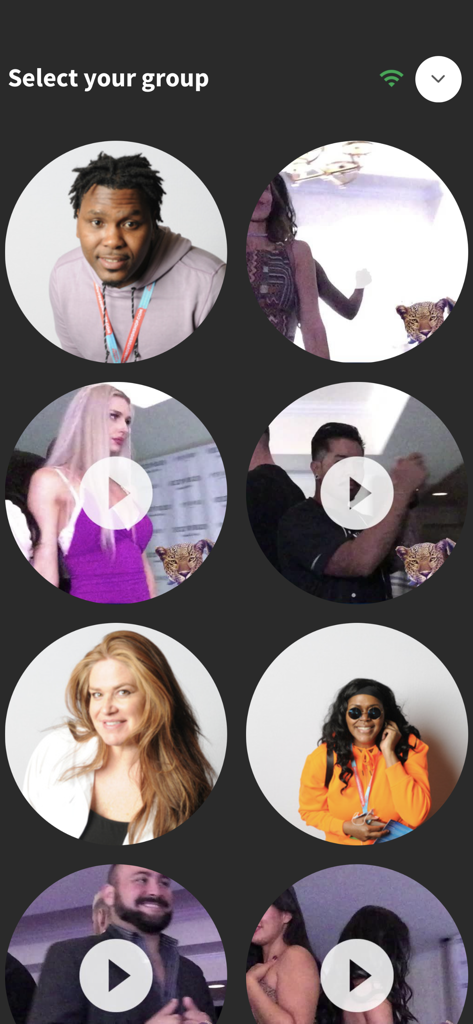
LumaShare App-Bildschirm mit kreisförmigen Miniaturansichten von Event-Fotos und -Videos zur Auswahl.
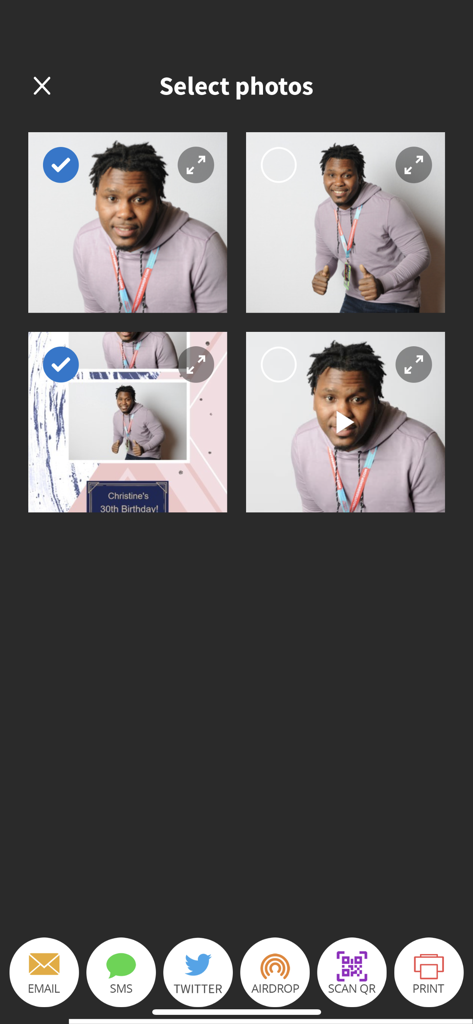
LumaShare App-Oberfläche zur Auswahl von Fotoautomaten-Bildern und zur Weitergabe per E-Mail, SMS oder QR-Code
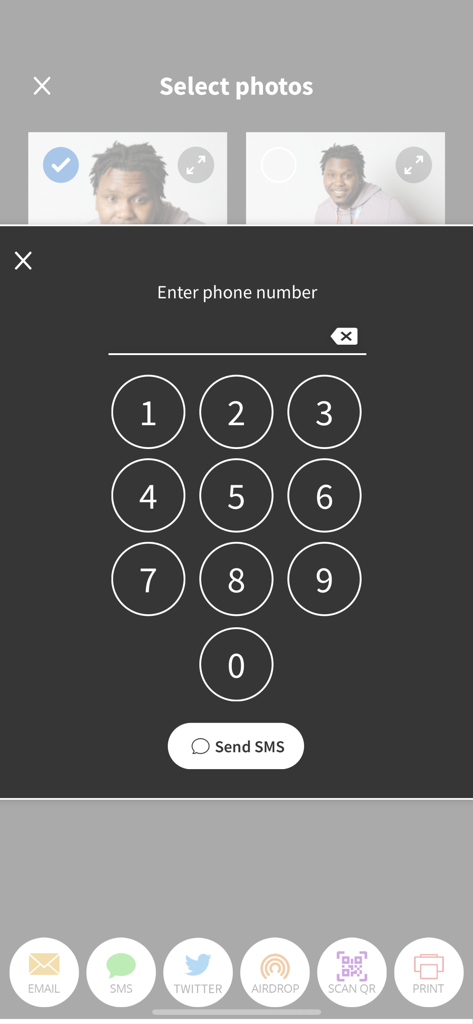
LumaShare App-Bildschirm mit Fotoauswahl und einem Ziffernblock zur Eingabe einer Telefonnummer für die SMS-Weitergabe
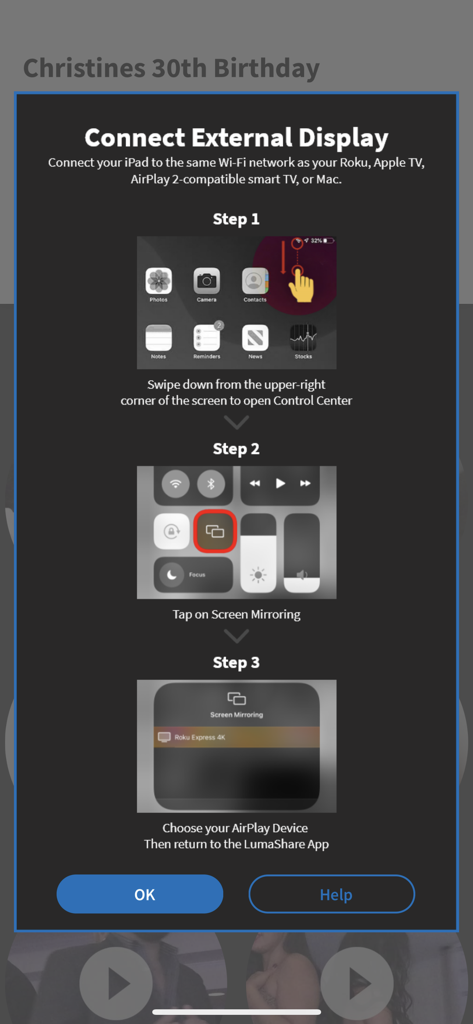
Schritt-für-Schritt-Anleitung zum Anschließen der LumaShare-App an ein externes Display über AirPlay-Bildschirmspiegelung
Beschreibung
Download
Ähnliche Apps
Apps mit ähnlichen Funktionen und Nutzererfahrung

ChackTok - 360video&photobooth
LINKSIGN UK CO., LTD

Touchpix · Photo & Video Booth
Propfun

RevoSpin 360
MRKJ INC

LumaBooth Event Photo Booth
Lumasoft LLC

Mini Photobooth
Minivan Labs

Simple Booth HALO
SMPL Inc.

Simple Booth Classic
SMPL Inc.

BoothLab: Photo & Video Booth
Jorge Cozain

Wifibooth the PRO photo booth
Solodigitalis Inc.
Diese Seite ist keine offizielle Seite der App oder ihres Entwicklers, sondern eine unabhängige redaktionelle Veröffentlichung, die zu Informations- und Kommentarzwecken erstellt wurde. Sofern nicht ausdrücklich anders angegeben, sind weder die App noch ihr Entwickler mit MWM, Apple, Google Play, dem App-Herausgeber oder dem Entwickler der App verbunden, von ihnen unterstützt, gesponsert, autorisiert oder anderweitig offiziell verbunden, und nichts auf dieser Seite impliziert, dass die App unter Verwendung der Dienste von MWM entwickelt wurde. Alle Marken, Logos, Screenshots und andere Inhalte bleiben Eigentum ihrer jeweiligen Inhaber.