
Diese Seite ist keine offizielle Seite der App oder ihres Entwicklers, sondern eine unabhängige redaktionelle Veröffentlichung, die zu Informations- und Kommentarzwecken erstellt wurde. Sofern nicht ausdrücklich anders angegeben, sind weder die App noch ihr Entwickler mit MWM, Apple, Google Play, dem App-Herausgeber oder dem Entwickler der App verbunden, von ihnen unterstützt, gesponsert, autorisiert oder anderweitig offiziell verbunden, und nichts auf dieser Seite impliziert, dass die App unter Verwendung der Dienste von MWM entwickelt wurde. Alle Marken, Logos, Screenshots und andere Inhalte bleiben Eigentum ihrer jeweiligen Inhaber.


MobiOffice・Word Docs・Excel・PDF
Dokumente jonglieren war gestern. Diese App macht aus Ihrem Smartphone ein vollwertiges Büro.
Downloads
10M+Bewertung
Bewertungen gesamt
134.7KHerausgeber
Kategorie
BusinessSprachen
17Neueste Version
13.3Größe
229.4 MBErstveröffentlichung
25. Okt. 2014Eine Bewertung der wichtigsten Leistungsmerkmale für produktivitätsorientierte Nutzer.
Analyse der Kernfunktionen von MobiOffice
Umfassende Formatkompatibilität
Die App bietet eine weitreichende Kompatibilität mit Microsoft Office (Word, Excel, PowerPoint), Google Docs, OpenOffice und weiteren Formaten, um einen nahtlosen Dokumentenaustausch zu gewährleisten.
Robuste Textverarbeitung (MobiDocs)
Dieses Tool verfügt über eine leistungsstarke Textverarbeitungsfunktion, die das Erstellen und Bearbeiten von Dokumenten inklusive Rich-Text-Formatierung, Tabellen und Bildern ermöglicht, vergleichbar mit Microsoft Word.
Erweiterte Tabellenkalkulation (MobiSheets)
Es ermöglicht Nutzern, komplexe Tabellenkalkulationen zu erstellen und zu bearbeiten, mit über 250 Funktionen, Diagrammen und Datenfilterung, die volle Kompatibilität mit Microsoft Excel bietet.
Professionelle Präsentationserstellung (MobiSlides)
Die App bietet umfassende Werkzeuge zum Erstellen und Bearbeiten von Präsentationen, einschließlich Folienlayouts, Diagrammen und dem Präsentationsmodus, was eine reibungslose Arbeit mit PowerPoint-Dateien gewährleistet.
PDF-Anzeige und -Bearbeitung
Dieses Tool ermöglicht das Öffnen, Anzeigen und Kommentieren von PDF-Dokumenten sowie die Arbeit mit Lesezeichen und Inhaltsverzeichnissen.
Flexible Cloud-Speicherintegration
Es ermöglicht Nutzern, ihre Konten bei Google Drive, OneDrive, Box oder Dropbox zu verknüpfen, um Dateien direkt aus der Cloud zu speichern und zu verwalten.
Erweiterte Dokumentensicherheit (Premium)
Die Premium-Version ermöglicht das Festlegen von Dokumentenpasswörtern, um sensible Informationen zu schützen und die Datensicherheit zu erhöhen.
Integrierter Dokumentenscanner
Die App verfügt über eine Funktion zum Scannen von Papierdokumenten mittels der Gerätekamera, um diese in digitale Formate umzuwandeln.
PDF-Konvertierung (Premium)
Die Premium-Funktion bietet die Möglichkeit, PDF-Dateien in bearbeitbare Word-, Excel- oder ePub-Formate umzuwandeln, was die Weiterverarbeitung erleichtert.
Kostenloser MobiDrive-Cloud-Speicher
Die App stellt 5 GB kostenlosen Cloud-Speicher in MobiDrive zur Verfügung, um wichtige Dokumente sicher online zu speichern.
Häufig gestellte Fragen
Alles, was Sie über wissen müssen MobiOffice・Word Docs・Excel・PDF
What is MobiOffice?
MobiOffice is an office productivity suite designed to create, edit, comment, format, convert, and protect documents, spreadsheets, and presentations. It also allows viewing and signing of PDF files.
Is MobiOffice compatible with Microsoft Office files?
Yes, MobiOffice is compatible with Microsoft Office formats including Word (.doc, .docx, .docm), Excel (.XLS, .XLSX, .XLSM), and PowerPoint (.PPT, .PPTX, .PPS, .PPSX, .PPTM, .PPSM).
Does MobiOffice provide cloud storage?
Yes, MobiOffice offers 5GB of free cloud space in MobiDrive upon sign-in. Premium users receive an extended 50GB of cloud storage.
What cloud services can MobiOffice link to?
MobiOffice allows users to link their Google Drive, OneDrive, Box, or Dropbox accounts. It also supports WebDAV and FTP connections.
Can MobiOffice scan paper documents?
Yes, MobiOffice includes a feature to scan paper documents to digital ones using the device's camera.
What word processing features does MobiDocs offer?
MobiDocs offers rich text and paragraph formatting, insertion of tables, pictures, text boxes, shapes, bookmarks, and symbols. It also creates and edits notes, headers/footers, and page numbers.
Can I edit formulas in spreadsheets using MobiOffice?
Yes, MobiOffice's MobiSheets application allows users to use over 250 functions and edit formulas. It also supports creating, previewing, and editing advanced charts.
Does MobiOffice offer a free trial?
Yes, MobiOffice offers a free trial. It automatically renews to a paid subscription unless auto-renew is turned off at least 24 hours prior to the trial period's end.
How much does a MobiOffice subscription cost?
A MobiOffice subscription costs $39.99 per year. This is an auto-renewable yearly subscription according to the pricing information.
How do I cancel a MobiOffice subscription?
Users can cancel a subscription anytime by turning off auto-renewal through their iTunes account settings at least 24 hours before the current subscription period ends.
Can MobiOffice convert PDF files?
Yes, the Premium MobiOffice PDF feature allows conversion of PDFs to Word, Excel, and ePub formats.
Does MobiOffice allow handwritten signatures on PDFs?
Yes, Premium MobiOffice PDF includes Quick Sign functionality, enabling handwritten signatures on fillable PDF forms.
Does MobiOffice support spell checking?
Yes, MobiOffice includes a spell check feature with options for language and learned words, as shown in its writing interface.
What file types can MobiOffice work with beyond Office documents and PDFs?
MobiOffice works with .zip, .png, .jpg, .tiff, .mp3, .mov, .mp4, .m4a, and OpenDocument formats, in addition to standard office documents and PDFs.
Die folgenden Screenshots und die Beschreibung stammen direkt aus dem offiziellen Store-Eintrag der App und sind Eigentum des Entwicklers.
App Store
Screenshots

Die App überzeugt durch ihre breite Akzeptanz und Leistung, was durch die über "250M+ Nutzern weltweit" und die "Trustpilot Excellent 4.6" Bewertung belegt wird.
App-Vertrauen & Leistung

Dieses Bild präsentiert die umfassende Tool-Suite der App, indem es überlappende Fenster von Textdokumenten und Tabellenkalkulationen zeigt, die alle wichtigen Bürofunktionen vereinen.
Alle Tools Vereint

Nutzer können ihre Texte professionell gestalten und bearbeiten, wie die Ansicht der Textverarbeitungs-Oberfläche und die nützliche Rechtschreibprüfung am unteren Bildschirmrand demonstrieren.
Texte Professionell Gestalten

Die App ermöglicht eine effiziente Datenanalyse, was durch die detaillierte Tabellenkalkulationsansicht und die angezeigten Optionen zur Zellformatierung anschaulich wird.
Daten Effizient Analysieren

Anwender können ihre Ideen überzeugend präsentieren, was durch die PowerPoint-ähnliche Bearbeitungsansicht und die flexible Option zum Einfügen von Bildern aus verschiedenen Quellen verdeutlicht wird.
Ideen Überzeugend Präsentieren

Dieses Tool erlaubt die einfache Bearbeitung von PDF-Dokumenten, wobei das Beispiel eines Zahlungsvereinbarung und die Option zur schnellen elektronischen "Quick Sign" Unterschrift visuell dargestellt sind.
PDFs Einfach Bearbeiten

Die App bietet eine praktische Funktion zum digitalen Scannen von Dokumenten, was durch das gescannte "Personal Budget"-Dokument und die Anweisungen zum "Anpassen der Ecken" visuell hervorgehoben wird.
Dokumente Digital Scannen

Dieses Tool gewährleistet eine umfassende Dateikompatibilität, wie die übersichtliche Dateiliste mit verschiedenen Formaten wie .docx und .pdf sowie die einfache Navigation durch "Recents" und "Files" zeigt.
Umfassende Dateikompatibilität
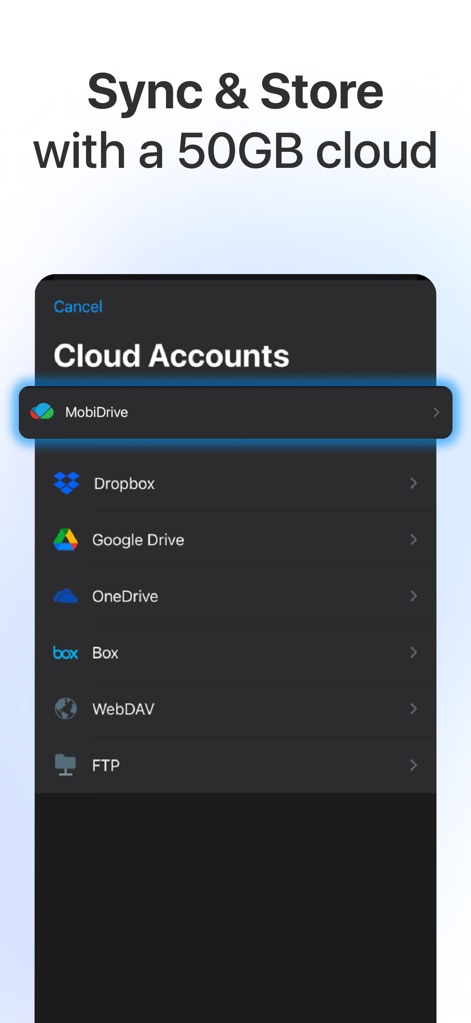
Die App bietet eine nahtlose Synchronisierung mit Cloud-Speichern, was an der Auswahl von Anbietern wie "MobiDrive" und "Dropbox" sowie dem beworbenen "50GB Cloud-Speicher" ersichtlich ist.
Cloud-Speicher Synchronisieren
Beschreibung
Download
Ähnliche Apps
Apps mit ähnlichen Funktionen und Nutzererfahrung

PDF PRO Scan Image & Documents
Balzo srl

The PDF Scanner, PDF editor HQ
NEXT K.U.M. LTD

CamScanner - PDF Scanner App
INTSIG Information Co., Ltd

Adobe Scan: PDF & OCR Scanner
Adobe Inc.

WPS Office: PDF, Docs, Sheets
KINGSOFT OFFICE SOFTWARE CORPORATION LIMITED

iLovePDF - PDF Editor & Scan
ILOVEPDF S.L.

Scanner App: Genius Scan
The Grizzly Labs

Microsoft Lens: PDF Scanner
Microsoft Corporation

Clear Scan: Doc Scanner App
INDY MOBILE APP COMPANY LIMITED
Diese Seite ist keine offizielle Seite der App oder ihres Entwicklers, sondern eine unabhängige redaktionelle Veröffentlichung, die zu Informations- und Kommentarzwecken erstellt wurde. Sofern nicht ausdrücklich anders angegeben, sind weder die App noch ihr Entwickler mit MWM, Apple, Google Play, dem App-Herausgeber oder dem Entwickler der App verbunden, von ihnen unterstützt, gesponsert, autorisiert oder anderweitig offiziell verbunden, und nichts auf dieser Seite impliziert, dass die App unter Verwendung der Dienste von MWM entwickelt wurde. Alle Marken, Logos, Screenshots und andere Inhalte bleiben Eigentum ihrer jeweiligen Inhaber.