OrgChart - Organization Chart
Herunterladen auf App Store

Diese Seite ist keine offizielle Seite der App oder ihres Entwicklers, sondern eine unabhängige redaktionelle Veröffentlichung, die zu Informations- und Kommentarzwecken erstellt wurde. Sofern nicht ausdrücklich anders angegeben, sind weder die App noch ihr Entwickler mit MWM, Apple, Google Play, dem App-Herausgeber oder dem Entwickler der App verbunden, von ihnen unterstützt, gesponsert, autorisiert oder anderweitig offiziell verbunden, und nichts auf dieser Seite impliziert, dass die App unter Verwendung der Dienste von MWM entwickelt wurde. Alle Marken, Logos, Screenshots und andere Inhalte bleiben Eigentum ihrer jeweiligen Inhaber.

Logo von OrgChart - Organization Chart
Herunterladen auf App Store

OrgChart - Organization Chart

Hören Sie auf, Zeit mit manuellen Linien und Formen zu verschwenden. Erstellen, verwalten und exportieren Sie professionelle Teamstrukturen automatisch auf Ihrem iPad mit intuitiven Gesten und nahtloser iCloud-Synchronisierung.

Kennzahlen

Downloads

127K+

Bewertung

4.6/5

Bewertungen gesamt

1K+

Herausgeber

皓 李

Kategorie

Business

Sprachen

-

Neueste Version

5.12

Größe

89.5 MB

Erstveröffentlichung

10. Apr. 2014
Funktionen

Visualisieren Sie Ihren Erfolg, mühelos

Vergessen Sie manuelle Linien und Ausrichtungsprobleme. OrgChart automatisiert den Designprozess, damit Sie sich auf die Führung Ihres Teams konzentrieren können, nicht auf das Zeichnen von Kästen.

Automatisches Layout, kein Zeichnen

Hören Sie auf, mit PowerPoint-Formen zu kämpfen. Geben Sie einfach Ihre Daten ein und lassen Sie unsere Engine sofort eine perfekt ausgerichtete Organisationsstruktur für Sie rendern.

Präsentationsreife Berichte

Verwandeln Sie Ihre Diagramme in Sekundenschnelle in professionelle PDF-, Excel- oder Bilddateien. Perfekt für Vorstandspräsentationen, Abteilungsprüfungen oder Stakeholder-Updates.

Die folgenden Screenshots und die Beschreibung stammen direkt aus dem offiziellen Store-Eintrag der App und sind Eigentum des Entwicklers.

App Store

Screenshots
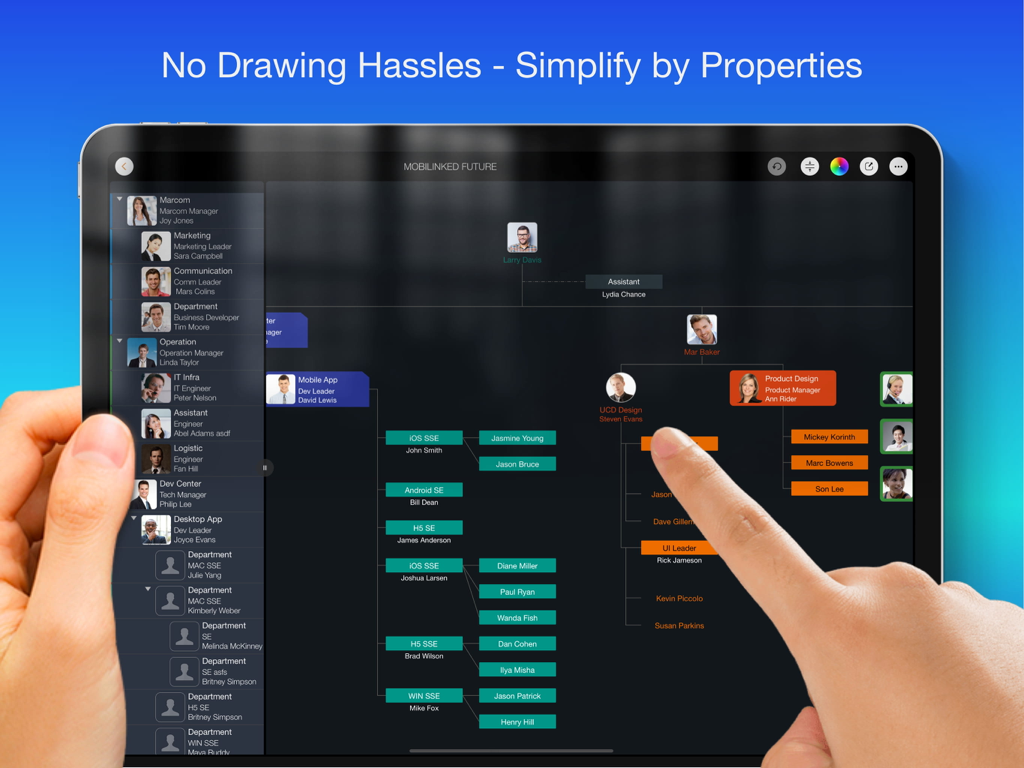
OrgChart - Organization Chart - Ein iPad-Bildschirm, der ein professionelles Organigramm mit Mitarbeiterfotos und bunten Abteilungszweigen anzeigt
Ein iPad-Bildschirm, der ein professionelles Organigramm mit Mitarbeiterfotos und bunten Abteilungszweigen anzeigt

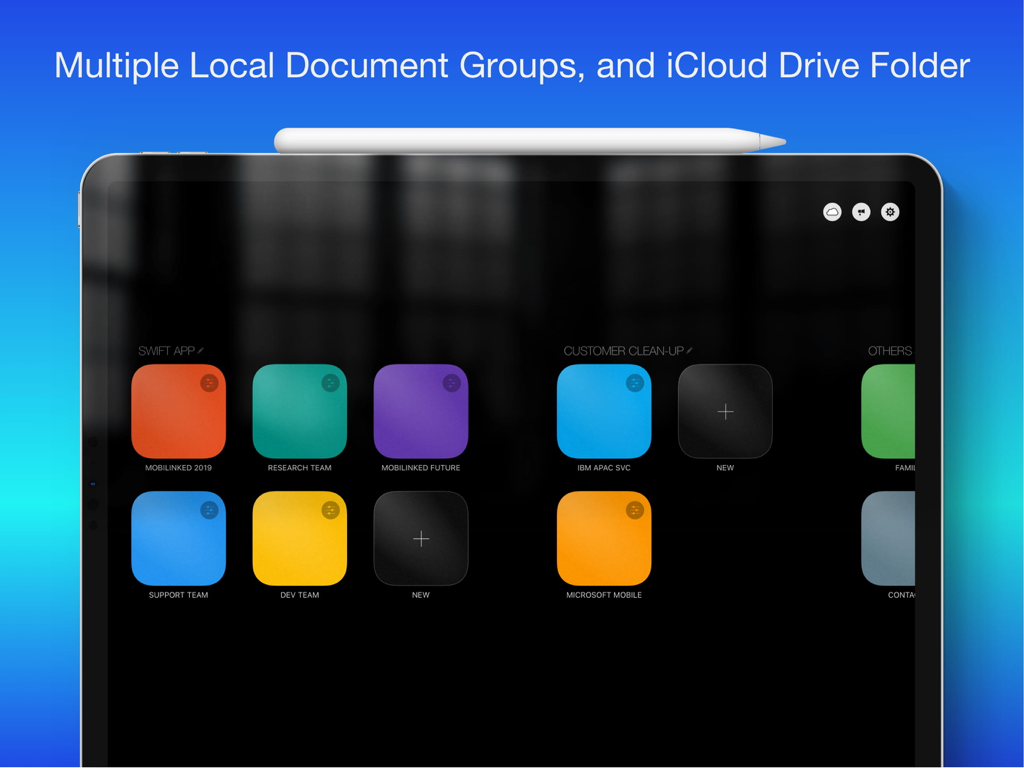
OrgChart - Organization Chart - OrgChart iPad App-Dashboard mit mehreren Dokumentgruppen und iCloud Drive-Integration
OrgChart iPad App-Dashboard mit mehreren Dokumentgruppen und iCloud Drive-Integration

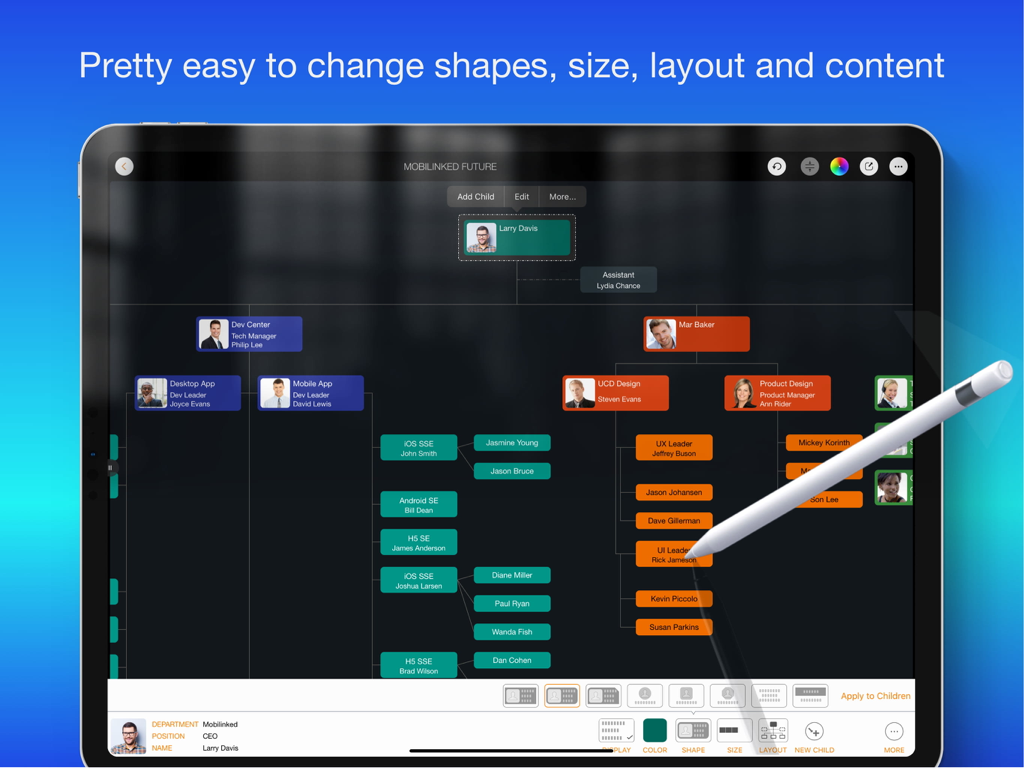
OrgChart - Organization Chart - Ein professionelles Organigramm, das auf einem iPad mit einem Apple Pencil bearbeitet wird
Ein professionelles Organigramm, das auf einem iPad mit einem Apple Pencil bearbeitet wird

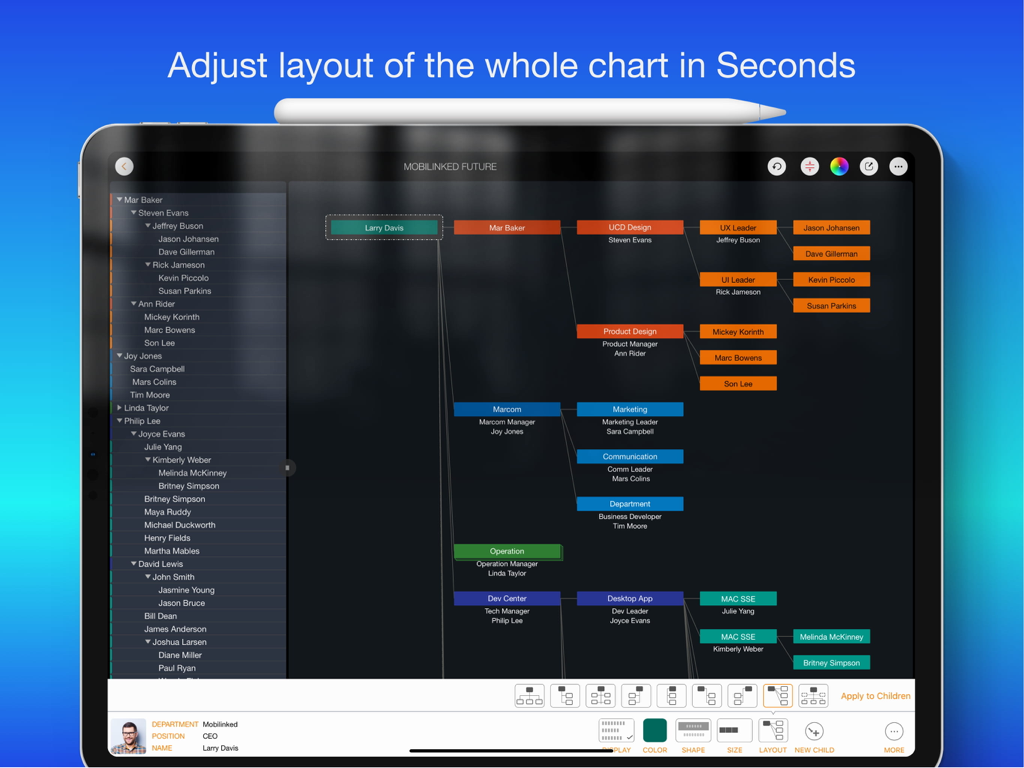
OrgChart - Organization Chart - Ein Screenshot der OrgChart-App auf einem iPad, der ein mehrstufiges Organigramm mit farbcodierten Feldern und einem Layout-Anpassungsmenü am unteren Rand zeigt.
Ein Screenshot der OrgChart-App auf einem iPad, der ein mehrstufiges Organigramm mit farbcodierten Feldern und einem Layout-Anpassungsmenü am unteren Rand zeigt.

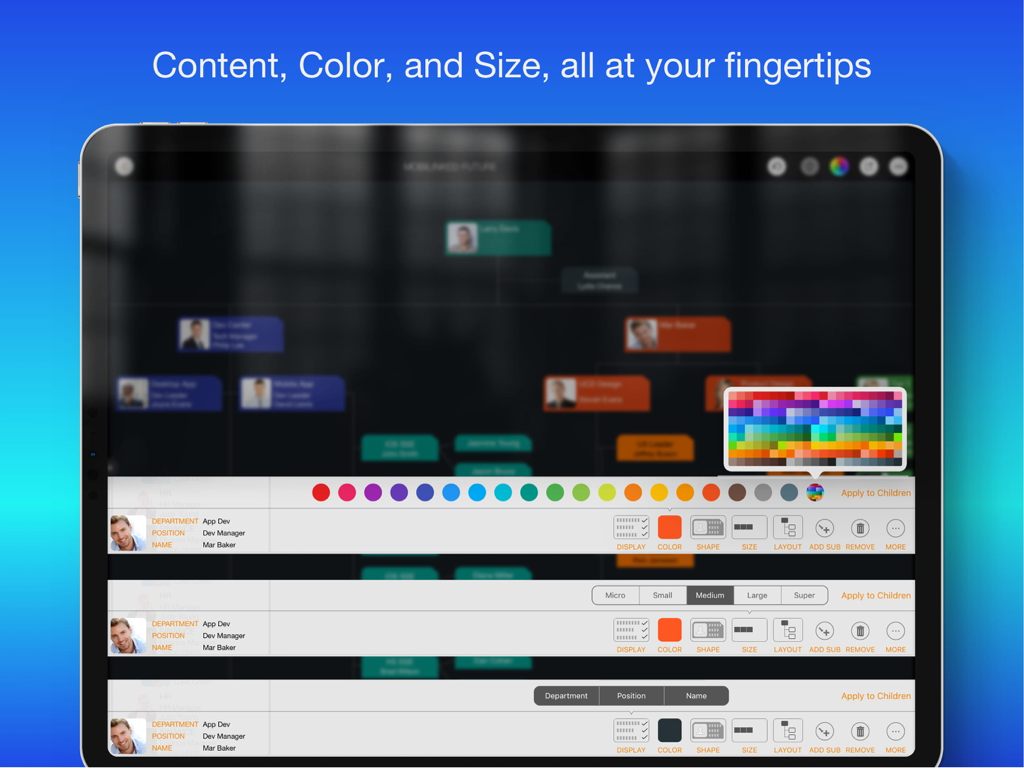
OrgChart - Organization Chart - iPad-Bildschirm, der Optionen zur Anpassung des Organigramms zeigt, einschließlich Farbpalette und Einheitengrößeneinstellungen
iPad-Bildschirm, der Optionen zur Anpassung des Organigramms zeigt, einschließlich Farbpalette und Einheitengrößeneinstellungen

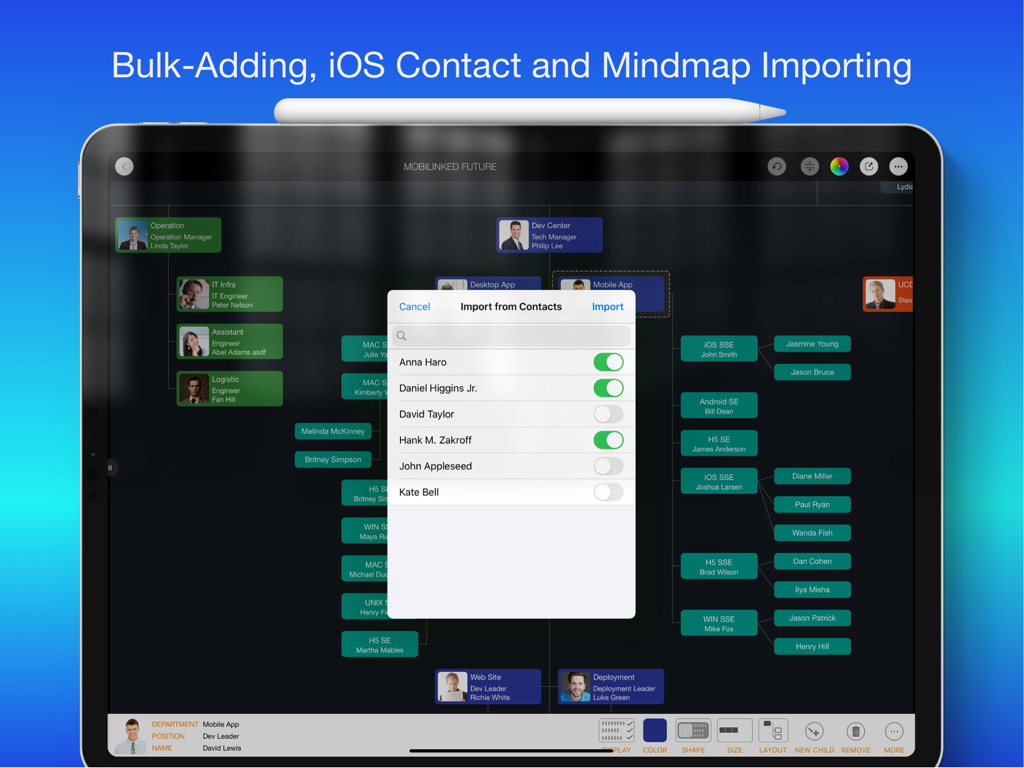
OrgChart - Organization Chart - Oberfläche der OrgChart-App auf einem iPad, die ein Popup zum Importieren von Personen aus den iOS-Kontakten in ein professionelles Organigramm anzeigt.
Oberfläche der OrgChart-App auf einem iPad, die ein Popup zum Importieren von Personen aus den iOS-Kontakten in ein professionelles Organigramm anzeigt.

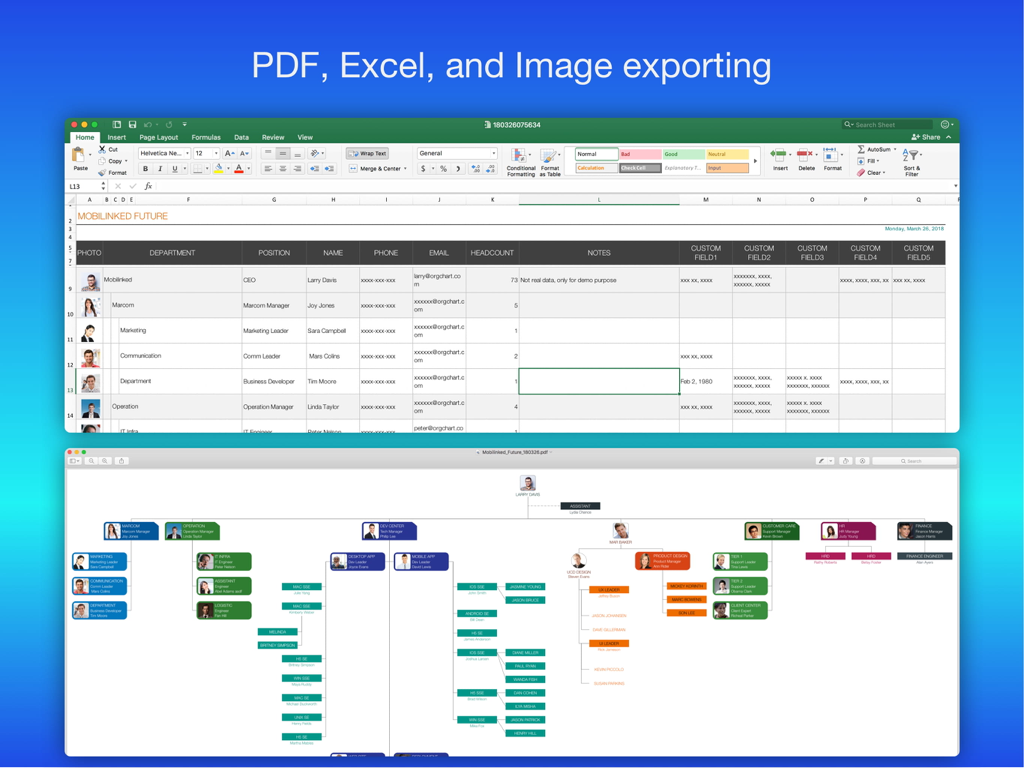
OrgChart - Organization Chart - Organigramm-App, die Datenexportoptionen in Excel-Tabellen und visuelle PDF-Diagramme anzeigt.

Organigramm-App, die Datenexportoptionen in Excel-Tabellen und visuelle PDF-Diagramme anzeigt.
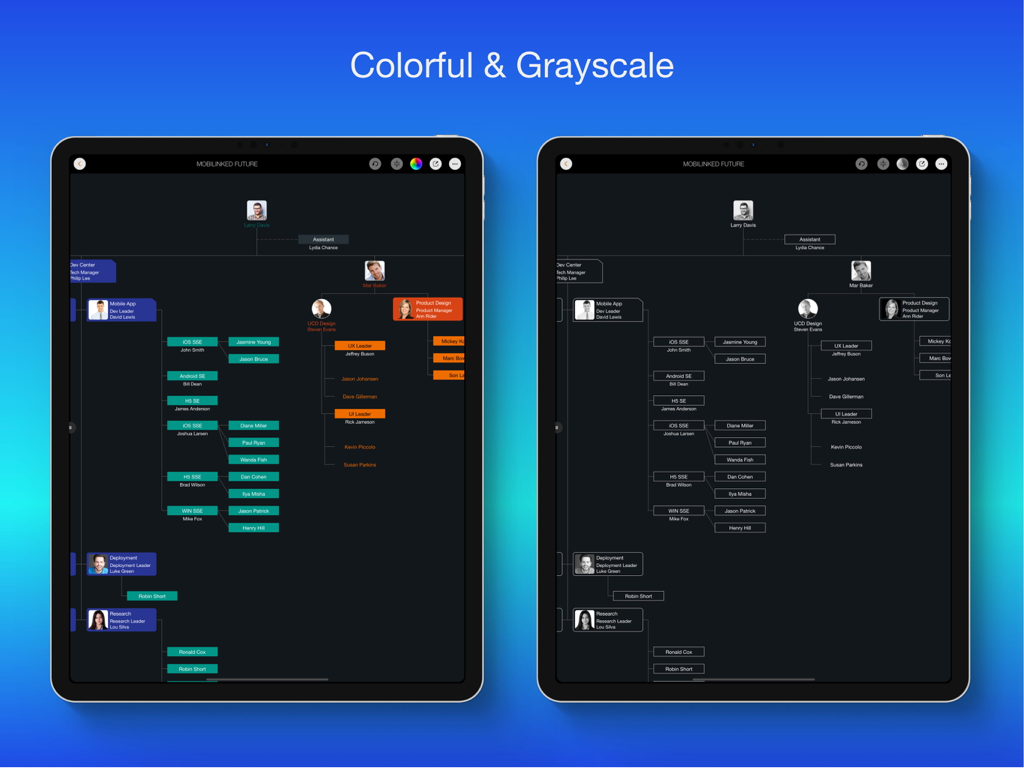
OrgChart - Organization Chart - Vergleich von bunten und Graustufen-Organigrammen auf iPad-Bildschirmen
Vergleich von bunten und Graustufen-Organigrammen auf iPad-Bildschirmen

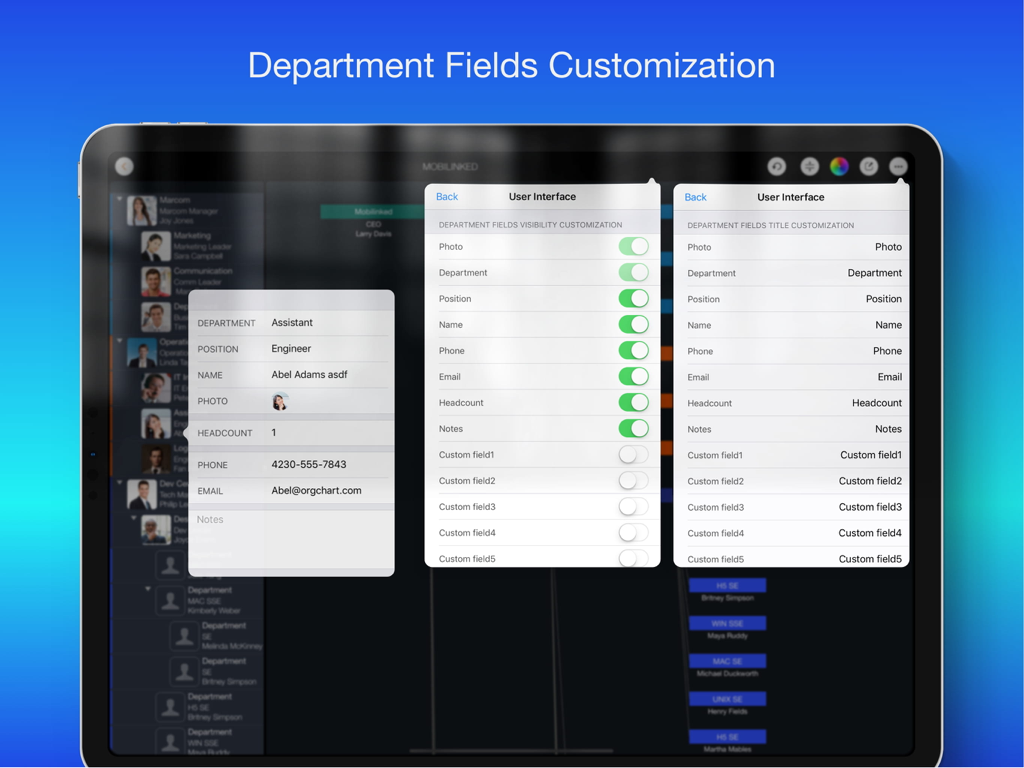
OrgChart - Organization Chart - OrgChart iPad App-Bildschirm mit Einstellungen zur Sichtbarkeit und Titelanpassung von Abteilungsfeldern

OrgChart iPad App-Bildschirm mit Einstellungen zur Sichtbarkeit und Titelanpassung von Abteilungsfeldern

Beschreibung

Please use OrgChartX: Search OrgChartX in App Store or visit https://orgchartx.mbl.app. OrgChartX is the modern, unified upgrade for iPhone, iPad, Mac & Vision Pro. This app stays for legacy users. Painless Organization Chart Creation - Simplify the maintenance, presentation, synchronization and sharing of organizational charts without having to deal with complicated drawings - OrgChart helps you render the shapes and place them in the right place automatically. ** NO DRAWING HASSLES ** With OrgChart, you don't have to waste time drawing shapes and connecting lines. OrgChart does it for you automatically. Just enter an element and customize its color, shape, size, text, and layout. OrgChart gives you an INTUITIVE and user-friendly interface to manage your org charts. ** TREE structure ONLY ** OrgChart is THE easy-to-use organizational chart app for iPad. Visualize, maintain and simplify organizational elements in a TREE structure. ## PRIVACY FOCUSED Your projects are stored on your device or in iCloud Drive, as you prefer. ## PRODUCTIVITY FOCUSED * Image, MS Excel and PDF export with options to customize the content. * Organizational charts can be synced between iOS and macOS devices via iCloud Drive. They can be shared as standalone files to other devices. * OrgChart supports sending people data directly to QuickPlan (https://itunes.apple.com/app/id621375878) as a project member. * Import from iOS contacts AND makes entering organization items easier, faster and more efficient. OrgChart is an innovative app that turns COMPLEXITY INTO SIMPLICITY. ## EFFICIENT MAINTENANCE - You do not need to draw manually anymore - you just need to set the visual styles of the elements. - Natural gestures to arrange parts, change element hierarchy, order, zoom, collapse, expand. - Bulk adding and importing iOS contacts. - The smoothest org chart app on a clean user interface. - Apply one visual style to all children. - In a clean user interface. ## STRONG MAINTENANCE - Multiple org charts organized in tile groups. - Maintain org charts in outline and diagram view. - Duplicate and import org charts. - Import an organizational unit from an iOS contact. - Batch input of organizational units. - Update unit properties - photo, unit name, job title, leader, phone, email, notes. - View organizational charts in color or black and white. - UNDO support. - Copy/paste support. - User interface customization options. ## FLEXIBILITY - Customization of title and visibility of department fields. - Visibility of department fields. - Color of department entries. - Nine layouts (customize where to place sub-items). - Eight shapes. - Size. - Three line styles. ## INTUITIVE - Pinch to zoom - Double tap to edit unit properties. - Long press to display the function menu. - Swipe left/right to change hierarchy. - Press and hold and swipe up/down to change the order and switch between groups. - Tap with two fingers to collapse/expand all groups together. ## REPORT - Export a full or partial org chart as an image, Excel, and PDF file (with PDF export options for PDF page size and zoom). - Export in color or black and white (automatic adjustment to current display color). ## SYNCHRONIZATION - Sync org charts between iOS and Mac devices via iCloud Drive. ## SHARE - Export org charts as .org files for sharing. - Share via email, airdrop, and third-party cloud apps. OrgChart is the best and only useful org chart app for Apple devices. ## USE CASES - Create an org chart for communication and presentation. - An option to manage personal contacts in a tree structure. - Change visual styles of existing org charts IN SECONDS, for different communication purposes. - Export a portion of a large org chart for presentation purposes. - Clean up the organization charts of customers and vendors. - Create a project team / new department / team. - Keep track of basic information of people in your team.

Download

Herunterladen auf App Store

Diese Seite ist keine offizielle Seite der App oder ihres Entwicklers, sondern eine unabhängige redaktionelle Veröffentlichung, die zu Informations- und Kommentarzwecken erstellt wurde. Sofern nicht ausdrücklich anders angegeben, sind weder die App noch ihr Entwickler mit MWM, Apple, Google Play, dem App-Herausgeber oder dem Entwickler der App verbunden, von ihnen unterstützt, gesponsert, autorisiert oder anderweitig offiziell verbunden, und nichts auf dieser Seite impliziert, dass die App unter Verwendung der Dienste von MWM entwickelt wurde. Alle Marken, Logos, Screenshots und andere Inhalte bleiben Eigentum ihrer jeweiligen Inhaber.