Packet Capture Pro: HTTPS
Herunterladen auf App Store

Diese Seite ist keine offizielle Seite der App oder ihres Entwicklers, sondern eine unabhängige redaktionelle Veröffentlichung, die zu Informations- und Kommentarzwecken erstellt wurde. Sofern nicht ausdrücklich anders angegeben, sind weder die App noch ihr Entwickler mit MWM, Apple, Google Play, dem App-Herausgeber oder dem Entwickler der App verbunden, von ihnen unterstützt, gesponsert, autorisiert oder anderweitig offiziell verbunden, und nichts auf dieser Seite impliziert, dass die App unter Verwendung der Dienste von MWM entwickelt wurde. Alle Marken, Logos, Screenshots und andere Inhalte bleiben Eigentum ihrer jeweiligen Inhaber.


Logo von Packet Capture Pro: HTTPS
Herunterladen auf App Store

Packet Capture Pro: HTTPS

Erfassen, überschreiben und analysieren Sie HTTPS-Traffic direkt auf Ihrem Gerät. Eine datenschutzfreundliche lokale VPN-Lösung für Entwickler und QA-Ingenieure, die überall ohne Desktop-Proxy debuggen müssen.

Kennzahlen

Downloads

2K+

Bewertung

4.6/5

Bewertungen gesamt

0

Herausgeber

REALSIGNAL PTE. LTD.

Kategorie

Developer Tools

Sprachen

2

Neueste Version

3.0.0

Größe

42.6 MB

Erstveröffentlichung

17. Apr. 2025
Funktionen

Professionelles Netzwerk-Debugging

Das ultimative mobile Toolkit zum Erfassen, Inspizieren und Modifizieren von HTTPS-Traffic in Echtzeit. Debuggen Sie APIs und simulieren Sie Edge-Cases direkt auf Ihrem Gerät, ohne Tethering.

Tethering-freies Paket-Sniffing

Erfassen Sie HTTP-, HTTPS- und WebSocket-Traffic überall mit lokaler VPN-Technologie. Inspizieren Sie vollständige Anfrage- und Antwortkörper in JSON, XML oder Rohdaten ohne Desktop-Proxy.

Fortgeschrittenes Überschreiben & Mocking

Modifizieren Sie Netzwerkantworten im laufenden Betrieb, um Serverfehler, Umleitungen oder benutzerdefinierte Payloads zu simulieren. Perfekt zum Testen von Edge-Cases und App-Stabilität, ohne Ihren Backend zu berühren.

Die folgenden Screenshots und die Beschreibung stammen direkt aus dem offiziellen Store-Eintrag der App und sind Eigentum des Entwicklers.

App Store

Screenshots
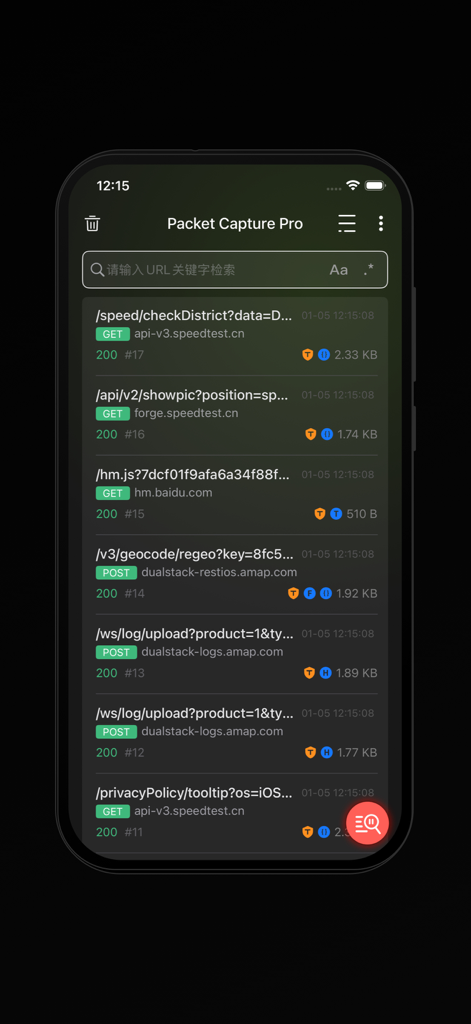
Packet Capture Pro: HTTPS - Eine Liste von Echtzeit-HTTP- und HTTPS-Netzwerkanfragen, die in der Packet Capture Pro App erfasst wurden.
Eine Liste von Echtzeit-HTTP- und HTTPS-Netzwerkanfragen, die in der Packet Capture Pro App erfasst wurden.

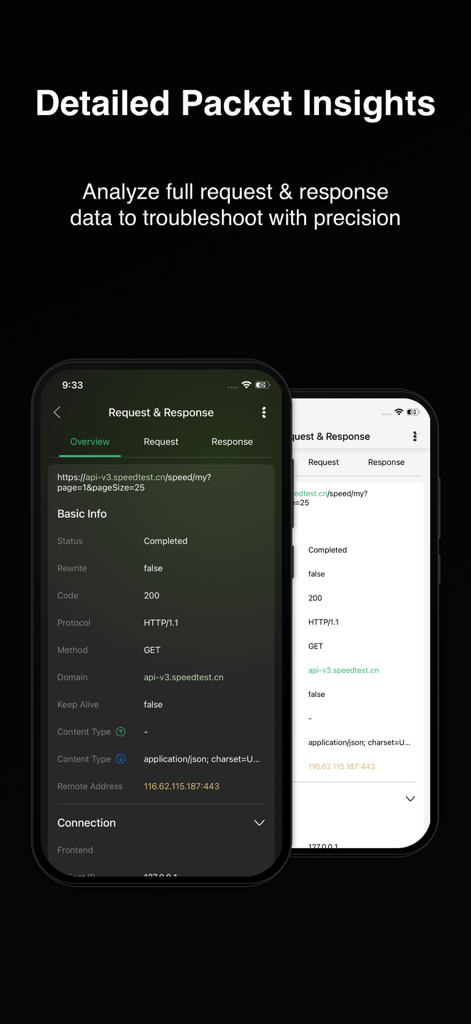
Packet Capture Pro: HTTPS - Detaillierte Anfrage- und Antwortinformationen in der Packet Capture Pro mobilen App-Oberfläche
Detaillierte Anfrage- und Antwortinformationen in der Packet Capture Pro mobilen App-Oberfläche

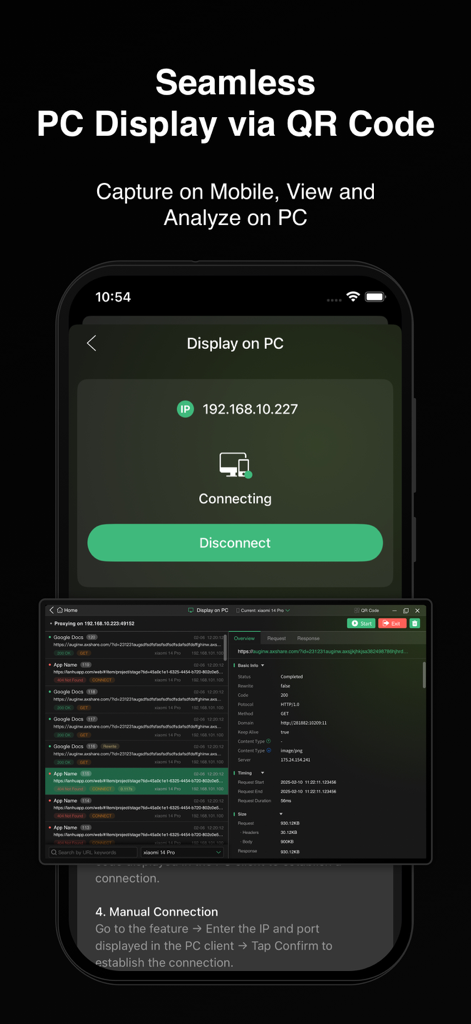
Packet Capture Pro: HTTPS - Packet Capture Pro-Oberfläche, die die Analyse des mobilen Netzwerkverkehrs zeigt, synchronisiert mit einem PC-Bildschirm
Packet Capture Pro-Oberfläche, die die Analyse des mobilen Netzwerkverkehrs zeigt, synchronisiert mit einem PC-Bildschirm

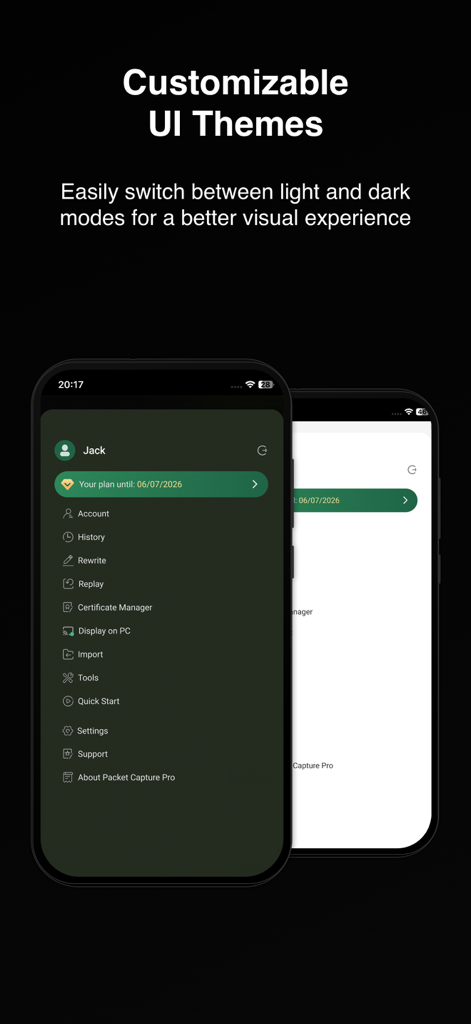
Packet Capture Pro: HTTPS - Packet Capture Pro anpassbare helle und dunkle UI-Themen
Packet Capture Pro anpassbare helle und dunkle UI-Themen

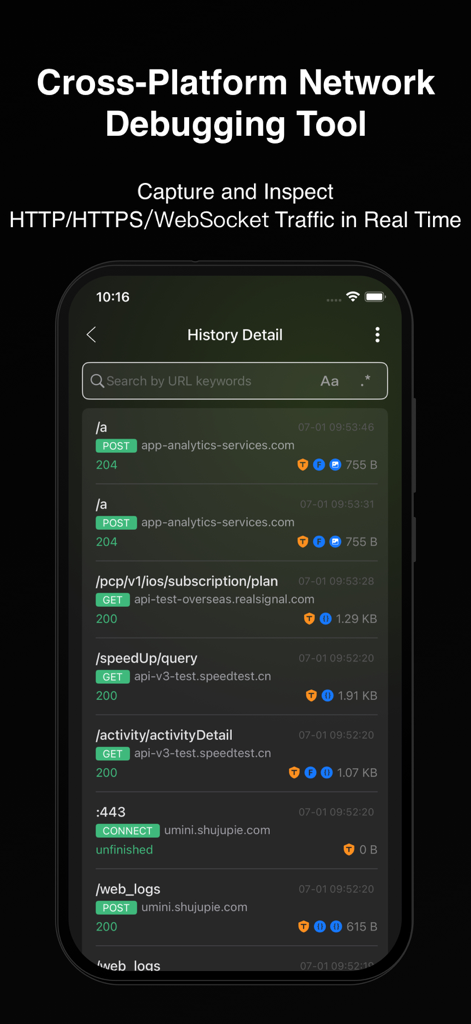
Packet Capture Pro: HTTPS - Mobile App-Oberfläche, die eine Liste von erfassten HTTP- und HTTPS-Netzwerkanfragen mit Statuscodes zeigt
Mobile App-Oberfläche, die eine Liste von erfassten HTTP- und HTTPS-Netzwerkanfragen mit Statuscodes zeigt

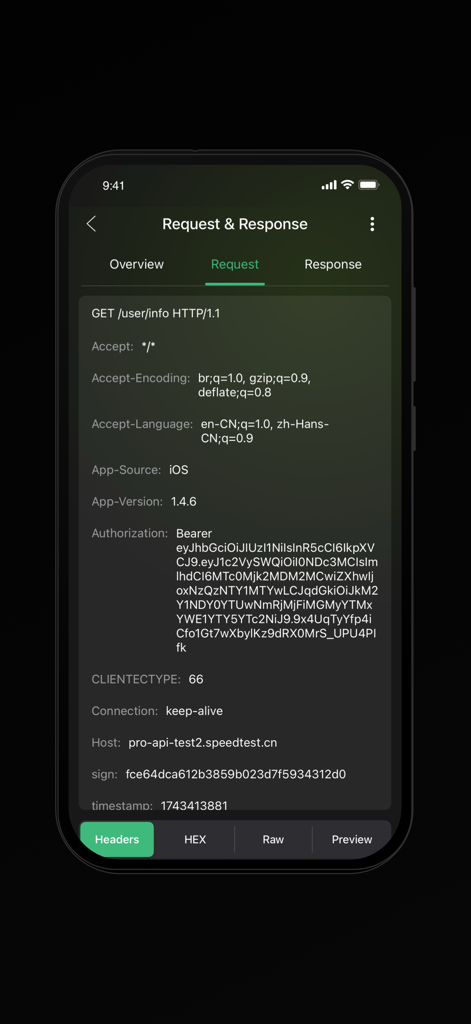
Packet Capture Pro: HTTPS - Oberfläche von Packet Capture Pro, die HTTP-Anfrage-Header anzeigt, einschließlich Autorisierungs- und Host-Details
Oberfläche von Packet Capture Pro, die HTTP-Anfrage-Header anzeigt, einschließlich Autorisierungs- und Host-Details

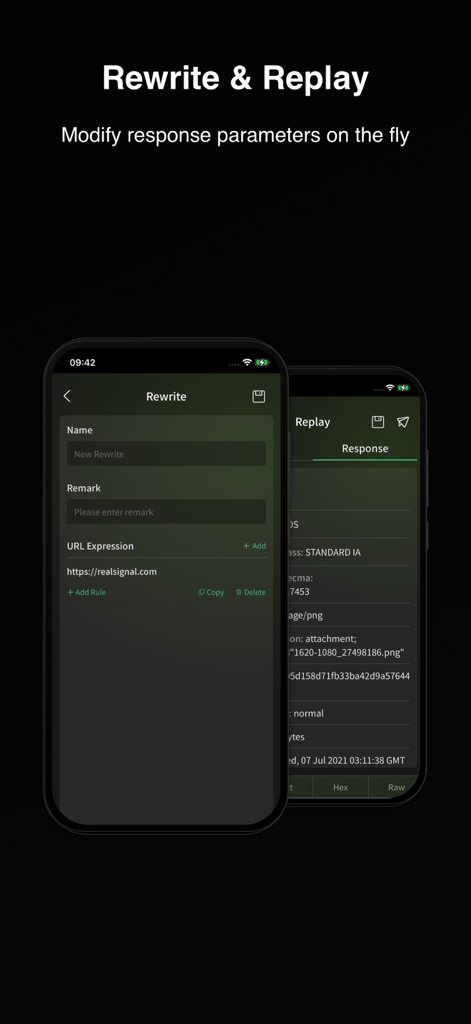
Packet Capture Pro: HTTPS - Packet Capture Pro-Oberfläche, die die Funktion Rewrite and Replay zeigt, um Netzwerkantwortparameter im laufenden Betrieb zu ändern

Packet Capture Pro-Oberfläche, die die Funktion Rewrite and Replay zeigt, um Netzwerkantwortparameter im laufenden Betrieb zu ändern

Beschreibung

Features Packet Capture & Packet Sniffer Capture HTTP/HTTPS/WebSocket traffic using local VPN technology and view full request and response details in real time, including status codes, headers, and body data. Choose from multiple view modes, such as raw data, JSON, XML, HTML, images, or videos, for seamless debugging. Packet Capture Pro works as a powerful packet sniffer and analysis tool on your device. Quick Filtering Filter by URL keywords to pinpoint issues quickly and save debugging time. These filters help you focus on the requests that matter most during network debug sessions. Rewrite & Replay Rewrite is one of PCP’s core debugging features. It allows automatic modification of network responses based on preset rules. Five modes are supported: request replacement, response replacement, request modification, response modification, and redirection. Multiple rewrite rules can run simultaneously, making it easy to simulate and debug complex network behaviors efficiently. Replay captured requests using custom parameters to reproduce and debug specific scenarios with precision. Cross-Device Collaboration Stream mobile app traffic to a PC client for real-time analysis on a larger screen. Connect easily via QR code or IP/port input for seamless teamwork. Visit our website to get Packet Capture Pro for other operating systems (macOS, Windows). Packet Import & Export Supports HAR file export for captured data, compatible with third-party analysis tools. This makes long-term data capture and sharing much easier. History list supports swipe actions for Export and Delete, and session details page also supports direct export. Also supports HAR file import, with imported entries listed in a separate view for easy access. Supports HAR file sharing. Quick Actions Easily copy any field content or decrypt data directly from the packet details view — faster and more efficient network debug and analysis. Tools Packet Capture Pro’s Tools module offers everything you need to streamline packet analysis and troubleshooting. It supports text encryption/decryption and multiple encoding/decoding formats including URL, Base64, Unicode, and MD5. You’ll also find practical utilities such as timestamp conversion, certificate hash conversion, regex testing, and QR code generation/ scanning. All tools are built to match the actual needs of packet capture and network debugging—making your workflow faster, smoother, and far more efficient. How it works Packet Capture Pro iOS creates a local VPN on your device, routing all traffic through a local proxy server. When the VPN is active, it captures all Wi-Fi and cellular data traffic for comprehensive on-device data capture and inspection. How about my sensitive data? Packet Capture Pro uses a self-signed root certificate generated on your device. All captured request and response data stays on your device and is never sent to remote servers, ensuring your data privacy during every data capture and network debug session. Privacy Policy and Terms of Service Privacy Policy: https://pcp.realsignal.com/privacy Terms of Service: https://pcp.realsignal.com/terms Our Website Download macOS, Windows, and other versions, or learn more about the app by visiting the official Packet Capture Pro website: https://pcp.realsignal.com To explore other products by RealSignal, welcome to the company’s official website: https://www.realsignal.com

Download

Herunterladen auf App Store

Diese Seite ist keine offizielle Seite der App oder ihres Entwicklers, sondern eine unabhängige redaktionelle Veröffentlichung, die zu Informations- und Kommentarzwecken erstellt wurde. Sofern nicht ausdrücklich anders angegeben, sind weder die App noch ihr Entwickler mit MWM, Apple, Google Play, dem App-Herausgeber oder dem Entwickler der App verbunden, von ihnen unterstützt, gesponsert, autorisiert oder anderweitig offiziell verbunden, und nichts auf dieser Seite impliziert, dass die App unter Verwendung der Dienste von MWM entwickelt wurde. Alle Marken, Logos, Screenshots und andere Inhalte bleiben Eigentum ihrer jeweiligen Inhaber.








