
Diese Seite ist keine offizielle Seite der App oder ihres Entwicklers, sondern eine unabhängige redaktionelle Veröffentlichung, die zu Informations- und Kommentarzwecken erstellt wurde. Sofern nicht ausdrücklich anders angegeben, sind weder die App noch ihr Entwickler mit MWM, Apple, Google Play, dem App-Herausgeber oder dem Entwickler der App verbunden, von ihnen unterstützt, gesponsert, autorisiert oder anderweitig offiziell verbunden, und nichts auf dieser Seite impliziert, dass die App unter Verwendung der Dienste von MWM entwickelt wurde. Alle Marken, Logos, Screenshots und andere Inhalte bleiben Eigentum ihrer jeweiligen Inhaber.


Camera Scanner: Scan to PDF
Papierkram frisst Zeit. Diese App gibt sie zurück.
Downloads
1M+Bewertung
Bewertungen gesamt
42.4KHerausgeber
Kategorie
ProductivitySprachen
1Neueste Version
8.1Größe
67.7 MBErstveröffentlichung
29. Dez. 2021Eine Bewertung der Schlüsselmerkmale, die die App zu einer umfassenden Lösung für mobiles Dokumentenmanagement machen.
Analyse der Kernfunktionen: Camera Scanner: Scan to PDF
Präziser Dokumentenscan mit automatischer Korrektur
Die App ermöglicht Nutzern, ihr iPhone in einen leistungsstarken Dokumentenscanner zu verwandeln, der Verträge, Notizen und Belege mit hoher Genauigkeit erfasst. Es verfügt über automatische Randerkennung und Perspektivkorrektur für saubere, scharfe Ergebnisse und speichert Scans als hochwertige PDF-Dokumente.
Effizienter Foto-zu-PDF-Konverter
Dieses Tool bietet eine einfache Möglichkeit, Fotos und Bilder schnell in professionelle PDF-Dateien umzuwandeln. Es ermöglicht das Zusammenführen mehrerer Scans oder Bilder zu einem einzigen PDF-Dokument, was die Organisation von mehrseitigen Unterlagen vereinfacht.
Umfassende PDF-Bearbeitung und digitale Unterschriften
Die App verfügt über einen integrierten PDF-Editor, der es Nutzern erlaubt, PDF-Dateien direkt auf dem Telefon zu bearbeiten, Anmerkungen hinzuzufügen und Dokumente sicher digital zu unterschreiben. Dies ist ideal für Verträge, Formulare und Geschäftsdokumente unterwegs.
Intelligente Dateiverwaltung und PDF-Reader
Es bietet einen schnellen und übersichtlichen PDF-Reader sowie ein System zur Dateiverwaltung, das Nutzern hilft, ihre gescannten Dokumente zu organisieren, zu durchsuchen und sofort darauf zuzugreifen. Dies fördert die Produktivität und einen aufgeräumten digitalen Arbeitsbereich.
Nahtloses Teilen und Exportieren
Die App ermöglicht das sofortige Teilen gescannter Dokumente per E-Mail, Messaging oder über Cloud-Speicherdienste. Nutzer können Dateien auch für den Druck oder die Speicherung exportieren, was eine nahtlose Integration in bestehende Workflows sicherstellt.
Praktischer Belegscanner für Ausgabenmanagement
Dieses Tool dient als zuverlässiger Belegscanner, der es Nutzern, insbesondere Freiberuflern und Kleinunternehmen, ermöglicht, Belege digital zu erfassen und zu speichern. Es erleichtert die Nachverfolgung von Ausgaben und die Vorbereitung von Steuerunterlagen.
Häufig gestellte Fragen
Alles, was Sie über wissen müssen Camera Scanner: Scan to PDF
What is the main function of the PDF Scanner App for Documents?
The PDF Scanner App for Documents transforms an iPhone into a powerful scanning tool, enabling users to scan various documents like receipts, contracts, notes, and IDs directly from their phone.
Does the PDF Scanner App for Documents offer a free version?
Yes, the PDF Scanner App for Documents offers a free version that allows users to scan, save, and share documents without needing an account or subscription.
Can the PDF Scanner App for Documents scan multi-page documents?
Yes, the PDF Scanner App for Documents can scan dozens of pages at once and provides features to easily add, remove, or rearrange pages for multi-page PDFs.
What types of documents can I scan with the PDF Scanner App for Documents?
Users can scan business receipts, contracts, school notes, ID cards, multi-page forms, books, and handwritten notes using the PDF Scanner App for Documents.
Are scans made with the PDF Scanner App for Documents stored securely?
Yes, all scans made with the PDF Scanner App for Documents stay on the user's device. The app ensures privacy with no automatic uploads or tracking of personal information.
Can I use the PDF Scanner App for Documents without an internet connection?
Yes, the PDF Scanner App for Documents supports offline scanning. Users can utilize the app's features and scan documents free without Wi-Fi or an internet connection.
What are the subscription costs for the PDF Scanner App for Documents?
The PDF Scanner App for Documents offers a weekly subscription for $1.99, a monthly subscription for $4.99, and a yearly subscription for $19.99.
Does the PDF Scanner App for Documents include OCR text recognition?
Yes, the PDF Scanner App for Documents includes text recognition features. Users can extract and edit any text from scanned documents, as shown in the app's interface.
Can I convert scanned documents to formats other than PDF using the PDF Scanner App for Documents?
Yes, the PDF Scanner App for Documents can convert PDFs to various formats including TXT, PPT, Word, HTML, and Excel. It also allows exporting as JPEG.
How does the PDF Scanner App for Documents enhance scan quality?
The PDF Scanner App for Documents enhances quality with auto edge detection, advanced image enhancement to clean shadows, improve contrast, and smart modes like Color, Grayscale, and Black & White filters.
Can users sign documents within the PDF Scanner App for Documents?
Yes, the PDF Scanner App for Documents allows users to edit and sign documents directly within the app. It provides tools for adding signatures to scanned files.
Does the PDF Scanner App for Documents allow for sharing scanned files?
Yes, the PDF Scanner App for Documents allows users to share scans as PDF or JPEG via email, text, and other methods. Users can also create zip files or set password protection.
Is there a quick way to start scanning with the PDF Scanner App for Documents?
Yes, the PDF Scanner App for Documents offers a Quick Launch Widget, allowing users to start scanning directly from their home screen for fast access.
Does the PDF Scanner App for Documents handle ID card scanning?
Yes, the PDF Scanner App for Documents provides specific functionality to digitize ID cards, ensuring they are scanned with precision and clarity.
Can the PDF Scanner App for Documents scan QR codes?
Yes, the PDF Scanner App for Documents functions as both a QR Code Scanner and Maker. It enables users to scan QR codes and perform actions like opening URLs.
Die folgenden Screenshots und die Beschreibung stammen direkt aus dem offiziellen Store-Eintrag der App und sind Eigentum des Entwicklers.
App Store
Screenshots
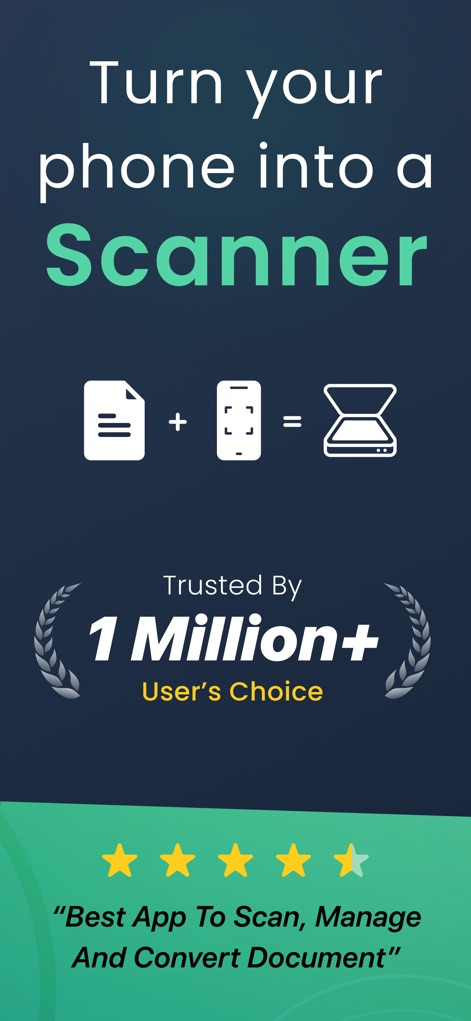
Dieser Screenshot zeigt die Kernfunktion der App, indem er das iPhone in einen Scanner verwandelt, unterstützt durch eine beeindruckende Nutzerbasis von über einer Million und einer hohen 4,5-Sterne-Bewertung.
Handy-Scan-Transformation
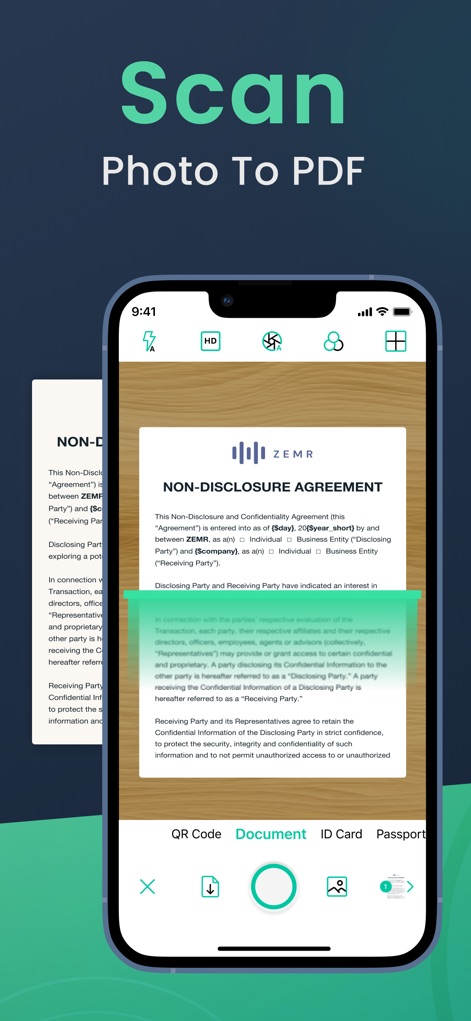
Die Abbildung demonstriert den nahtlosen Prozess des Scannens von Fotos in PDF-Dateien mit automatischer Kantenerkennung und zeigt die vielseitigen Scan-Optionen für Dokumente und Ausweise.
Präzises Dokumentenscannen
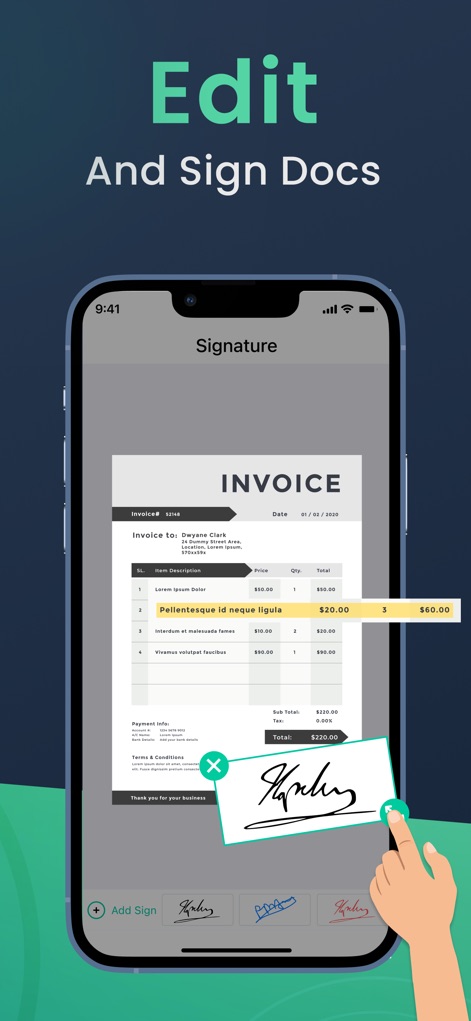
Hier wird die Funktionalität zum Bearbeiten und Signieren von Dokumenten präsentiert, wobei Nutzer eine Rechnung direkt auf dem Bildschirm unterschreiben und zusätzliche Anmerkungen hinzufügen können.
Dokumente bearbeiten & signieren
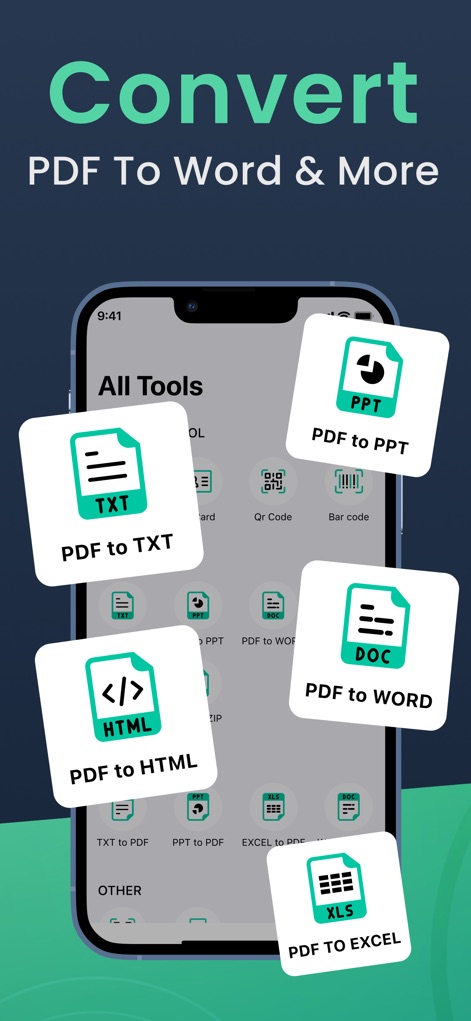
Dieser Screenshot visualisiert die umfassenden Konvertierungsfunktionen der App, die es Nutzern ermöglichen, PDFs in verschiedene Formate wie Word und Excel umzuwandeln.
Vielseitige PDF-Konvertierung
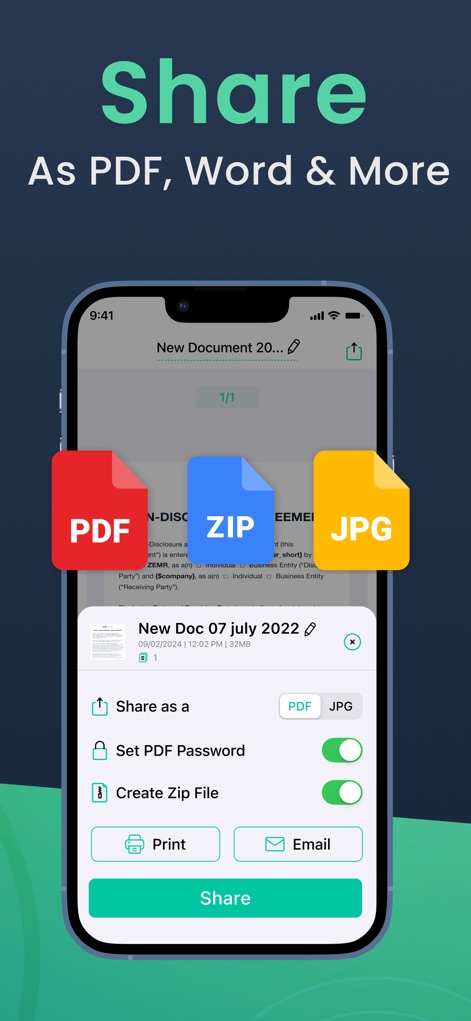
Die Ansicht verdeutlicht die einfachen Freigabefunktionen, die das Teilen von Dokumenten als PDF, JPG oder ZIP-Dateien ermöglichen und zusätzliche Sicherheitsoptionen wie den PDF-Passwortschutz bieten.
Einfaches Teilen & Exportieren
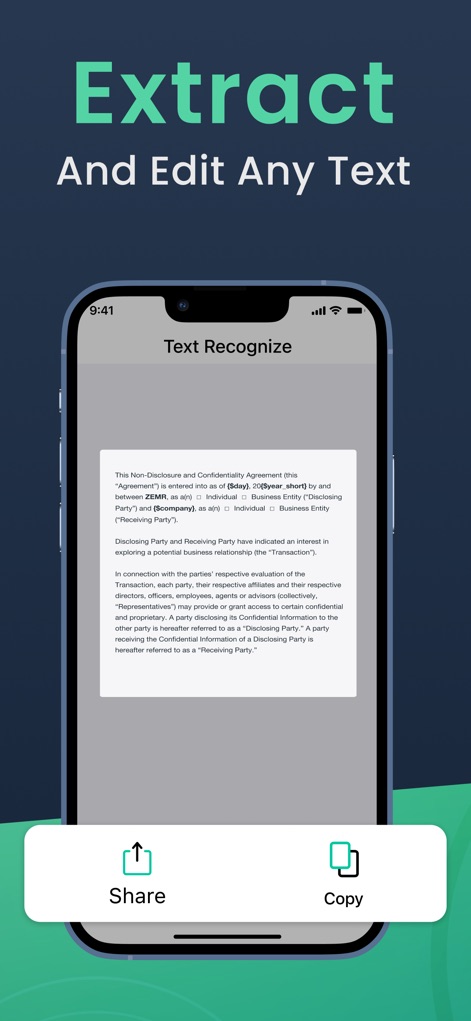
Dieser Bildschirm illustriert die Texterkennungsfunktion (OCR), die es Anwendern ermöglicht, Text aus gescannten Dokumenten zu extrahieren und diesen direkt zu kopieren oder zu teilen.
Texterkennung & Extraktion
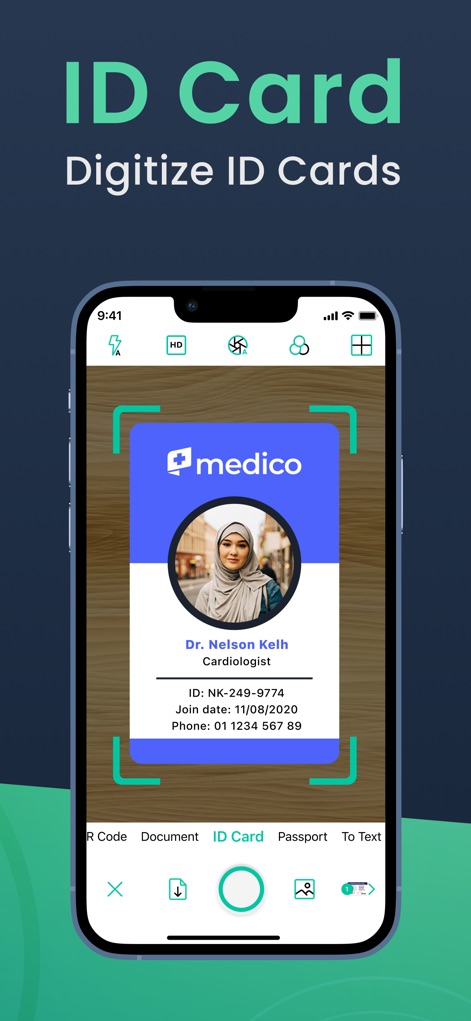
Die Darstellung hebt die spezialisierte Funktion zum Digitalisieren von Ausweisen hervor, indem ein Ausweis mit automatischer Kantenerkennung erfasst wird und verschiedene Scan-Modi zur Auswahl stehen.
Ausweise digitalisieren
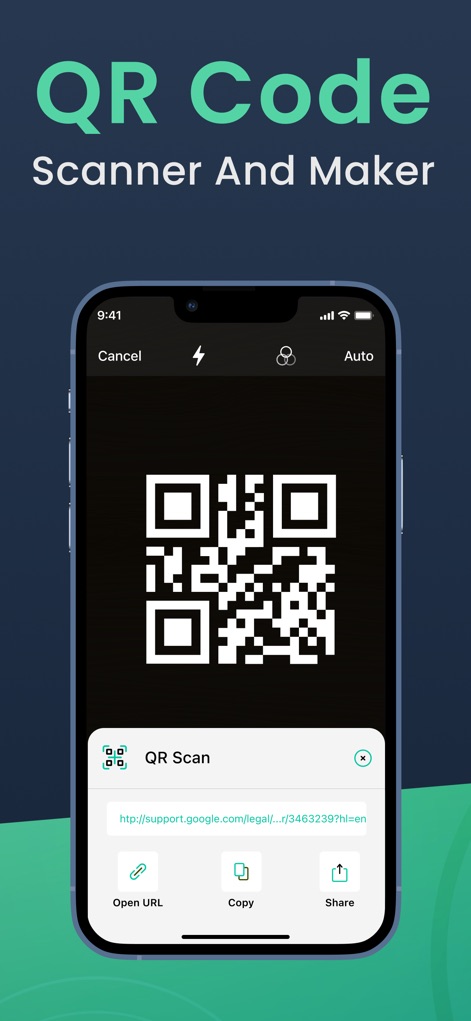
Hier wird die integrierte QR-Code-Funktion gezeigt, die sowohl das Scannen von QR-Codes mit direkter URL-Vorschau als auch deren Verwaltung durch Kopieren oder Teilen ermöglicht.
QR-Code-Management
Beschreibung
Download
Ähnliche Apps
Apps mit ähnlichen Funktionen und Nutzererfahrung

PDF PRO Scan Image & Documents
Balzo srl

The PDF Scanner, PDF editor HQ
NEXT K.U.M. LTD

CamScanner - PDF Scanner App
INTSIG Information Co., Ltd

Adobe Scan: PDF & OCR Scanner
Adobe Inc.

WPS Office: PDF, Docs, Sheets
KINGSOFT OFFICE SOFTWARE CORPORATION LIMITED

iLovePDF - PDF Editor & Scan
ILOVEPDF S.L.

Scanner App: Genius Scan
The Grizzly Labs

Microsoft Lens: PDF Scanner
Microsoft Corporation

Clear Scan: Doc Scanner App
INDY MOBILE APP COMPANY LIMITED
Diese Seite ist keine offizielle Seite der App oder ihres Entwicklers, sondern eine unabhängige redaktionelle Veröffentlichung, die zu Informations- und Kommentarzwecken erstellt wurde. Sofern nicht ausdrücklich anders angegeben, sind weder die App noch ihr Entwickler mit MWM, Apple, Google Play, dem App-Herausgeber oder dem Entwickler der App verbunden, von ihnen unterstützt, gesponsert, autorisiert oder anderweitig offiziell verbunden, und nichts auf dieser Seite impliziert, dass die App unter Verwendung der Dienste von MWM entwickelt wurde. Alle Marken, Logos, Screenshots und andere Inhalte bleiben Eigentum ihrer jeweiligen Inhaber.