
Diese Seite ist keine offizielle Seite der App oder ihres Entwicklers, sondern eine unabhängige redaktionelle Veröffentlichung, die zu Informations- und Kommentarzwecken erstellt wurde. Sofern nicht ausdrücklich anders angegeben, sind weder die App noch ihr Entwickler mit MWM, Apple, Google Play, dem App-Herausgeber oder dem Entwickler der App verbunden, von ihnen unterstützt, gesponsert, autorisiert oder anderweitig offiziell verbunden, und nichts auf dieser Seite impliziert, dass die App unter Verwendung der Dienste von MWM entwickelt wurde. Alle Marken, Logos, Screenshots und andere Inhalte bleiben Eigentum ihrer jeweiligen Inhaber.


PDF Scanner App: Scanner+ Docs
Keine Ausreden mehr: Diese App macht aus deinem iPhone ein vollwertiges Scanzentrum.
Downloads
2.5M+Bewertung
Bewertungen gesamt
27.2KHerausgeber
Kategorie
BusinessSprachen
8Neueste Version
3.7.2Größe
200.9 MBErstveröffentlichung
26. Mai 2020Eine detaillierte Bewertung der Schlüsselmerkmale für Produktivität und Dokumentenmanagement.
Analyse der Kernfunktionen von Scanner+ Docs
OCR-Texterkennung
Es ermöglicht Nutzern, Text aus gescannten Dokumenten zu extrahieren, zu bearbeiten und durchsuchbar zu machen, selbst bei handschriftlichen Notizen.
Vielseitiger Export & Teilen
Die App bietet umfangreiche Exportoptionen in verschiedenen Formaten (.PDF, .DOCX, .TXT) und die Möglichkeit, Dokumente nahtlos über eine Vielzahl von Kommunikations- und Speicherplattformen zu teilen.
Dokumentenscan
Dieses Tool verfügt über eine Schnellscan-Funktion für mehrseitige Dokumente, automatische Kantenerkennung und Bildverbesserung, um qualitativ hochwertige digitale Kopien zu erstellen.
Dokumentenorganisation
Es ermöglicht Nutzern, ihre digitalen Dokumente mithilfe eines Drag & Drop Dateimanagers und intelligenter Tags effizient zu organisieren und zu verwalten, um den Überblick zu behalten.
Intelligenter Zuschnitt
Die App schneidet Dokumente nach dem Scannen automatisch intelligent zu, was Zeit spart und für saubere, professionell aussehende Scans sorgt.
Dokumenten-Signatur
Dieses Tool ermöglicht es, PDF-Dokumente innerhalb von Sekunden digital zu signieren und die Unterschrift für die Wiederverwendung über mehrere Dokumente hinweg zu speichern.
PDF-Konvertierung mit Suchfunktion
Es ermöglicht Nutzern, Fotos und Bilder in durchsuchbare PDF-Dokumente umzuwandeln, was die Textsuche (ähnlich "CTRL+F") innerhalb der digitalisierten Inhalte ermöglicht.
Dokumentenbearbeitung (Verbergen & Weichzeichnen)
Die App bietet Bearbeitungswerkzeuge zum Verbergen oder Weichzeichnen vertraulicher oder unerwünschter Bereiche in gescannten Dokumenten, was die Sicherheit und den Datenschutz erhöht.
Foto-Scan & -Wiederherstellung
Dieses Tool ermöglicht das Scannen und digitale Speichern gedruckter Fotos, wobei automatisch Ränder erkannt, zugeschnitten und Farben wiederhergestellt werden, um alte Erinnerungen zu bewahren.
Textübersetzung
Es bietet die Möglichkeit, Texte aus gescannten Dokumenten in über 100 Sprachen zu übersetzen, was die App für internationale Nutzer und vielfältige Anwendungsfälle sehr wertvoll macht.
Die folgenden Screenshots und die Beschreibung stammen direkt aus dem offiziellen Store-Eintrag der App und sind Eigentum des Entwicklers.
App Store
Screenshots

Die App ermöglicht Nutzern, Dokumente mit automatischer Kantenerkennung zu digitalisieren und direkt in ein professionelles PDF-Format zu konvertieren.
Dokumente schnell scannen

Dieses Tool bietet einen visuellen Vorher-Nachher-Vergleich, der die Wiederherstellung alter Fotos durch intelligente Farb- und Verbesserungsoptionen demonstriert.
Fotos wiederherstellen
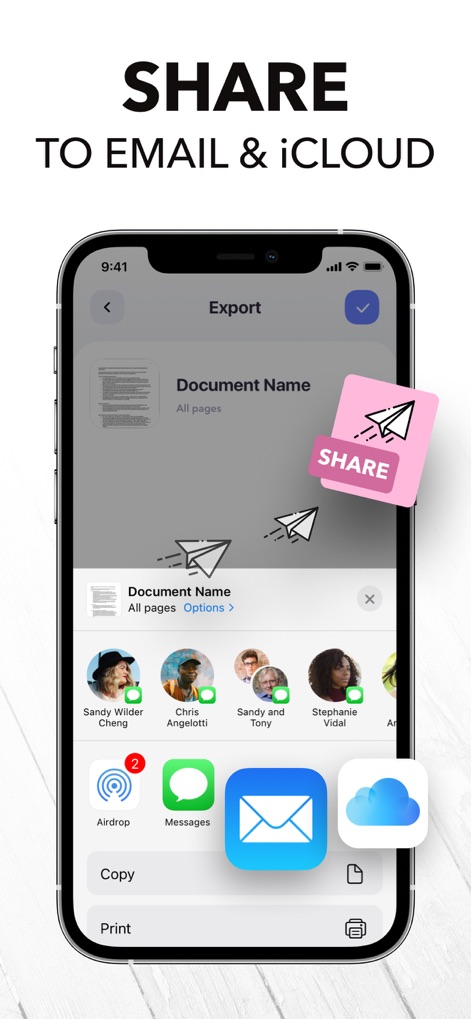
Nutzer können gescannte Dokumente mühelos über verschiedene Exportoptionen teilen, darunter E-Mail und iCloud, für eine nahtlose direkte Freigabe.
Einfach teilen

Die App unterstützt das Speichern von Dokumenten in vielfältigen Dateiformaten wie PDF, TXT und JPG, wie am Beispiel eines ausgefüllten Registrierungsformulars gezeigt.
Flexible Speicherformate

Nutzer können Dokumente direkt in der App elektronisch unterschreiben und dabei eine bereits gespeicherte Signatur aus den verfügbaren Auswahloptionen nutzen.
Dokumente digital unterschreiben

Dieses Tool wandelt Bilder mittels Texterkennung (OCR) in bearbeitbaren Text um, der direkt im eingeblendeten Textfeld kopiert oder bearbeitet werden kann.
Texte aus Bildern extrahieren

Die App bietet Funktionen, um wichtige Textbereiche hervorzuheben und vertrauliche Informationen diskret auszublenden, um Dokumente professionell anzupassen.
Dokumente anpassen

Die App ermöglicht eine präzise automatische Dokumentenerfassung per Kamera, unterstützt durch die Auszeichnung als #1 im App Store.
Jedes Dokument scannen

Dieses Tool kann handschriftliche Notizen und andere Bildformate schnell in ein durchsuchbares PDF-Format umwandeln.
Konvertierung in PDF

Nutzer können ihre Dokumente in einer übersichtlichen Ordnerstruktur verwalten und erhalten praktische Vorschauen der Inhalte.
Dokumente organisieren
Beschreibung
Download
Ähnliche Apps
Apps mit ähnlichen Funktionen und Nutzererfahrung

PDF PRO Scan Image & Documents
Balzo srl

The PDF Scanner, PDF editor HQ
NEXT K.U.M. LTD

CamScanner - PDF Scanner App
INTSIG Information Co., Ltd

Adobe Scan: PDF & OCR Scanner
Adobe Inc.

WPS Office: PDF, Docs, Sheets
KINGSOFT OFFICE SOFTWARE CORPORATION LIMITED

iLovePDF - PDF Editor & Scan
ILOVEPDF S.L.

Scanner App: Genius Scan
The Grizzly Labs

Microsoft Lens: PDF Scanner
Microsoft Corporation

Clear Scan: Doc Scanner App
INDY MOBILE APP COMPANY LIMITED
Diese Seite ist keine offizielle Seite der App oder ihres Entwicklers, sondern eine unabhängige redaktionelle Veröffentlichung, die zu Informations- und Kommentarzwecken erstellt wurde. Sofern nicht ausdrücklich anders angegeben, sind weder die App noch ihr Entwickler mit MWM, Apple, Google Play, dem App-Herausgeber oder dem Entwickler der App verbunden, von ihnen unterstützt, gesponsert, autorisiert oder anderweitig offiziell verbunden, und nichts auf dieser Seite impliziert, dass die App unter Verwendung der Dienste von MWM entwickelt wurde. Alle Marken, Logos, Screenshots und andere Inhalte bleiben Eigentum ihrer jeweiligen Inhaber.