
Diese Seite ist keine offizielle Seite der App oder ihres Entwicklers, sondern eine unabhängige redaktionelle Veröffentlichung, die zu Informations- und Kommentarzwecken erstellt wurde. Sofern nicht ausdrücklich anders angegeben, sind weder die App noch ihr Entwickler mit MWM, Apple, Google Play, dem App-Herausgeber oder dem Entwickler der App verbunden, von ihnen unterstützt, gesponsert, autorisiert oder anderweitig offiziell verbunden, und nichts auf dieser Seite impliziert, dass die App unter Verwendung der Dienste von MWM entwickelt wurde. Alle Marken, Logos, Screenshots und andere Inhalte bleiben Eigentum ihrer jeweiligen Inhaber.


Pixel Studio for pixel art
Pixel Studio verleiht die Macht, detailreiche Pixelkunst und Animationen zu schmieden – egal, ob auf dem Smartphone oder dem PC. Eine mobile Fabrik für digitale Ästhetik.
Downloads
1M+Bewertung
Bewertungen gesamt
6.0KHerausgeber
Kategorie
Graphics & DesignSprachen
26Neueste Version
5.42Größe
125.0 MBErstveröffentlichung
30. Juli 2018Eine Bewertung der wesentlichen Werkzeuge und Vorteile für Pixel-Art-Künstler und Entwickler.
Analyse der Kernfunktionen von 'Pixel Studio for pixel art'
Frame-by-Frame Animation mit Onion Skin
Die App bietet umfassende Werkzeuge zur Erstellung von Frame-by-Frame-Animationen, ergänzt durch die nützliche Zwiebelschicht-Funktion (Onion Skin), die das flüssige Übergänge und präzises Animieren ermöglicht.
Ebenenbasiertes Arbeiten
Es ermöglicht Nutzern, mit Ebenen zu arbeiten, was für komplexere Pixel-Art-Projekte unerlässlich ist, um Elemente separat zu bearbeiten und nicht-destruktive Änderungen vorzunehmen.
Umfangreiche Exportformate und Sprite Sheets
Dieses Tool unterstützt den Export in eine Vielzahl gängiger Formate wie PNG, GIF, PSP, PSD und EXR, einschließlich der Erstellung von Sprite Sheets, was für Game-Developer und die Integration in andere Workflows kritisch ist.
Geräteübergreifende Synchronisation und mobile Optimierung
Die App verfügt über eine Google Drive-Synchronisation, die es ermöglicht, Projekte nahtlos zwischen Mobilgeräten und dem Desktop zu bearbeiten, was besonders für unterwegs arbeitende Künstler von Vorteil ist.
Pixel Network™ Community-Integration
Es ermöglicht Nutzern, ihre Kunstwerke direkt mit einer engagierten Community zu teilen und sich mit anderen Pixel-Art-Enthusiasten über das integrierte Pixel Network™ zu vernetzen.
Erweiterte Zeichenwerkzeuge
Die App bietet eine Fülle von erweiterten Zeichenwerkzeugen wie Symmetrie, Punktstift für Präzision, Verlaufs-Tools, Formen und anpassbare Pinsel, die eine hohe künstlerische Flexibilität gewährleisten.
Animationsexport mit Musik als MP4
Dieses Tool ermöglicht es, Animationen mit Musik zu erweitern und als MP4-Video zu exportieren, was für Content Creators und das Teilen auf sozialen Medien besonders nützlich ist.
Benutzerdefinierte Paletten und fortgeschrittener Farbwähler
Die App bietet die Möglichkeit, eigene Farbpaletten zu erstellen oder bestehende zu importieren, zusammen mit einem fortgeschrittenen Farbwähler, der präzise Farbauswahl in RGBA- und HSV-Modi ermöglicht.
Häufig gestellte Fragen
Alles, was Sie über wissen müssen Pixel Studio for pixel art
What is Pixel Studio?
Pixel Studio is a pixel art editor for artists and game developers, designed to create pixel art and animations. It offers simplicity, speed, and portability for users of all skill levels.
Can I create animations with Pixel Studio?
Yes, Pixel Studio supports creating frame-by-frame animations. Users can export these animations to GIF, sprite sheets, or MP4 videos, and also add music to them.
Does Pixel Studio support cloud synchronization?
Yes, Pixel Studio offers Google Drive sync. This feature allows users to synchronize their work across various mobile and desktop devices, ensuring access from anywhere.
Is there a community platform for Pixel Studio users?
Yes, Pixel Studio integrates with Pixel Network™, a dedicated community for pixel art enthusiasts. Users can join to share their creations and connect with other artists.
What file formats does Pixel Studio support?
Pixel Studio supports a wide array of formats including PNG, JPG, GIF, BMP, TGA, PSP, PSD, and EXR. It also supports JASC Palette (PAL) format and Aseprite file import.
Is Pixel Studio PRO a one-time purchase?
Yes, Pixel Studio PRO is a one-time purchase. It removes ads, enables Dark Theme, unlocks 256-color palettes, extends project size, and adds extra format support among other benefits.
Does Pixel Studio support Apple Pencil?
Yes, Pixel Studio officially supports Apple Pencil. This provides enhanced precision and control for users creating pixel art on compatible Apple devices.
What are the system requirements for Pixel Studio?
The minimum system requirements for Pixel Studio include 2GB or more RAM for large projects and animations. A powerful CPU with an AnTuTu score of 100,000+ is also necessary.
Where can I find the Privacy Policy for Pixel Studio?
The Privacy Policy for Pixel Studio is available on GitHub. Users can find the complete policy document at https://github.com/hippogamesunity/PixelStudioHub/wiki/Privacy-Policy.
Die folgenden Screenshots und die Beschreibung stammen direkt aus dem offiziellen Store-Eintrag der App und sind Eigentum des Entwicklers.
App Store
Screenshots

Nutzer können auf mobilen Geräten hochwertige Pixelkunst erschaffen, unterstützt durch eine vollständige Werkzeugleiste und eine vielfältige Farbpalette für kreative Freiheit.
Pixelkunst unterwegs erstellen
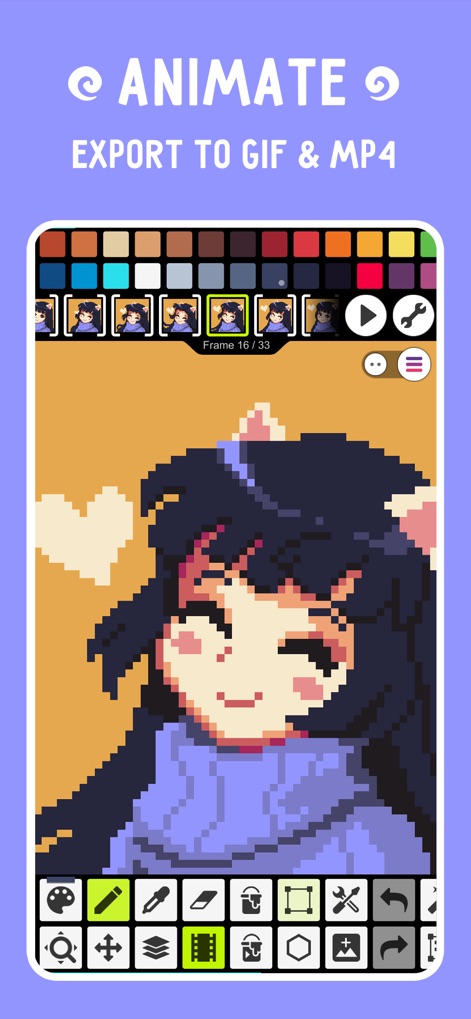
Diese App ermöglicht das einfache Erstellen von Frame-by-Frame-Animationen und den Export der Ergebnisse als GIF- oder MP4-Dateien für vielfältige Anwendungen.
Bilder lebendig animieren

Die App bietet Zugang zu einer lebendigen Pixel Network™-Community, in der Nutzer ihre Kunstwerke teilen und inspirierende Kreationen von anderen entdecken können.
Teil der Pixel-Community

Fortgeschrittene Pixelkünstler profitieren von der Ebenenverwaltung, die komplexe Bildkompositionen und detaillierte Bearbeitung der einzelnen Elemente ermöglicht.
Komplexe Projekte schichten

Nutzer können ihre animierten Projekte mit Musikstücken anreichern und die fertigen Videos mit Soundeffekten für eine immersive Präsentation exportieren.
Animationen mit Musik untermalen

Das erweiterte Farbmanagement der App bietet einen detaillierten Farbwähler mit HSV- und RGBA-Modi sowie Optionen zur Speicherung und Verwaltung individueller Paletten.
Präzise Farben steuern

Die Benutzeroberfläche zeichnet sich durch einfache, intuitive Steuerelemente und anpassbare Tools aus, die das Bearbeiten und Skalieren von Pixelkunst erleichtern.
Intuitive Werkzeuge beherrschen
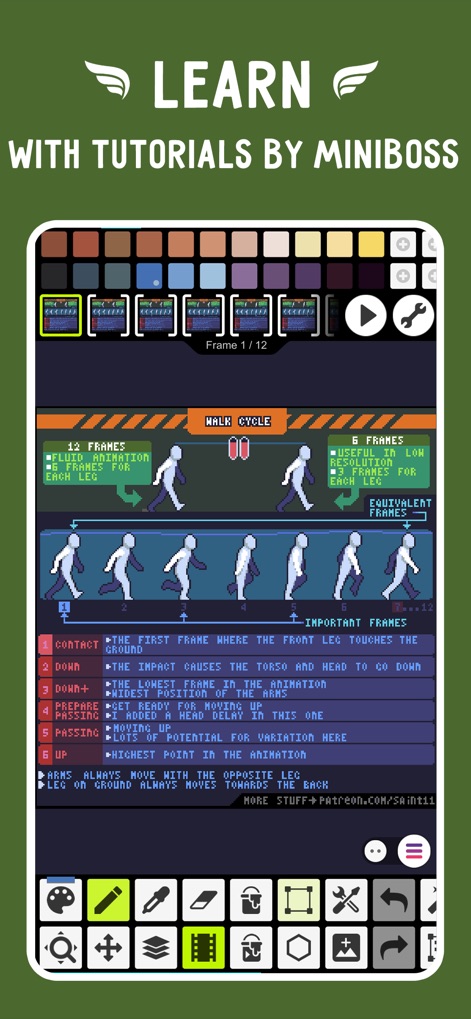
Anfänger und Fortgeschrittene profitieren von integrierten Tutorials, die beispielsweise komplexe Bewegungszyklen wie den Walk Cycle verständlich aufschlüsseln.
Animation lernen & verstehen
Beschreibung
Download
Ähnliche Apps
Apps mit ähnlichen Funktionen und Nutzererfahrung


Diese Seite ist keine offizielle Seite der App oder ihres Entwicklers, sondern eine unabhängige redaktionelle Veröffentlichung, die zu Informations- und Kommentarzwecken erstellt wurde. Sofern nicht ausdrücklich anders angegeben, sind weder die App noch ihr Entwickler mit MWM, Apple, Google Play, dem App-Herausgeber oder dem Entwickler der App verbunden, von ihnen unterstützt, gesponsert, autorisiert oder anderweitig offiziell verbunden, und nichts auf dieser Seite impliziert, dass die App unter Verwendung der Dienste von MWM entwickelt wurde. Alle Marken, Logos, Screenshots und andere Inhalte bleiben Eigentum ihrer jeweiligen Inhaber.