
Diese Seite ist keine offizielle Seite der App oder ihres Entwicklers, sondern eine unabhängige redaktionelle Veröffentlichung, die zu Informations- und Kommentarzwecken erstellt wurde. Sofern nicht ausdrücklich anders angegeben, sind weder die App noch ihr Entwickler mit MWM, Apple, Google Play, dem App-Herausgeber oder dem Entwickler der App verbunden, von ihnen unterstützt, gesponsert, autorisiert oder anderweitig offiziell verbunden, und nichts auf dieser Seite impliziert, dass die App unter Verwendung der Dienste von MWM entwickelt wurde. Alle Marken, Logos, Screenshots und andere Inhalte bleiben Eigentum ihrer jeweiligen Inhaber.


Polaris Office - PDF & Docs
Dokumentenchaos? Diese App macht dich zum Herrscher über jedes Format.
Downloads
10M+Bewertung
Bewertungen gesamt
94.1KHerausgeber
Kategorie
ProductivitySprachen
17Neueste Version
9.8.24Größe
329.1 MBErstveröffentlichung
14. Dez. 2013Eine detaillierte Analyse der Kernfunktionen für eine produktive Arbeitsumgebung auf mobilen Geräten.
Analyse der Polaris Office Hauptfunktionen
Umfassende Dokumentenbearbeitung
Die App bietet eine vollständige Kompatibilität und Bearbeitung für eine Vielzahl von Office-Dokumentenformaten, darunter Word, Excel, PowerPoint, Google Docs und das neu unterstützte CSV-Format.
Multi-Cloud-Synchronisation und Geräteübergreifender Zugriff
Dieses Tool gewährleistet eine nahtlose Synchronisation und den Zugriff auf Dokumente über verschiedene Geräte (Desktop, iPhone, iPad) und zahlreiche Cloud-Dienste, einschließlich Polaris Drive, iCloud, Google Drive und Dropbox.
PDF-Integration und Konvertierung
Es ermöglicht Nutzern, PDF-Dateien direkt anzuzeigen und diese bei Bedarf in bearbeitbare Office-Dokumente umzuwandeln, was die Flexibilität im Umgang mit verschiedenen Dateitypen erhöht.
Kollaborations- und Teilenfunktionen
Die App ermöglicht das schnelle und einfache Teilen von Dokumentenlinks über verschiedene Kanäle (SMS, E-Mail, soziale Medien), was die Zusammenarbeit mit anderen Anwendern vereinfacht.
Erweiterte Bearbeitungstools und Vorlagen
Es verfügt über eine Fülle von kreativen Ressourcen wie Vorlagen, Diagramme, Übergangseffekte und Formeln, die die Erstellung professioneller Dokumente und Präsentationen unterstützen.
Sicherheit und Datenschutz
Die App bietet Sicherheit und Datenschutz gemäß ISO 27001, was für den Umgang mit sensiblen Unternehmens- und persönlichen Daten unerlässlich ist und Vertrauen schafft.
Häufig gestellte Fragen
Alles, was Sie über wissen müssen Polaris Office - PDF & Docs
Is Polaris Office compatible with Microsoft Office formats?
Yes, Polaris Office is compatible with Word, Excel, and PowerPoint documents. It supports editing and saving files in DOC, DOCX, XLS, XLSX, PPT, and PPTX formats.
What document types can Polaris Office edit?
Polaris Office edits various document types including Word, Excel, PowerPoint, and Google Docs. It also supports editing DOC, DOCX, XLS, XLSX, PPT, PPTX, TXT, HWP, HWPX, ODT, PDF, and CSV formats.
Does Polaris Office support PDF editing and viewing?
Yes, Polaris Office supports viewing PDFs directly from your iPhone and iPad. It also allows converting PDFs into editable Office documents. PDF annotation is available.
Can I use templates in Polaris Office?
Yes, Polaris Office provides 33 free templates. Users can save frequent templates in the 'My Template' folder and create their own custom templates anytime.
What cloud storage services does Polaris Office integrate with?
Polaris Office integrates with Polaris Drive as the default cloud service. It also supports iCloud, Google Drive, Dropbox, OneDrive, Box, WebDAV, and FTP for document syncing.
Can Polaris Office open compressed zip files?
Yes, Polaris Office allows users to easily open and read all types of documents from zip files without extracting them on iPhone and iPad.
What languages does Polaris Office support?
Polaris Office supports 18 global languages. These include English, French, Simplified Chinese, Japanese, Russian, German, Italian, Spanish, Polish, Portuguese (Europe, Brazil), among others.
Can users share documents using Polaris Office?
Yes, Polaris Office users can quickly and easily share documents. Sharing is possible by sending a link via SMS, email, Facebook, and other channels.
Is Polaris Office a free app?
Yes, Polaris Office is a free all-in-one office suite. However, some features may be limited based on cloud usage or chosen subscription options.
What is the size of the Polaris Office app?
The Polaris Office app is under 100 MB in size. It functions as a single application sufficient for managing various document types on iOS devices.
Does Polaris Office offer document synchronization across devices?
Yes, Polaris Office keeps all documents up-to-date and synced across devices like Desktop, iPhone, and iPad. This sync occurs via Polaris Drive, iCloud, and other cloud services.
How do I manage sharing permissions for Polaris Office?
To manage sharing options, go to Settings > Privacy > Allow additional permissions within your device. Select the category and then revoke access to Polaris Office.
What are the subscription plans for Polaris Office?
Polaris Office offers several plans: Smart Plan ($3.99/month, $39.99/year), Pro Plan ($5.99/month, $59.99/year), AI Plan ($12.99/month, $129.99/year), and AI-Plus Plan ($20.99/month, $209.99/year).
How much does the Polaris Office Smart Plan cost?
The Polaris Office Smart Plan costs $3.99 per month or $39.99 per year. These recurring payments are charged to your Apple Store account.
How do I stop auto-renewal for my Polaris Office subscription?
To turn off auto-renewal for your Polaris Office subscription, go to your user’s Account Settings within the App Store. Auto-renewal must be turned off at least 24 hours before the current period ends.
Is Polaris Office compliant with cloud privacy standards?
Yes, Polaris Office has earned ISO 27001 certification. This certification confirms compliance with the International Cloud Privacy Standard, ensuring robust data privacy measures.
Die folgenden Screenshots und die Beschreibung stammen direkt aus dem offiziellen Store-Eintrag der App und sind Eigentum des Entwicklers.
App Store
Screenshots

Die App zeigt eine zentrale Dateiansicht und ermöglicht Nutzern, Word-, Excel- und PDF-Dokumente zu organisieren und darauf zuzugreifen, wie durch die verschiedenen Dateisymbole und den "My Polaris Drive"-Header erkennbar.
Dokumentenverwaltung leicht gemacht

Nutzer können nahtlos zwischen geöffneten Word-, Excel- und PowerPoint-Dokumenten wechseln, wobei die Registerkarten für DOCX, XLSX und PPTX am oberen Rand und die Bearbeitungswerkzeuge im unteren Bereich die vielseitige Funktionalität der App hervorheben.
Multitasking-Dokumentenbearbeitung
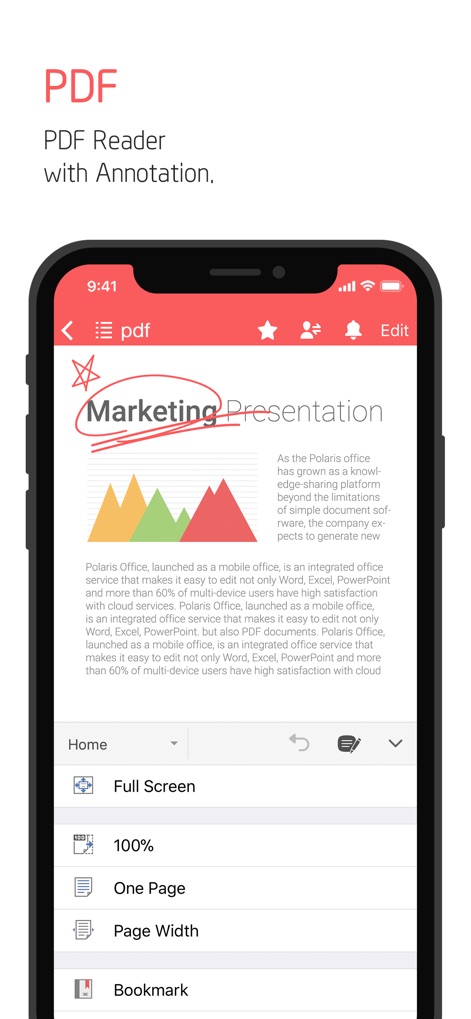
Dieses Tool bietet eine umfassende PDF-Reader-Funktion mit Annotationsmöglichkeiten, wie der handschriftlichen Notiz auf der "Marketing Presentation" und den übersichtlichen Optionen zur Ansichtssteuerung wie "Full Screen" und "Bookmark".
Interaktive PDF-Ansicht
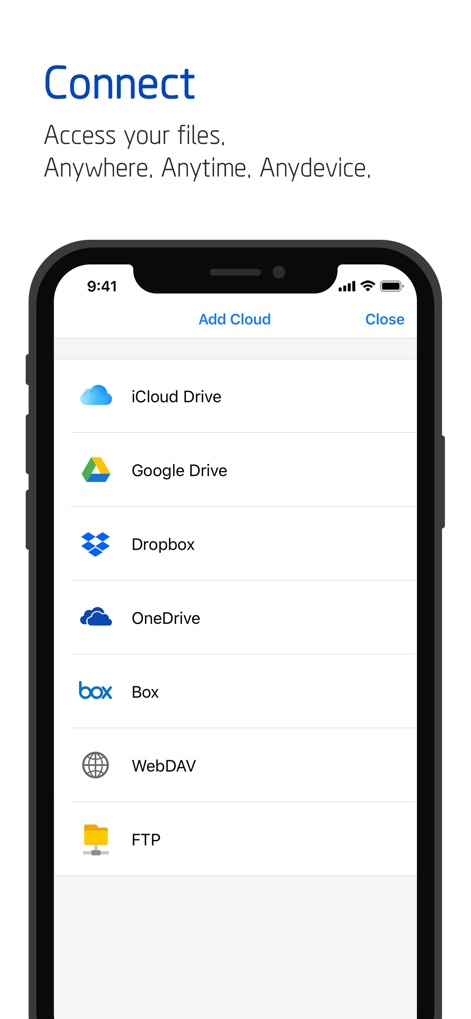
Die App demonstriert ihre weitreichende Konnektivität, indem sie eine Vielzahl von Cloud-Diensten wie iCloud Drive und Google Drive zur Integration anbietet, was Nutzern den Zugriff auf ihre Dateien von überall ermöglicht.
Nahtlose Cloud-Integration

Nutzer können Dokumente mühelos teilen und zur Zusammenarbeit einladen, wie die Optionen "Share Link" und "Invite People" verdeutlichen, was die gemeinsame Bearbeitung von Dateien vereinfacht.
Effiziente Zusammenarbeit

Diese Ansicht zeigt, wie Nutzer ihre eigenen Vorlagen im dedizierten "My Template"-Ordner speichern und organisieren können, was durch die hervorgehobene Ordnerstruktur und die Möglichkeit, neue Dokumente schnell zu erstellen, die Effizienz steigert.
Personalisierte Vorlagen-Verwaltung
Beschreibung
Download
Ähnliche Apps
Apps mit ähnlichen Funktionen und Nutzererfahrung

PDF PRO Scan Image & Documents
Balzo srl

The PDF Scanner, PDF editor HQ
NEXT K.U.M. LTD

CamScanner - PDF Scanner App
INTSIG Information Co., Ltd

Adobe Scan: PDF & OCR Scanner
Adobe Inc.

WPS Office: PDF, Docs, Sheets
KINGSOFT OFFICE SOFTWARE CORPORATION LIMITED

iLovePDF - PDF Editor & Scan
ILOVEPDF S.L.

Scanner App: Genius Scan
The Grizzly Labs

Microsoft Lens: PDF Scanner
Microsoft Corporation

Clear Scan: Doc Scanner App
INDY MOBILE APP COMPANY LIMITED
Diese Seite ist keine offizielle Seite der App oder ihres Entwicklers, sondern eine unabhängige redaktionelle Veröffentlichung, die zu Informations- und Kommentarzwecken erstellt wurde. Sofern nicht ausdrücklich anders angegeben, sind weder die App noch ihr Entwickler mit MWM, Apple, Google Play, dem App-Herausgeber oder dem Entwickler der App verbunden, von ihnen unterstützt, gesponsert, autorisiert oder anderweitig offiziell verbunden, und nichts auf dieser Seite impliziert, dass die App unter Verwendung der Dienste von MWM entwickelt wurde. Alle Marken, Logos, Screenshots und andere Inhalte bleiben Eigentum ihrer jeweiligen Inhaber.