
Diese Seite ist keine offizielle Seite der App oder ihres Entwicklers, sondern eine unabhängige redaktionelle Veröffentlichung, die zu Informations- und Kommentarzwecken erstellt wurde. Sofern nicht ausdrücklich anders angegeben, sind weder die App noch ihr Entwickler mit MWM, Apple, Google Play, dem App-Herausgeber oder dem Entwickler der App verbunden, von ihnen unterstützt, gesponsert, autorisiert oder anderweitig offiziell verbunden, und nichts auf dieser Seite impliziert, dass die App unter Verwendung der Dienste von MWM entwickelt wurde. Alle Marken, Logos, Screenshots und andere Inhalte bleiben Eigentum ihrer jeweiligen Inhaber.


Procreate Dreams
Zeitraffer-Alpträumen ein Ende bereiten: Procreate Dreams gibt Kreativen die Kontrolle über flüssige Animationen zurück.
Downloads
250k+Bewertung
Bewertungen gesamt
4.7KHerausgeber
Kategorie
Photo & VideoSprachen
18Neueste Version
2.0.4Größe
1.7 GBErstveröffentlichung
22. Nov. 2023Eine detaillierte Bewertung der Schlüsselmerkmale für professionelle 2D-Animations- und Digitalkunstschaffende auf dem iPad.
Analyse der Kernfunktionen von Procreate Dreams
Revolutionäre Echtzeit-Rendering-Engine
Die App zeichnet sich durch eine hochmoderne Echtzeit-Rendering-Engine aus, die Wartezeiten drastisch reduziert und einen flüssigen und effizienten kreativen Workflow ermöglicht, was für professionelle Produktionen unerlässlich ist.
Leistungsstarke Frame-für-Frame-Animation
Dieses Tool bietet robuste und intuitive Werkzeuge für die Frame-für-Frame-Animation, ergänzt durch über 300 Procreate-Pinsel und anpassbare Zwiebelschichten, was eine detailreiche und ausdrucksstarke 2D-Animation ermöglicht.
Reaktionsschnelle Mehrspur-Timeline
Es verfügt über eine reaktionsschnelle Mehrspur-Timeline, die eine präzise Steuerung und Komposition von Animations-, Video-, Audio- und Textschichten ermöglicht und so komplexe Projekte übersichtlich gestaltet.
Schlüsselbild-Animation für Bewegung & Effekte
Die App integriert umfassende Schlüsselbildfunktionen für die Steuerung von Bewegung und Effekten, wodurch Nutzer präzise Animationen und filmische Übergänge für ihre Inhalte erstellen können.
Integrierte Multimedia-Komposition
Dieses Tool ermöglicht die nahtlose Integration und Bearbeitung von Video-, Foto-, Audio- und Textinhalten, was die Erstellung von Multimedia-Projekten und interaktiven Geschichten erheblich vereinfacht.
Umfassende Pinselkompatibilität & Bibliothek
Es bietet volle Kompatibilität mit allen Procreate-Pinseln und unterstützt den Import benutzerdefinierter Pinsel, was Künstlern eine nahtlose Nutzung ihrer bestehenden Sammlungen ermöglicht.
Unterstützung für Ultrahohe Auflösung
Die App unterstützt Zeichnungen in einer Auflösung von bis zu 16K, was eine außergewöhnliche Detailtreue und Flexibilität für hochauflösende Ausgaben in verschiedenen Medienformaten bietet.
Professionelle Exportformate
Die App bietet vielseitige Exportoptionen, einschließlich gängiger Video-Codecs (H264, HEVC, ProRes) und PNG-Sequenzen mit Transparenz, um den Anforderungen professioneller Produktionspipelines gerecht zu werden.
Häufig gestellte Fragen
Alles, was Sie über wissen müssen Procreate Dreams
What is Procreate Dreams?
Procreate Dreams is an award-winning iPad animation app. It combines drawing, frame-by-frame animation, keyframing, and video editing to create rich 2D animations, expressive videos, and captivating stories.
Does Procreate Dreams support frame-by-frame animation?
Yes, Procreate Dreams supports powerful frame-by-frame animation. It offers over 300 textured brushes, customizable onion skins, and compatibility with existing Procreate brushes, enabling hand-drawn animations.
Can I import my existing Procreate brushes into Procreate Dreams?
Yes, Procreate Dreams is compatible with all Procreate brushes. Users can import their custom and purchased Procreate brushes, expanding their creative options for animation projects.
Does Procreate Dreams have a multi-track timeline?
Yes, Procreate Dreams features a responsive multi-track timeline. This allows users to seamlessly compose and manage video, photos, audio, and type, facilitating layered animations and complex projects.
What video and image file formats can Procreate Dreams import?
Procreate Dreams imports video and photos in JPG, PNG, TGA, Procreate, MP4, GIF, and ProRes formats. It also supports importing layered Procreate files and Procreate Animation Assist as Flipbooks.
Can I add sound, music, and voice-overs to my projects in Procreate Dreams?
Yes, Procreate Dreams allows users to import, edit, and trim audio. You can add voice-overs and music in formats like MP3, AIFF, WAV, FLAC, AAC, CAFF, M4A, AC3, and MP2.
Does Procreate Dreams use keyframes for animation effects?
Yes, Procreate Dreams uses keyframes for precise motion and cinematic animations. Users can modify easing and apply various effects such as HSB, opacity, Gaussian blur, lens blur, noise, and sharpen with keyframes.
Are there ads or subscriptions required for Procreate Dreams?
No, Procreate Dreams does not contain any ads or require subscriptions. It is a one-time purchase application, providing full access to all its powerful animation and editing features.
What is the maximum drawing resolution supported by Procreate Dreams?
Procreate Dreams supports drawing at up to 16K resolution. This high resolution ensures detailed and professional-quality artwork for animations and illustrations within the app.
Can Procreate Dreams export transparent videos or image sequences for professional pipelines?
Yes, Procreate Dreams exports transparent video and PNG sequences with transparency. Users can also export the current frame as a transparent image for integration into professional workflows.
Can I draw over videos in Procreate Dreams?
Yes, Procreate Dreams allows users to draw over their imported video content. This feature enhances creative control, enabling custom annotations or artistic overlays directly on top of video footage.
Does Procreate Dreams offer real-time rendering?
Yes, Procreate Dreams features a next-generation, real-time rendering engine. This technology ensures immediate visual feedback, making waiting for renders a thing of the past and enhancing workflow efficiency.
Does Procreate Dreams have an auto-save feature?
Yes, Procreate Dreams includes continuous auto-save and undo history. This ensures users never lose their artwork and can easily revert changes, providing a secure and flexible creative environment.
Die folgenden Screenshots und die Beschreibung stammen direkt aus dem offiziellen Store-Eintrag der App und sind Eigentum des Entwicklers.
App Store
Screenshots
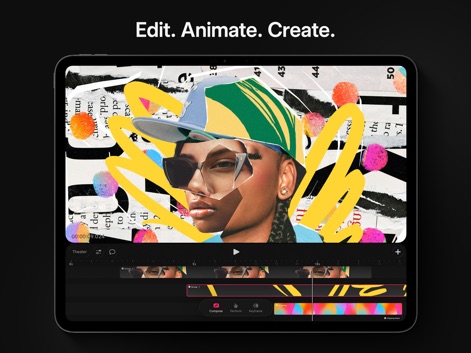
Nutzer können vielfältige Videos bearbeiten und animieren, indem sie kreative Elemente wie Papiercollagen-Texturen und dynamische Formen auf der intuitiven Multi-Track-Timeline anordnen.
Collage-Animation bearbeiten
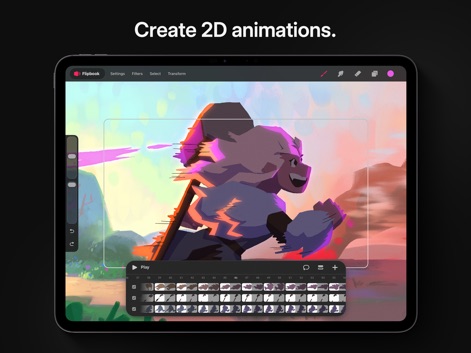
Dieses Tool ermöglicht die Erstellung detaillierter 2D-Animationen, wobei die Figuren-Bewegung durch Einzelbilder auf einer Flipbook-Ansicht präzise gesteuert wird, um flüssige Übergänge zu erzielen.
2D-Animation erstellen
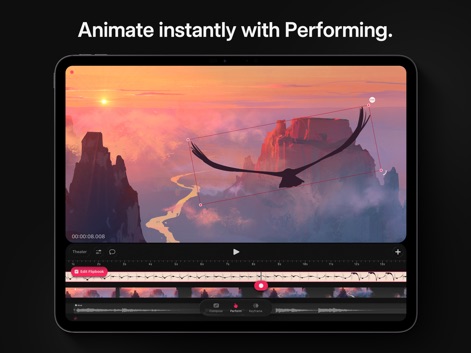
Mit dem "Performing"-Modus der App können Anwender Bewegungen wie den Flug des Vogels in Echtzeit aufnehmen und anpassen, während die Keyframe-Timeline die präzise Steuerung der Animation ermöglicht.
Bewegung performen aufnehmen
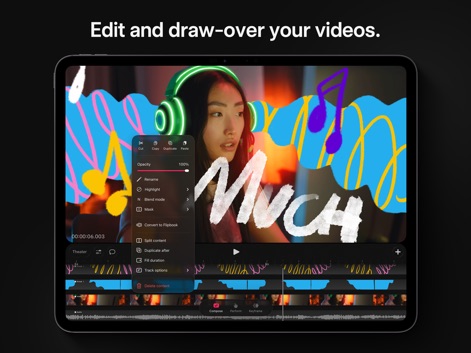
Anwender können Videos direkt überzeichnen und bearbeiten, indem sie kreative Grafiken hinzufügen und mittels eines Kontextmenüs Effekte wie Deckkraft und Mischmodi anpassen.
Videos überzeichnen bearbeiten
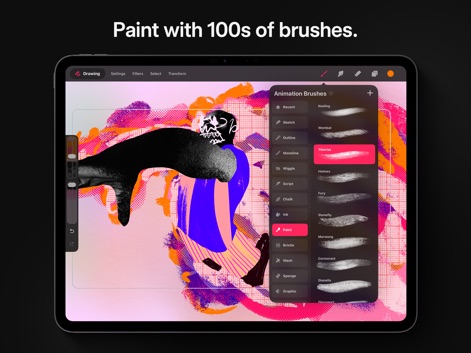
Die App bietet eine umfangreiche Pinsel-Bibliothek mit Hunderten von Texturen, die es Nutzern erlaubt, vielfältige Kunstwerke zu gestalten, wie die Darstellung verschiedener Pinselstile in der Seitenleiste zeigt.
Kreative Pinsel-Bibliothek
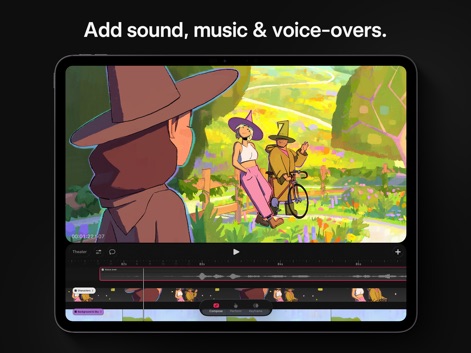
Dieses Tool ermöglicht das einfache Hinzufügen von Audioelementen zu Szenen, wobei die Musik- und Sprachspuren deutlich auf der Timeline sichtbar sind und die visuelle Szene mit den Charakteren lebendig untermalen.
Audio hinzufügen vertonen
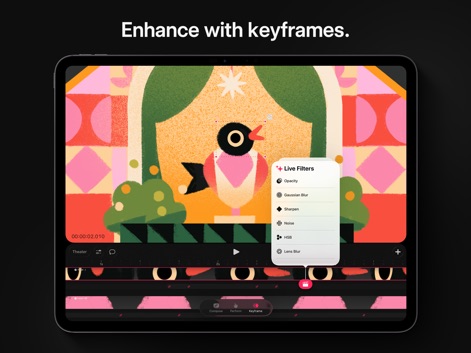
Nutzer können Animationen mit Keyframes verfeinern, indem sie dynamische Effekte wie den Gaußschen Weichzeichner anwenden und diese über ein intuitives Live-Filter-Menü präzise steuern.
Effekte per Keyframe
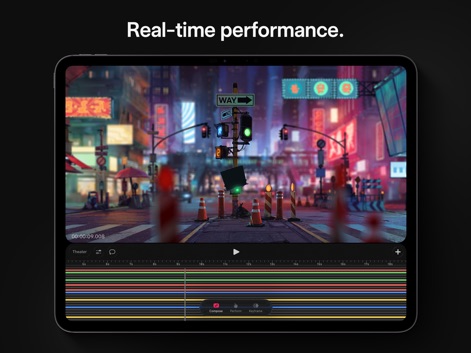
Die App liefert eine beeindruckende Echtzeit-Performance für komplexe Projekte, wobei die vielschichtige Timeline eine Fülle von Spuren anzeigt und die dynamische Stadtlandschaft flüssig animiert wird.
Echtzeit-Performance erleben
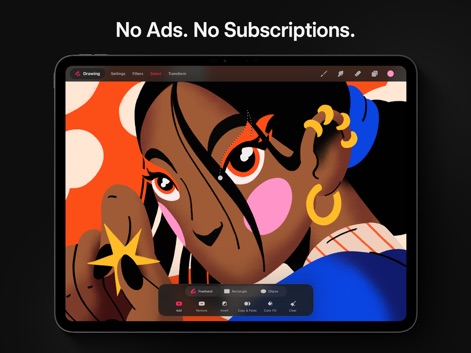
Anwender können detaillierte Zeichnungen mit verschiedenen Auswahlwerkzeugen erstellen, wie die Freihand-Auswahl um das Auge zeigt, und diese mit Optionen zum Hinzufügen oder Entfernen von Bereichen verfeinern.
Präzise Auswahlwerkzeuge
Beschreibung
Download
Ähnliche Apps
Apps mit ähnlichen Funktionen und Nutzererfahrung





Diese Seite ist keine offizielle Seite der App oder ihres Entwicklers, sondern eine unabhängige redaktionelle Veröffentlichung, die zu Informations- und Kommentarzwecken erstellt wurde. Sofern nicht ausdrücklich anders angegeben, sind weder die App noch ihr Entwickler mit MWM, Apple, Google Play, dem App-Herausgeber oder dem Entwickler der App verbunden, von ihnen unterstützt, gesponsert, autorisiert oder anderweitig offiziell verbunden, und nichts auf dieser Seite impliziert, dass die App unter Verwendung der Dienste von MWM entwickelt wurde. Alle Marken, Logos, Screenshots und andere Inhalte bleiben Eigentum ihrer jeweiligen Inhaber.