
Diese Seite ist keine offizielle Seite der App oder ihres Entwicklers, sondern eine unabhängige redaktionelle Veröffentlichung, die zu Informations- und Kommentarzwecken erstellt wurde. Sofern nicht ausdrücklich anders angegeben, sind weder die App noch ihr Entwickler mit MWM, Apple, Google Play, dem App-Herausgeber oder dem Entwickler der App verbunden, von ihnen unterstützt, gesponsert, autorisiert oder anderweitig offiziell verbunden, und nichts auf dieser Seite impliziert, dass die App unter Verwendung der Dienste von MWM entwickelt wurde. Alle Marken, Logos, Screenshots und andere Inhalte bleiben Eigentum ihrer jeweiligen Inhaber.


QQ邮箱
Der digitale Posteingang ist ein Sumpf. QQ Mail reicht die Seile zur souveränen Navigation.
Downloads
100M+Bewertung
Bewertungen gesamt
138.9KHerausgeber
Kategorie
ProductivitySprachen
3Neueste Version
7.1.5Größe
166.8 MBErstveröffentlichung
24. Okt. 2011Analyse der Kernfunktionen von QQ Mail für Produktivität
Eine detaillierte Betrachtung der Schlüsselmerkmale, die QQ Mail zu einer umfassenden Lösung für anspruchsvolle E-Mail-Nutzer machen.
E-Mail-Übersetzungsfunktion
Es ermöglicht Nutzern, E-Mails in Fremdsprachen automatisch ins Chinesische zu übersetzen, was die internationale Kommunikation erheblich vereinfacht und Sprachbarrieren überwindet.
Umfassende Multi-Account-Verwaltung
Die App bietet vollständige Unterstützung für allgemeine E-Mail-Protokolle, um mehrere E-Mail-Konten zentral zu verwalten, was die Effizienz für produktivitätsorientierte Nutzer steigert.
Integrierte Kalenderfunktion
Dieses Tool verfügt über eine integrierte Kalenderfunktion, die eine effiziente Terminverwaltung direkt aus der App ermöglicht und die Organisation verbessert.
Cloud-basierter Dateitransfer ('Transfer Station')
Es bietet eine 'Transfer Station' für die temporäre Speicherung und den Versand großer Dateien, was für den Austausch umfangreicher Dokumente in der geschäftlichen Kommunikation unerlässlich ist.
Vorschau von Dateianhängen
Die App unterstützt die Online-Vorschau verschiedener Dateianhänge (Dokumente, Bilder, Videos, komprimierte Dateien), was einen schnellen Überblick ohne Download ermöglicht und Zeit spart.
Priorisierte E-Mail-Benachrichtigungen
Es ermöglicht die Konfiguration von Benachrichtigungen, sodass nur E-Mails von markierten Kontakten gemeldet werden. Dies hilft, sich auf wichtige Nachrichten zu konzentrieren und Ablenkungen zu minimieren.
Integrierte Kontaktverwaltung
Die App bietet eine effiziente Kontaktverwaltung, die das Auffinden von Ansprechpartnern und die Übersicht über vergangene Konversationen vereinfacht.
Screenshot-Annotation
Es erlaubt die schnelle Annotation von Screenshots der E-Mail-Ansicht, was die Kommunikation und das Feedback zu Inhalten effizienter gestaltet.
Intelligente Werbemail-Aggregation
Die App verfügt über eine intelligente Aggregation von Werbe-E-Mails, wodurch der Posteingang übersichtlicher bleibt und die manuelle Sortierung reduziert wird.
Integriertes Notizbuch
Ein integriertes Notizbuch ermöglicht es Nutzern, Gedanken und Ideen jederzeit festzuhalten, was die Organisation und das schnelle Festhalten von Informationen fördert.
Häufig gestellte Fragen
Alles, was Sie über wissen müssen QQ邮箱
What is QQ Mail?
QQ Mail is an email application that supports various mail protocols, allowing users to manage multiple mailboxes. It provides features like mail synchronization, attachment preview, and notification customization.
Does QQ Mail support multiple email accounts?
Yes, QQ Mail supports multiple email accounts. It offers full support for general mail protocols, allowing users to add and manage various mailboxes beyond QQ Mail, including Gmail and Outlook.
Can I preview attachments directly in the QQ Mail app?
Yes, QQ Mail supports online preview of various attachment types. This includes documents, images, audio and video files, compressed packages, and eml files.
How much does QQ Mail VIP auto-renewal cost monthly?
The QQ Mail VIP Monthly Auto-Renewal subscription costs RMB 22 per month. This amount is charged to your Apple iTunes account within 24 hours before expiration.
How do I cancel my QQ Mail VIP auto-renewal subscription?
To cancel your QQ Mail VIP subscription, go to Settings > Apple ID > Subscriptions, select the QQ Mail VIP subscription, and tap Cancel Subscription. You must do this at least 24 hours before the billing period ends.
Does QQ Mail offer translation services for emails?
Yes, QQ Mail offers a translation feature. It can translate mails in foreign languages into Chinese, enhancing user convenience for international communication.
What is QQMail Drive and its features?
QQMail Drive is a feature for file storage with no expiration date. It supports multi-device synchronization and facilitates easy sharing of files within the QQ Mail app.
Can QQ Mail help manage calendar events?
Yes, QQ Mail can help manage calendar events. It includes a Calendar plug-in to efficiently manage events and offers flexible event management capabilities.
What types of email accounts can I add to QQ Mail?
QQ Mail supports adding various email accounts, including QQ Mail, Tencent Exmail, 163 Mail, 126 Mail, Gmail, Outlook, Microsoft 365, and Exchange, among others.
Does QQ Mail provide options for temporary storage of large files?
Yes, QQ Mail includes a Transfer Station plug-in. This feature allows for the temporary storage of large files on the network, accessible within the application.
Die folgenden Screenshots und die Beschreibung stammen direkt aus dem offiziellen Store-Eintrag der App und sind Eigentum des Entwicklers.
App Store
Screenshots

Cloud-Speicher-Übersicht
Dieses Feature präsentiert eine übersichtliche Dateiliste mit verschiedenen Dateitypen wie PDFs und Bildern, die eine effiziente Organisation und den Zugriff auf wichtige Dokumente ermöglicht.

E-Mail-Inhalte erweitern
Die App bietet eine intuitive E-Mail-Verfassungsoberfläche mit integrierten Optionen für Kalenderereignisse und Notizen, wodurch Nutzer vielfältige Inhalte direkt in ihre Nachrichten einfügen können.

Kalender effizient nutzen
Der übersichtliche Monatskalender ermöglicht eine flexible Ereignisverwaltung und zeigt klar alle anstehenden Termine und Aufgaben an, um die Planung zu erleichtern.
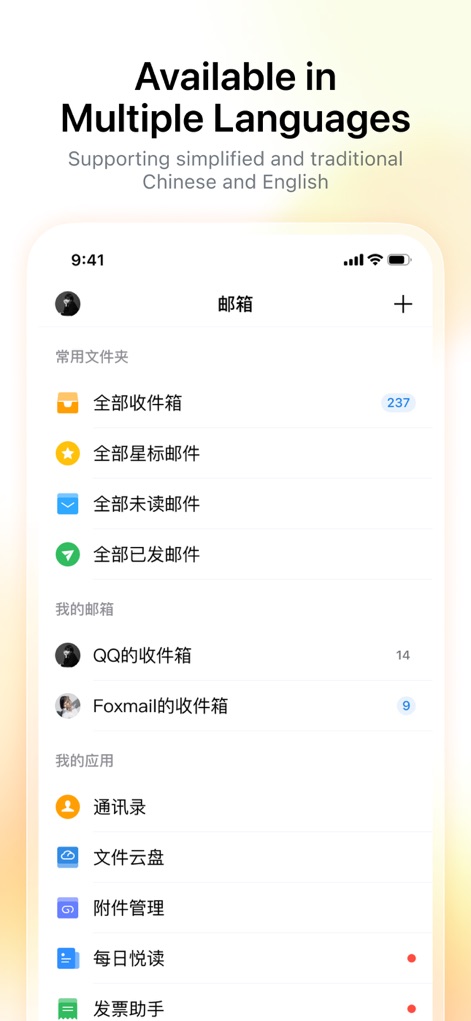
Mehrsprachige Benutzeroberfläche
Die Oberfläche präsentiert eine Vielzahl von Mailbox-Ordnern sowie integrierte App-Funktionen wie Kontakte und Dateiverwaltung, was die Mehrsprachigkeit und Funktionsvielfalt der Anwendung hervorhebt.
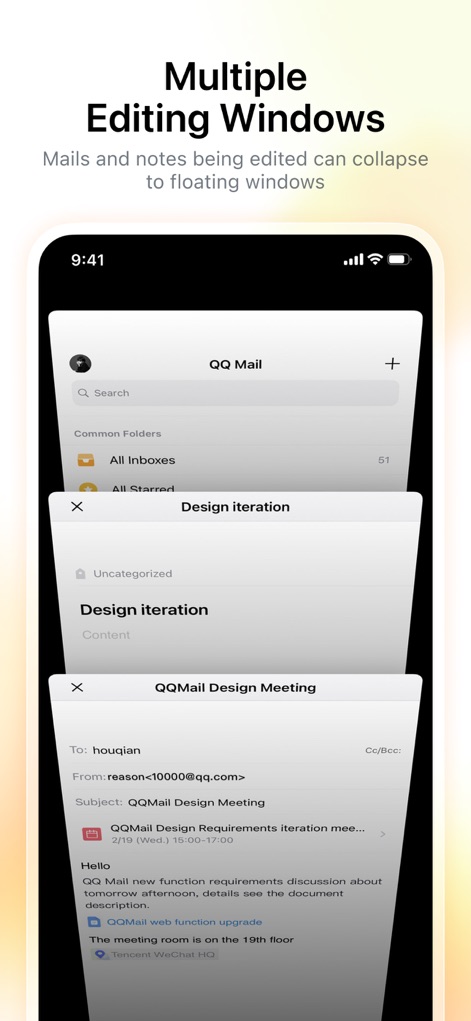
Multitasking mit Fenstern
Die App unterstützt die gleichzeitige Bearbeitung in mehreren schwebenden Fenstern, wodurch Nutzer bequem zwischen E-Mail-Entwürfen und Notizen wechseln können, ohne den Kontext zu verlieren.

Konten flexibel hinzufügen
Dieses Tool ermöglicht die einfache Integration verschiedener E-Mail-Konten von Anbietern wie Gmail und Outlook, um alle Postfächer zentral und effizient zu verwalten.
Beschreibung
Download
Ähnliche Apps
Apps mit ähnlichen Funktionen und Nutzererfahrung

Microsoft Outlook
Microsoft Corporation

Mail: Email, Cloud, Calendar
V Kontakte OOO

Yandex Mail: Email & Cloud
DIRECT CURSUS COMPUTER SYSTEMS TRADING LLC

Gmail - Email by Google
Google LLC

Yahoo Mail
Yahoo Inc.

Proton Mail - Encrypted Email
Proton AG

Email - Edison Mail
Edison Software Inc.

Zoho Mail - Email and Calendar
Zoho Corporation

GMX - Mail & Cloud
1&1 Mail & Media GmbH
Diese Seite ist keine offizielle Seite der App oder ihres Entwicklers, sondern eine unabhängige redaktionelle Veröffentlichung, die zu Informations- und Kommentarzwecken erstellt wurde. Sofern nicht ausdrücklich anders angegeben, sind weder die App noch ihr Entwickler mit MWM, Apple, Google Play, dem App-Herausgeber oder dem Entwickler der App verbunden, von ihnen unterstützt, gesponsert, autorisiert oder anderweitig offiziell verbunden, und nichts auf dieser Seite impliziert, dass die App unter Verwendung der Dienste von MWM entwickelt wurde. Alle Marken, Logos, Screenshots und andere Inhalte bleiben Eigentum ihrer jeweiligen Inhaber.