
Diese Seite ist keine offizielle Seite der App oder ihres Entwicklers, sondern eine unabhängige redaktionelle Veröffentlichung, die zu Informations- und Kommentarzwecken erstellt wurde. Sofern nicht ausdrücklich anders angegeben, sind weder die App noch ihr Entwickler mit MWM, Apple, Google Play, dem App-Herausgeber oder dem Entwickler der App verbunden, von ihnen unterstützt, gesponsert, autorisiert oder anderweitig offiziell verbunden, und nichts auf dieser Seite impliziert, dass die App unter Verwendung der Dienste von MWM entwickelt wurde. Alle Marken, Logos, Screenshots und andere Inhalte bleiben Eigentum ihrer jeweiligen Inhaber.


Remove BG - Background Remover
Verwandle jedes Foto in Sekundenschnelle in ein professionelles Produktangebot, ein Social-Media-Thumbnail oder ein Ausweisfoto. Erlebe professionelle Hintergrundentfernung mit nur einem Fingertipp, ganz ohne Designkenntnisse.
Downloads
4K+Bewertung
Bewertungen gesamt
0Herausgeber
Kategorie
Photo & VideoSprachen
48Neueste Version
1.2.1Größe
57.6 MBErstveröffentlichung
5. Mai 2023Stärke deinen Nebenverdienst mit KI
Höre auf, mit komplexer Bearbeitungssoftware zu kämpfen. Remove BG bietet professionelle Werkzeuge, die speziell für Kreative, Wiederverkäufer und digitale Unternehmer entwickelt wurden.
KI-Hintergrundentfernung mit einem Fingertipp
Schneide Personen, Haustiere und Produkte in Sekundenschnelle automatisch aus. Unsere intelligente KI liefert pixelgenaue Kanten ohne manuellen Aufwand.
Professionelle E-Commerce-Angebote
Steigere deine Verkäufe auf Poshmark, eBay und Etsy. Verwandle unordentliche Aufnahmen von zu Hause in saubere, professionelle Produktpräsentationen im Handumdrehen.
Häufig gestellte Fragen
Alles, was Sie über wissen müssen Remove BG - Background Remover
Was ist Remove BG - Background Remover?
Remove BG - Background Remover ist eine Anwendung zum sofortigen Entfernen von Hintergründen aus Originalbildern. Sie schneidet Bilder automatisch aus, löscht unerwünschte Teile und lässt nur die gewünschten Elemente übrig.
Wie entferne ich einen Hintergrund mit der Remove BG App?
Um einen Hintergrund mit der Remove BG App zu entfernen, laden Sie ein Bild aus Ihrer Galerie oder Kamera hoch. Treffen Sie dann auf dem Bildschirm die Schaltfläche "Hintergrund entfernen". Sie können einen neuen Hintergrund auswählen oder das Bild speichern.
Verwendet Remove BG - Background Remover KI zur Hintergrundentfernung?
Ja, Remove BG - Background Remover verfügt über einen KI-Modus. Dieser Modus erkennt automatisch Personen, Tiere, Pflanzen und Anime, um Hintergründe zu entfernen. Er liefert hochwertige Ausschnitte mit scharfen Kanten.
Kann ich Ausschnitte in Remove BG - Background Remover manuell bearbeiten?
Ja, Remove BG - Background Remover bietet einen manuellen Modus. Benutzer können das gewünschte Objekt schnell umreißen, um es auszuschneiden und zu extrahieren, und dann das ausgeschnittene Bild manuell löschen und reparieren, um eine präzise Bearbeitung zu ermöglichen.
Ist Remove BG - Background Remover eine kostenlose App?
Ja, die App "Remove BG - Background Remover" gibt an, dass sie "keinen Cent" für ihre Funktionalität berechnet. Sie positioniert sich als intelligentes Werkzeug, das die Hintergrundentfernung kostenlos durchführt.
Welche Hintergrundoptionen bietet Remove BG - Background Remover?
Remove BG - Background Remover bietet verschiedene integrierte Hintergrundoptionen. Dazu gehören einfarbige Farben, Farbverläufe und produktspezifische Hintergründe. Die App bietet auch Kategorien wie "Samt" für verschiedene Stile.
Kann Remove BG - Background Remover Bilder für E-Commerce erstellen?
Ja, Remove BG - Background Remover kann Bilder erstellen, die sich für E-Commerce-Produktpräsentationen eignen. Es unterstützt auch die Erstellung von Bildern für Podcast-Cover, Cartoon-Profile und perfekte Profilbilder.
Kann Remove BG - Background Remover für offizielle Ausweis- oder Passfotos verwendet werden?
Ja, Remove BG - Background Remover kann für offizielle Ausweis-, Pass- oder Bewerbungsfotos verwendet werden. Benutzer können dem extrahierten Bild einen farbigen Hintergrund hinzufügen, um bestimmte Anforderungen zu erfüllen.
Die folgenden Screenshots und die Beschreibung stammen direkt aus dem offiziellen Store-Eintrag der App und sind Eigentum des Entwicklers.
App Store
Screenshots
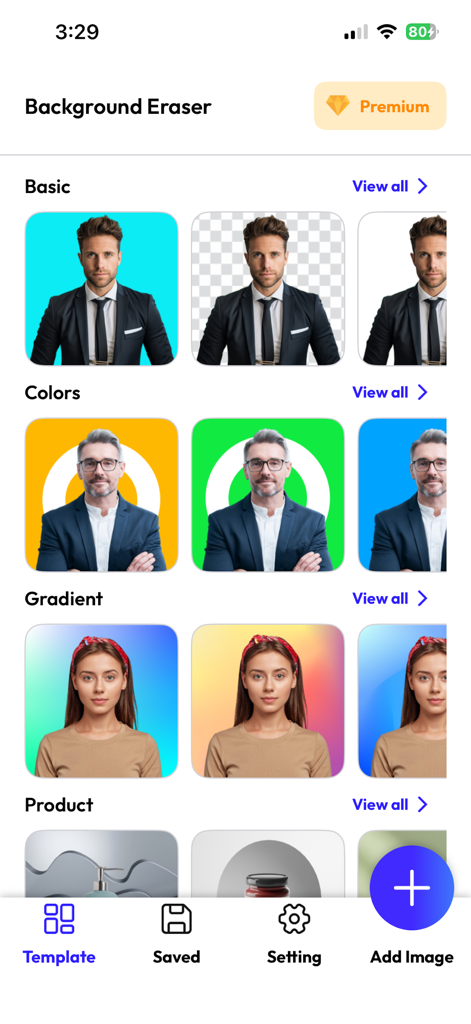
Mobile App-Oberfläche zur Hintergrundentfernung mit verschiedenen farbigen und verlaufenden Vorlagen für Porträts und Produkte.
Startbildschirm der Remove BG App mit einem kreisförmigen Profilbild und einer Ladeanzeige auf einem blauen Farbverlaufshintergrund
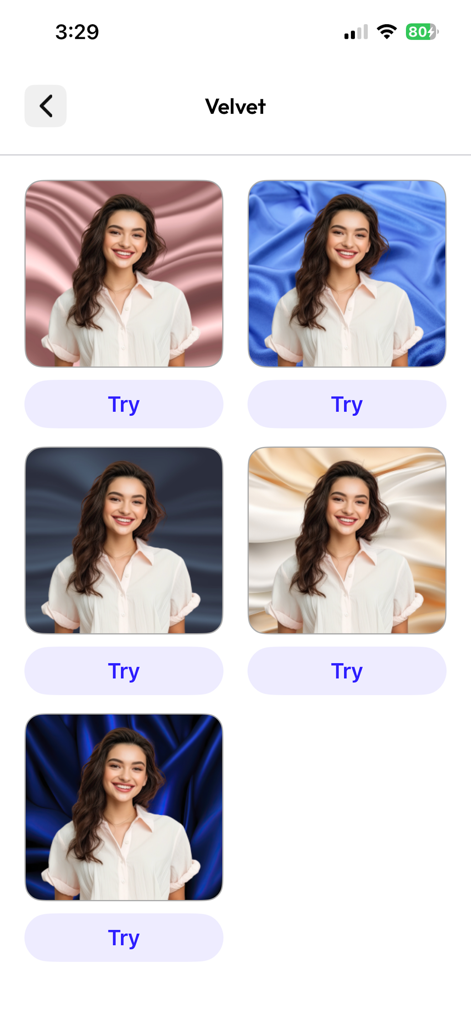
Ein Bildschirm einer mobilen App, der mehrere Samtstoff-Hintergrundoptionen für ein Porträtfoto anzeigt
Beschreibung
Download
Ähnliche Apps
Top-gerankte Apps in derselben Kategorie

CapCut: Photo & Video Editor
BYTEDANCE PTE. LTD.

Instagram, Inc.

YouTube
Google LLC

Canva: AI Photo & Video Editor
Canva Pty Ltd

快手
Beijing Kwai Technology Co., Ltd.

Snapchat
Snap, Inc.

Edits: Video Editor
Instagram, Inc.

Google Photos: Backup & Edit
Google LLC

Meta AI - Vibes & AI Glasses
Meta Platforms, Inc.
Diese Seite ist keine offizielle Seite der App oder ihres Entwicklers, sondern eine unabhängige redaktionelle Veröffentlichung, die zu Informations- und Kommentarzwecken erstellt wurde. Sofern nicht ausdrücklich anders angegeben, sind weder die App noch ihr Entwickler mit MWM, Apple, Google Play, dem App-Herausgeber oder dem Entwickler der App verbunden, von ihnen unterstützt, gesponsert, autorisiert oder anderweitig offiziell verbunden, und nichts auf dieser Seite impliziert, dass die App unter Verwendung der Dienste von MWM entwickelt wurde. Alle Marken, Logos, Screenshots und andere Inhalte bleiben Eigentum ihrer jeweiligen Inhaber.