
Diese Seite ist keine offizielle Seite der App oder ihres Entwicklers, sondern eine unabhängige redaktionelle Veröffentlichung, die zu Informations- und Kommentarzwecken erstellt wurde. Sofern nicht ausdrücklich anders angegeben, sind weder die App noch ihr Entwickler mit MWM, Apple, Google Play, dem App-Herausgeber oder dem Entwickler der App verbunden, von ihnen unterstützt, gesponsert, autorisiert oder anderweitig offiziell verbunden, und nichts auf dieser Seite impliziert, dass die App unter Verwendung der Dienste von MWM entwickelt wurde. Alle Marken, Logos, Screenshots und andere Inhalte bleiben Eigentum ihrer jeweiligen Inhaber.


TV Cast for Chromecast ‣
Schluss mit kleinen Bildschirmen: Die App beamt Inhalte auf den TV und macht jeden Chromecast zum Medien-Kraftwerk.
Downloads
10M+Bewertung
Bewertungen gesamt
92.2KHerausgeber
Kategorie
Photo & VideoSprachen
1Neueste Version
3.12Größe
31.5 MBErstveröffentlichung
27. Aug. 2014Eine Bewertung der Hauptmerkmale, die das Streaming-Erlebnis für Chromecast-Nutzer verbessern.
Analyse der Kernfunktionen von 'TV Cast for Chromecast ‣'
Web-Video-Streaming
Die App ermöglicht Nutzern, eine breite Palette von Online-Videos (Filme, TV-Sendungen, Sport, Musik) von beliebigen Webseiten direkt auf ihr Chromecast-Gerät zu streamen, was den Zugriff auf vielfältige Inhalte erleichtert und die Beschränkungen offizieller Apps umgeht.
Integrierter Ad-Blocker
Die App integriert einen Ad-Blocker, der Werbung und Pop-ups auf den meisten Webseiten blockiert und die In-App-Werbung entfernt, was ein ununterbrochenes, werbefreies Streaming-Erlebnis schafft, das von der Zielgruppe hoch geschätzt wird.
Streaming persönlicher Medien
Dieses Tool bietet die Möglichkeit, persönliche Fotos, Videos und Musik von lokalen Geräten sowie von Cloud-Diensten wie iCloud und Dropbox auf den Fernseher zu übertragen, um private Medien auf großer Leinwand zu genießen.
Fernsteuerungsleiste (Remote Playbar)
Es verfügt über eine Fernbedienungsleiste, die das Vorspulen und Zurückspulen von Videos während des Browsens erlaubt und sich geräteübergreifend synchronisiert, was die gemeinsame Steuerung von Inhalten vereinfacht und den Komfort erhöht.
Website-Lesezeichen
Die App erlaubt das Speichern einer unbegrenzten Anzahl von Webseiten-Lesezeichen, die über iCloud zwischen verschiedenen Geräten synchronisiert und wiederhergestellt werden können, was den schnellen Zugriff auf Lieblingsinhalte sichert.
Anzeige von Untertiteln
Die App unterstützt die Anzeige von Untertiteln und Closed Captions auf dem Fernseher, wodurch die Zugänglichkeit und das Verständnis von Inhalten für ein breiteres Publikum verbessert werden.
Häufig gestellte Fragen
Alles, was Sie über wissen müssen TV Cast for Chromecast ‣
What does TV Cast for Chromecast do?
TV Cast for Chromecast enables users to browse the web and stream online videos, personal photos, videos, and music to their Chromecast or Google Cast-enabled TV.
Does TV Cast for Chromecast work with all Chromecast devices?
Yes, TV Cast for Chromecast works with all Chromecast devices from Google and on devices with Google Cast or Chromecast built-in.
Can TV Cast for Chromecast stream Netflix or Amazon Prime videos?
No, TV Cast for Chromecast does not support DRM-protected videos such as Amazon Prime, Netflix, Hulu, Vudu, DirecTV, Xfinity, or HBO now.
Does TV Cast for Chromecast require a subscription?
No, TV Cast for Chromecast does not require any subscriptions. Features are available through in-app purchases.
Does TV Cast for Chromecast include an ad-blocker?
Yes, TV Cast for Chromecast offers an Ad-Blocker as an upgrade feature, which blocks ads and popups on most websites and removes in-app sponsoring ads.
Can I cast personal photos and music with TV Cast for Chromecast?
Yes, the Personal Media upgrade feature allows casting unlimited personal photos, videos, and music directly from the device or cloud services like iCloud and Dropbox.
How can I get support for TV Cast for Chromecast?
Users can get support by emailing info@video-tv-cast.com. The app also offers fast premium support chat for assistance.
Does TV Cast for Chromecast mirror my device screen?
No, TV Cast for Chromecast streams only the video part of a website. It does not perform screen or tab mirroring of the entire website content.
Does TV Cast for Chromecast support subtitles?
Yes, the app offers a Subtitles upgrade feature, which enables the display of subtitles and closed captions on the TV.
How do I unlock all features in TV Cast for Chromecast?
All features in TV Cast for Chromecast are unlocked by purchasing the Premium Edition as an in-app purchase. This includes current and future features.
Die folgenden Screenshots und die Beschreibung stammen direkt aus dem offiziellen Store-Eintrag der App und sind Eigentum des Entwicklers.
App Store
Screenshots
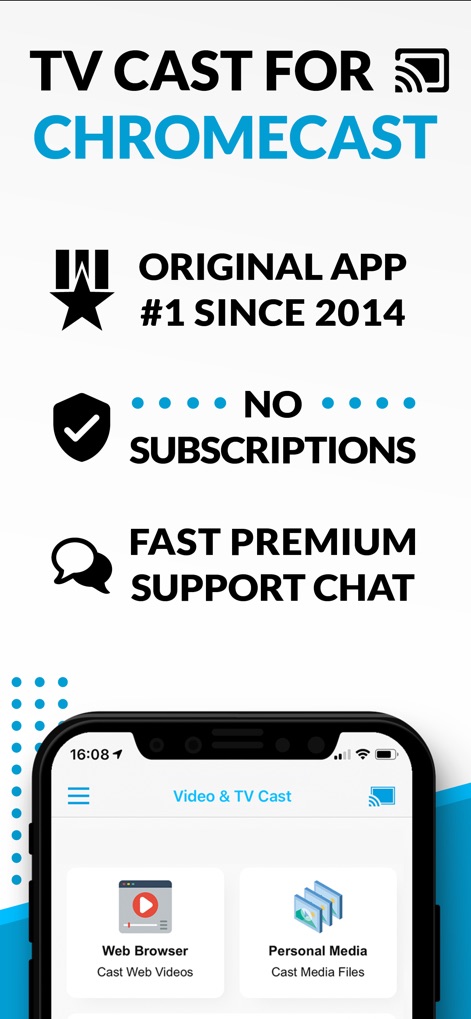
Die App präsentiert ihre Hauptvorteile wie die langjährige Marktführerschaft und das Fehlen von Abonnements, während die intuitive Benutzeroberfläche die Optionen zum Streamen von Webinhalten und persönlichen Medien darstellt.
Übersicht & Vorteile

Nutzer können mühelos Webvideos, Filme und TV-Sendungen auf den Großbildschirm übertragen, wobei die visuelle Darstellung die Synchronisation zwischen dem Mobilgerät und dem Fernseher hervorhebt.
Videos & Filme streamen
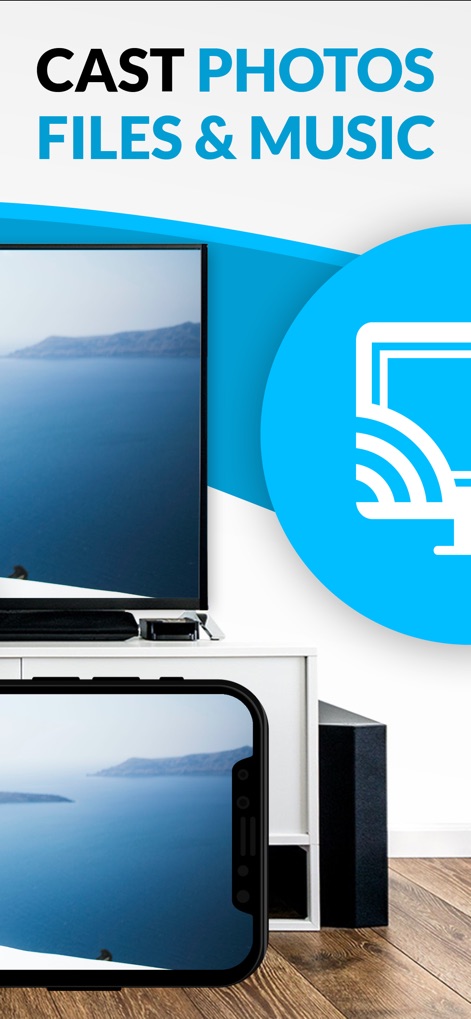
Dieses Tool ermöglicht die nahtlose Übertragung persönlicher Fotos, Dateien und Musik, was durch das Casting-Symbol und die identische Bildanzeige auf beiden Geräten klar demonstriert wird.
Fotos & Medien übertragen
Beschreibung
Download
Ähnliche Apps
Apps mit ähnlichen Funktionen und Nutzererfahrung


Diese Seite ist keine offizielle Seite der App oder ihres Entwicklers, sondern eine unabhängige redaktionelle Veröffentlichung, die zu Informations- und Kommentarzwecken erstellt wurde. Sofern nicht ausdrücklich anders angegeben, sind weder die App noch ihr Entwickler mit MWM, Apple, Google Play, dem App-Herausgeber oder dem Entwickler der App verbunden, von ihnen unterstützt, gesponsert, autorisiert oder anderweitig offiziell verbunden, und nichts auf dieser Seite impliziert, dass die App unter Verwendung der Dienste von MWM entwickelt wurde. Alle Marken, Logos, Screenshots und andere Inhalte bleiben Eigentum ihrer jeweiligen Inhaber.