
Diese Seite ist keine offizielle Seite der App oder ihres Entwicklers, sondern eine unabhängige redaktionelle Veröffentlichung, die zu Informations- und Kommentarzwecken erstellt wurde. Sofern nicht ausdrücklich anders angegeben, sind weder die App noch ihr Entwickler mit MWM, Apple, Google Play, dem App-Herausgeber oder dem Entwickler der App verbunden, von ihnen unterstützt, gesponsert, autorisiert oder anderweitig offiziell verbunden, und nichts auf dieser Seite impliziert, dass die App unter Verwendung der Dienste von MWM entwickelt wurde. Alle Marken, Logos, Screenshots und andere Inhalte bleiben Eigentum ihrer jeweiligen Inhaber.


TV Cast for Samsung TV App
Der Web-Stream landet auf dem Großbildschirm. MWMs Kreation liefert Medien dorthin, wo sie hingehören: auf den Samsung Smart TV.
Downloads
10M+Bewertung
Bewertungen gesamt
117.8KHerausgeber
Kategorie
Photo & VideoSprachen
1Neueste Version
3.8Größe
34.7 MBErstveröffentlichung
26. März 2015Eine detaillierte Bewertung der Kernfunktionen für Samsung Smart TV-Nutzer.
Analyse der 'TV Cast for Samsung TV App'
Direkter Web-Video-Stream auf Samsung TV
Es ermöglicht das direkte Streamen von Webvideos, Online-Filmen, Livestreams und TV-Sendungen von iOS-Geräten auf Samsung Smart TVs und Blu-ray Player.
Einfache Einrichtung: Kein externer Medienserver nötig
Dieses Tool eliminiert die Notwendigkeit, komplexe Medienserver wie Plex zu installieren, was die Einrichtung vereinfacht und den Wartungsaufwand reduziert.
Umfassende Formatunterstützung
Die App unterstützt gängige Videoformate wie MP4, M3U8, HLS-Livestreams und Video-over-HTTPS, was eine breite Palette an streamfähigen Inhalten gewährleistet.
Streaming lokaler Medien
Es ermöglicht Nutzern, Videos aus der Kamerarolle ihrer iOS-Geräte direkt auf den großen Bildschirm zu übertragen, wodurch persönliche Medien leicht geteilt werden können.
Unbegrenzte Wiedergabedauer
Die App bietet eine Wiedergabe ohne Zeitbegrenzung, was ununterbrochenes Streaming von Inhalten jeder Länge ermöglicht und ein nahtloses Unterhaltungserlebnis sicherstellt.
Integriertes Werbeblocker
Dieses Tool blockiert störende Werbung und Pop-ups auf den meisten Websites und entfernt Sponsorenanzeigen aus der App, um ein ungestörtes Seherlebnis zu gewährleisten.
Erweiterte Videosteuerung
Die App verfügt über eine Remote Playbar für detaillierte Videokontrolle, einschließlich Spulen, Vorspulen, Zurückspulen, Abspielen und Pausieren, auch während des Browsens.
Desktop-Modus für Website-Kompatibilität
Es erlaubt die Umschaltung des Browsers in einen Desktop-Modus, um die Desktop-Versionen von Websites zu laden, was den Zugang zu umfassenderen Inhalten oder Inhalten, die nicht mobil optimiert sind, ermöglicht.
Häufig gestellte Fragen
Alles, was Sie über wissen müssen TV Cast for Samsung TV App
What is the TV Cast for Samsung TV App?
The TV Cast for Samsung TV App streams web videos, online movies, livestreams, and live TV shows to Samsung Smart TVs and Blu-ray Players. It provides direct casting from your mobile device.
Does the TV Cast for Samsung TV App require a subscription?
No, there are no recurring subscription fees for the TV Cast for Samsung TV App. The app emphasizes "NO SUBSCRIPTIONS" on its primary promotional material, indicating one-time purchases for features.
Does TV Cast for Samsung TV App offer in-app purchases?
Yes, the TV Cast for Samsung TV App offers in-app purchases for upgrade features. The Premium Edition unlocks all available features, including future updates without additional payment.
What video formats does TV Cast for Samsung TV App support?
The TV Cast for Samsung TV App supports streaming of mp4, m3u8, hls livestreams, and video-over-https. Users can cast various web video formats directly to their Samsung Smart TV.
Does the TV Cast for Samsung TV App have a time limit for streaming?
No, the TV Cast for Samsung TV App does not impose any time limits on streaming. Users can watch videos of any duration, including those lasting hours, without interruption.
How do I set up the TV Cast for Samsung TV App on my TV?
To set up the TV Cast for Samsung TV App, open the Samsung App Store (Smart Hub) on your TV or Blu-ray Player. Search for and install the 'TV Cast' receiver app to enable video casting.
How do I connect my iPhone/iPad to the TV Cast for Samsung TV App?
Users connect their iPhone/iPad to the TV Cast for Samsung TV App by entering their device's IP address on the Samsung TV using the remote's number pad and navigation keys.
Does the TV Cast for Samsung TV App support DRM-protected content?
No, the TV Cast for Samsung TV App does not support DRM-protected videos. This includes iTunes movies, Flash video, and content from services like HBO Now.
Does the TV Cast for Samsung TV App mirror my device's screen?
No, the TV Cast for Samsung TV App does not mirror your device's screen or tab. It only streams the video portion of a website directly to your Samsung Smart TV.
What is the Remote Playbar feature in TV Cast for Samsung TV App?
The Remote Playbar feature in TV Cast for Samsung TV App provides advanced video control, such as scrubbing, forward, rewind, play, pause, and stop, while browsing.
Can I cast local videos with TV Cast for Samsung TV App?
Yes, the TV Cast for Samsung TV App allows users to cast local videos from their iPhone or iPad camera roll. It supports mp4, m4v, and mov formats.
Does the TV Cast for Samsung TV App include an ad-blocker?
Yes, the TV Cast for Samsung TV App offers an Ad-Blocker feature as an in-app purchase. It blocks ads and pop-ups on most websites and removes sponsoring ads from within the app.
Does TV Cast for Samsung TV App offer customer support?
Yes, TV Cast for Samsung TV App provides "FAST PREMIUM SUPPORT CHAT." This indicates that users can obtain quick assistance with the app's features or any encountered issues.
Die folgenden Screenshots und die Beschreibung stammen direkt aus dem offiziellen Store-Eintrag der App und sind Eigentum des Entwicklers.
App Store
Screenshots
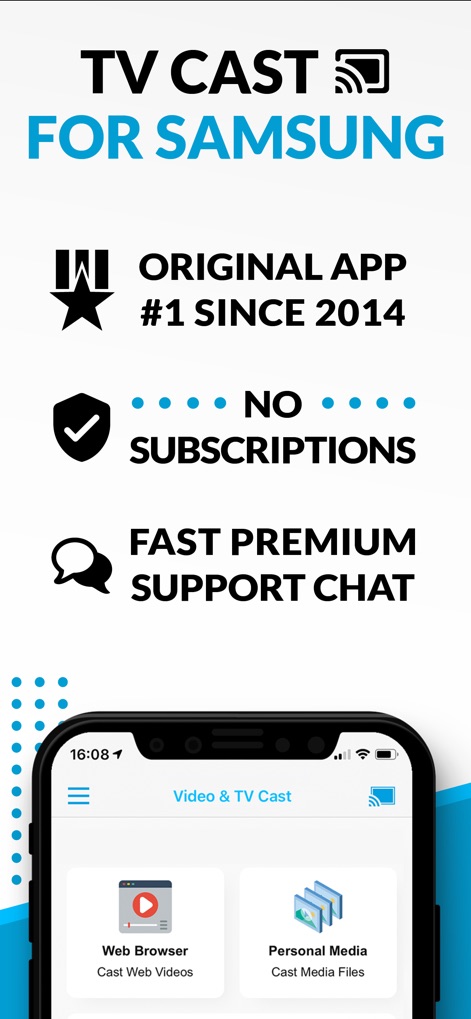
Nutzer erhalten einen klaren Einblick in die Kernfunktionen der App, darunter die Möglichkeit zum Streamen von Webvideos und die einfache Verwaltung persönlicher Mediendateien.
App-Funktionen im Überblick

Die Darstellung zeigt die nahtlose Übertragung von Videos, Filmen und TV-Inhalten vom mobilen Gerät auf den großen Samsung Smart TV, wobei ein Videoinhalt sowohl auf dem Smartphone als auch auf dem Fernsehbildschirm zu sehen ist.
Videos & TV streamen

Diese Ansicht demonstriert die Möglichkeit, Fotos und diverse Mediendateien vom Mobilgerät auf den Samsung Smart TV zu übertragen, erkennbar an der spiegelbildlichen Darstellung eines Fotos und dem klaren Casting-Symbol.
Fotos & Dateien teilen
Beschreibung
Download
Ähnliche Apps
Apps mit ähnlichen Funktionen und Nutzererfahrung



Diese Seite ist keine offizielle Seite der App oder ihres Entwicklers, sondern eine unabhängige redaktionelle Veröffentlichung, die zu Informations- und Kommentarzwecken erstellt wurde. Sofern nicht ausdrücklich anders angegeben, sind weder die App noch ihr Entwickler mit MWM, Apple, Google Play, dem App-Herausgeber oder dem Entwickler der App verbunden, von ihnen unterstützt, gesponsert, autorisiert oder anderweitig offiziell verbunden, und nichts auf dieser Seite impliziert, dass die App unter Verwendung der Dienste von MWM entwickelt wurde. Alle Marken, Logos, Screenshots und andere Inhalte bleiben Eigentum ihrer jeweiligen Inhaber.