Diese Seite ist keine offizielle Seite der App oder ihres Entwicklers, sondern eine unabhängige redaktionelle Veröffentlichung, die zu Informations- und Kommentarzwecken erstellt wurde. Sofern nicht ausdrücklich anders angegeben, sind weder die App noch ihr Entwickler mit MWM, Apple, Google Play, dem App-Herausgeber oder dem Entwickler der App verbunden, von ihnen unterstützt, gesponsert, autorisiert oder anderweitig offiziell verbunden, und nichts auf dieser Seite impliziert, dass die App unter Verwendung der Dienste von MWM entwickelt wurde. Alle Marken, Logos, Screenshots und andere Inhalte bleiben Eigentum ihrer jeweiligen Inhaber.
WebDebug - Web debugging tool
Inspizieren Sie Elemente, überwachen Sie Netzwerkanfragen und debuggen Sie Konsolenprotokolle direkt auf Ihrem iPhone oder iPad. Erweitern Sie Ihren mobilen Workflow mit JS-Injektion, Hosting lokaler Websites und Codebearbeitung auf Desktop-Niveau unterwegs.
Kennzahlen
Downloads
44K+
Bewertung
4.0/5
Bewertungen gesamt
0
Herausgeber
Shanghai Dazhuo Information Technology Co., Ltd.
Kategorie
Developer Tools
Sprachen
2
Neueste Version
1.7
Größe
74.9 MB
Erstveröffentlichung
24. Juni 2020
Funktionen
Professionelle Web-Tools in Ihrer Tasche
Schließen Sie die Lücke zwischen Desktop-Entwicklung und mobiler Realität. WebDebug stattet Sie mit einer vollständigen Suite von Inspektions- und Testwerkzeugen aus, die speziell für das iOS-Ökosystem entwickelt wurden.
Vollständiger Inspektor & Konsole
Greifen Sie auf Echtzeit-Konsolenprotokolle zu, inspizieren Sie DOM-Strukturen und verwalten Sie den lokalen Speicher genau wie mit Desktop-DevTools.
Integrierter lokaler Server
Starten Sie einen lokalen statischen Server auf Ihrem Gerät, um Projekte sofort zu testen, ohne eine Staging-Umgebung oder eine Remote-Bereitstellung.
Die folgenden Screenshots und die Beschreibung stammen direkt aus dem offiziellen Store-Eintrag der App und sind Eigentum des Entwicklers.
App Store
Screenshots
Beschreibung
This app is a web debugging panel that can be run on iPhone, iPad, and other devices. You can conveniently debug web pages on your mobile phone. It supports local static websites, allows for testing multiple projects locally, and manages various document files.
Features:
- Debug by inputting the URL
- Debug by scanning a QR code to open the URL
- Automatically save debugging page link information to the database and record debugging time
- View console logs
- View system information
- View network requests
- View page element structure
- View cookies, localStorage, and SessionStorage
- Input JavaScript commands, e.g., alert(document.body.outerHTML);
- Inject JavaScript code snippets or plugins for web page debugging (e.g., injecting jq, vue plugins or JS code snippets), with the console displaying return values
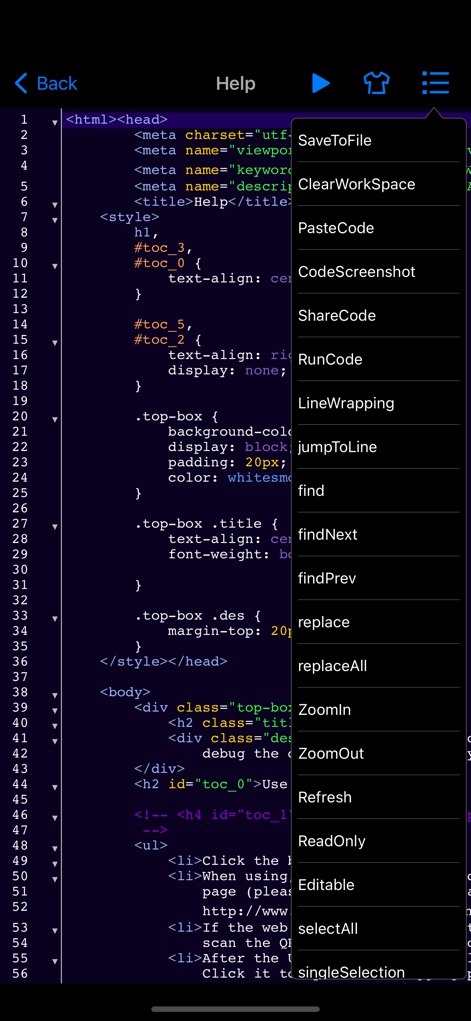
- Web page code editing and preview function
- Code auto-suggestions for HTML, JavaScript, CSS, and content
- Keyboard extensions
- Tokenization of debugging code for easy input
- HTML, CSS, and JavaScript code input with auto-suggestions, auto-bracket matching, line numbering, code folding, and more
- Syntax error correction for HTML, CSS, and JavaScript code input, further enhancing mobile testing capabilities
Version 1.5 introduces the following new features:
1. Static server function: You can now start a local static server on your phone, supporting the creation of multiple local websites for testing. It supports WiFi, WebDAV file management, remote file downloading with decompression, direct preview of most document, video, audio, image files, and various code files on your phone.
2. Automatic injection of window.onerror code before page loading: Now, before the page loads, the application will automatically inject some code into the webpage that helps capture potential errors and print these error messages to the application's console. You can also choose to send these error reports to a backend server for further analysis and processing.
3. Show network requests when shaking the phone: When you shake your phone, the application will display the network requests made by the current page. This can help you better understand the communication between the application and the server. Additionally, you can choose to send the recorded HTTP request logs via email for further analysis.
4. jQuery-like element selector function: The application has added a feature similar to using jQuery's element selector, which means you can select and manipulate various DOM elements on the webpage more precisely, allowing for more flexible customization of page behavior and styles.
5. Code injection function: Now, you can mix HTML and JS code in the webpage being loaded. This feature supports multiple injection scenarios, meaning you can conveniently control or intercept page requests and execute custom code on the page.
6. Added dozens of code themes and code editing commands: You can easily use code auto-suggestions and customize code themes.
Unlimited Access Subscription:
- With this subscription, you can enjoy unlimited access to all features within the app.
- Subscriptions are charged weekly, monthly, or yearly, depending on the selected subscription plan.
- Payment will be charged to your iTunes account upon confirmation of purchase.
- You can turn off auto-renewal at least 24 hours before the current subscription period ends; otherwise, the subscription will automatically renew.
- The renewal fee will be charged to your account within 24 hours before the end of the current subscription period, depending on the chosen plan.
- Users can manage their subscriptions and can turn off auto-renewal in their account settings after purchase.
- Any unused portion of a free subscription trial period will be forfeited upon purchase.
Privacy Policy: https://www.dazhuogroup.com/debugweb/privacy_statement_en.php
Terms of Use: https://www.dazhuogroup.com/debugweb/terms_of_use_en.php
Diese Seite ist keine offizielle Seite der App oder ihres Entwicklers, sondern eine unabhängige redaktionelle Veröffentlichung, die zu Informations- und Kommentarzwecken erstellt wurde. Sofern nicht ausdrücklich anders angegeben, sind weder die App noch ihr Entwickler mit MWM, Apple, Google Play, dem App-Herausgeber oder dem Entwickler der App verbunden, von ihnen unterstützt, gesponsert, autorisiert oder anderweitig offiziell verbunden, und nichts auf dieser Seite impliziert, dass die App unter Verwendung der Dienste von MWM entwickelt wurde. Alle Marken, Logos, Screenshots und andere Inhalte bleiben Eigentum ihrer jeweiligen Inhaber.