
Diese Seite ist keine offizielle Seite der App oder ihres Entwicklers, sondern eine unabhängige redaktionelle Veröffentlichung, die zu Informations- und Kommentarzwecken erstellt wurde. Sofern nicht ausdrücklich anders angegeben, sind weder die App noch ihr Entwickler mit MWM, Apple, Google Play, dem App-Herausgeber oder dem Entwickler der App verbunden, von ihnen unterstützt, gesponsert, autorisiert oder anderweitig offiziell verbunden, und nichts auf dieser Seite impliziert, dass die App unter Verwendung der Dienste von MWM entwickelt wurde. Alle Marken, Logos, Screenshots und andere Inhalte bleiben Eigentum ihrer jeweiligen Inhaber.


Wireless Display - TV+
Kleine Bildschirme sind eine Qual. Diese App befreit Ihre Inhalte auf den großen TV-Bildschirm, schnell und ohne Gedöns.
Downloads
750k+Bewertung
Bewertungen gesamt
432Herausgeber
Kategorie
UtilitiesSprachen
7Neueste Version
2.8Größe
52.9 MBErstveröffentlichung
13. Sept. 2023Eine Bewertung der Schlüsselmerkmale für alltägliche Smartphone-Nutzer, die Wert auf bequemes und qualitativ hochwertiges Screen Mirroring legen.
Analyse der Kernfunktionen: 'Wireless Display - TV+'
Hochauflösendes Echtzeit-Screen Mirroring
Ermöglicht die synchronisierte Anzeige des mobilen Bildschirms in bester Qualität und ohne Verzögerung auf einem größeren Display, ideal für immersive Erlebnisse.
Breite Geräte- und Protokollunterstützung
Stellt sicher, dass Nutzer ihre Inhalte auf einer Vielzahl von Smart TVs, Streaming-Sticks und mobilen Geräten spiegeln oder übertragen können, unabhängig vom Hersteller.
Müheloses Casting vielfältiger Medien
Vereinfacht das Teilen persönlicher Medien und das Streamen von Online-Videos direkt aus dem Browser auf den großen Bildschirm für gemeinsame Ansichten.
Einfache Bildschirmfreigabe für soziale Interaktion
Ermöglicht das problemlose Teilen von Bildschirminhalten mit Familie und Freunden, perfekt für gemeinsame Unterhaltung und soziale Anlässe.
Umfassende Streaming-Optionen für Live-Inhalte und Unterhaltung
Bietet die Möglichkeit, Live-Nachrichten, Sportveranstaltungen, Blockbuster und andere dynamische Unterhaltungsinhalte in Echtzeit auf einem größeren Bildschirm zu verfolgen.
Intuitive Bedienung und schnelle Einrichtung
Eine einfache und unkomplizierte Bedienung sowie eine schnelle Einrichtung machen die App für jedermann zugänglich und erhöhen die Benutzerfreundlichkeit erheblich.
Häufig gestellte Fragen
Alles, was Sie über wissen müssen Wireless Display - TV+
What is Wireless Display - TV+?
Wireless Display - TV+ is an application that helps cast a small phone screen to a big TV screen. It delivers content in high quality and real-time speed.
Does Wireless Display - TV+ support screen mirroring technologies like Airplay and Miracast?
Yes, Wireless Display - TV+ supports screen mirroring. It utilizes Airplay and Miracast for wireless connections, enabling users to cast devices like laptops, tablets, or smartphones to display receivers.
Can I cast content from my iPhone or iPad to a TV using Wireless Display - TV+?
Yes, Wireless Display - TV+ enables casting of iPhone and iPad screens to a TV. Users can mirror photos and videos, and stream live news or sports.
Does Wireless Display - TV+ offer a free trial period?
Yes, Wireless Display - TV+ may offer a free trial period. If offered, any unused portion of the free trial is forfeited when the user purchases a subscription.
How does the subscription model work for Wireless Display - TV+?
Subscriptions for Wireless Display - TV+ automatically renew unless turned off 24 hours prior to the current period's end. Payment is charged to the iTunes Account upon purchase confirmation.
Can Wireless Display - TV+ cast videos directly from a web browser to a TV?
Yes, Wireless Display - TV+ includes a Web Video Caster feature. This allows users to watch videos from websites directly on their television screen.
Does Wireless Display - TV+ provide high-quality picture and video streaming?
Yes, Wireless Display - TV+ provides high-quality streaming. It supports HD video quality for Miracast and displays pictures in Full HD on the TV screen.
How does a user connect to a TV with Wireless Display - TV+?
Users connect to a TV with Wireless Display - TV+ via a one-tap process. They select their desired device, such as Airplay TV or Android TV, from a provided list.
Can Wireless Display - TV+ stream live content?
Yes, Wireless Display - TV+ streams live content. Users can stream various forms of media, including live news and sports, to their connected TV.
Does Wireless Display - TV+ allow multitasking between a PC and TV?
Yes, Wireless Display - TV+ supports multitasking. With wireless media streaming, users can perform different functions simultaneously on their PC and TV.
Die folgenden Screenshots und die Beschreibung stammen direkt aus dem offiziellen Store-Eintrag der App und sind Eigentum des Entwicklers.
App Store
Screenshots

Nutzer können die Funktion 'Screen Casting' auf dem Smartphone auswählen, um sofort eine drahtlose Verbindung zum Fernsehgerät herzustellen und Inhalte zu spiegeln.
Einfaches Screen Casting
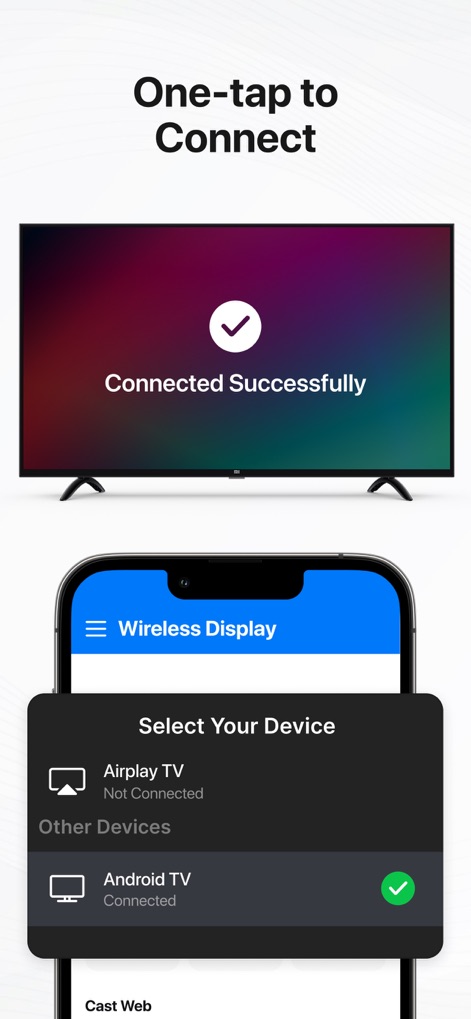
Dieses Tool ermöglicht eine einfache Geräteauswahl auf dem Smartphone und bestätigt die erfolgreiche Verbindung sofort auf dem Fernsehbildschirm.
Schnelle Geräteverbindung

Nutzer können Videos über den integrierten Player auf dem Smartphone steuern und den ausgewählten Film nahtlos auf dem großen TV-Bildschirm in hoher Qualität ansehen.
Videos Groß Genießen

Die App zeigt eine Vorschau der Bildergalerie auf dem Smartphone und präsentiert ausgewählte Fotos in beeindruckender Full-HD-Qualität auf dem TV.
Bilder in Full HD

Dieses Tool ermöglicht das einfache Übertragen von Webvideos direkt aus dem Browser auf dem Smartphone zur Wiedergabe auf dem großen Fernsehbildschirm.
Webvideos auf TV
Beschreibung
Download
Ähnliche Apps
Apps mit ähnlichen Funktionen und Nutzererfahrung

Web Video Cast | Browser to TV
InstantBits Inc

PigeonCast:Send by Google Cast
Sichuan FalconAI Technology Co., Ltd.

Screen Mirroring • Smart TV
Mihkel Pikk

Screen Mirroring | Cast to TV
Ozuna Limited

Screen Mirroring・Smart View TV
TOGGLE APPS SP Z O O

UbeCast: Music Streamer & PiP
AER SOFTWARE COMPANY LIMITED

AirDroid Cast-screen mirroring
SAND STUDIO CORPORATION LIMITED

Miracast: Screen Mirroring TV
Hainan Delta Software Co., Ltd

Screen Mirroring・Air Cast TV
Dalma Innovation Solutions d.o.o.
Diese Seite ist keine offizielle Seite der App oder ihres Entwicklers, sondern eine unabhängige redaktionelle Veröffentlichung, die zu Informations- und Kommentarzwecken erstellt wurde. Sofern nicht ausdrücklich anders angegeben, sind weder die App noch ihr Entwickler mit MWM, Apple, Google Play, dem App-Herausgeber oder dem Entwickler der App verbunden, von ihnen unterstützt, gesponsert, autorisiert oder anderweitig offiziell verbunden, und nichts auf dieser Seite impliziert, dass die App unter Verwendung der Dienste von MWM entwickelt wurde. Alle Marken, Logos, Screenshots und andere Inhalte bleiben Eigentum ihrer jeweiligen Inhaber.