
Diese Seite ist keine offizielle Seite der App oder ihres Entwicklers, sondern eine unabhängige redaktionelle Veröffentlichung, die zu Informations- und Kommentarzwecken erstellt wurde. Sofern nicht ausdrücklich anders angegeben, sind weder die App noch ihr Entwickler mit MWM, Apple, Google Play, dem App-Herausgeber oder dem Entwickler der App verbunden, von ihnen unterstützt, gesponsert, autorisiert oder anderweitig offiziell verbunden, und nichts auf dieser Seite impliziert, dass die App unter Verwendung der Dienste von MWM entwickelt wurde. Alle Marken, Logos, Screenshots und andere Inhalte bleiben Eigentum ihrer jeweiligen Inhaber.

xScan : Document Scanner App
Dein iPhone wird zur digitalen Aktenvernichtungsmaschine für den Papierkram. MWMs Kreation verwandelt Zettelwirtschaft in verwertbare Daten – blitzschnell und ohne Umwege.
Downloads
7.5M+Bewertung
Bewertungen gesamt
40.1KHerausgeber
Kategorie
BusinessSprachen
12Neueste Version
2.10.2Größe
132.2 MBErstveröffentlichung
29. Mai 2020Ein Überblick über die Kernfunktionen und deren Mehrwert für produktive Nutzer.
Analyse der xScan : Document Scanner App
Professioneller mobiler Dokumentenscanner
Die App bietet eine professionelle Scanfunktion, die das iPhone in einen leistungsstarken mobilen Dokumentenscanner verwandelt. Sie ermöglicht das schnelle und präzise Erfassen verschiedenster Dokumente wie Verträge, Rechnungen, Notizen oder Ausweise und die Speicherung in hoher Qualität als PDF oder JPEG.
Intelligente OCR-Texterkennung und -Bearbeitung
Es ermöglicht Nutzern, gescannte Dokumente in bearbeitbaren Text umzuwandeln, indem die OCR-Funktion (Optical Character Recognition) genutzt wird. Diese Funktion unterstützt eine Vielzahl von Sprachen und erleichtert die Weiterverarbeitung und Bearbeitung von Inhalten erheblich.
Lokale und sichere Speicherung der Dokumente
Dieses Tool gewährleistet die Privatsphäre und Datensicherheit der Nutzer, da alle gescannten Dokumente ausschließlich lokal auf dem Mobilgerät gespeichert werden und für den Anbieter sowie Dritte unzugänglich sind.
Komfortable E-Signatur-Funktion
Die App verfügt über eine integrierte E-Signatur-Funktion, die es Nutzern ermöglicht, Dokumente direkt auf dem Gerät mit wenigen Klicks digital zu unterschreiben. Dies beschleunigt den Workflow bei vertragsrelevanten oder offiziellen Unterlagen.
Umfassende Freigabe- und Exportoptionen
Dieses Tool stellt vielseitige Optionen zur Verfügung, um gescannte Dokumente zu teilen. Nutzer können Inhalte über soziale Medien, Messenger oder E-Mail versenden, sie in Cloud-Dienste wie Dropbox oder Google Drive hochladen oder direkt über einen WLAN-Drucker ausdrucken.
Unterstützung vielfältiger Exportformate
Die App unterstützt das Speichern von Dokumenten in verschiedenen gängigen Formaten, darunter PDF, JPEG und DOC. Dies bietet Flexibilität bei der Archivierung und Weiterverarbeitung, insbesondere durch die Möglichkeit, Dokumente als bearbeitbare Word-Dateien zu speichern.
Die folgenden Screenshots und die Beschreibung stammen direkt aus dem offiziellen Store-Eintrag der App und sind Eigentum des Entwicklers.
App Store
Screenshots

Nutzer können hier sehen, wie die App ein Dokument mit dem Titel "Meeting Minutes" anzeigt und erkannten Text mit einem blauen Highlight hervorhebt.
Dokumente sofort scannen

Die Abbildung zeigt ein gescanntes "INVOICE"-Dokument und die Vielseitigkeit der App beim Speichern in den Formaten JPG, TXT und PDF.
Vielseitig speichern

Diese Ansicht illustriert die Fähigkeit der App, Ausweisdokumente wie einen Führerschein und einen Reisepass präzise zu digitalisieren.
Ausweise digitalisieren

Hier wird demonstriert, wie die App Text aus einem gescannten Dokument extrahiert und Optionen zum Bearbeiten und Kopieren des erkannten Textes bietet.
Text extrahieren bearbeiten

Die Ansicht präsentiert ein Dokument mit dem Titel "NOTICE OF SPECIAL MEETING", auf dem Nutzer ihre elektronische Unterschrift direkt mit der App hinzufügen können.
Sicher unterschreiben

Dieses Bild veranschaulicht das Teilen-Menü, über das gescannte Dokumente einfach per Airdrop oder über Nachrichten mit Kontakten geteilt werden können.
Mühelos teilen
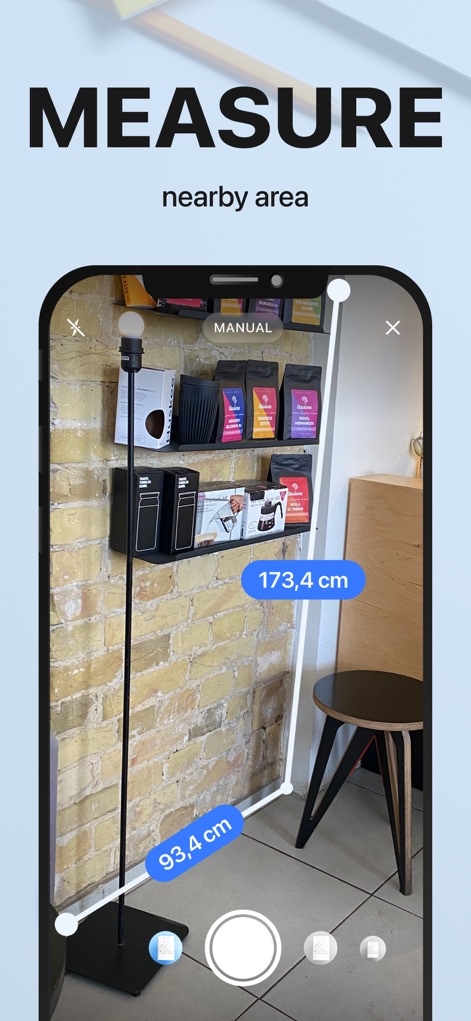
Die App bietet eine AR-Messfunktion, die es Nutzern ermöglicht, Entfernungen wie 173,4 cm und 93,4 cm präzise in ihrer Umgebung zu messen.
AR-Messungen durchführen

Nutzer können mühelos QR-Codes scannen, wobei die App direkt Optionen wie "Open in Safari" oder "Copy to clipboard" anbietet.
QR-Codes lesen
Beschreibung
Download
Ähnliche Apps
Apps mit ähnlichen Funktionen und Nutzererfahrung

PDF PRO Scan Image & Documents
Balzo srl

The PDF Scanner, PDF editor HQ
NEXT K.U.M. LTD

CamScanner - PDF Scanner App
INTSIG Information Co., Ltd

Adobe Scan: PDF & OCR Scanner
Adobe Inc.

WPS Office: PDF, Docs, Sheets
KINGSOFT OFFICE SOFTWARE CORPORATION LIMITED

iLovePDF - PDF Editor & Scan
ILOVEPDF S.L.

Scanner App: Genius Scan
The Grizzly Labs

Microsoft Lens: PDF Scanner
Microsoft Corporation

Clear Scan: Doc Scanner App
INDY MOBILE APP COMPANY LIMITED
Diese Seite ist keine offizielle Seite der App oder ihres Entwicklers, sondern eine unabhängige redaktionelle Veröffentlichung, die zu Informations- und Kommentarzwecken erstellt wurde. Sofern nicht ausdrücklich anders angegeben, sind weder die App noch ihr Entwickler mit MWM, Apple, Google Play, dem App-Herausgeber oder dem Entwickler der App verbunden, von ihnen unterstützt, gesponsert, autorisiert oder anderweitig offiziell verbunden, und nichts auf dieser Seite impliziert, dass die App unter Verwendung der Dienste von MWM entwickelt wurde. Alle Marken, Logos, Screenshots und andere Inhalte bleiben Eigentum ihrer jeweiligen Inhaber.