Adobe Fill & Sign-Form Filler
ダウンロード: App Store

このページはアプリまたはその開発者の公式ページではなく、情報提供および論評を目的として作成された独立した編集出版物です。明示的に別段の記載がない限り、アプリおよびその開発者は、MWM、Apple、Google Play、アプリのパブリッシャー、またはアプリの開発者と提携、承認、後援、認可、またはその他の公式的な関係はなく、このページのいかなる内容も、アプリがMWMのサービスを使用して開発されたことを意味するものではありません。すべての商標、ロゴ、スクリーンショット、その他のコンテンツはそれぞれの所有者の財産です。

ロゴ: Adobe Fill & Sign-Form Filler
ダウンロード: App Store

Adobe Fill & Sign-Form Filler

紙とペンの呪縛を断ち切り、どこでも瞬時に契約を完結させる力。その真価は今、Acrobat Readerで発揮される。

主要数値

ダウンロード

12.5M+

ユーザー評価

4.8/5

評価数

317.2K

開発元

Adobe Inc.

カテゴリ

Business

対応言語

19

最新バージョン

25.1.0

サイズ

28.6 MB

リリース日

2015年1月14日
機能

Adobe Fill & Sign-Form Filler: テックアナリストによる機能分析

Adobe Fill & Signの主要機能を、対象ユーザーへの影響度に基づき評価します。

電子署名機能

指やスタイラスを使用して簡単に署名を作成し、それをフォームに直接適用できるため、物理的な署名の必要がなくなります。

フォームへの入力

ユーザーは、紙のフォームをカメラでスキャンするか、メールから直接ファイルを開き、フィールドにタップするだけでテキストやチェックマークを入力できます。カスタム自動入力機能により、さらに迅速な処理が可能です。

場所を選ばない書類処理

インターネット接続があれば、ユーザーはいつでもどこでも書類に署名し、フォームを記入・送信できるため、柔軟な働き方を可能にします。

以下のスクリーンショットと説明は、アプリの公式ストアリスティングから直接取得されたものであり、アプリ開発者の所有物です。

アプリストア

スクリーンショット
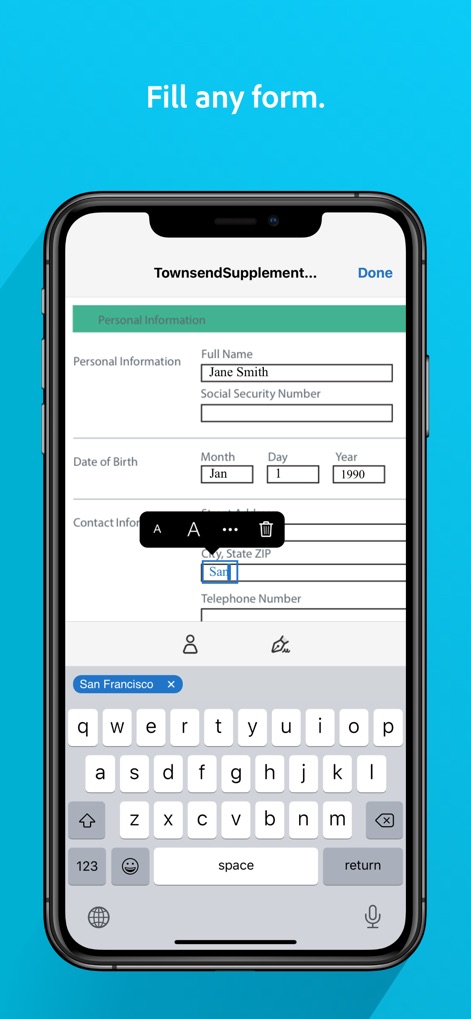
Adobe Fill & Sign-Form Filler - 手軽に記入

手軽に記入

ユーザーはフォームのテキスト入力フィールドに直接情報を入力でき、画面下部のキーボード表示を通じてスムーズなデータ入力が可能です。
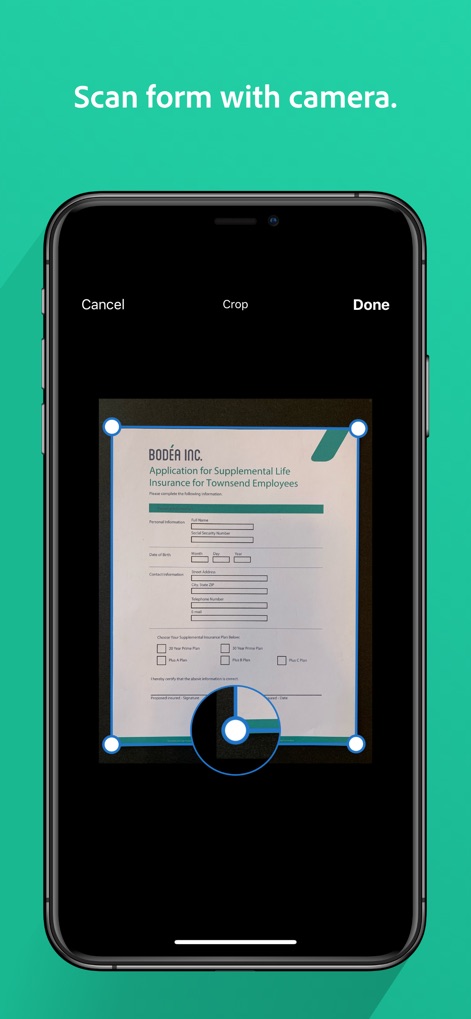
Adobe Fill & Sign-Form Filler - カメラで取り込み

カメラで取り込み

物理的な紙のフォームをスマートフォンのカメラで取り込み、スキャン範囲調整機能で書類を正確にデジタル化します。
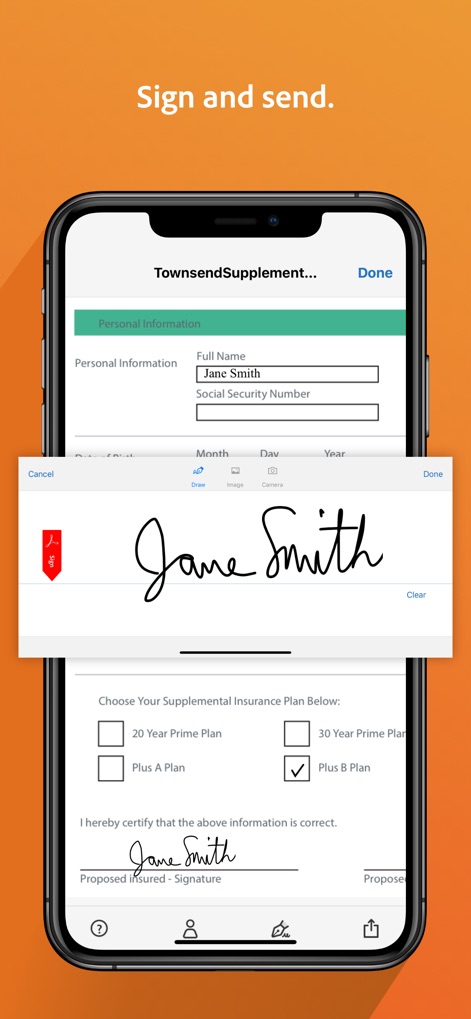
Adobe Fill & Sign-Form Filler - サインして完了

サインして完了

指やスタイラスでデジタル署名を作成し、その署名をフォームの指定箇所に適用して書類を完成させます。
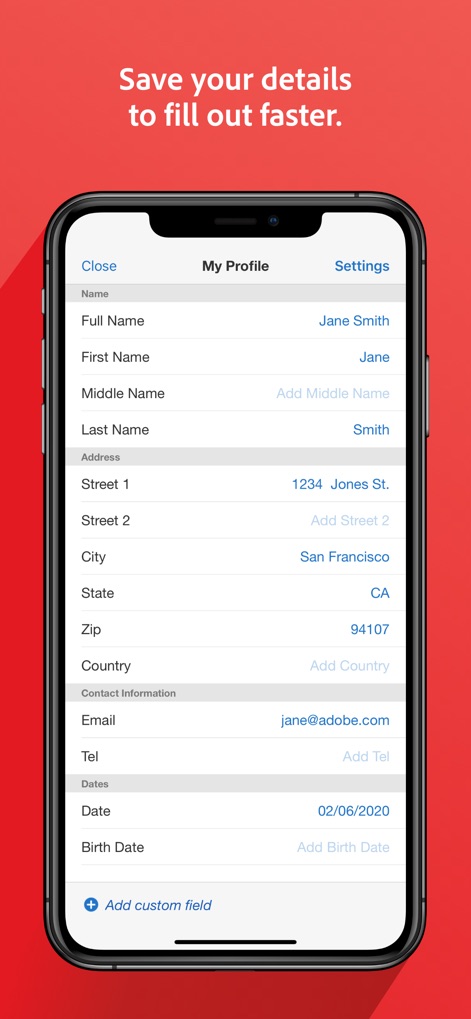
Adobe Fill & Sign-Form Filler - 迅速な自動入力

迅速な自動入力

ユーザーは「マイプロフィール」に氏名や住所などの情報を保存でき、連絡先情報の事前設定により、次回以降のフォーム入力が迅速に行えます。

説明

**IMPORTANT UPDATE** The Fill & Sign app is being retired, but don’t worry, all the features you love can now be found on Adobe Acrobat Reader. To make your workflow even better we’re taking all the best bits from Fill & Sign and adding them to Acrobat Reader, making it the best all-in-one app for productivity. You can download Acrobat Reader for FREE and start using it today. To keep all your documents and tools from Fill & Sign, please ensure all your files are uploaded to the Adobe Cloud and you have Acrobat Reader installed on your device. The free Adobe Fill & Sign app streamlines the paperwork process and enhances productivity with contracts, business documents, and more. The app lets you fill, sign, and send any form fast and reliably. You can even snap a picture of a paper form and fill it in on your phone or tablet, then e-sign and send. It’s that easy: no physical document, no printing or faxing needed. ALL THE TOOLS YOU LOVE ARE NOW ON ACROBAT READER: • FILL. The Adobe Fill & Sign app allows you to scan paper forms with your camera or open a file straight from your email. Simply tap to enter text or check marks in form fields. The app’s custom autofill entries let you fill forms even faster. • SIGN. With the document signer, easily create your signature with your finger or a stylus, then apply it or your initials directly to the form. • SEND. Save your forms, contracts, and business documents easily, and send to others immediately via email. With the sleekest PDF editor and signature app out there, it’s that easy. WHAT CAN ADOBE FILL & SIGN DO FOR YOU? • GET IT DONE NOW. Adobe Fill & Sign is an intuitive, easy-to-use platform suited to every situation. As long as you have an internet connection, the app allows you to sign documents, anytime, anywhere. • GO GREEN. Our document signing and editing app allows you to go truly paperless. With Adobe Fill & Sign, send forms by email and avoid wasting paper. • STAY ORGANIZED. No more messy paperwork with Fill & Sign. The app allows you to store your forms after signing and sending them. With your documents all in one place, simply access the app to consult your forms at a later date. Terms & Conditions: Your use of this application is governed by the Adobe General Terms of Use http://www.adobe.com/go/terms_linkfree_en and the Adobe Privacy Policy http://www.adobe.com/go/privacy_policy_linkfree_en Do not sell or share my personal information www.adobe.com/go/ca-rights-linkfree

Download

ダウンロード: App Store

このページはアプリまたはその開発者の公式ページではなく、情報提供および論評を目的として作成された独立した編集出版物です。明示的に別段の記載がない限り、アプリおよびその開発者は、MWM、Apple、Google Play、アプリのパブリッシャー、またはアプリの開発者と提携、承認、後援、認可、またはその他の公式的な関係はなく、このページのいかなる内容も、アプリがMWMのサービスを使用して開発されたことを意味するものではありません。すべての商標、ロゴ、スクリーンショット、その他のコンテンツはそれぞれの所有者の財産です。