
このページはアプリまたはその開発者の公式ページではなく、情報提供および論評を目的として作成された独立した編集出版物です。明示的に別段の記載がない限り、アプリおよびその開発者は、MWM、Apple、Google Play、アプリのパブリッシャー、またはアプリの開発者と提携、承認、後援、認可、またはその他の公式的な関係はなく、このページのいかなる内容も、アプリがMWMのサービスを使用して開発されたことを意味するものではありません。すべての商標、ロゴ、スクリーンショット、その他のコンテンツはそれぞれの所有者の財産です。


AI Photo Cleaner - Cleanup Kit
「ストレージがいっぱいです」の通知に悩むのはもうやめましょう。AIを使って、重複写真を瞬時に削除し、連絡先を整理し、ワンタップでメタデータ除去を行いプライバシーを保護します。
ダウンロード
81K+ユーザー評価
評価数
700開発元
カテゴリ
Utilities対応言語
4最新バージョン
1.2サイズ
56.9 MBリリース日
2025年9月12日スマートフォンの可能性を取り戻す
「ストレージがいっぱいです」の通知に悩むのはもうやめましょう。AI搭載ツールキットが、ギャラリーをインテリジェントに整理し、プライバシーを保護し、デバイスを最高のパフォーマンスで動作させ続けます。
スマートギャラリー整理
AIが、ほぼ同一のバーストショットやぼやけた写真を瞬時に特定。最高の思い出だけを残し、残りは数秒で削除できます。
プライバシー重視の写真共有
共有前に、写真から隠された位置情報やメタデータを瞬時に削除。自宅の住所や個人情報がプライベートに保たれます。
よくある質問
について知っておくべきこと AI Photo Cleaner - Cleanup Kit
AI Photo Cleaner - Cleanup Kitとは何ですか?
AI Photo Cleaner - Cleanup Kitは、スマートなツールとAIを活用したヒントを使って、スマートフォンのストレージを解放し、ギャラリーを整理し、デバイスをクリーンアップするために設計されたスマートなソリューションです。
AI Photo Cleaner - Cleanup Kitはどのようにストレージの解放に役立ちますか?
AI Photo Cleaner - Cleanup Kitは、似た写真、重複した動画、古いスクリーンショット、画面録画を特定することでストレージを解放します。デバイスのメモリを最適化するために、不要なファイルの削除を提案します。
AI Photo Cleaner - Cleanup Kitは重複した連絡先をマージできますか?
はい、AI Photo Cleaner - Cleanup Kitには連絡先マネージャー機能があります。このツールを使用すると、ユーザーはワンクリックで重複した連絡先をマージし、不完全なエントリを削除して、電話帳を整理できます。
AI Photo Cleaner - Cleanup Kitはカレンダーイベントを管理しますか?
はい、AI Photo Cleaner - Cleanup Kitにはカレンダーイベントクリーナーが含まれています。これにより、ユーザーは古いまたは時代遅れのイベントを簡単に確認および削除でき、スケジュールの過負荷を防ぎ、クリーンに保つことができます。
AI Photo Cleaner - Cleanup Kitのデイリークリーニングプランとは何ですか?
AI Photo Cleaner - Cleanup Kitのデイリークリーニングプランは、パーソナライズされた毎日のタスクを提供します。これらの小さなクリーニングアクションは、ユーザーが段階的に電話を整理するのに役立ち、ストレージの過負荷を効率的に防ぎます。
AI Photo Cleaner - Cleanup Kitは似た写真や動画を検出できますか?
はい、AI Photo Cleaner - Cleanup Kitは、似た写真や連写写真をグループ化して検出し、重複した動画を見つけます。ユーザーはそれらを確認して削除でき、最高のコンテンツのみを保持できます。
AI Photo Cleaner - Cleanup Kitは写真のプライバシーをどのように保護しますか?
AI Photo Cleaner - Cleanup Kitは、写真メタデータクリーナーで写真のプライバシーを保護します。この機能は、写真から位置情報タグを削除し、ユーザーが個人ジオデータを明らかにすることなくオンラインで共有できるようにします。
AI Photo Cleaner - Cleanup KitはAI搭載のヒントを提供しますか?
はい、AI Photo Cleaner - Cleanup KitはAIヒントと提案を提供します。ユーザーは、メモリの解放やファイル整理のベストプラクティスに関するスマートなアドバイスを受け取り、デバイスをすっきりと保つことができます。
AI Photo Cleaner - Cleanup Kitのサブスクリプションを管理するにはどうすればよいですか?
AI Photo Cleaner - Cleanup Kitのサブスクリプションは、ユーザーが管理できます。自動更新は、サブスクリプションの下にあるデバイスのアカウント設定でいつでも無効にできます。
AI Photo Cleaner - Cleanup Kitのアクティブなサブスクリプションをキャンセルできますか?
いいえ、AI Photo Cleaner - Cleanup Kitのアクティブなサブスクリプションは、現在のサブスクリプション期間が完了するまでキャンセルできません。次の期間のために自動更新をオフにすることができます。
AI Photo Cleaner - Cleanup KitにAIチャットアシスタントはありますか?
はい、AI Photo Cleaner - Cleanup KitにはAIチャットアシスタントが含まれています。この機能は、電話のクリーニングに関する即時のヘルプを提供し、ファイルやストレージの管理にパーソナライズされた推奨事項やヒントを提供します。
以下のスクリーンショットと説明は、アプリの公式ストアリスティングから直接取得されたものであり、アプリ開発者の所有物です。
アプリストア
スクリーンショット
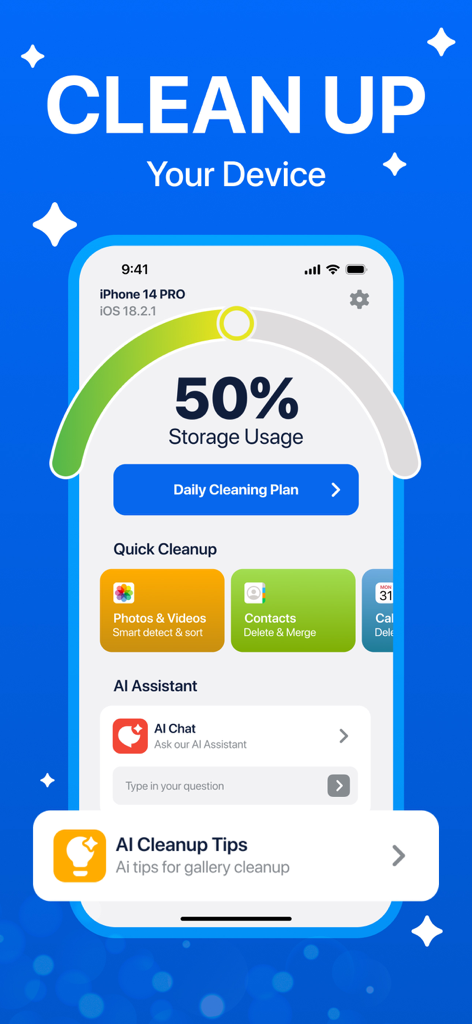
ストレージ使用量とクリーニングオプションが表示されたAI Photo Cleanerのダッシュボード
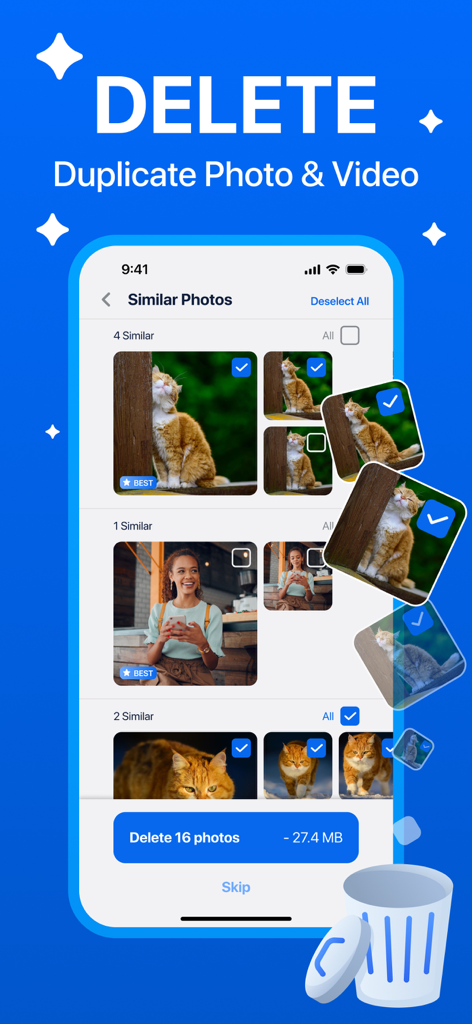
類似写真や重複写真を削除する方法を示すAI Photo Cleanerアプリの画面
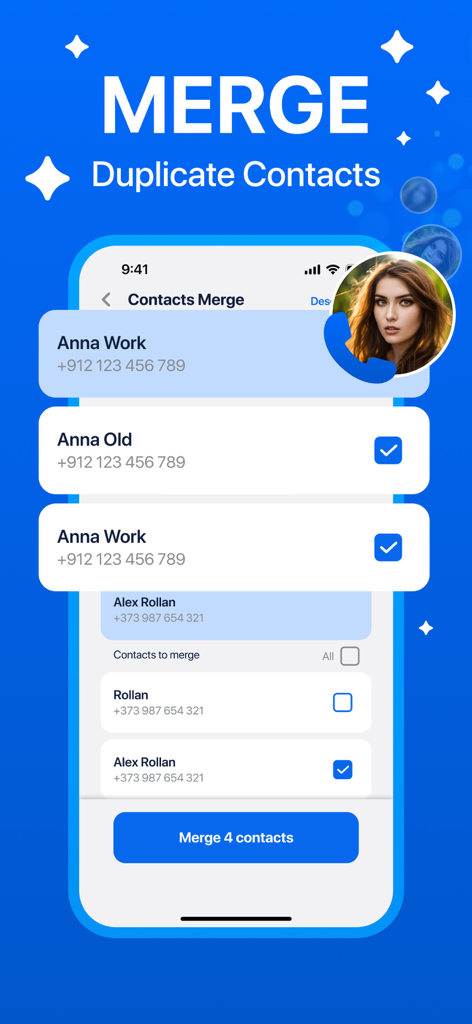
重複連絡先をマージしてデバイス容量を解放する連絡先マネージャー機能を示すAI Photo Cleanerアプリのインターフェース

デバイス容量を解放するために複数のエントリを一度に削除するオプションが表示されたカレンダーイベントクリーニング機能を示す携帯電話インターフェース
説明
Download
類似アプリ
似た機能とユーザー体験を持つアプリ

Clever Cleaner: AI CleanUp App
CleverFiles Inc.

Slidebox: Photo Cleaner App
Slidebox LLC

Photo Organizer: Picnic
Picnic Ventures Ltd

Super Smart Cleaner
VIBE WITH ME LTD

Boost Cleaner -Clean Up Smart°
AEGIS SOLUTIONS PRIVATE LIMITED

Cleanup: Phone Storage Cleaner
DEEP FLOW SOFTWARE SERVICES - FZCO

Cleaner Guru: Clean Up Storage
GM UniverseApps Limited

AI Cleaner: Clean Up Storage
GRIMLAX TRADE,S.L.

Photo Cleaner: Swipewipe
MWM
このページはアプリまたはその開発者の公式ページではなく、情報提供および論評を目的として作成された独立した編集出版物です。明示的に別段の記載がない限り、アプリおよびその開発者は、MWM、Apple、Google Play、アプリのパブリッシャー、またはアプリの開発者と提携、承認、後援、認可、またはその他の公式的な関係はなく、このページのいかなる内容も、アプリがMWMのサービスを使用して開発されたことを意味するものではありません。すべての商標、ロゴ、スクリーンショット、その他のコンテンツはそれぞれの所有者の財産です。